If you want to change your settings or unsubscribe please visit:
http://blogs.elphel.com/post_notification_header/?code=cd9ad4791210eef4735d43f52cc21dd2&addr=support-list%40support.elphel.com&
Elphel as a line-scan camera (for river panoramas)

In my search for an affordable and reasonable solution of creating high-res panoramic river views I came along the Elphel camera and it’s photo-finish mode. As part of my ongoing projects Danube Panorama Project, Nile Studies and the new umbrella project River Studies, I am capturing virtually endless panoramic river views from a moving vessels with a slit- or line-scan method. I was using webcams or DV-cameras before, and all possible ways to upgrade to higher resolutions either seemed clumsy (I don’t want to be loaded with much more than a tiny laptop or tablet and the camera itself), very processing intense and/or expensive and far out of reach of my (very limited) budget.
The âall-purpose cameraâ Elphel stepped in as a good, reasonable and flexible solution for that task. The first season using an Elphel353 is over, so time to share some of my experiences with Elphel and it’s not so well know photo-finish mode for line-scanning.
what is line-scan?
Line-scan is an image acquisition method that continuously samples (sensor) lines into a composite image. A Flatbed or hand held scanner is essentially also kind of a line-scanner. For some historic reasons (I guess due to the various application and realms they derived from) there a many terms: line scan, slit scan, strip photography, streak photography, scanography, photo-finish,.. Basically they all describe the same principle, a principle that is rather old and was already used in traditional analogue photography (for instance rotating panorama cameras), where you have a slit as an aperture, exposing the film as it moves by. In the digital realm one would cut out slices of existing image footage or – as in case of dedicated line-scan cameras â it is really just a one line sensor (to be correct: that’s true for monochrome cameras, color line-scan cameras normally have either 3 lines – in case of CCD sensor: one for each color â or 2, if the sensor is CMOS using Bayer pattern).
Applications of these line-scan method include industrial surface scanning, photo-finish, rotating panorama cameras, aerial imaginary, the arts (an interesting overview of art and research related slit-scan approaches can be found here) and certainly many more.
line-scan with Elphel
Since 2005 and the older 333 model, Elphel cameras have a âphoto-finishâ mode. With its 3Mpix Aptina CMOS sensor Elphel 333 was able so sample around 3072 lines per second. The photo-finsh mode was revived for the current Elphel 353 model with firmware release 8.0.8.7 by end of April 2010. The current 5Mpix Aptina CMOS sensor (width: 2536px) is a bit slower and allows a sample rate of approx. 2300 lines per second – or a line rate of 2.3 kHz (as it seems to be measured in dedicated line-scan cameras).
In photo-finish mode the camera then samples just lines and delivers composite images as video frames via RTSP network stream or directly to a hard-disc. Programming the camera into line-scan mode is as simple as setting PH_HEIGHT to the desired line height (in pixel):
PH_HEIGHT=2
Due to the Bayer pattern of the sensor the minimal sample height is 2 lines.

ignore not functional - it is (as of firmware 8.0.8.7)
Photo-finish mode per “default” then samples line-pairs as fast as (exposure) settings allow with a maximum rate of approx. 2300 line-pairs per second and a maximum width of the composite frame of 16384px (defined by WOI_HEIGHT). The sensor location that is used as source for these lines is defined by WOI_TOP, WOI_LEFT and WOI_WIDTH.
For variable control of the line sampling speed you can either:
- change exposure settings.
- slow down that process by defining a virtual size with VIRT_KEEP and VIRT_HEIGHT (which still samples as fast as it can for given virtual size and exposure settings)
- use the camera’s internal trigger mode with TRIG=4 and TRIG_PERIOD settings to generate a regular trigger impulse. (but due to camera’s internal delays in that mode the line rate is a bit less )
(A common pitfall â in my opinion – in trying out photo-finish mode is that one needs to take care of appropriate exposure setting before going into photo-finish mode. If you just start that mode in low light conditions you will end up waiting for frames endlessly – and get the impression the camera does not work anymore)
Elphel on the river

For use on rivers I use very narrow composite images (48-96px) which allows me to have a small âreal-time previewâ over the resulting imaginary. I need that to be able to adapt (manual) exposure settings and line-scan rate on the fly according to the situation, the speed of the ship and the distance to the river embankments. I wrote a custom application, that uses gstreamer as a backend to read in the RTSP stream (or potentially every other gstreamer pipeline source), display a small real-time preview, save the stream as video file and log GPS data (and possibly other sensor data in the future) as well.
I started to write this software before the photo-finish mode was resurrected for the current NCL353 model so it is able to do both: the line-scanning by itself or read in âpre-scannedâ sources. The software is still pretty rough but if interested you can find it in my git repo.
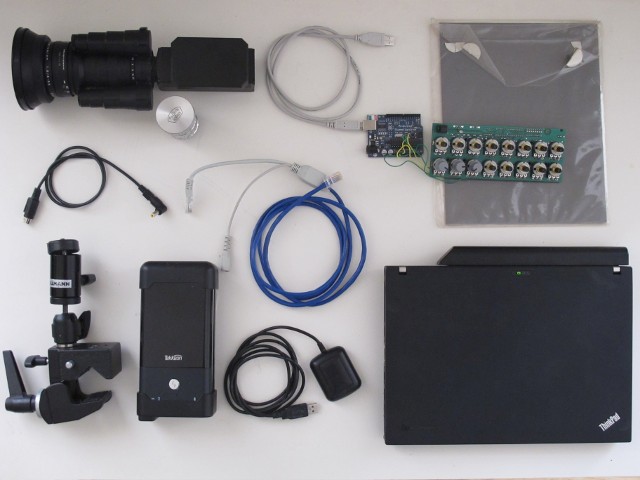
hardware overview
In addition I hacked together a proof-of-concept knob-based controller with arduino and an older dismantled midi-controller, to have a more haptic and easier control for handling line-scan rate and exposure settings on future tours. But now for some images.
Here is an example of an old host-based line-scan from a vessel, using Elphel NCL353 to deliver a WOI-stream of 2536×48 px (which allowed a maximum framerate of 424 fps)

host-based line-scan, Elphel NCL353 with WOI 2536x48 px, lens: Computar H0514-MP, 5mm

host-based line-scan, Elphel NCL353 with WOI 2536x48 px, lens: Computar H0514-MP, 5mm
The internal photo-finish mode makes things a bit simpler. But note there are small gaps/erroneous lines at the end of each composite image, also if cropped they unfortunately leave some visible traces . This might not be a big issue if you use large composite images. However if they are very small they leave annoying artefacts (even if cropped out as it is the case here)

internal linescan, Elphel NCL353 , lens: Computar H0514-MP, 5mm

internal linescan, Elphel NCL353 , lens: Computar H0514-MP, 5mm
These gaps do not appear anymore if capturing in Elphel’s raw JP46 mode (better quality anyway) having reasonable WOI_HEIGHTs that are multiple of 2 and 3. An example scanning in JP46 mode (unfortunately from a very shaky – also very fast – hydrofoil and shot against the sun)

internal linescan and JP46, Elphel NCL353, lens: Som Berthiot Cinor 10mm/1,9

internal linescan and JP46, Elphel NCL353, lens: Som Berthiot Cinor 10mm/1,9
Finally these river view should be viewable with a decent web-based player. An early and rough example of how this might look like can be seen here (based on OpenLayers):
prototype webplayer

black/white sample of Budapest
Conclusio and open issues
Elphel’s line-scan mode works very reliable and well (if you don’t screw its settings with your own software bugs). There are a few things to optimize like the annoying gaps in normal color mode. Also I still have not found a reasonable solution to getting rid of the fixed pattern noise in photo-finish mode.

example of fixed pattern noise in line-scan
Certainly there are still plenty of other things to do for me as well as this is still in heavy progress (bugs and issues, optimize post processing tasks, avoid too many (lossy) image conversions, adapt the hardware for outdoor field-recordings, create a proper webplayer and underlying postgis-database and so on)
Yet you can expect more to come as soon as season allows and spring comes back to Europe again.
_______________________________________________
Support-list mailing list
[email protected]
http://support.elphel.com/mailman/listinfo/support-list_support.elphel.com
