pilatfr wrote:
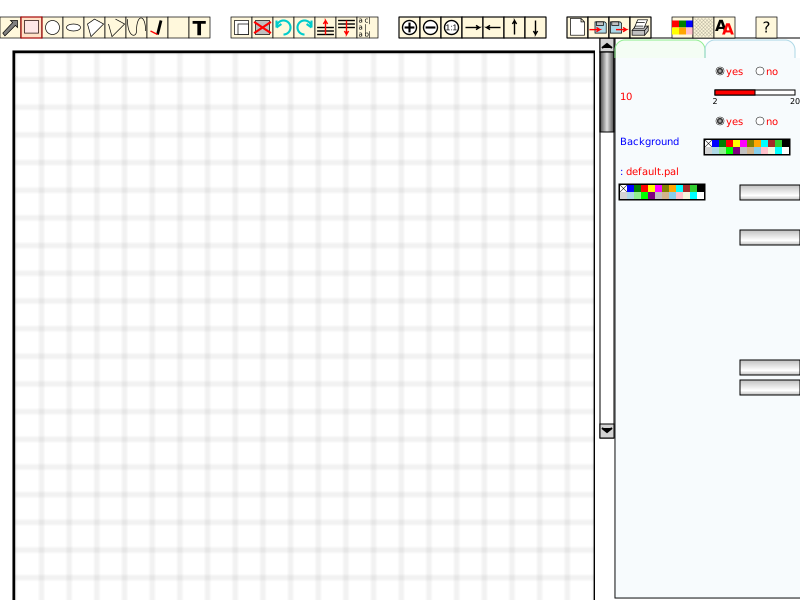
> I post drawing tool ( SVG only with JS and some PHP ) always to try
> to show that we can use svg to build applications ...
> Some features
> - All shapes and pencil
> - HSL colors, gradients and patterns
> - Menus - icons + tooltips - contextual menus
> - Save Load and print
> - Create patterns from drawing
> ....
>
> Tested with Win + IE + ASV 3 or 6 beta
> With Firefox + ASV 6, only popup window don't run
> ( If some guru know how use popup from svg using Adobe JS engine in
> Firefox ... )
>
> To try
> http://pilat.free.fr/dessin_loc/draw.svg
> In french
> http://pilat.free.fr/dessin_loc/draw.svg?l=french
>
> To load all components in zip file
> http://pilat.free.fr/english/svgdraw/index.htm
> In french
> http://pilat.free.fr/svgdraw/index.htm
>
> If you want more, make propositions for next version
>
> Michel
Testing, writing remarks as I go...
French version, run on IE5.5+ASV3 on Win98SE, PII300.

- On 1024x768 display, I don't see the end of the drawing area, if it
has one, even with IE on full screen. Perhaps it is on purpose, there is
the scrollbar after all. But perhaps you should make it end on a border,
and scroll within.

- I expect a menu to disappear when I click again on the menu name or go
on next menu header. Mmm, disappears when I go into the menu area then exit.

- Palette: clicking on the swash doesn't do anything, I expected the
cross to jump on click position. Ah, OK, I can drag the cross. Slowly,
otherwise I loose it (when I go out of the BB). Same for luminance
cursor. I think there are ways to drag'n'drop shapes without this
problem. Curiously, it works better when drag'n'dropping shapes in the
drawing zone.

Mmm, I thought I could edit HSL values, given the look of the area, but
I can't, typing goes to palette name. I suggest dropping the borders
around the HSL values (shows them as labels) and adding one to the
palette name. I deleted chars in the palette name using Del. If I hit
Del when there is no more char, I see a rectangle char, deleted on next
Del hit.

Save palette with empty name. Go a dialog stating that .pal already
exists... Click on No, type Foo, Save... No confirmation/feedback that
operation is OK. Reclick on Save, overwrite dialog, OK.

- Palette change is OK. I expected the dropdown list do display when
clicking on the text area, but that's a minor glitch. Arrows for list
scrolling are inverted to what I am used to (and to the scrollbar of the
drawing zone). No scroll when I click on the scroll bar outside the
scroll grip, same on the drawing area.

- Draw a rectangle. Found the Shape tab (I thought it was the one
activated), seems fine. It would be nice to be able to hand-edit the
numerical values (x, y, h, w, etc.).

- Draw a circle, I see the operations on existing shapes (Delete,
Modify...) works by first choosing the tool, then the shape, unlike the
operations on the Shape tab. Well, it leaves less ambiguity on which
shape we work on, since there is no way to see the active shape, beside
data on the Shape tab.
The handle to resize circle has the same D'n'D problem (move slowly).

- Rotate, by increments. Can I change the increment value?

- Draw a bitmap image. Nice image chooser, only one image currently. Go
up in dir. doesn't work, this is OK (security).
Oh, if I click on the blank area (list) below the bateau.jpg name, I get
a MS JScript error:
'list_files[...]' a la valeur Null ou n'est pas un objet.
line: 147, column: 2
Click on OK, similar error:
'list_files[...]' a la valeur Null ou n'est pas un objet.
line: 2091, column: 3
Do again, if bateau.jpg is select, behaves correctly. Wow, it is small!
I can resize it. No way to preserve aspect ration?
I can change the rounded corners, but it affects only the border around
the image, it doesn't clip the bitmap.

- Create polygon. I add a node on each click, but how do I stop? If I
click on the selector, the last node is wrong. Trying to modify the
shape, I have handles on each node, but moving them around doesn't
change the shape...

- Trying to draw a B�zier shape (missing an accent in the tooltip). Go:
'polygo' a la valeur Null ou n'est pas un objet.
line: 1203, column: 3
repeatidly, as soon as I am in the drawing area and each time I move the
mouse inside this zone... I have to move the mouse out the drawing area
and hit Return to get rid of the error messages.

- Create pattern isn't active yet?

- Click on Help, get a secondary window. Ah, I end polygons by clicking
on same node? I try, get:
'svgdoc.getElementById(...)' a la valeur Null ou n'est pas un objet.
line: 1175, column: 3
when I go to drawing area... Mmm, polygon, polyline and freehand drawing
seems broken now.

- Trying Save (PhiLho01.svg), seems OK. Erase drawing. Load drawing.
Same problem when clicking in empty area of the list. I get another error:
Not found
line: 2429, column: 3
whatever it means. The drawing is loaded OK. No such problem when
loading another drawing. People have a lot of imagination when naming
files... I hope they don't do the same on their own computer...

- Oh, I found how to make a motif, click on the icon, then draw a
selection. It is explained in the help, but I tried the intuitiveness of
the application, which is good.
Got:
'null' a la valeur Null ou n'est pas un objet.
line: 1867, column: 1
when releasing the mouse. Groumpf... I suppose there is something wrong
in the data of my drawing, due to previous errors.
I tried with a new drawing, but it doesn't work. I will try again later.

- Tested gradient tools, excellents. Good ergonmy (beside the D'n'D
problem), good feedback. Only problem, I can't swap two colors, even by
changing their relative position in the offset zone. I guess I have to
play with delete and add. No way to save a gradient or define several
ones (to have a palette of gradients) or to apply a gradient from one
shape to another?

Excellent application! Reactive even on my old computer. Nice set of
widgets. You did a good job, congratulations.

OK, that's all for today... I hope I didn't sound too negative, giving
more issues than good points. This is only to help improve your app.

Oh, how do I get the file of my drawings? You should provide an URL.
OK, navigating around, I found they are stored in:
http://pilat.free.fr/dessin_loc/examples/
but I suggest you give officially the URL.

Looking at the generated file, a potential source of some of the
problems above is that there is an empty image (perhaps I clicked then
cancelled?): imag1 contains a rectangle without dimension (w, h) and an
image without picture attribute.

You have an inconsistent use of quotes: single quotes at the start,
double quotes inside. I am not even sure it is correct XML.
Why don't you put neither <?xml?> element nor <!DOCTYPE>?
I suppose they are optional, I have to reread the XML spec...

Hope that help.

--
Philippe Lhoste
--  (near) Paris -- France
--  http://Phi.Lho.free.fr
--  For servers mangling my From and Reply-To fields,
--  please send private answers to PhiLho(a)GMX.net
--  --  --  --  --  --  --  --  --  --  --  --  --  --


-----
To unsubscribe send a message to: [EMAIL PROTECTED]
-or-
visit http://groups.yahoo.com/group/svg-developers and click "edit my
membership"
----
Yahoo! Groups Links

<*> To visit your group on the web, go to:
    http://groups.yahoo.com/group/svg-developers/

<*> To unsubscribe from this group, send an email to:
    [EMAIL PROTECTED]

<*> Your use of Yahoo! Groups is subject to:
    http://docs.yahoo.com/info/terms/