Tails 4.5, scheduled for April 7, will be the first version of Tails to
support Secure Boot.
You can help Tails by testing the release candidate for Tails 4.5 now.
# Secure Boot
Tails 4.5~rc1 should start on computers in UEFI mode and with Secure Boot
enabled.
# Known issues
If your Mac displays the following error:
Security settings do not allow this Mac to use an external startup disk.
Then you have to change the change the settings of the _Startup Security
Utility_ of your Mac to authorize starting from Tails.
[Read our instructions on how to authorize starting from Tails on your
Mac.](https://tails.boum.org/news/index.en.html#news-test-4.5-rc1.mac)
To open _Startup Security Utility_:
1. Turn on your Mac, then press and hold **Command(⌘)+R** immediately after
you see the Apple logo. Your Mac starts up from [macOS
Recovery](https://support.apple.com/kb/HT201314).
2. When you see the macOS _Utilities_ window, choose **Utilities ▸ Startup
Security Utility** from the menu bar.
3. When you are asked to authenticate, click **Enter macOS Password**, then
choose an administrator account and enter its password.
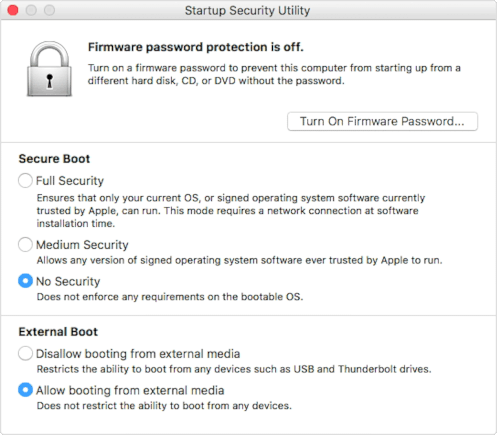
In the _Startup Security Utility_:
* Choose **No Security** in the **Secure Boot** section.
* Choose **Allow booting from external media** in the **External Boot**.
To still protect your Mac from starting on untrusted external media, you can
[set a firmware password](https://support.apple.com/en-us/HT204455), available
on macOS Mountain Lion or later. A firmware password prevents users who do not
have the password from starting up from any media other than the designated
startup disk.
**If you forget your firmware password it will require an in-person service
appointment with an Apple Store or Apple Authorized Service Provider.**
Read more on Apple Support about:
* [Startup Security Utility](https://support.apple.com/en-us/HT208198)
* [Secure Boot](https://support.apple.com/en-us/HT208330)
* [How to set a firmware password on your
Mac](https://support.apple.com/en-us/HT204455)
See the list of [long-standing
issues](https://tails.boum.org/support/known_issues/index.en.html).
# How to test Tails 4.5~rc1?
Keep in mind that this is a test image. We tested that it is not broken in
obvious ways, but it might still contain undiscovered issues.
Please, report any new problem to [[email protected]](mailto:tails-
[email protected]) (public mailing list).
# Get Tails 4.5~rc1
## To upgrade your Tails USB stick and keep your persistent storage
* Automatic upgrades are available from 4.2 or later to 4.5~rc1.
To do an automatic upgrade to Tails 4.5~rc1:
1. Start Tails 4.2 or later and [set an administration
password](https://tails.boum.org/doc/first_steps/startup_options/administration_password/index.en.html).
2. Run this command in a _Terminal_:
echo TAILS_CHANNEL=\"alpha\" | sudo tee -a /etc/os-release && \
tails-upgrade-frontend-wrapper
Enter the administration password when asked for the "password for amnesia".
3. After the upgrade is applied, restart Tails and choose **Applications ▸
Tails ▸ About Tails** to verify that you are running Tails 4.5~rc1.
* If you cannot do an automatic upgrade or if Tails fails to start after an
automatic upgrade, please try to do a [manual
upgrade](https://tails.boum.org/doc/upgrade/index.en.html#manual).
## To download 4.5~rc1
### Direct download
* [For USB sticks (USB
image)](http://dl.amnesia.boum.org/tails/alpha/tails-amd64-4.0~rc1/tails-amd64-4.0~rc1.img)
([?](https://tails.boum.org/ikiwiki.cgi?do=create&from=news%2Ftest_4.5-rc1&page=torrents%2Ffiles%2Ftails-amd64-4.0~rc1.img.sig)OpenPGP
signature)
* [For DVDs and virtual machines (ISO
image)](http://dl.amnesia.boum.org/tails/alpha/tails-amd64-4.0~rc1/tails-amd64-4.0~rc1.iso)
([?](https://tails.boum.org/ikiwiki.cgi?do=create&from=news%2Ftest_4.5-rc1&page=torrents%2Ffiles%2Ftails-amd64-4.0~rc1.iso.sig)OpenPGP
signature)
### BitTorrent download
* [For USB sticks (USB
image)](https://tails.boum.org/torrents/files/tails-amd64-4.0~rc1.img.torrent)
* [For DVDs and virtual machines (ISO
image)](https://tails.boum.org/torrents/files/tails-amd64-4.0~rc1.iso.torrent)
## To install Tails on a new USB stick
Follow our installation instructions:
* [Install from Windows](https://tails.boum.org/install/win/usb/index.en.html)
* [Install from macOS](https://tails.boum.org/install/mac/usb/index.en.html)
* [Install from Linux](https://tails.boum.org/install/linux/usb/index.en.html)
All the data on this USB stick will be lost.
# What's coming up?
Tails 4.5 is [scheduled](https://tails.boum.org/contribute/calendar/) for
April 7.
Have a look at our [roadmap](https://tails.boum.org/contribute/roadmap) to see
where we are heading to.
We need your help and there are many ways to [contribute to
Tails](https://tails.boum.org/contribute/index.en.html)
([donating](https://tails.boum.org/donate/?r=4.5-rc1) is only one of them).
Come [talk to us](https://tails.boum.org/about/contact/index.en.html#tails-
dev)!
URL: https://tails.boum.org/news/test_4.5-rc1/
_______________________________________________
amnesia-news mailing list
[email protected]
https://www.autistici.org/mailman/listinfo/amnesia-news
To unsubscribe from this list, send an email to
[email protected].
_______________________________________________
Tails-dev mailing list
[email protected]
https://www.autistici.org/mailman/listinfo/tails-dev
To unsubscribe from this list, send an empty email to
[email protected].
