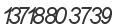
Hi, everyone, I'm using tesseract v 3.02 to extract number from images.
I've already specified the white-list as 0123456789- and tesseract seems
work very well for numbers when the space between them is big enough, but
for touching numbers, the result is wrong. For the below sample images, the
result for the first image is 010-  805, several numbers are lost, and for
the 2nd image the result is  13786133739, the 1 after 7 is lost and the 0
after 8 is recognized as 6!
<https://lh5.googleusercontent.com/-9OWXPLCi6-s/UufpWWXUuPI/AAAAAAAAAXk/ZiVdrLun5Nk/s1600/image1.gif>
I think there should be a better way to cope with this issue, just as the
following description:

  For some character sets that have similar character widths, a greedy
extraction method works reasonably well. Find the score for each template
in each pixel position across the connected component, and select the
template and position for which the score is maximized. Excise the
rectangle bounding the template (and save it). This typically leaves two
rectangles, on on the left and one on the right. Apply a filter such that
if a rectangle is too narrow to be one of the characters in the character
set, it is discarded. Apply the same operation to any pieces that are not
filtered. At the end, we have a set of rectangles that cover the initial
component, and the segmentation is finished. The image pieces in these
rectangles are then sent to the recognizer.

Can I achieve this operation with tesseract?

Thanks in advance, your help would be greatly appreciated!


--
--
You received this message because you are subscribed to the Google
Groups "tesseract-ocr" group.
To post to this group, send email to [email protected]
To unsubscribe from this group, send email to
[email protected]
For more options, visit this group at
http://groups.google.com/group/tesseract-ocr?hl=en

---
You received this message because you are subscribed to the Google Groups
"tesseract-ocr" group.
To unsubscribe from this group and stop receiving emails from it, send an email
to [email protected].
For more options, visit https://groups.google.com/groups/opt_out.