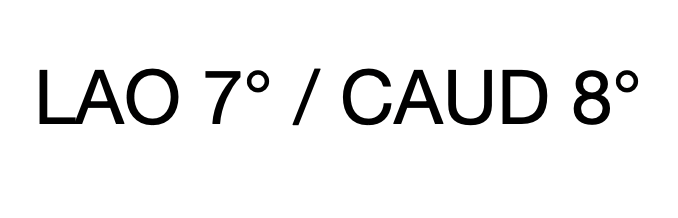
I'm having trouble getting tesseract to recognize any characters in the
following image:
[image: tessinput]
<https://user-images.githubusercontent.com/1205705/71773281-8e405700-2f28-11ea-86f6-2acfc6c09b46.jpg>


When I run tesseract from the command line on this image, I get "Empty
page!!" - that is, no results - returned. Based on my reading of the Improving
Quality <https://github.com/tesseract-ocr/tesseract/wiki/ImproveQuality>
section
of the wiki, I thought that the issue might be that the words in this image
are not dictionary words. With that in mind, I have tried both disabling
the tesseract dictionaries altogether (using the load_system_dawg and
load_freq_dawg config flags) as well as augmenting the existing dictionary
with these additional words (LAO and CAUD). Neither of those approaches
worked. I have tried tesseract versions 3, 4, and have built version 5 from
source on a Mac computer. All have given the same result.


Curiously, if I type the exact words from that image into a word processor
and take a screenshot, it works: the resulting image is readable by
tesseract. It correctly parses each character. Here is that image:

[image: Screen Shot 2020-01-04 at 7 01 11 PM]
<https://user-images.githubusercontent.com/1205705/71773337-7d441580-2f29-11ea-96ab-5d4d58c77ce2.png>

The only difference between the two images is that the first one is of a
slightly lower resolution/quality. Am I then to believe that tesseract is
unable to recognize characters in a slightly inferior quality image like
that? Is there anything I can do to improve that image quality? Is there
something else I'm missing?


Thanks in advance.


-Rory

--
You received this message because you are subscribed to the Google Groups
"tesseract-ocr" group.
To unsubscribe from this group and stop receiving emails from it, send an email
to [email protected].
To view this discussion on the web visit
https://groups.google.com/d/msgid/tesseract-ocr/980a7d52-9343-46a5-a417-f6b01cb711da%40googlegroups.com.