Hi Keith

I read your reply with great interest because your case appears to be rather
unique in that you are try to OCR lines and lines of dot matrix characters and
it’s an interesting project to translate those old BASIC listings to a PDF or a
txt file.
So I followed your links and your adventure and I am fascinated by what you
found to be the most helpful, https://aws.amazon.com/textract/
<https://aws.amazon.com/textract/>. If it is the most frictionless and most
effective for your circumstances then I am delighted that you found a solution
that fits your OCR needs. This is what I understood you eventually chose to
align your process with.

If you eventually complete your OCR project will you be willing to upload a
copy to the internet archive (archive.org <http://archive.org/>) or if you
can’t be inconvenienced I will be happy to do so in your behalf.

If you need more help in any way please let me know and thank you for posting
the question and for the interesting conversation.

Kindest regards
—Alex

> On 2 Jan 2021, at 05:33, Keith M <[email protected]> wrote:
>
> Alex,
>
> Thanks for replying, appreciate the time. Especially the command line with
> various options specified!
>
> I've spent hours and hours googling both before posting here, and afterwards.
> There's SOME information out there, but no real smoking gun. Most of the
> ideas in the first 10 pages of google results have not panned out in terms of
> EFFECTIVE results.
>
> https://github.com/ameera3/OCR_Expiration_Date
> <https://github.com/ameera3/OCR_Expiration_Date>
>
> looks pretty interesting, but it felt overly complicated to me.
>
> other responses in-line
>
>
> On 1/1/2021 3:07 PM, Alex Santos wrote:
> To overcome [the fact that the dots when scanned in hi-res are individual] >
> you might need to preprocess the > scanned images with some image editing
> software to find a sweet spot. I
> would probably start by doing a high contrast medium resolution scan, then
> add some gaussian blue to effectively marry the dots into a continuous shape,
> rather than individual dots and then use some leveling tool to tighten the
> soft blur around the edges.
>
> Spent a few hours messing around with this.
>
> https://jeffreymorgan.io/articles/improve-dot-matrix-ocr-performance-tutorial/
>
> <https://jeffreymorgan.io/articles/improve-dot-matrix-ocr-performance-tutorial/>
>
>
> I get idea, and if I read you right, you're saying basically the same thing.
> However, it really didn't pan out. Yes, the characters look more like
> traditional text, but there was no dramatic improvement in recognition. Part
> of the problem is that there are so many variables and it's hard to isolate
> minor improvements.
>
> I attached a zip file with two tests based on the sample image you provided.
> I didn't get a good chance to make all the comparisons but I created a PNG
> with some gaussian blur and then contracting the levels gave me what appear
> to be decent results. I also scaled the processed image to 200% and saved it
> as a TIF.
>
> Thanks for doing this.
>
> Here's my current state process that is yielding very good results:
>
> * Use Windows scanning software(linux works too, but more cumbersome) with
> Fujitsu IX500 scanner: Setting Black and White adjusted 75% dark, 1200 dpi.
>
> * Use pdftoppm with -gray option to spit out a *.pgm file at full resolution.
>
> * Use unpaper (https://github.com/unpaper/unpaper
> <https://github.com/unpaper/unpaper>) with default options to pre-process the
> scanned image. This really helps!
>
> * Convert to *.png and resize 50%. Doing this because AWS Textract can't take
> such a large image: 8.5x11 at 1200 dpi is 10,200 x 13,200!
>
> * Use AWS's Textract(https://aws.amazon.com/textract/
> <https://aws.amazon.com/textract/>) to perform the OCR. I can't recommend
> this service enough. It's practically free. Super easy to use (10) lines of
> python to call from Linux. You get feedback per line/word/block/page with
> confidence values. Average confidence value is 98%+.
>
> I'm going to type a more comprehensive document but some basic results on
> LIMITED testing, comparison using Text Compare in Beyond Compare 4:
>
> Amazon's Textract: Only 1 wrong character in 1020. Two other smaller
> excusable defects (an extra : detected) and a one-letter mistake. This simply
> works out of the box with zero configuration.
>
> Tesseract: With whitelisting only characters, and added BASIC keywords to
> eng.user-words. Definitely can't get under about 12 lines worth of mistakes.
> Approximately 80% accuracy with this one test document. I feel like there's
> room for optimization, but I'm not sure I'm going to chase it.
>
> Alex test1: 25 different lines (not great)
> Alex test2: 18 different lines (A little worse than my best tesseract run
> with any configuration)
>
> Abbyy FineReader 15: Pretty horrible results
>
> Abbyy Cloud OCR: Better than the application, but can't easily evaluate
> results.
>
> ReadIris 17: Pretty horrible results
>
>
> Without sounding too much like an Amazon commercial (no relation beyond happy
> customer here), Amazon Textract has a feature called A2I which routes low
> confidence value recognition lines through machine learning, and then
> implements Human Review using Amazon Mechanical Turk. I'm not using A2I, but
> I *am*going to manually route my results through MTurk. It's a couple extra
> manual steps, and I have to pay for this human review (maybe $50 by the time
> I'm done), but I think it's neat, and I like learning about new technology.
>
> Hope the group finds this info useful.
> Thanks,
>
> Keith
>
>
> On Friday, January 1, 2021 at 11:32:40 PM UTC-5 Keith M wrote:
> Ger,
>
> Thanks for taking the time to reply.
>
> On 1/1/2021 4:00 PM, Ger Hobbelt wrote:
> Another technique specifically for dot-matrix might be to blend multiple
> copies of the scan at small offsets. The idea here is that back in the old
> days of dot matrix, a few DTP applications had printing modes which would
> print dot patterns several times on the same line, but ever so slightly
> offset from one another to 'fill the character up'. The poor man's way to
> print BOLD characters that way was to print the same line multiple times at
> slight offsets.
>
>
> The printer's manual actually details so much of this internal working.
> Besides schematics and BOM lists, descriptions of theory of operation, etc I
> had forgotten the level of detail we used to get when we bought a
> multi-hundred dollar product.
>
> Hence to simulate this sort of 'gap closing', one could scan at higher
> resolution, then offset the image multiple times in various directions by
> "half a printer dot" (or less) and blend the copies using a blending mode
> like Photoshop Darken.
>
> I *believe* that morphological dilation is similar to what you're talking
> about here.
>
> "Dilation [...] adds a layer of pixels to both the inner and outer boundaries
> of regions."
>
> from
>
> https://www.cs.auckland.ac.nz/courses/compsci773s1c/lectures/ImageProcessing-html/topic4.htm
>
> <https://www.cs.auckland.ac.nz/courses/compsci773s1c/lectures/ImageProcessing-html/topic4.htm>
>
>
> I tried a few different techniques similar to what you've mentioned. While
> conceptually it should help, practically speaking I saw only minimal
> improvement.
>
> While it's still a work in progress, I'm describing my current best
> efforts/results in the other reply here.
>
> Thanks,
> Keith
>
>
> On Friday, January 1, 2021 at 10:03:37 PM UTC-5 shree wrote:
> Please see old thread at
> https://groups.google.com/g/tesseract-ocr/c/ApM_TqwV7aE/m/z5jZV0I0AgAJ
> <https://groups.google.com/g/tesseract-ocr/c/ApM_TqwV7aE/m/z5jZV0I0AgAJ> for
> link to a completed project for dot matrix
>
> On Monday, December 14, 2020 at 12:11:00 PM UTC+5:30 Keith M wrote:
> Hi there,
>
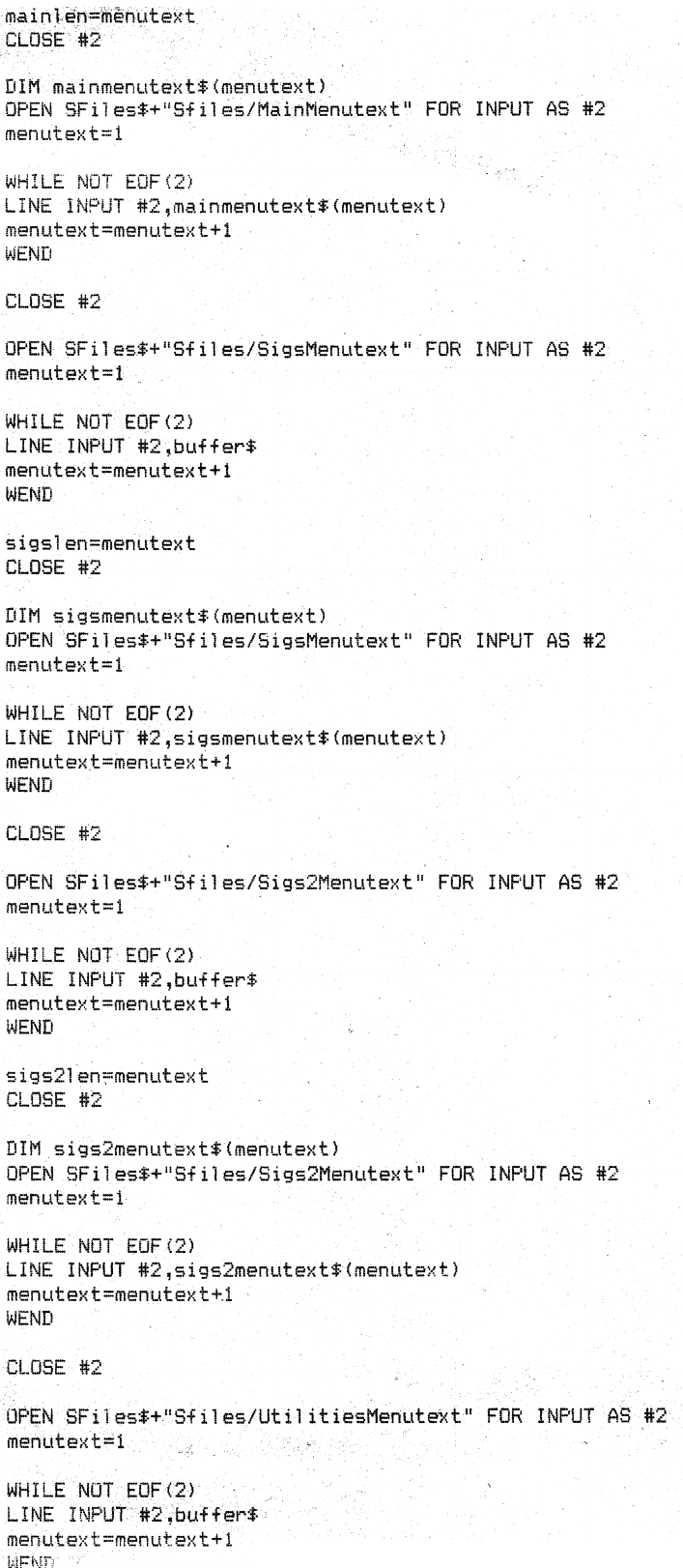
> I've been circling a problem with OCR'ing 90-pages of 30 year old BASIC code.
> I've been working on optimizing my scanning settings, and pre-processing,
> stuck in photoshop for hours messing around. Long couple days with this stuff!
>
> I've been through tessdoc, through the FAQ, through wikipedia reading about
> morphological operators. Through PPAs for 5.0.0-alpha-833-ga06c.
>
> I'm getting OK results so far, but need to process more images, my workflow
> is tedious.
>
> Sample image here
> https://www.techtravels.org/wp-content/uploads/2020/12/FNBBS-02_crop.png
> <https://www.techtravels.org/wp-content/uploads/2020/12/FNBBS-02_crop.png>
>
> 150dpi image extracted via pdftoppm -png from a 1200dpi scan. While it's not
> super clear to me why, higher res scans are resulting in WORSE OCR's.
>
> TLDR; What should be the ideal configuration of tesseract for my application?
> Disable the dictionary? Can I add BASIC commands and keywords to
> eng.user-words? From the manual "CONFIG FILES AND AUGMENTING WITH USER DATA"
> section ??
>
> I could use some help, thanks!
>
> Keith
>
>
> --
> You received this message because you are subscribed to a topic in the Google
> Groups "tesseract-ocr" group.
> To unsubscribe from this topic, visit
> https://groups.google.com/d/topic/tesseract-ocr/Yd3ncAlr8Os/unsubscribe
> <https://groups.google.com/d/topic/tesseract-ocr/Yd3ncAlr8Os/unsubscribe>.
> To unsubscribe from this group and all its topics, send an email to
> [email protected]
> <mailto:[email protected]>.
> To view this discussion on the web visit
> https://groups.google.com/d/msgid/tesseract-ocr/2f945abb-0eab-4504-877f-8dc7c61d5a0an%40googlegroups.com
>
> <https://groups.google.com/d/msgid/tesseract-ocr/2f945abb-0eab-4504-877f-8dc7c61d5a0an%40googlegroups.com?utm_medium=email&utm_source=footer>.

--
You received this message because you are subscribed to the Google Groups
"tesseract-ocr" group.
To unsubscribe from this group and stop receiving emails from it, send an email
to [email protected].
To view this discussion on the web visit
https://groups.google.com/d/msgid/tesseract-ocr/2F0FA881-DE8A-43CE-AE78-B79F7DAFA952%40gmail.com.