TidBITS#663/20-Jan-03
=====================

  How extreme is Apple's new AirPort Extreme? Sure, it boost
  throughputs to 54 Mbps, but it's more important that Apple's
  adoption of 802.11g puts the company back into the pilot's seat
  for the industry's wireless technology adoption. Adam and Glenn
  Fleishman take off with all the details. We also pass on some
  of the best and worst bits from the Macworld Expo show floor,
  and take a quick look at Apple's $8 million loss for the first
  quarter of 2003.
Topics:
    MailBITS/20-Jan-03
    Macworld Expo San Francisco 2003 Superlatives, Part 1
    AirPort Extreme: In the Key of G

<http://www.tidbits.com/tb-issues/TidBITS-663.html>
<ftp://ftp.tidbits.com/issues/2003/TidBITS#663_20-Jan-03.etx>

Copyright 2003 TidBITS Electronic Publishing. All rights reserved.
   Information: <[EMAIL PROTECTED]> Comments: <[EMAIL PROTECTED]>
   ---------------------------------------------------------------

This issue of TidBITS sponsored in part by:
* READERS LIKE YOU! Help keep TidBITS going via our voluntary <------ NEW!
   contribution program. Special thanks this week to Terje Berg,
   Andre Peternell, and Harvey Barnett for their generous support!
   <http://www.tidbits.com/about/support/contributors.html>

* SMALL DOG ELECTRONICS: Dual Processor 1 GHz G4s On Sale! <--------- NEW!
   G4/1 GHz DP 256/80/SuperDrive/Radeon9000/56K: $2159
   XServe 1 GHz DP 512/60 GB/CD/ATI: $3150; G4/1 GHz DP/SD: $2199
   <http://www.smalldog.com/tb/> 802/496-7171

* DEALMAC: Mac OS X 10.2 upgrade for $67. <-------------------------- NEW!
   <http://dealmac.com/articles/46428.html?ref=tb>
   DEALMAC: Lexar 6-in-1 USB card reader for $26 shipped.
   <http://dealmac.com/articles/46529.html?ref=tb>

* easyDNS: Is your present Domain Registration company taking you <-- NEW!
   for granted? Easily transfer your domains to the leading DNS
   company on the net. It's fast & simple. Now YOU have control.
   easyDNS: the way things should work. <http://www.easyDNS.com>

* SIX DEGREES: Automatically link messages, files and people so <---- NEW!
   you can navigate through projects quickly. Great timesaver!
   Works with Microsoft Entourage and Outlook. Free trial version!
   =======> <http://www.creo.com/sixdegrees/index.asp?id=tidbits>

* TINDERBOX: Are your research notes on cocktail napkins? <---------- NEW!
   Have we got a tool for you!  Make, map, analyze, and share
   your notes in your Tinderbox-generated weblog.
   Download your free demo! <http://www.eastgate.com/Tinderbox/>
   ---------------------------------------------------------------

MailBITS/20-Jan-03
------------------

**Apple Posts $8 Million Loss** -- Apple Computer last week
  announced an $8 million loss for its first fiscal quarter of
  2003. The results include one-time charges for restructuring
  and an accounting transition adjustment; without these items,
  Apple would have had an $11 million profit for the quarter. Apple
  shipped 743,000 Macs during the quarter - on par with the same
  period a year ago - and although gross margins were down to 27.6
  percent, those were on revenue of $1.47 billion, up 7 percent
  from the same quarter the year before. International sales
  accounted for 43 percent of Apple's revenue. Apple also noted
  it was able to reduce channel inventories 11 percent during
  the quarter, which bodes well for the new PowerBooks just
  announced at Macworld Expo. [GD]

<http://www.apple.com/pr/library/2003/jan/15results.html>
<http://db.tidbits.com/getbits.acgi?tbart=07041>


**AppleWorks 6 Presents, Too!** Oops. AppleWorks 6 does indeed
  have a presentation module, so my offhand comment to the contrary
  last week in "Apple Reduces Its Microsoft Dependency" was just
  plain wrong. My only defense is that I've never seen AppleWorks 6,
  since Apple doesn't generally send us review copies. AppleWorks 6
  replaced the communication module in AppleWorks 5 about two years
  ago, and although I can't comment on how good AppleWorks 6's
  presentation module is, it's interesting to see how Apple
  redirected efforts from the AppleWorks presentation module into
  the full-featured Keynote. Perhaps the same thing is happening
  with other chunks of AppleWorks. As an aside, if you're interested
  in the history of integrated software, check out the final link
  below for the tale of how ClarisWorks came to be, written by one
  of the program's creators. [ACE]

<http://www.apple.com/appleworks/>
<http://db.tidbits.com/getbits.acgi?tbart=07042>
<http://www.apple.com/keynote/>
<http://www.swiss.ai.mit.edu/~bob/clarisworks.php>


Macworld Expo San Francisco 2003 Superlatives, Part 1
-----------------------------------------------------
  by Adam C. Engst <[EMAIL PROTECTED]>

  Every year I worry that Macworld Expo will somehow fall flat, that
  there won't be many exhibitors, that no one will come, that there
  won't be anything that's even moderately interesting. But every
  year, it seems, my fears are unfounded, and the Expo ends up
  showcasing an enthused community of innovative developers and
  committed users. This year was no exception, with over 330 vendors
  displaying their wares to more than 90,000 attendees. Never mind
  that the active show floor space was significantly smaller than in
  previous years or that IDG World Expo was giving free passes out
  like they were candy - without exception, all the attendees I
  talked to were upbeat, and the vendors were all happy about
  traffic and sales.

  This was by far the busiest Macworld Expo I've ever had
  personally, thanks to 12 signings, interviews, and appearances
  over 4 days (including a quick bit on TechTV, which you can watch
  at the link below if you missed it live), not to mention a variety
  of press briefings and other meetings. Harried though I was, I had
  a great time and managed to see the entire show floor, where the
  Macintosh development community was demoing the latest and
  greatest. Without further ado, then, here are some of my
  superlatives from the show, mixed in with those from the rest
  of the TidBITS staff in attendance: Jeff Carlson, Matt Neuburg,
  and Mark Anbinder. Due to issue size restrictions, look for even
  more superlatives in next week's TidBITS. As always, thanks, guys!

<http://ftp.tidbits.com/pub/misc/adam-techtv-small.mov>
<http://www.techtv.com/>


**Cheapest AirPort Range Extender** -- It takes two to tango with
  wireless networking, and one way to improve your laptop's signal
  strength is to move your AirPort Base Station to a more central
  location. If you've avoided doing so because there's no electrical
  power near that ideal spot, MacWireless has a solution for you.
  The MacWireless Power Over Ethernet product consists of a pair
  of adapters that send power over unused pairs of wires in the
  Ethernet cable that connects your AirPort Base Station to the rest
  of your network. It's only $30 and should be shipping in a few
  weeks. [ACE]

<http://www.macwireless.com/html/products/poe.html>


**Goin' on an iTrip** -- Griffin Technology is starting to make a
  tradition of showing up at Macworld Expo with a hand-assembled
  pre-production device of some sort. This year's goodie, available
  in a few months, is the iTrip, an FM transmitter for the iPod.
  With the iTrip plugged into the top of your iPod, you can transmit
  music to any FM stereo (great for cars with no other audio input).
  Unlike other FM transmitters, the iTrip can use any frequency on
  the FM radio spectrum, controlled via software installed on the
  iPod, and it doesn't require an additional battery. The $35 iTrip
  can even sit perpendicular to the iPod if you need access to the
  FireWire port for charging. [JLC]

<http://griffintechnology.com/products/itrip/>


**Best Addition to Your Stereo** -- This award is shared by the
  HomePod, from Gloo Labs, and the SliMP3 from Slim Devices. The
  SliMP3 is an MP3 player that streams music from your computer
  over Ethernet straight to your stereo. It's a great way to direct
  those MP3s to a sound system that offers higher quality than
  tinny computer speakers. The SliMP3 is available now for $250
  and requires that you plug it into your Ethernet network. But
  what if you can't easily run Ethernet cable to your Mac? You
  could attach a wireless bridge like the $100 Linksys WET11 to
  the SliMP3, but that's more expensive than buying a $200 HomePod,
  another MP3 player that communicates via an 802.11b wireless
  network rather than Ethernet (and in the process, makes true
  my first prediction for 2003 from "Back to 2002, Forward to 2003"
  in TidBITS-661_). The HomePod is scheduled to ship in March and
  will be sold by MacSense. Both MP3 players offer remote controls,
  both can be controlled from a computer, and both have open-source
  platforms for developers to extend. Some differences though (as
  far as we can tell): the HomePod has a FireWire port for adding
  a hard drive or perhaps an iPod; the SliMP3 supports Internet
  radio; and the SliMP3 uses a bright front-mounted fluorescent
  display whereas the HomePod has a top-mounted LCD display.
  They're both way cool. [ACE]

<http://www.slimp3.com/>
<http://linksys.com/products/product.asp?prid=432&grid=33>
<http://www.gloolabs.com/>
<http://db.tidbits.com/getbits.acgi?tbart=07035>


**Most Ingenious Use of Built-In Technology** -- When I first
  heard that Riccardo Ettore had ported his popular TypeIt4Me
  utility to Mac OS X, my reaction was: "No way!" After all,
  TypeIt4Me is a control panel that hacks into the system to
  watch everything you type into any application, looking for
  abbreviations you've set up, and, when you type one, expanding
  it into its full form like some ghostly typist inside the
  computer. But on Mac OS X there are no control panels and no
  hacking into the system is allowed, so how could TypeIt4Me
  possibly work there? What I forgot, though, was that Mac OS X
  already has a technology that can watch everything you type
  and replace some characters with others - the Input Manager,
  which is used to implement "input methods." That's how you
  type Japanese and other Unicode characters, after all. So
  TypeIt4Me is implemented as an input method. To use it, just
  choose it from the keyboard menu, after which it watches you
  type, expanding abbreviations as necessary (an extra menu icon
  lets you access configuration windows). It's brilliant in its
  simplicity, and it works remarkably well. If you use any kind
  of boilerplate text that you'd prefer not to have to type manually
  every time (your phone number, your address, etc.), TypeIt4Me
  is a great way to store and access it. [MAN]

<http://typeit4me.com/>
<http://db.tidbits.com/getbits.acgi?tbart=06780>


**Best Windows at Macworld Expo** -- You thought I was going to
  mention Connectix's Virtual PC 6.0 (now with a 6.0.1 update that's
  especially useful for those with PowerPC G3-based Macs) here,
  didn't you? But no, not this time, because this superlative goes
  to Andersen Windows, which had a good-sized booth at Macworld Expo
  showing off their windows (the glass variety) and doors. There are
  always a few non sequitur booths on the show floor, such as the
  perennially ignored IRS table (Free audits! Step right up!), but
  none so completely inexplicable as Andersen Windows. At least they
  had the humor to display a hand-lettered sign saying, "The best
  windows for Mac users." [ACE]

<http://www.andersenwindows.com/>
<http://www.connectix.com/support/vpcm_online.html>


**Nichiest Niche-Market Device** -- The iGo is a desk, of sorts,
  that's useful only if you have one of the new iMacs, no need for
  a writing surface, and a retro interior decorating scheme. You
  know how the iMac's base is the top half of a sphere; now imagine
  the bottom half of that sphere, with four huge chrome legs and
  a flat plank attached to the front two legs. The iMac sits on
  the half-sphere, and the keyboard and mouse go on the plank (with
  no room for anything else). It makes a statement, but could you
  really get any work done? And does it really match your furniture,
  your wallpaper, and your nightgown? I predict that ten of these
  will be sold nationwide; on the other hand, I also predicted that
  the Internet would flop, so there's always hope. [MAN]

<http://igo4mac.com/intro.html>


**Worst Outfit** -- Over the years, the use of scantily clad women
  to attract expo-goers into booths has almost entirely fallen by
  the wayside. Although we're happy to see such a crass strategy
  disappear, we think those women would have felt a lot better about
  the job if they'd seen Microsoft's MSN butterfly guy prancing
  around in his multicolored leotard and wings, as you can see in
  our picture linked below. We also spotted him when he was grabbing
  a bite to eat, and he didn't look at all comfortable. Maybe he was
  just pining for some nectar. [MHA]

<http://www.msn.com/>
<http://www.tidbits.com/resources/663/msn-butterfly.jpg>


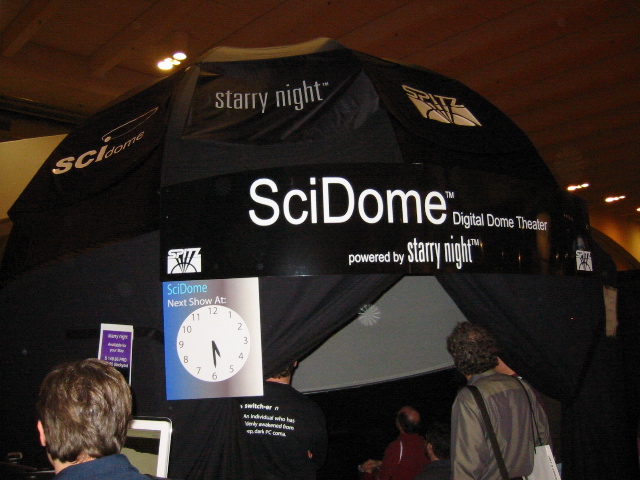
**Best Booth Under the Stars** -- Most booths are either bare-
  bones functional or attractively designed, but our favorite booth
  used its product to full effect. The Starry Night booth featured a
  SciDome portable planetarium, where you could sit and gaze at the
  astronomy software projected onto the curved firmament above your
  head. It wasn't just an excellent way to showcase the program -
  we liked to pop in occasionally to rest from Moscone's fluorescent
  rays. Check out our picture below. [JLC]

<http://www.starrynight.com/>
<http://www.spitzinc.com/esky.html#scidome>
<http://www.tidbits.com/resources/663/starry-night.jpg>


**PALling around with a DVR** -- Never let it be said that we
  don't try to expand beyond our American parochialism. This
  announcement may not have made headlines in the U.S., but we're
  sure it will be a huge hit with many of our international readers.
  At Macworld Expo, El Gato Software released a PAL and SECAM
  version of EyeTV, the digital video recording hardware and
  software package for the Mac (think of it as TiVo for the Mac).
  PAL versions of EyeTV should be available in Germany, France,
  Italy, and the UK by the end of January, and Mac users in other
  European countries should be able to buy it soon thereafter.
  The initial European version will not include support for an
  electronic program guide, which will be added on a country-by-
  country basis (engineers are already working on electronic program
  guide integration in the UK, Italy, and Germany). Plus, El Gato
  encourages Mac programmers to add program guide support to the
  EyeTV, much as Karelia's Watson does in the U.S. Although the PAL
  versions of EyeTV aren't yet available (and haven't yet been
  tested) in Australia, South America, Asia, and Africa, El Gato
  is working on the necessary distribution agreements. [ACE]

<http://www.elgato.com/eyeTV/>
<http://www.ee.surrey.ac.uk/Contrib/WorldTV/>
<http://www.karelia.com/watson/>

   PayBITS: Feel like you got the best of Macworld Expo without
   having to go? Help us keep bringing you Macworld highlights!
   <http://www.tidbits.com/about/support/contributors.html>
   Read more about PayBITS: <http://www.tidbits.com/paybits/>


AirPort Extreme: In the Key of G
--------------------------------
  by Glenn Fleishman & Adam C. Engst <[EMAIL PROTECTED]>

  Apple led the drive to offer Wi-Fi wireless networking equipment
  at reasonable prices to consumers way back in 1999, but the
  company's gateway product, the AirPort Base Station, had started
  to look under-featured and overpriced even by late 2001 -
  especially for broadband users who didn't need its built-in modem.

  But Apple stayed the course: $300 for the AirPort Base Station and
  $100 for the proprietary AirPort card that inserted into a special
  PC Card-like slot in every model of the Macintosh. Because many
  Mac models over the last three years lack PC Card and PCI slots -
  notably, the iMac, eMac, Cube, and iBook - the AirPort slot was
  for a long time the only reasonable option for adding wireless
  access for under $150.

  At this month's Macworld Expo, Apple not only caught up with but
  exceeded the rest of the wireless world by announcing AirPort
  Extreme. The AirPort Extreme products rely on a draft version
  of the IEEE 802.11g specification, which uses the 2.4 GHz radio
  spectrum band just like 802.11b, is completely backwards
  compatible with 802.11b, and operates at up to 54 Mbps.

<http://www.apple.com/airport/>

  In this article, which we're also publishing as an addendum to our
  recently released book, The Wireless Networking Starter Kit, we
  discuss compatibility issues with 802.11g and AirPort Extreme and
  run through the equipment's specifications. Later in this section,
  we note the other makers of 802.11g equipment, including Linksys,
  Belkin, and D-Link, and survey their initial product offerings and
  pricing. We've also started tracking Mac-related wireless news on
  a new weblog hosted at the book's Web site; stop by regularly (or
  add its RSS feed to your favorite headline watcher) if you're
  interested in what's up with AirPort and AirPort Extreme.

<http://wireless-starter-kit.com/>
<http://wireless-starter-kit.com/airportblog/>


**Forward and Backward Compatibility** -- The 802.11g
  specification uses a relatively new method of encoding bits onto
  radio waves in such a way as to squeeze up to 54 Mbps of raw data
  across a single channel. As is the case with most theoretical
  network throughputs, the net throughput of real data - the actual
  contents of files or transactions - provides somewhere between
  20 and 30 Mbps. In contrast, 802.11b's 11 Mbps raw throughput
  generally translated to 4 to 6 Mbps at best, and it isn't uncommon
  to drop below that as distance from the base station increases.

  802.11g is attractive because it includes full backwards
  compatibility with 802.11b. This compatibility isn't optional for
  manufacturers, but rather is a mandatory part of the spec. 802.11g
  also has several intermediate steps for speed, so you don't just
  drop from 54 Mbps all the way down to 11 Mbps.

  One of 802.11g's big advantages over 802.11b is that it better
  handles the inevitable signal reflection. Radio signals bounce off
  different pieces of matter - floors, metal, even the air around
  you - at different angles and speeds. A receiver must reconcile
  all the different reflections of the same signal that arrive at
  slightly different times into a single set of data. 802.11g (like
  802.11a) slices up the spectrum in a way that enables receivers to
  handle these reflections in a simpler but more effective way than
  802.11b.

  Despite Steve Jobs's confident declaration in the Macworld Expo
  keynote that 802.11g is a "standard," the current specification
  has not been finalized and ratified by the IEEE, the engineering
  group that develops new standards. Ratification should happen
  relatively soon, almost certainly by the end of 2003. Until then,
  the 802.11g "standard," remains in draft form, although that
  hasn't stopped several chip manufacturers from shipping the
  silicon necessary to implement the current draft of 802.11g.
  (Apple's Web site now calls 802.11g a draft, reflecting reality.)

  Also note that the Wi-Fi Alliance hasn't included 802.11g as part
  of its certification suite. The Wi-Fi Alliance tests equipment to
  make sure it works according to spec and is interoperable with all
  other certified equipment; if so, the maker is allowed to use the
  Wi-Fi logo. Until 802.11g is finished, the Wi-Fi Alliance has no
  way of guaranteeing that different 802.11g devices will work with
  one another, meaning that it will likely be some time after
  ratification that the Wi-Fi Alliance considers adding 802.11g
  to the Wi-Fi certification suite. Some of our sources speculate
  that a testing program could be in place as early as summer,
  but final certification almost certainly wouldn't start until
  at least late 2003.

  That's not to imply that compatibility is likely to be a major
  problem. Manufacturers have significant motivation to maintain
  compatibility with other makers. No one wants to sell equipment
  that won't play nice with others, because to do so would undermine
  confidence in the entire technology. In the worst case, unless a
  piece of hardware is designed extremely poorly, two incompatible
  802.11g devices should be able to talk at 802.11b speeds.

  Compatibility problems are particularly unlikely among different
  devices from the same manufacturer. Apple AirPort Extreme Base
  Stations will happily communicate with AirPort and AirPort Extreme
  cards, for instance. However, good compatibility likely goes
  farther. Apple's equipment relies on chips from Broadcom, as does
  802.11g gear from Linksys. For that reason, and because Apple and
  Linksys have brought the first 802.11g devices to market, it's
  likely that Apple and Linksys equipment will be compatible. In
  addition, later equipment makers will have to meet Broadcom's
  specs rather than vice-versa. Sometimes standards are set merely
  by shipping the most devices.

  One way or another, compatibility will not be an issue in the long
  run, whether you buy hardware now or later. Apple has promised
  firmware upgrades as the standard stabilizes, and Apple has done
  a good job thus far providing these kinds of updates to the older
  AirPort equipment.

  On a related front, Apple hasn't committed to or rejected support
  for WPA (Wi-Fi Protected Access), the security update that fixes
  encryption problems and removes complexity from securing local
  wireless network connections. Apple said that they will monitor
  whether WPA becomes widely adopted and evaluate their response
  based on usage. Again, if Apple were to support WPA, that support
  would appear in the form of a free firmware update. Meanwhile,
  many other vendors are already promising WPA support. For
  instance, D-Link says their new 802.11g devices will support
  WPA with a firmware upgrade by the second quarter of the year.


**Is 802.11a Dead?** Apple has chosen to not support the existing
  802.11a specification as part of AirPort Extreme. 802.11a operates
  in the 5 GHz band and its use of a different frequency means that
  it is not backwards compatible with 802.11b. Several companies
  offer dual-band 2.4/5 GHz radios now, but that approach increases
  cost and complexity.

  Because of this lack of compatibility with millions of 802.11b
  devices currently in use, Steve Jobs said that 802.11a is doomed
  to failure. However, it's more appropriate to say that 802.11a is
  now relegated to niche status for particular purposes, such as
  dense installations in corporations, server room backup links,
  or high-speed point-to-point bridges.

  Because 802.11a has 12 distinct channels that can be used without
  interference in the same place, it offers an advantage for
  scenarios in which avoiding interference is important. Likewise,
  the four channels reserved in the upper end of the 5 GHz band
  for 802.11a outdoor, point-to-point use can employ higher power
  levels, which may provide a better throughput than 802.11g in
  the same circumstances.


**AirPort Extreme Base Station** -- Apple offers two different
  AirPort Extreme Base Station models, priced at $200 and $250.
  Both units have 10/100 Mbps WAN and LAN ports, sport a USB port
  for printer sharing (but not spooling), and can bridge to other
  AirPort Extreme Base Stations, acting as an access point and a
  bridge simultaneously. The $250 unit also includes a 56K modem
  and a jack for an external antenna.

  The 10/100 Mbps bump up in speed on the WAN port recognizes that
  some users might be hooking into wide-area networks or broadband
  connections that provide more than 10 Mbps of bandwidth (that's
  unfortunately not true for us, so we can't test that feature). If
  you're only running a 10 Mbps wired Ethernet, it might also be
  time to upgrade to 10/100 Mbps switches if you're also installing
  AirPort Extreme equipment to take full advantage of the intra-
  network speed. Do note that AirPort Extreme won't help your
  Internet use at all, since almost all Internet connections are
  far slower than even 802.11b's realistic 4 to 6 Mbps.

  The addition of USB printer sharing enables a network of Macs to
  share a printer without connecting the printer to a Mac which must
  be turned on whenever anyone wants to print. However, the printer
  itself must be turned on: Apple confirmed that this feature is
  indeed "printer sharing," which makes it seem just like the
  printer is connected to each machine, rather than "printer
  spooling," in which print jobs are sent to the print spooler,
  stored in a file, and then printed out whenever the printer
  becomes available. (Adam absolutely adores print spooling because
  his printer is seldom on, and whenever he turns it on, his
  AppleShare IP-based print spooler immediately prints all the
  waiting print jobs.)

  In the past, adding an external antenna to an AirPort Base Station
  required serious surgery that made a mockery of your warranty and
  required significant manual dexterity. Now, with the $250 model of
  the AirPort Extreme Base Station, you can simply plug an external
  antenna into the Apple-proprietary antenna jack.

  Don't blame Apple for yet another proprietary jack - the FCC
  mandates that any wireless networking equipment that can take an
  antenna must feature a hard-to-find connector. That's because the
  FCC doesn't want just anyone attaching uncertified antennas that
  could spew more than the legal amount of signal. (An uncertified
  antenna is anything that the manufacturer didn't have the FCC test
  with a given wireless gateway or card.)

  You'll be able to buy two external antennas for the AirPort
  Extreme Base Station. Both initial models are made and marketed
  by veteran Mac firm Dr. Bott. Apple said that they didn't want
  to get into the antenna business, but Apple is having the entire
  $250 AirPort Extreme Base Station plus Dr. Bott antenna system
  certified by the FCC. (Companies pay a separate fee for each
  certification - which may account for part of why the cheaper
  AirPort Extreme Base Station doesn't have an external antenna
  jack.)

<http://www.drbott.com/>

  The Dr. Bott ExtendAIR Omni ($100) is a 3.5 dBi omnidirectional
  antenna suitable for extending the range of an AirPort Extreme
  Base Station in a 360-degree spread; the ExtendAIR Direct ($150)
  is a 6.5 dBi 70-degree directional antenna. (For more on adding
  antennas to access points for extending range, read Chapter 8,
  "Going the Distance," in The Wireless Networking Starter Kit.)

  Although you can still use the 56 Kbps modem (V.90, not V.92,
  unfortunately; see Kevin Savetz's articles on V.92 linked below)
  to connect via a dialup Internet connection, you might still want
  the modem-equipped version of the AirPort Extreme Base Station
  even if you have a broadband connection to the Internet. That's
  because the AirPort Extreme Base Station also supports PPP dial-in
  connections. Forget a file while you're traveling? As long as your
  Mac is turned on and has file sharing enabled, you can use your
  laptop's modem to dial up your AirPort Extreme Base Station and
  retrieve that file. Exactly how this feature will work won't be
  clear until we can test the hardware, but it could be a welcome
  addition. (Of course, this assumes a phone line dedicated to
  incoming data calls.)

<http://db.tidbits.com/getbits.acgi?tbart=06431>
<http://db.tidbits.com/getbits.acgi?tbart=06996>

  The AirPort Extreme Base Station's bridge feature is unique for
  equipment in this price range. It enables you to extend the range
  of a network without wires. Just buy two AirPort Extreme Base
  Stations, connect one to your Internet connection, and set the
  other to work in bridge mode. The bridge unit connects to the
  master AirPort Extreme Base Station and acts as an access point
  for computers within range. In the past, you would have had to
  spend well over $500 to buy a single device that could act as an
  access point and bridge simultaneously, or combine separate pieces
  of equipment like the Linksys WAP11 and WET11 to achieve the same
  effect. (See pages 152 to 160 in The Wireless Networking Starter
  Kit for more on how wireless bridging works.)

  Remember that even if you don't have a single AirPort Extreme
  card or 802.11g adapter on your network, two AirPort Extreme Base
  Stations can connect to each other at the full 54 Mbps raw speed
  of 802.11g. If your wired network runs at 100 Mbps, the high-speed
  bridging is another reason for the 10/100 Mbps WAN port on the new
  units.

  With AirPort Extreme Base Stations, you could locate islands of
  wired and wireless access in various locations without running
  wire among those islands. This could allow you to create larger
  coverage area or connect neighboring buildings or homes.

  Although the AirPort Extreme Base Station bridging works with up
  to four units at once, you reportedly cannot daisy chain the
  AirPort Extreme Base Stations in bridging mode; all the bridged
  units must each connect back to the master unit. In more extensive
  installations, you could run Ethernet among several master AirPort
  Extreme Base Stations and still use bridging on the edges of the
  network.


**AirPort Extreme Card** -- The new AirPort Extreme Card is
  based on the mini-PCI Card form factor, and has a new shape and
  connector. The card is built into every 17-inch PowerBook G4,
  and is a user-expandable or build-to-order option with the 12-inch
  PowerBook G4. (Both PowerBooks were announced at the same time as
  AirPort Extreme.)

<http://db.tidbits.com/getbits.acgi?tbart=07041>

  These two PowerBook models also have built-in Bluetooth and a pair
  of antennas. Apple said the two antennas reconfigure themselves
  dynamically to provide either antenna diversity for better
  reception of Wi-Fi or 802.11g signals, or for one antenna
  to be dedicated to Bluetooth and the other to 802.11 depending
  on what's needed.

  The antenna redesign also solves a problem inherent in the
  Titanium PowerBook G4 design which restricted the signal strength
  entering and leaving the computer. In the new PowerBook G4
  aluminum case design, the antennas are located at the top of
  both sides of the LCD display with rubber seals providing radio
  "transparency."

  Will there be an upgraded AirPort Extreme card for older Macs?
  The answer is a firm no. Greg Joswiak, Apple's VP of hardware
  products, confirmed for us that the older AirPort card relied on
  a too-slow bus, or communications channel, inside each Mac. This
  slow bus can't operate at the speed required by 802.11g, thus
  making it impossible to revise the card or plug a different card
  into that slot.

  We expect that new Power Macs will be among the first Macs to
  sport either an AirPort Extreme slot or, less likely, a PCI-based
  AirPort Extreme card option. iMacs, eMacs, and iBooks would
  require motherboard redesign to support AirPort Extreme, and thus
  only a major refresh to each product line will be extreme enough
  to incorporate 802.11g.

  It's certain that other companies will step up to the plate as
  well, such as Asante, Proxim, MacWireless, and Belkin, all of
  which have a history of supporting Macintosh networking. These
  companies typically release PC Cards first, meaning that only
  certain PowerBook models would handle 802.11g. PCI card adapters
  are already shipping, and we might see Ethernet or even FireWire
  (USB is too slow for 802.11g) converters as well.


**Other 802.11g Makers** -- Although Apple is early with 802.11g,
  it's not the first to ship products. Linksys gets that honor,
  having pushed out its first "54G" gateways and cards before the
  end of 2002, with Buffalo following quickly. D-Link and Belkin
  aren't far behind. (Prices are all the lowest price at Amazon.com
  or via the companies' online stores.)

  Many Mac users know Belkin as a cable company, but the firm
  has been shipping a variety of networking products, including
  inexpensive Bluetooth adapters, for some time. By the time
  you read this, the company plans to ship four devices: a
  wired/wireless gateway (F5D7230-4, retail price $150), a plain
  access point (F5D7130, $140), a PC Card (F5D7010, $80), and a
  PCI card (F5D7000, $80). Belkin has promised drivers for its
  802.11g gear by February for Mac OS 8.6 and later.

<http://www.belkin.com/>

  Linksys has two 54G gateways and two cards. The WRT54G is a
  combination wired switch and wireless gateway which updates their
  BEFW11S4 model ($130). The WAP54G is a simple access point that
  adds 802.11g support to the WAP11 ($130). The WPC54G PC Card ($70)
  is available now, and the WMP54G PCI adapter ($70) is coming soon.
  Linksys has little to no Macintosh support for any of its existing
  products.

<http://www.linksys.com/splash/54g_splash.asp>

  D-Link is offering products under the complicated brand name
  of AirPlus Xtreme G. They also have a wired/wireless gateway
  (DI-624, $150), a plain access point (DWL-2000AP, $140), a
  PC Card (DWL-G650, $80), and a PCI Card (DWL-G520, $90).
  D-Link has offered limited AppleTalk support in its previous
  offerings, but Mac drivers are unlikely.

<http://www.dlink.com/products/wireless/airxtreme.asp>

  Buffalo has its AirStation G54 Broadband Router Access Point
  (WBR-G54) for a retail price of $200 and a PC Card (WLI-CB-G54)
  for $100. Street prices should be less. The company has offered
  limited Mac support in the past.

<http://www.buffalotech.com/wireless/>


**Future of G** -- The future of 802.11g is bright given its
  advantages, and the early rush to push products into the
  marketplace. Buying equipment now should cost only a slight
  premium over later prices: Apple probably won't adjust its prices
  much, if at all, based on its history, and 802.11g devices from
  other manufacturers will probably drop only $10 to $30 over
  the course of 2003 unless major manufacturing breakthroughs
  occur or chip prices plummet.

  We're bullish on 802.11g because it's backwards compatible, and
  because it doesn't rely on unproven technology. Faster speed at
  about the same price? Count us in.

   PayBITS: Did this article help you figure out what wireless
   products to buy? Why not drop Glenn a few bucks via PayPal?
   <https://www.paypal.com/xclick/business=glenn%40glennf.com>
   Read more about PayBITS: <http://www.tidbits.com/paybits/>


$$

 Non-profit, non-commercial publications may reprint articles if
 full credit is given. Others please contact us. We don't guarantee
 accuracy of articles. Caveat lector. Publication, product, and
 company names may be registered trademarks of their companies.

 This file is formatted as setext. For more information send email
 to <[EMAIL PROTECTED]>. A file will be returned shortly.

 For information: how to subscribe, where to find back issues,
 and more, email <[EMAIL PROTECTED]>. TidBITS ISSN 1090-7017.
 Send comments and editorial submissions to: <[EMAIL PROTECTED]>
 Back issues available at: <http://www.tidbits.com/tb-issues/>
 And: <ftp://ftp.tidbits.com/issues/>
 Full text searching available at: <http://www.tidbits.com/search/>
 -------------------------------------------------------------------