TidBITS#744/30-Aug-04
=====================

  Bare Bones introduced BBEdit 8.0 today, and we have the scoop on
  what's new in the venerable text editor. Meanwhile, Jeff Carlson
  digs his way out of a Palm Desktop installation nightmare, and
  Adam explains how Take Control updates work technically. In other
  news, the newest fashion accessory seems to be the action figure:
  Adam's and Microsoft's duke it out. We also note the releases of
  SpamSieve 2.2, OmniWeb 5.0.1, and AirPort 4.0.1, plus a FMChecker
  DealBITS drawing.
Topics:
    MailBITS/30-Aug-04
    DealBITS Drawing: FMChecker
    My Action Figure Can Beat Up Microsoft's Action Figure
    Escaping Palm HotSync Installation Hell
    The Story Behind Take Control Updates
    BBEdit 8.0: Even More Muscular
    Hot Topics in TidBITS Talk/30-Aug-04

<http://www.tidbits.com/tb-issues/TidBITS-744.html>
<ftp://ftp.tidbits.com/issues/2004/TidBITS#744_30-Aug-04.etx>

Copyright 2004 TidBITS: Reuse governed by Creative Commons license
   <http://www.tidbits.com/terms/> Contact: <[EMAIL PROTECTED]>
   ---------------------------------------------------------------

This issue of TidBITS sponsored in part by:
* READERS LIKE YOU! Help keep TidBITS great via our voluntary <------ NEW!
   contribution program. Our thanks this week to Lew Harriman,
   Bruce Jackson, and Abdulkarim Alzuhair for their kind support!
   <http://www.tidbits.com/about/support/contributors.html>

* SMALL DOG ELECTRONICS: Apple Cinema Display 20-inch LCD only <----- NEW!
   $1,095! PowerBook G4/1 GHz 15-inch only $1,559!
   Xserve 720 GB RAID only $4,199!
   Visit: <http://www.smalldog.com/tb/> 800-511-MACS

* FETCH SOFTWORKS: Want to copy files between FTP servers? <--------- NEW!
   Use Fetch, the FTP client for Mac OS 9 and X, and you can
   drag and drop files for fast and easy file copying.
   Download your free trial version! <http://fetchsoftworks.com/>

* Dr. Bott, LLC:  Our VGA and DVI Extractors are like skeleton <----- NEW!
   keys for the world of changing video standards. Having our
   Extractors on hand ensures that your ADC Mac will work with
   any display around. <http://www.drbott.com/>

* Web Crossing: Did you know Web Crossing does Blogs?!? Used for
   workgroup reports, entertainment, advice columns, politics, or
   whatever, Web Crossing's Blogs can integrate w/discussions,
   access lists, etc. Try it! <http://www.webcrossing.com/tb-504>

* Available in anodized Aluminum, White Aluminum, Black Aluminum, <-- NEW!
   and Basic Black, Laptop Armor cases keep your laptop safe and
   looking great. Its patented cushioning system has been drop-
   tested from 10 feet! <http://laptoparmor.com/index.php?refID=5>

* MindFortress: We built MindFortress because I wanted one place <--- NEW!
   to write notes and keep my wallet info in a secure, yet easily
   accessed spot. No other app brings together all these features!
   Get MindFortress! Free trial at <http://www.mindfortress.com/>

* JIRA: Revolutionary Issue Tracking: a world class bug and issue <-- NEW!
   tracking application - instantly usable and highly flexible.
   As used by NASA, Boeing, Cisco, Stanford, Sony, AOL, and more!
   <http://www.atlassian.com/c/TIDB/10351>

* Spring Cleaning 7 from Allume Systems is the all-in-one cleaning
   and privacy solution! Boost performance, secure your privacy,
   protect your information with Spring Cleaning's powerful tools!
   Only $49.99!        <http://www.allume.com/mac/springcleaning/>
   ---------------------------------------------------------------

MailBITS/30-Aug-04
------------------

**SpamSieve 2.2 Improves Accuracy, Notification** -- Michael Tsai
  has released SpamSieve 2.2, the latest version of his award-
  winning anti-spam program for a number of common email clients
  (see "Tools We Use: SpamSieve" in TidBITS-667_). SpamSieve 2.2
  performs better message analysis, uses the Habeas Whitelist, and
  takes SpamAssassin's tests into account when evaluating incoming
  messages. The program can notify you of new "good" mail by
  flashing a Griffin PowerMate or by playing sounds in your email
  program. SpamSieve's Apple Mail plug-in now protects against
  Web bugs, colors messages according to their spam rating, and
  moves false positives back to the proper inbox. You can also use
  AppleScript to access SpamSieve's corpus and rules, and it's now
  possible for the blocklist and the whitelist to import addresses
  and match on more fields. For full details, see SpamSieve's
  version history. SpamSieve 2.2 costs $25, although updates
  are free to registered users and there are $5 discount coupons
  in "Take Control of Spam with Apple Mail" and "Take Control of
  What's New in Entourage 2004. [ACE]

<http://www.c-command.com/spamsieve/>
<http://db.tidbits.com/getbits.acgi?tbart=07076>
<http://www.c-command.com/spamsieve/manual.shtml#version-history>
<http://www.tidbits.com/takecontrol/spam-Apple-Mail.html>
<http://www.tidbits.com/takecontrol/entourage-2004.html>


**OmniWeb 5.0.1 Fixes Glitches** -- The Omni Group has released
  OmniWeb 5.0.1, a maintenance update to the alternative Web browser
  (see "OmniWeb 5.0: the Powerful Web Browser" in TidBITS-472_).
  This version fixes a bug in the History feature, updates the Help
  files, and corrects a security vulnerability in handling PNG image
  files. The update is free for registered owners of OmniWeb 5.0,
  and is a 5.7 MB download. [JLC]

<http://www.omnigroup.com/applications/omniweb/>
<http://db.tidbits.com/getbits.acgi?tbart=07775>


**AirPort 4.0.1 Updates AirPort Express** -- Apple's AirPort
  Express base station received an update this week, to version
  4.0.1. The update improves the use of profiles in AirPort Admin
  Utility, and improves the way WEP keys are handled with third-
  party access points. Although AirPort Admin is enhanced to version
  4.0.1, this update applies only to owners of the AirPort Express;
  owners of original AirPort and AirPort Extreme Base Stations are
  still at version 3.x (the revisions are specific to base station
  and version of Mac OS X). The AirPort 4.0.1 update is a 1 MB
  installer via Software Update or as an individual download; a
  Windows version is also available as a 7.5 MB download. [JLC]

<http://www.apple.com/airportexpress/>
<http://www.apple.com/support/downloads/airport401formac.html>
<http://www.apple.com/support/downloads/airport401forwindows.html>


**Adam's "Take Control of Buying a Mac" Interviews** -- After
  releasing "Take Control of Buying a Mac" recently, I did a pair
  of radio interviews, one for Shawn King's Your Mac Life show, and
  one for Gene Steinberg's Mac Night Owl show (in the second half).
  They're fun to do and (I hope) fun to listen to. [ACE]

<http://www.tidbits.com/resources/744/AdamEngstonYML.mp3>
<http://www.macradio.com/Friday/>


DealBITS Drawing: FMChecker
---------------------------
  by Adam C. Engst <[EMAIL PROTECTED]>

  FileMaker Pro 7 has been out for few months now, and since
  FileMaker Pro 6 soon won't be available for purchase, many people
  are facing the need to upgrade. But FileMaker Pro 7 is such a
  major change (so much so that William Porter called his TidBITS
  article about it "FileMaker Pro 7: Can You Say Paradigm Shift?")
  that upgrading an existing FileMaker solution could be truly
  difficult, particularly if you're dealing with someone else's
  badly documented databases. So if you're thinking about upgrading
  solutions created in FileMaker Pro 3, 4, 5, or 6, you might want
  to take a look at FMChecker, a inexpensive standalone utility
  (it doesn't run within FileMaker Pro or FileMaker Developer) that
  quickly reveals a large number of otherwise scattered and hidden
  details about your FileMaker Pro files. It can tell you if all
  referenced files exist in the current environment, what elements
  a formula uses, how many times a file has been closed improperly
  or recovered, if a file is currently in use, under what operating
  system and FileMaker version a file was last used, and much more.
  It runs in Mac OS 9, Mac OS X, and Windows, and a free preview
  version is available.

<http://www.fmchecker.com/>
<http://db.tidbits.com/getbits.acgi?tbart=07587>

  In this week's DealBITS drawing, you can enter to win one of five
  electronic copies of FMChecker, worth $50. Entrants who aren't
  among our lucky winners will receive a discount on FMChecker,
  so if you're interested in the program, be sure to enter at the
  DealBITS page linked below. All information gathered is covered
  by our comprehensive privacy policy. Be careful with your spam
  filters, since you must be able to receive email from my address
  to learn if you've won.

<http://www.tidbits.com/dealbits/fmchecker.html>
<http://www.tidbits.com/about/privacy.html>


My Action Figure Can Beat Up Microsoft's Action Figure
------------------------------------------------------
  by Adam C. Engst <[EMAIL PROTECTED]>

  Now here's an odd marketing campaign - so odd, in fact, that
  I wonder if I'm missing a level or two of self-mocking irony.
  Microsoft is running a sweepstakes to promote Microsoft Office
  2004 for Mac based on the slogan, "Get in touch with your inner
  suit." This is a good thing? "Suit" isn't generally a positive
  term - the suits are the buttoned-down executives generally
  responsible for (or at least blamed for) all the bad stuff
  in technology companies. Dilbert's pointy-haired boss is a
  suit. Enron suits bilked shareholders of billions. This is
  not a good thing.

<http://sweepstakesonline.com/macoffice/>

  But wait, it gets weirder. There are nine prizes. Why nine? No
  idea, other than perhaps it's an odd number. But then, 11 would
  have made more sense, since Office 2004 is really considered
  Office 11 (check the names of its preference files if you don't
  believe me).

  So what are these prizes? If you win, you get a copy of Office
  2004, of course, but the real prize that Microsoft is pushing
  is a "business professional action figure." In the picture of
  the hip young fashion designer on the sweepstakes Web page, you
  can see what that means: a personalized doll that looks sort of
  like you, dressed in your Monday-go-to-business-meetings best.
  Look at the picture. Would you rather be (or date, if you just
  can't put yourself in her Manolo Blahnik shoes) the hip young
  fashion designer or her dolled-down doppelganger? Her action
  figure looks like one of those women who take their glasses off
  in old movies to encourage the male lead to exclaim, "Why, you're
  beautiful!" I also wonder what kind of actions the figure will
  be able to perform. I'll bet it can schedule meetings, make
  random sales forecasts, and perhaps even fire other action
  figures like that perpetual slacker Barbie. Do you think it
  will have a voicebox? A programmable voicebox? The mind boggles
  at the possibilities.

  Let's assume you really want a "business professional action
  figure" sitting on your desk, reminding you that your mother
  wanted you to go to law school. What's it worth? According to the
  rules, the approximate retail value of the prize is $787.88, and,
  although that doesn't seem at all approximate, subtracting $399
  for Office 2004 shows that your action figure will cost $388.88.
  That's one pricey doll! But at least it will sort of look like
  you. And just think of how having your own business professional
  action figure will help break the ice at cocktail parties.

  (Tip to Microsoft: preview your Web pages in Macintosh Web
  browsers, since the rules page looks terrible in all the
  browsers I tried. Oh, and while you're at it, the light grey
  text on a white background on the main sweepstakes page is almost
  impossible to read.)

<http://sweepstakesonline.com/macoffice/rules/>

  Of course, the sweepstakes is a publicity stunt, so if you
  win, you must agree that Microsoft can use your name, likeness,
  hometown, and biographical information (and presumably the name,
  likeness, hometown, and biographical information of Mini You as
  well). It's a bad thought. You could get in touch with your inner
  suit, and anti-Microsoft zealots can get in touch with you.

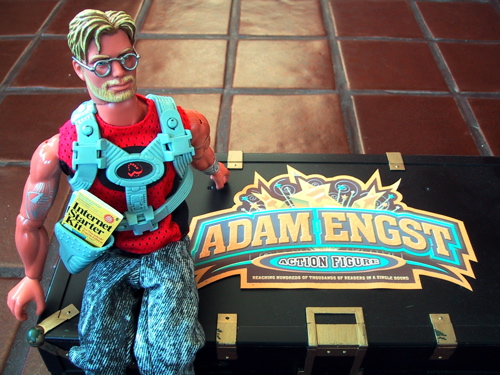
  All I can say is that, since I actually have a personalized action
  figure created for me by hand and presented to me at Macworld New
  York by the good folks at Power On Software, if you're going to
  get an action figure, you want one that will impress your friends,
  not one that worries about month-end budget numbers and corporate
  reports. I'm extremely proud of mine, and although I'm undoubtedly
  biased, I think it's a remarkable likeness. Well, except for the
  muscles.

<http://www.tidbits.com/resources/744/AdamsActionFigure.jpg>
<http://homepage.mac.com/adamengst/iMovieTheater15.html>
<http://www.poweronsoftware.com/>


Escaping Palm HotSync Installation Hell
---------------------------------------
  by Jeff Carlson <[EMAIL PROTECTED]>

  It all seemed easy enough. The task: Set up the iBook (the
  computer my wife uses) so that it would synchronize with her
  Palm Vx. The actions: Download the latest Palm Desktop installer;
  run the installer; synchronize. The reality: Installation Hell.
  If you've encountered problems installing or using Palm's Mac
  software, hopefully my experience below will help.


**The Price of Free** -- First, a rant about getting the free
  software. After following a few links at PalmOne's site to locate
  the Mac Palm Desktop software, I clicked the Mac OS X link and
  ended up on a page where I had to specify my handheld type and
  (again) my operating system version (even though, as near as
  I can tell, the Palm Desktop installer is the same software
  for every Palm handheld).

<http://www.palmone.com/us/software/desktop/mac.html>

  On the next page, I had to provide my name, email, country,
  handheld type (again), and (yes, third time) my operating system
  version; oh, and be sure to make a point of turning off the option
  for PalmOne to send junk via email.

<http://www.palmone.com/us/support/macintosh/mac_desktop.html>

  On the next page... I was told to look for an email message that
  would tell me where I could download the software. (I'll save you
  the trouble: use the second URL below to access the Mac OS X
  download directly.)

<http://www.palmone.com/us/support/macintosh/macdesk421.html>
<http://www.palmone.com/us/support/macintosh/macdesk421_legal.html>

  I can understand wanting to exchange name and email information
  for free software, but these hoops are flat-out stupid. Do
  companies not realize that it's in their best interests to make
  it as easy as possible for their customers to connect with them
  and download free updates?


**Install, Install, Install** -- With installer in hand, I ran
  it on the iBook and got an error stating that the application
  Transport Monitor could not be launched due to a shared library
  error. Fortunately, I ran into this problem when I first upgraded
  to Mac OS X 10.3 Panther; at the time, the solution was to log
  in as root and install the software using that account.

  On the iBook, however, this trick didn't work. I tried installing
  under multiple admin users on the machine; tried using Brian
  Hill's utility Pseudo to install; tried installing while logged
  in as the root user. Nothing. I uninstalled, reinstalled, manually
  removed all traces of Palm Desktop and HotSync from the various
  Library subfolders, and generally spent way too much time trying
  to get it to work.

<http://personalpages.tds.net/~brian_hill/pseudo.html>

  Finally, hours later, I realized that the solution was at
  hand - or rather, buried in an old email that, thanks to
  Eudora's excellent search capabilities, I was able to retrieve
  in a few seconds. Following the publication of my TidBITS
  article, "PalmSource to Drop Mac Support in Palm OS Cobalt,"
  I received a friendly note from TidBITS reader Pamela Crossley,
  who wrote:

<http://www.eudora.com/>
<http://db.tidbits.com/getbits.acgi?tbart=07543>

  "All one has to do is take the HotSync Libraries file
  that was installed under Jaguar, and manually drag it to
  /Library/CFMSupport/. Any permissions issues (which, as
  you note, probably are what prevents this file from being
  installed correctly in the first place) can be resolved
  at that point through the info panel for the CFMSupport
  folder. It is all extremely simple, and people who have
  done this don't have problems with HotSync and Panther
  afterward."

  I don't have any machines currently running Jaguar, but I did have
  a Previous System folder on the iBook's hard drive from when I
  upgraded to Panther. Sure enough, the HotSync Libraries file was
  there. I replaced the newer version with the older version, logged
  out, logged back in under my wife's account, and everything
  worked.


**Customers Must Be Earned** -- Sadly, this is an issue that's
  been around since February. The latest version of Palm Desktop
  (4.2.1), released in May, was supposed to fix the problem, but
  in my case, for whatever reason, it didn't. I acknowledge that
  my problems don't automatically justify development effort on
  a company's part, but I'm not the only one affected by the
  problem - and a solution has been found, so I can't imagine
  it would be difficult for PalmOne to incorporate a fix.

<http://db.tidbits.com/getbits.acgi?tbart=07656>

  PalmOne recently revamped the Mac-specific area of its Web site
  to trumpet how Palm OS handhelds can work with iCal, Address Book,
  Entourage, and other solutions, such as transferring photos.
  Unfortunately, I get the sense that PalmOne lacks the interest,
  or the manpower, to get beyond the marketing and consider Mac
  users as what we are: devoted customers.


The Story Behind Take Control Updates
-------------------------------------
  by Adam C. Engst <[EMAIL PROTECTED]>

  As you know, we offer free minor updates to our Take Control
  ebooks to customers; it's a great way for authors to keep their
  ebooks up to date with new software releases, to respond to
  feedback from readers, and to fix any mistakes that slipped in.
  From what we can tell, readers appreciate the service, so it's
  a great example of how publishing electronically helps everyone.

  Helping customers learn about and download the updates has been
  challenging, however, and in this article I tell you what we've
  done, what we've learned, and what we're doing now. Even if you're
  not a Take Control reader, you may find it interesting to read
  about the pros and cons of different methods of distributing
  updates to digital products.

  On Saturday we released three updates, version 1.1.1 of Glenn
  Fleishman's "Take Control of Your AirPort Network" (to fix a
  few typos that slipped into the 152-page ebook and add a $10-off
  coupon for Sustainable Softworks' IPNetRouterX), version 1.1
  of Joe Kissell's "Take Control of Email with Apple Mail," and
  version 1.1.2 of Joe's "Take Control of Spam with Apple Mail"
  (to address changes in Mail 1.3.9, add clarifications, provide
  new screenshots, and more). It took some time, for sure, but
  the fact that we could do three updates in such a short time is
  an indication that we've come a long way from our start 10 months
  ago. In fact, in that time, we've tried four different approaches
  to providing free updates with varying levels of success; the
  lessons we've learned may prove instructive to others providing
  updates as well.

<http://www.tidbits.com/TakeControl/airport.html>
<http://www.tidbits.com/TakeControl/email-apple-mail.html>
<http://www.tidbits.com/TakeControl/spam-apple-mail.html>


**Password-Protected Archives via FTP** -- Our first approach
  seemed sensible enough on the surface; we'd inform customers
  of an update via email and give them an FTP URL which they
  could use to download the update. To restrict the URL to
  customers, we protected the StuffIt archive containing the
  update with a password, and our email included that password.
  The approach worked fine in our testing, and it undoubtedly
  worked for many people, but it fell down in a number of ways:

* People use a wide range of programs for downloading via FTP,
  from solid FTP clients like Fetch and Interarchy to Web browsers
  to the Finder (generally the worst of the lot). Download problems
  with FTP URLs occurred much more frequently than we would have
  liked.

* Some programs also had trouble processing the StuffIt archive,
  not calling StuffIt Expander properly, trying to open the file in
  another program, or not opening it at all. Most people managed to
  get past these problems, but the instructions we provided often
  didn't match reality.

* You wouldn't believe the ancient versions of StuffIt Expander
  people are still running! That wouldn't matter except that
  password-protected archives don't always expand properly in
  much older versions. It really is worth keeping StuffIt Expander
  up to date to avoid confusions like this.

* Downloading and printing at work on a PC, which some people like
  to do, required that people download StuffIt Expander for Windows.
  (With Panther's built-in support for Zip files, switching to that
  format in general made sense for both Mac and PC users.)


**eSellerate Coupons** -- One of the core tenets of Take Control
  is to do more of what works and less of what doesn't, so we
  quickly changed gears. Our second approach to providing free
  updates was to send email to every customer of an ebook giving
  them a special coupon code that, when used in an eSellerate order,
  gave them a free copy of the ebook in question. This method worked
  quite well, due to a few advantages:

* The eSellerate order process was familiar, and although people
  still occasionally have troubles (usually solved by trying again
  with another browser or turning off download accelerator utilities
  like Speed Download), the vast majority of orders, and thus free
  updates, went smoothly. If the free update was the only ebook
  in the order, eSellerate's system was smart enough to skip asking
  for credit card information.

* Because the update process required placing an actual order,
  people often used it as an opportunity to purchase other ebooks
  they hadn't yet bought, making it good for business.

  However, there were still some problems that made us unhappy
  with this method of providing updates.

* Making people run through an entire order seemed like more
  effort than should be necessary, even if they didn't have to
  enter credit card information.

* Doing the work necessary in eSellerate to set up the coupon and
  make the file available for download took me more time than was
  reasonable for a very small update. Extracting email addresses
  from our database added significantly to the necessary effort.

* Since every update download was a real order, it added a lot
  of data to our order database, data that was either essentially
  uninteresting or potentially confusing. That in turn required
  more work on my part to pull out these zero dollar orders when
  preparing royalty statements for our authors.


**eSellerate Redownload** -- In an attempt to reduce the amount
  of effort and keep the unnecessary data out of our database,
  particularly with very small updates, we tried a third approach.
  eSellerate allows anyone who orders to download the file they've
  bought up to three times (the email receipt contains a URL that
  leads to a Web page with various after-order services, including
  another link leading to a Download Now button). By allowing three
  downloads, eSellerate makes it possible for people to work through
  problems they have downloading, but the download URL can't be
  posted in public. We had a tiny update ready, so we replaced the
  file appropriately in eSellerate, and then sent email to everyone
  who had bought that ebook, telling them how to download it. It was
  a big mistake, for many reasons:

* Email continues to become less and less reliable due to spam and
  spam-fighting efforts, so some percentage of people never received
  their email receipts at all. Many of those who did receive a
  receipt threw it away or lost it. The end result was that lots
  of readers couldn't find the URL that would let them download
  the update without help from Tonya.

* Since many people buy more than one ebook, and since people had
  email receipts from all the orders that had resulted from previous
  free updates, a number of people had trouble finding the right
  receipt, again requiring help from Tonya.

* If someone had, for whatever reason already downloaded the file
  three times (they experienced a dropped phone line or a browser
  crash, for example), eSellerate wouldn't allow any more downloads
  until Tonya reset the download counter in eSellerate's order
  tracking system.

  Luckily, it's easy for us to solve customer problems; after
  a quick check to verify that the person is a customer, Tonya
  usually sends them a copy of the ebook they're having trouble
  getting. Readers seem to appreciate this fast solution to the
  problem at hand, but we'd of course rather avoid the problem
  altogether. The amount of work this method caused was insanely
  higher than any other approach, so we clearly needed to rethink
  the entire process if we were to move away from the free coupon
  strategy.


**Check for Updates Button** -- After talking about all sorts
  of crazy ideas, including an application that could store the
  differences between two PDF files and use that information to
  update an original PDF, I realized that I was thinking about the
  problem all wrong. In many ways, ebooks have a lot in common with
  software, and if a developer had asked me how to handle updates,
  I would have said to build update checking into the application,
  automatically downloading and installing available updates with
  user assent. Obviously, since we distribute PDF files, not full-
  fledged applications, there's a limit to what's possible, but
  enabling the user to check for updates from within the ebook
  itself was within the limits of possibility.

  The trick for us is that we're now running Web Crossing, which,
  along with its many other benefits, is an entirely programmable
  system. With some help from Sue Boettcher of Web Crossing,
  I created what is essentially a CGI (Web Crossing calls it a
  "macro") that accepts as input data embedded in a URL and returns
  a Web page that tells the user if an update is available, and
  if so, provides a protected and obfuscated link to download
  the update. The advantages are numerous:

* A single click on the Check for Updates button loads the Web
  page, and if an update is available, a second click downloads
  the update. That's a lot easier than requiring people to run
  through a full order on eSellerate.

* A separate part of the Web page lets readers sign up to receive
  notification about updates in email along with notifications of
  new Take Control books in general. That makes sending out update
  notifications a lot easier (before, it involved extracting
  addresses from our database and putting that data in the Bcc
  line in Eudora).

* We can post information about both available updates (so people
  can decide if they want to bother downloading) and upcoming
  updates (so people can postpone printing if an update is due
  shortly).

* No unnecessary data ends up in our order database.

  The system isn't perfect yet, of course. Certain download
  utilities have trouble with the way I serve download URLs through
  a CGI, and we discovered that if you use Acrobat Professional 6.0,
  you must set the Web Capture preferences to open Web links in your
  Web browser, not in Acrobat. (Otherwise, Web pages are added to
  your ebook, and the download link won't work.) I'm sure other
  issues will crop up, but as long as handling new quirks remains
  less work than any of the other systems we've tried and discarded,
  it's good for everyone.

  Obviously, the particular system I've developed isn't portable
  outside of Web Crossing, but I hope that anyone who needs to
  provide updates to users can learn from our experiences to do
  it in as clean and efficient a way as possible.


BBEdit 8.0: Even More Muscular
------------------------------
  by Adam C. Engst <[EMAIL PROTECTED]>

  BBEdit has long enjoyed a well-deserved reputation as a powerful
  text editor for programmers and HTML coders, so when Rich Siegel,
  CEO of Bare Bones Software, wanted to show me the latest features
  in BBEdit 8.0, available today, I was curious about where they
  could have taken the program. Was it going to be one of those
  upgrades that offers only a few minor improvements and which many
  people can't justify? As it turned out, nothing could be farther
  from the truth: BBEdit 8.0 is one heck of an upgrade, and I think
  anyone who's serious about editing text in BBEdit will find a
  number of significant improvements that make the upgrade price
  worthwhile. Let's look at some of the most interesting among
  the more than 100 improvements.

<http://www.barebones.com/products/bbedit/>


**Document Drawer** -- Tabbed browsing has taken the Web browser
  world by storm, so it's not too surprising that Bare Bones started
  to get customer requests for tabbed editing: a single-window
  interface where tabs provide quick access to multiple open
  documents. What that really translates to is that people don't
  so much want the Web browser tabbed interface, which breaks down
  after just a few tabs for lack of horizontal space, but a quick
  way to switch among documents. Enter the Document Drawer, which
  is a standard Mac OS X drawer listing the names of documents open
  in the current window. It's a bit like OmniWeb's tabs showing in
  text form, and it's a brilliant way to keep a lot of documents
  (such as all the pages in flux in a Web site or development
  project) open at once.

  Don't want to use the horizontal space on the Document Drawer?
  BBEdit 8.0 also features an optional Navigation Bar at the top of
  the window that provides forward and back buttons, and a pop-up
  menu listing the open documents in that window. I know I seldom
  find myself working on only a single HTML file at a time, but
  I don't usually need to see my multiple documents simultaneously
  in separate windows (though that's of course still possible).


**Multi-File Search** -- The Document Drawer's emphasis on keeping
  multiple files open helped encourage the next major new feature,
  which is improved multi-file search. BBEdit has long been able to
  search through multiple files and display the results in a single
  browser window, but you could select only a single folder at
  a time; now a drawer in the Find & Replace window lets you
  select any arbitrary set of files and folders for the search,
  or collections such as all of a window's open documents or all
  open documents. Even better, those searches are now preemptively
  multithreaded, which means that you can not only keep working in
  BBEdit while a search is running, you can keep working in BBEdit
  while multiple searches are running. And, since each search is a
  separate thread, they take full advantage of multiple processors.


**Text Factory** -- Ironically, despite BBEdit's power, I still
  find myself going back to the Classic version of Nisus Writer for
  certain text processing tasks - not because it's more capable than
  BBEdit, but because its macro capabilities make it easy to string
  together multiple Find & Replace actions. BBEdit drives another
  nail into Nisus Writer's Classic coffin with its new Text Factory
  feature, which provides an interface for stringing together
  multiple instances of BBEdit's text manipulation tools. You can
  save a set of Text Factory settings as a separate document, and
  you can either run it across multiple documents in a batch, or
  against a single arbitrary document any time you like.

  In essence then, Text Factory brings batch text processing to
  BBEdit. For instance, for the last nine months I've been merging
  lists of email addresses for the Take Control Announcements list
  every time we release a new ebook. It's a tiresome, particular
  process that involves about six steps in BBEdit to format each of
  two files appropriately, merge them, and run several iterations of
  the Process Duplicate Lines command to eliminate duplicates. In
  fact, it was so time-consuming that I re-engineered our ordering
  process to eliminate it, but if I'd had Text Factory automating
  the process, I might never have bothered.

  Along with BBEdit's internal commands, you can add AppleScript
  or Unix filters to Text Factory commands, which enables even
  more sophisticated processing of files.


**Preview via Local Server** -- One of the most useful features
  added during the BBEdit 7.x days was Preview in BBEdit, which used
  Apple's WebKit to provide a nicely rendered live preview of an
  HTML document. The only problem with Preview in BBEdit, which I
  like and use regularly, is that HTML files on sites that rely on
  dynamic processing (such as my Web Crossing server) often don't
  render particularly well, since there's no server to generate the
  dynamic bits of the page.

  Well, now there can be. A new option in BBEdit 8.0 lets you
  specify a local Web server (such as the copy of Apache launched by
  turning on Personal Web Sharing) as a preview server, and instead
  of just rendering the page directly, BBEdit sends the code through
  the server and renders what comes back.

  There is a slight catch, of course, which is that the local server
  must be capable of everything your primary server is, and it must
  have access to all the images and other assets that your pages
  use. But it's not a bad idea to have a testbed server anyway,
  so I imagine people who use BBEdit for a lot of HTML will start
  thinking about the best way to integrate this into their
  workflows.


**Better Mac OS X Application** -- A number of the improvements
  in BBEdit are under the hood, and are aimed at making it a better
  Mac OS X application. Most notably, Bare Bones claims that it's
  a full-fledged Unicode program now, so you can work with multiple
  script systems in the same document (in the previous version,
  you could use only a single script system at a time). BBEdit 8.0
  now uses the Mac OS X system-wide spelling checker, but it
  unfortunately doesn't yet support Check Spelling As You Type.
  Rich said that feature is at the top of the list to add; I hope
  we'll see it in an 8.1 release relatively soon, since the lack
  of inline spell checking actually drives me to write certain
  things in other programs.

  Also, although fonts still aren't a big deal in BBEdit (where you
  can display only one per script system), the program now uses the
  Mac OS X Font palette. It's worth noting that although the Unicode
  underpinnings would conceivably enable BBEdit to become a styled
  text editor, Bare Bones stated no interest in adding such a
  feature. I can see why Bare Bones might want to avoid styles,
  since BBEdit simply isn't about making text look good. However,
  one aspect of that decision that I find disappointing is that
  being able to style text is a way of adding metadata to runs
  of text within a document, which in turn enables all sorts of
  additional things you can do in terms of text processing. That's
  one area where Nisus Writer still beats out BBEdit, since Nisus
  Writer macros can search for and work with text based on its font,
  color, style, and more. Perhaps a future version of BBEdit could
  add user-defined styles as a way of applying metadata to text.


**Other Features** -- Additional features abound. BBEdit 8.0 now
  includes an open source tool called HTML Tidy that cleans up HTML
  code to make it easier to read; it includes additional CSS markup
  commands. People working in Web scripting environments and other
  currently unrecognized languages can now create their own syntax
  coloring to make reading code easier. The new syntax coloring
  capabilities are aimed primarily at scripting and programming
  languages, and Rich said they'll be concentrating more on SGML
  and XML coloring in the future.

  Whereas BBEdit 7.x added support for the CVS version control
  system, BBEdit 8.0 brings support for most of the things
  programmers want to do in the Perforce version control system
  as well. BBEdit 8.0 also adds support for Exuberant Ctags, which
  creates an index of functions in source files that enables these
  items to be found quickly. You can now optionally have a yellow
  highlight on the line containing the cursor, which may make
  working in complex documents easier. The Philip Bar has been
  replaced by the Page Guide, which puts a light grey background
  on the right side of the page where you could soft-wrap text.
  Tab stops can now be displayed as light gray lines running the
  full length of the window, a boon to anyone who regularly works
  with columnar textual data. For a full list of new and modified
  features, see the Bare Bones Web site.

<http://www.barebones.com/products/bbedit/features.shtml>


**Details** -- BBEdit 8.0 requires Mac OS X 10.3.5 or later; Mac
  OS 9 users will have to stick with BBEdit 7.1. New copies cost
  $180 through 31-Oct-04 and $200 after that. Cross-upgrades from
  BBEdit Lite, Adobe GoLive, or Macromedia Dreamweaver cost $130.
  Upgrades from BBEdit 7.x cost $50 (unless you purchased since
  01-Jun-04, at which point they're free), and upgrades from 6.5
  cost $60. Bare Bones also offers user group, educational, and
  quantity discounts, and if you want to check it out first,
  there's a 30-day demo available as an 11.3 MB download.

<http://www.barebones.com/products/bbedit/demo.shtml>


Hot Topics in TidBITS Talk/30-Aug-04
------------------------------------
  by TidBITS Staff <[EMAIL PROTECTED]>

  The second URL below each thread description points to the
  discussion on our Web Crossing server, which will be much
  faster.

<http://emperor.tidbits.com/TidBITS/Talk/>
<http://www.tidbits.com/search/talk.html>


**Escaping Palm HotSync Hell** -- This week's article originally
  appeared as an ExtraBITS posting and generated discussion on
  TidBITS Talk. Readers debate the solidity of Palm's desktop
  application, and comment on The Missing Sync 4.0, which was
  reviewed in TidBITS-743_. (7 messages)

<http://db.tidbits.com/getbits.acgi?tlkthrd=2300>
<http://emperor.tidbits.com/TidBITS/Talk/164>


**What to do with really old Macs** -- We like Macs. We don't like
  to throw them away. They work for a long, long time. But, really,
  some older models aren't as useful today as they were in 1989.
  Here are some options for donating or disposing of older Macs.
  (9 messages)

<http://db.tidbits.com/getbits.acgi?tlkthrd=2301>
<http://emperor.tidbits.com/TidBITS/Talk/165>


**OmniWeb 5.0: The Powerful Web Browser** -- After posting a note
  in ExtraBITS about the odd commentary regarding OmniWeb, numerous
  other people chime in with things they like and don't like about
  OmniWeb 5.0. (17 messages)

<http://db.tidbits.com/getbits.acgi?tlkthrd=2291>
<http://emperor.tidbits.com/TidBITS/Talk/155>


$$

 Non-profit, non-commercial publications may reprint articles if
 full credit is given. Others please contact us. We don't guarantee
 accuracy of articles. Caveat lector. Publication, product, and
 company names may be registered trademarks of their companies.

 For information: how to subscribe, where to find back issues,
 and more, see <http://www.tidbits.com/>. TidBITS ISSN 1090-7017.
 Send comments and editorial submissions to: <[EMAIL PROTECTED]>
 Back issues available at: <http://www.tidbits.com/tb-issues/>
 And: <ftp://ftp.tidbits.com/issues/>
 Full text searching available at: <http://www.tidbits.com/search/>
 -------------------------------------------------------------------