TidBITS#803/31-Oct-05
=====================

  Just in time for Halloween, Apple surprises you with a ghoulish
  set of bug fixes in Mac OS X 10.4.3! Travis Butler returns
  with a look at three third-party AC adapters for Apple's laptop
  computers, and Geoff Duncan tunes into ICANN's long-running
  Internet soap opera. Adam passes on news and tips about some new
  Retrospect 6.1 updates, and we also note the third-generation
  Squeezebox and SlimServer 6.2 software, OmniWeb 5.1.2, a slew
  of pro video software updates from Apple, and of course, the
  iTunes Music Store opening in Australia.
Topics:
    MailBITS/31-Oct-05
    Apple Releases Mac OS X 10.4.3
    New Retrospect 6.1 Updates
    ICANN and VeriSign Agree to End Site Finder Suits
    Comparing Three AC Adapters
    Hot Topics in TidBITS Talk/31-Oct-05

<http://www.tidbits.com/tb-issues/TidBITS-803.html>
<ftp://ftp.tidbits.com/issues/2005/TidBITS#803_31-Oct-05.etx>

Copyright 2005 TidBITS: Reuse governed by Creative Commons license
   <http://www.tidbits.com/terms/> Contact: <[EMAIL PROTECTED]>
   ---------------------------------------------------------------

This issue of TidBITS sponsored in part by:
* READERS LIKE YOU! Support TidBITS with a contribution today! <----- NEW!
   <http://www.tidbits.com/about/support/contributors.html>
   Special thanks this week to Sebastian Hagedorn, Jack Stokvis,
   Carey Handfield, and Jeff Wexler for their generous support!

* SMALL DOG ELECTRONICS: Protect from scratching <------------------- NEW!
   without losing style. Cool designs - under $10.
   MobileJuice iPod protection for all iPods.
   Visit: <http://www.smalldog.com/> 800-511-MACS

* FETCH SOFTWORKS: With Fetch 5, FTP and SFTP are simpler <---------- NEW!
   than ever. Use it on Mac OS X to upload, download, mirror,
   and manage your Web site, eBay images, and data sets.
   Download your free trial version! <http://fetchsoftworks.com/>

* Dr. Bott, LLC:  Bulletproof your PowerBook. It's the briefcase <--- NEW!
   of choice for the chrome-plated professional with a plane to
   catch and documents to carry. Laptop Armor in chrome, black,
   or white for 12-17" laptops. <http://www.drbott.com/>

* Web Crossing, Inc: Site Crossing brings Web Crossing power to
   your small biz, family or club. Build a core site or bolt onto
   a current one for discussions, blogs, chat, polls, calendars,
   podcasts, and more. <http://www.sitecrossing.com/tb-305>

* Circus Ponies NoteBook: Never lose anything again. NoteBook <------ NEW!
   lets you take notes, clip content, and share information. Find
   anything instantly with automatic index pages. One-step Web
   publishing. Free 30-day demo! <http://www.circusponies.com/>

* Rumpus 4: Redesigned for Mac OS X. <------------------------------- NEW!
   Rumpus now features a refined Aqua control application and
   Unix daemon server engine, fully optimized for Mac OS X.
   Visit: <http://www.maxum.com/Rumpus/>

* StuffIt Deluxe 10 from Allume Systems supports Automator,
   compresses JPEGs up to 30%, enables Spotlight to search in
   archives, can make self-extracting archives, and more!
   Upgrade for only $29.99! <http://www.stuffit.com/mac/deluxe/>
   ---------------------------------------------------------------

MailBITS/31-Oct-05
------------------

**iTunes Music Store Sells Over 1 Million Videos** -- Less than
  20 days after unveiling new video-capable iPods and announcing
  Apple would begin selling music videos, short films, and selected
  ad-free ABC television episodes for $1.99 apiece, Apple says it
  has already sold more than 1 million videos through its iTunes
  Music Store. The most popular items include music videos from
  Michael Jackson, Fatboy Slim, and Kanye West; Pixar's shorts
  For the Birds and Boundin'; and episodes of Lost and Desperate
  Housewives. Apple's press release quotes CEO Steve Jobs saying
  the sales indicate a strong market for legal video downloads,
  and pledging to expand iTMS's video offerings. Is it too soon
  to hope for The Honeymooners or Your Show of Shows? [GD]

<http://www.apple.com/pr/library/2005/oct/31itms.html>
<http://db.tidbits.com/getbits.acgi?tbart=08287>


**Squeezebox Gets New Design, Software Upgrade** -- Slim Devices
  has released the third generation of their Squeezebox network
  music player (see "Squeezebox2: Long Live Rock" in TidBITS-782_).
  The change is largely cosmetic, as the new player's design
  features the polished metal look that's all the rage, and it
  stands upright like a picture frame. (Personally, I like how
  the prior design nestles subtly inside my stereo rack.) Technical
  improvements include two internal wireless antennas, and a new
  power supply. The player is available in black or white, with
  a matching remote control.

<http://www.slimdevices.com/>
<http://db.tidbits.com/getbits.acgi?tbart=08128>

  SlimServer 6.2 adds support for automatic volume adjustment;
  it reads settings stored by the Volume Adjustment and Sound Check
  features of iTunes, or mp3gain, aacgain, J.River Media Center,
  or replaygain (in Ogg Vorbis or FLAC files). The Windows Media
  Audio (WMA) format is now supported on all platforms, including
  files and streaming radio stations. New firmware for the
  Squeezebox 2 and 3 adds Wake-on-LAN support, Unicode character
  display, and support for WPA2 security on 802.11g wireless
  networks. [ATL]

<http://www.slimdevices.com/su_downloads.html>


**OmniWeb 5.1.2 Released** -- The Omni Group has released OmniWeb
  5.1.2, a minor update aimed primarily at fixing bugs (see "OmniWeb
  5.0: The Powerful Web Browser" in TidBITS-742_ for a full review).
  New features in OmniWeb 5.1.2 include support for Fast User
  Switching and the Flash Player 8 plug-in. JavaScript alert()
  and prompt() dialogs now properly display the domain that
  initiated them and bring the initiating page or tab to the front,
  a useful security measure. Most of the changes, however, are bug
  fixes, ranging from the trivial, such as corrected tooltips,
  to the significant, including a variety of crashing bugs. See
  the release notes for a full list. OmniWeb 5.1.2 costs $30,
  and upgrades are free to registered users as a 6.0 MB (English)
  or 10.3 MB (internationalized) disk image. [ACE]

<http://www.omnigroup.com/applications/omniweb/>
<http://www.omnigroup.com/applications/omniweb/releasenotes/>


**Apple Opens iTunes Music Store in Australia** -- Much to the
  delight of some of our friends down under, Apple has finally
  opened a version of the iTunes Music Store in Australia.
  Reportedly, the delay was due to at least one of the big music
  companies holding out, and that may account for the lack of
  artists from the Sony/BMG label. Despite this, Apple claims over
  1 million tracks, including a number of exclusives from Australian
  musicians, and over 1,000 music videos; that's about half the size
  of the U.S. iTunes Music Store. Also currently missing are TV
  shows, which undoubtedly require an entirely different licensing
  process. Prices are a bit higher than the U.S. iTunes Music Store,
  with most songs costing A$1.69, which is equivalent to US$1.28 at
  the moment, in comparison with the US$0.99 that U.S. customers pay
  for most tracks. Nevertheless, it's nice to see Apple finally
  serving Australian Mac and iPod users in this way. [ACE]

<http://www.apple.com/pr/library/2005/oct/25itms.html>


**Apple Releases Pro Video Updates** -- Apple recently released
  a slew of updates to its professional video software. Final Cut
  Express HD 3.0.1 adds compatibility with the recently announced
  Power Mac G5s equipped with PCI Express graphics controllers;
  the update is a 948K download. For Final Cut Pro 5 users, the
  Final Cut Pro 5 Updates provide "improved reliability" and bring
  Final Cut to version 5.0.3; the updater is an 85 MB download.
  Apple also released Pro Applications Update 2005-02, which updates
  the Helium.framework and DesktopVideoOut.component used by Final
  Cut Studio, Apple Qmaster 2, and Final Cut Express HD 3; it's
  available via Software Update. Finally, Pro Application Support
  3.1 improves general user interface reliability for Final Cut
  Studio, Soundtrack, Logic Pro, and Logic Express; separate
  versions for Mac OS X 10.3  and 10.4 are available as 6.1 MB
  downloads. [JLC]

<http://www.apple.com/support/downloads/finalcutexpresshd301.html>
<http://www.apple.com/support/downloads/finalcutpro5updates.html>
<http://docs.info.apple.com/article.html?artnum=302323>
<http://www.apple.com/support/downloads/proapplicationsupport31macosx104.html>
<http://www.apple.com/support/downloads/proapplicationsupport31macosx1039.html>


Apple Releases Mac OS X 10.4.3
------------------------------
  by Geoff Duncan <[EMAIL PROTECTED]>

  Apple has released Mac OS X 10.4.3, the latest update to its Tiger
  operating system. Two versions are available: one, the "Delta"
  update, updates Mac OS X 10.4.2 to 10.4.3, while the other "Combo"
  update brings either Mac OS X 10.4 or 10.4.1 to version 10.4.3.
  The 10.4.3. update is available for free from Apple either via
  Software Update or as separate standalone installers: sizes vary
  depending on computer models and software installed, but range
  from around 55 MB for the Delta update to 109 MB for the
  standalone Combo updater.

<http://docs.info.apple.com/article.html?artnum=301984>
<http://docs.info.apple.com/article.html?artnum=301985>

  The Mac OS X 10.4.3 update is a collection of bug fixes and
  tweaks, rather than new features or capabilities, and the update
  includes previous security updates Apple has released for all
  versions of Mac OS X 10.4. According to Apple, the following
  changes and improvements highlight Mac OS X 10.4.3; the complete
  release notes are available at the first URL above, Apple's Web
  page describing the "Delta" update.

* Spotlight searches in the Finder should be more responsive
  (which is welcome; it's difficult to imagine them being _less_
  responsive!); Spotlight comments should also be preserved during
  iDisk synchronization.

* Safari should be more compatible with webcams, handle Macromedia
  Shockwave projects accelerated using OpenGL, and pass the tortuous
  "Acid 2" CSS rendering test. (Viewing the Acid 2 test's source is
  recommended for amusement purposes only.)

<http://www.webstandards.org/act/acid2/test.html>

* Disk Utility can (finally!) verify the Mac OS X startup volume.
  To perform repairs, though, you still need to start up from
  another Mac OS X disk (such as a spare hard drive or an
  installation DVD.)

* In Mail, Smart Folders which use "entire message contains" and
  other criteria with the "any" qualifier now work correctly, and
  Apple has fixed a bug in which some Mail rules could sometimes be
  lost or duplicated following a .Mac sync. Mail also accepts Smart
  Groups dragged from the Address Book to a message's recipient
  fields, and better handles meeting requests sent from Microsoft
  Outlook to an Exchange account.

* iChat supports encrypted chat sessions between .Mac members,
  and tries to address persistent alerts about insufficient
  bandwidth and missing data during video chats. Also, users can
  elect to have emoticons shown as plain text rather than graphics
  (handy for those of us who occasionally get tripped up when face-
  like graphics appear in code snippets pasted into iChat sessions).

* Hebrew and Arabic text is better handled in both Safari
  and Mail.

* Fixes an issue where Microsoft Word and Excel 2004 stop
  responding to user input for several seconds at a time.

* Items copied to a Drop Box have their permissions set correctly
  and file permissions inside packages are correctly set when
  changing permissions to enclosed items via a Finder's Info window.

* Improves connecting to and mounting SMB volumes, along with
  compatibility with Squid proxy servers. The Finder is also better
  at mounting and accessing MS-DOS volumes, which amusingly includes
  Apple's iPod shuffle.

* The Address Book's URL field now syncs with .Mac, Address Book
  subgroups can be synced with an iPod via iTunes, and .Mac
  synchronization errors are better reported in the dotmacsync.log
  file.

* The Apple Wireless keyboard can now be used in single-user mode;
  also, upper ASCII characters in account passwords no longer
  potentially prevent login or crash the Mac OS X startup sequence.

* Quartz 2D Extreme is completely disabled: it was never a
  supported feature in Tiger, and re-enabling it may cause
  redraw issues or system crashes.


New Retrospect 6.1 Updates
--------------------------
  by Adam C. Engst <[EMAIL PROTECTED]>

  After releasing Retrospect 6.1 several weeks ago (see "Retrospect
  6.1 Gains Full Tiger Compatibility" in TidBITS-799_), EMC Dantz
  has pumped out a few more minor updates. Most interesting
  is Retrospect Express 6.1, which is a free update for anyone
  who received Retrospect Express 6.0 bundled with an external
  hard drive; Retrospect Express isn't sold separately any more.
  (Note that you must install Retrospect Express 6.0 before
  attempting to update to 6.1). As with the full Retrospect 6.1,
  Retrospect Express 6.1 now supports Tiger's extended attributes
  and access control lists, along with providing some bug fixes
  and tweaks for full Tiger compatibility. Also released recently
  was an update to the Retrospect Client software that fixes
  a bug that caused Net Retry errors; Retrospect Client wasn't
  properly deleting the old retropds.log file on the client
  system. If you installed Retrospect 6.1 before 12-Oct-05,
  be sure to download and install Retrospect Client 6.1.107 or
  later. You may have to install it manually, since the Net Retry
  problem can affect updating remotely from Retrospect, but
  the benefit of installing manually is that the new Retrospect
  Client installer can automatically add exceptions to the
  Mac OS X firewall for itself.

<http://db.tidbits.com/getbits.acgi?tbart=08268>
<http://www.dantz.com/updates/>
<http://kb.dantz.com/article.asp?article=8132&p=2>
<http://kb.dantz.com/article.asp?article=8119&p=2>

  Also, there was some confusion related to our initial coverage
  of Retrospect 6.1, since we said that Retrospect 6.1 provided
  full Tiger compatibility, and yet there's a note in the Read Me
  that talks about how Retrospect doesn't back up the Spotlight
  database (specifically, it excludes the .Spotlight-V100
  directory). Retrospect is doing the right thing here - since
  the Spotlight database won't be correct for the content on a
  restored volume, there's no point in backing it up and restoring
  it. Spotlight rebuilds the database in the background after
  you restore.


**Other Notes of Interest** -- Retrospect 6.1 now always creates
  separate data and catalog files by default, and these files must
  be stored together in the same directory and not renamed. This
  approach is necessary to avoid the Mac OS-imposed limit of 16 MB
  in a file's resource fork, which was where Retrospect previously
  saved catalog data. Although Retrospect 6.1 supports backup sets
  created with Retrospect 6.0, once you write to a Retrospect 6.0-
  created backup set, you may receive errors if you try to restore
  from that backup set using the older Retrospect 6.0 again.
  Similarly, Retrospect 6.0 cannot use new backup sets created
  with 6.1. Lastly, to back up and restore Spotlight comments
  correctly, you must back up and restore an entire volume or
  subvolume to avoid the Spotlight comments going missing or being
  out of date; EMC Dantz says this limitation is due to the way
  Apple implemented Spotlight comments. For more, be sure to check
  out the full Read Me.

<http://kb.dantz.com/article.asp?article=8117&p=2>


ICANN and VeriSign Agree to End Site Finder Suits
-------------------------------------------------
  by Geoff Duncan <[EMAIL PROTECTED]>

  The Internet Corporation for Assigned Numbers and Names (ICANN)
  and registration services provider VeriSign have reached a
  tentative agreement to end their long-standing lawsuits against
  each other over how VeriSign resolves non-existent domain names
  for the .com and .net top-level domains. The agreement must still
  be approved by ICANN's board after a period of public comment;
  you can see both ICANN's and VeriSign's announcements of the
  agreement on their respective Web sites.

<http://www.icann.org/announcements/announcement-24oct05.htm>
<http://www.verisign.com/press_releases/pr/page_036088.html>

  The dispute between VeriSign and ICANN dates back to late 2003,
  when VeriSign rolled out a new service called Site Finder which
  altered the way non-existent domains under VeriSign's purview
  were resolved. When users typed in or clicked a link pointing
  to certain sites which didn't exist, VeriSign programmed its
  name servers to report the sites _did_ exist. And viola!
  The unsuspecting surfer sees a Web page with a list of suggested
  sites the user might have wanted to reach, along with selected
  sponsored items from VeriSign and its partners.

<http://www.verisign.com/products-services/naming-and-directory-
services/naming-services/site-finder-services/>

  To understand the magnitude of the change Site Finder represented,
  it's important to note .com and .net are two of the most widely
  used top-level domains (TLDs). VeriSign's change wreaked havoc
  on software which relied on the Internet's DNS system returning
  errors for non-existent sites - as the system was designed to do,
  and had done for decades. Anti-spam systems which checked the
  veracity of a sender's domain suddenly approved any nonexistent
  or faked domain in the .com and .net name spaces. Similarly,
  providers like Microsoft and AOL who offered custom error pages
  to their subscribers when a site couldn't be located suddenly
  saw those features go dark: all that "junk traffic" was now going
  to VeriSign. Just to make things more controversial, VeriSign
  was selling advertising on the Site Finder pages and had revenue
  sharing agreements with several sites promoted in Site Finder
  listings. Search providers claimed VeriSign was unilaterally
  abusing its responsibility as a top-level domain operator to
  gain unfair competitive advantage. VeriSign claimed it was
  rolling out an innovative new service.

  Software developers and ISPs rapidly began to deploy mechanisms
  to block traffic to Site Finder, and, after considerable whining,
  VeriSign bowed to pressure from ICANN and the Internet community
  to shut down the service. However, VeriSign sued ICANN some months
  later, saying ICANN's actions unfairly impeded VeriSign's ability
  to develop new revenue sources. ICANN - in the way of most non-
  profit organizations comprised of committees and procedural
  requirements - eventually got around to counter-suing.

  The new agreement, if approved, would redefine the role of a
  registry service for the .com top-level domain so that services
  like Site Finder would require prior ICANN approval before being
  deployed. VeriSign seems to like the agreement because it would
  provide "business certainty:" VeriSign wouldn't have to worry
  about having the rug yanked out from under any new services
  approved under the new policy after spending considerable time
  and money developing some new idea. ICANN, and in turn the larger
  Internet community, wouldn't have to worry about registrars making
  changes to services without sufficient technical evaluation and
  prior notice. Similar terms were rolled into ICANN's renewal of
  VeriSign as the .net registry operator in earlier this year.

  The agreement does not provide either party with a monetary
  settlement, although the new .com Registry Agreement requires
  VeriSign to make a $1.25 million lump sum payment to ICANN to meet
  "the costs associated with establishing structures to implement
  the provisions of this agreement." It seems likely that VeriSign
  will pass this fee along to registrants and domain resellers as
  a surcharge on a per-domain basis. So, if you've registered .com
  domains, get ready to pay a little bit more next time you renew.

<http://www.icann.org/tlds/agreements/verisign/index-2005.htm>


**Coming Soon, International Governance Issues** -- This news
  comes amid unease over ICANN's role in Internet governance,
  which will no doubt be a hot topic at the World Summit on the
  Information Society (WSIS) in Tunisia on 16-Nov-05.

<http://www.itu.int/wsis/>

  Essentially, ICANN operates at the pleasure of the United States
  Commerce Department, which retains final policy control over the
  Internet's authoritative root servers as a historical artifact
  of the Internet's development within U.S.'s Advanced Research
  Projects Agency. Lately, the Commerce Department's role isn't
  merely a formality: it recently reversed policy and announced
  it would not consider turning over root server control to an
  international agency, and abruptly forced ICANN to delay a process
  of creating a top-level domain which would function as a sort
  of online red light district.

  A number of countries insist Internet governance ought to be
  handled by an international agency, possibly within the United
  Nations, rather than by non-elected members of a non-profit
  organization who ultimately must defer to a department of the
  U.S. government. The current Bush administration - along with
  an increasing number of Senators and other U.S. lawmakers -
  say "no," claiming that the smooth operation of the Internet
  is crucial to international commerce and, therefore, a matter
  of U.S. national security.

  So, a crisis is brewing which may fragment the Internet. Without
  some resolution, some countries and regions may set up their own
  governance bodies and registry services, which could mean some
  Internet sites wouldn't be accessible from particular regions,
  or the same domain name could load different sites in different
  places. Presumably some peering arrangements would be worked out,
  but there's no telling what forms those might take, or how
  reliable they might be.


Comparing Three AC Adapters
---------------------------
  by Travis Butler <[EMAIL PROTECTED]>

  A laptop road warrior's best friend - or most bitter enemy - is
  his AC adapter. It's the second most vital thing you must carry;
  no adapter, and you start crying a few hours into the trip when
  your laptop goes down for the last time. Heaven help you if you
  left yours at home, because you'll need to find another one
  somewhere. (If you're lucky, you'll check into the hotel, unpack,
  and notice it missing before the nearest computer store closes.)
  Your AC adapter should be small and light enough to fit easily
  in your laptop bag, so you don't forget it or have to dig around
  in your suitcase to pull it out. It should be simple and self-
  contained, so you can pull it out and hook it up in less-than-
  convenient places, without dragging out half-a-dozen other things
  that got tangled up in the cord. And it must be durable, because
  an AC adapter is likely to be pounded more than almost anything
  else you carry with you.

  Apple has received much praise for its current AC adapter
  design, and justly so. It is compact, with flip-out posts that
  give you a convenient place to wrap the cord when travelling.
  The adapter/wall outlet interface is ingenious: a plug with
  flip-out prongs lets you plug it directly into the wall, or remove
  the plug and use a standard-design cord when outlet space is tight
  or you want extra length. The power tip has a lighted ring that
  shows the charging status, a nice touch. However, it's known for
  occasionally having problems with the cord fraying, breaking, or
  pulling out at either end; if the cord goes, the adapter becomes
  an $80 paperweight. Is this reason enough to go with a third-party
  adapter? Or are there other benefits you can find?


**MadsonLine's Lucille** -- Back in the days of the Wallstreet
  PowerBook G3, the best AC adapter I could find was the
  MicroAdapter by MadsonLine. It was about half the size of
  the power block that Apple used at the time, and even smaller
  than the yo-yo adapter that Apple switched to later. When the
  white iBook and Titanium PowerBook G4 came out, with a different-
  sized power socket, MadsonLine went their previous adapter one
  better by making the power tip - designed at a right-angle to
  reduce the amount of clearance needed - a machined aluminum piece
  instead of molded plastic. Unfortunately, the G4 MicroAdapter
  didn't produce enough power to run and charge simultaneously a
  last-generation Titanium PowerBook, or the 15-inch and 17-inch
  PowerBooks. And so for a couple of years, I've been operating
  without my preferred adapter, and missing it.

  I was therefore excited to learn that MadsonLine was finally
  coming out with a new adapter that would provide the 65 watts
  needed for the newer PowerBooks. I was even happier to see
  that the new $90 adapter - named "Lucille" after B.B. King's
  guitar - would have a USB and a FireWire jack, to power devices
  like iPods and Palms that would charge over one of the two
  connections. I placed my pre-order as soon as I could.

<http://www.madsonline.com/acadapter.html>

  Unfortunately, when the Lucille arrived several months later,
  it turned out to be something of a disappointment. While
  MadsonLine's Web page lists accurate dimensions for the adapter
  (if you don't count the cord-wrapping flanges), I still hadn't
  imagined how bulky it would end up being: substantially larger
  than the old MicroAdapter, and even a bit larger than the current
  Apple power adapter. What's more, while the power tip looks from
  a distance like the machined aluminum of the prior model, it
  turned out to be molded plastic.

  That said, once I got over my disappointment, the Lucille is
  still a good AC adapter. The angled power tip doesn't have
  the same "expensive equipment" feel as the aluminum one on the
  previous MicroAdapter, but it's still solid and saves space,
  and the cord seems sturdier than the Apple adapter's cord at
  both the brick and the tip ends. The MadsonLine Web site touts
  Lucille's power consumption, claiming it draws very little power
  when not in use, half the power of the Apple AC adapter. I don't
  have the test equipment to verify this, but I can say it remains
  cool when nothing's plugged into it, which many wall warts cannot
  claim. Raised flanges give you an easy way to wrap the cord around
  the case; they're a nice touch, and not as susceptible to breakage
  as Apple's flip-out cord posts.

  The USB and FireWire power jacks work as advertised; with the
  appropriate cable, I could charge my iPod through either port,
  and my Palm handheld through the USB port. The large number of
  devices that can be charged or powered through USB gives this
  power port additional value; instead of carrying several chargers
  for your devices (I'd normally have at least three: Palm, iPod,
  and cell phone), just pack the Lucille and appropriate USB
  charging cables. And while you can always plug a USB-powered
  device into your PowerBook/iBook, the Lucille's port doesn't add
  to the number of cables hanging off your laptop. (For those who
  haven't tried it, actually using a PowerBook or iBook on your
  lap becomes awkward if several devices are hanging off the ports
  on either side.) You can also use the Lucille to give something
  a quick booster charge without dragging your entire laptop out
  of the bag, which can be a boon in a crowded airport. (Insert
  obligatory "Why can't airports provide more power outlets?!?"
  rant here.)

  All in all, I have to give the Lucille a qualified recommendation.
  It's well-built and well-designed for its size, and the extra
  power ports give it added versatility, for only $10 more than
  the Apple adapter. However, it wasn't the modern version of the
  svelte MicroAdapter that I was hoping for - and that I still hope
  MadsonLine will release, someday. If versatility is your prime
  goal, other adapters go beyond the Lucille's capabilities, though
  with correspondingly increased clutter.


**Kensington Universal AC/Car/Air Adapter** -- I originally bought
  this unit as the Kensington Universal AC/Car/Air Adapter model
  33069; Kensington also sold the same unit in white plastic instead
  of black. While this model seems to have been discontinued by
  Kensington (I could only find it on their Web site through a
  model number search, and their online store lists it as out-of-
  stock), another company sells what appears to be an identical
  model (save some minor cosmetic differences) as the iGo Juice.
  Because it no longer seems to be available from Kensington,
  for the sake of this review I'll usually refer to this unit
  as the Juice.

<http://www.us.kensington.com/html/3722.html>
<http://www.igo.com/product.asp?sku=2366908>
<http://www.smalldog.com/product/43536>

  (Note: Kensington has released replacements for the various
  AC/Auto/Air models; the transformer bricks look thinner but wider,
  and the Web site now lists a series of "SmartTips" similar to
  the iGo system. However, I can't tell from their Web site whether
  they remain cross-compatible with the iGo parts.)

<http://www.us.kensington.com/html/6612.html>

  The basic Juice is a fairly large transformer brick with an input
  socket and an output socket. The input socket accepts one of two
  cables: an AC cable for wall power, and a DC cable that fits a
  typical 12V car cigarette lighter socket. Remove a shell from the
  DC cable and you expose a DC power plug that fits the Empower
  socket featured on some airplanes.

<http://seatguru.com/help.shtml#Power%20Port>

  The output cable has a plug on each end, plus a round power
  socket partway down its length (more on that in a moment);
  one end goes into the brick, while the other accepts a series
  of tips made to fit various models of laptops. The tip handles
  the appropriate power manipulations needed to make the brick
  work with a given laptop. (The Juice comes with tips for both
  the previous-generation PowerBook socket - PowerBook 1400/2400/
  3400, Wallstreet/Lombard/Pismo, original iBook - and current
  socket - all PowerBook G4 models and white iBook G3/G4 models.)

  By itself, this would be handy, and that was all I was expecting
  when I originally bought the Kensington model. However, I was
  curious about the extra socket on the cable, and asked the
  Kensington people about it at Macworld Expo this year. They
  explained that it was meant for an adapter from the iGo power
  system, and could then be used to power/charge other pieces
  of equipment, with the appropriate tip. Soon after the event,
  I went to Radio Shack to pick up the adapter (called the iGo
  DualPower Accessory) to see what I could do with it.

<http://www.igo.com/product.asp?sku=2625475>
<http://igosolutionscenter.com/>

  As it turned out, I could use the DualPower Accessory to run just
  about every portable electronic device I had access to, with the
  appropriate tip - Nokia cell phone, Palm Tungsten T and Tungsten
  E, iPod with dock connector, even an old Sharp Zaurus. (See either
  URL above for a tip selector wizard that helps you pick the right
  tip for your device.) This was, needless to say, pretty cool;
  instead of needing to travel with several wall warts, or several
  USB charge cables, I could just bring the Juice, the DualPower
  Accessory, and a set of tips. I like this.

  Unfortunately, this versatility comes with a price, and the
  most notable one is the complexity. While the Kensington version
  included a carry-bag that holds all the various parts and tips,
  there are a lot of pieces; you have to be careful to avoid
  spilling something accidentally. The multiple parts also mean
  it takes longer to set up; instead of "pull out, plug in, and
  go," you must assemble all the various bits for the power you
  have access to and the device you're charging.

  The Juice is also bulky and heavy compared to the other adapters
  I discuss here, making it more suitable for a suitcase than a
  laptop case. And while the system in general has a tough, durable
  feel, the plug where the output cable attaches to the brick feels
  chintzy; it binds occasionally when it goes into the socket, and
  while the plug is keyed to prevent it from going in the wrong way,
  I can't avoid a nagging feeling that I could plug it in wrong if
  I wasn't careful.

  Finally, the system is not cheap; the Juice itself normally sells
  between $100 and $120, the DualPower Accessory lists for $25,
  and individual tips list for $10 each. I was lucky enough to find
  good deals and paid a lot less than that, but you should plan on
  investing a chunk of change to get the most out of the system.
  Of course, there are much less expensive options.


**MacAlly AC Adapter for PowerBook G4** -- This unit's main virtue
  is value; it's a reasonably well-built unit for half the price of
  the Apple model. And while it's not as elegantly designed as the
  Apple adapter, or versatile as the Juice, or balanced as the
  Lucille, it is solid and functional.

<http://www.macally.com/spec/specialties/accessories/psac4.html>
<http://www.smalldog.com/product/12653671>

  The adapter is a rectangular brick about the length of the
  Lucille, but narrower. Most of the adapters I've worked with,
  including all the Apple and MadsonLine models, have the output
  cord to the laptop permanently attached and the input cord from
  the wall plugging in; on the MacAlly, the input cord is the one
  permanently attached, with a strain relief that feels very solid.
  Both design styles have advantages, as I'll describe momentarily.
  The output cord plugs into the brick with a connector that looks
  like a mini headphone plug; while there is a plastic locking
  mechanism to hold it in place, and I have yet to have a problem,
  I still feel a bit uneasy about the stability of the connection.
  The combination of cords stretches to 10 feet, a respectable
  length. Although all that wire makes for an awkward lump in the
  carrying case, the unit has an attached velcro strap that keeps
  the cables mostly under control.

  I can't say a whole lot more about the MacAlly adapter. It does
  the job, simply and unobtrusively, and does it well enough that
  I don't notice any significant irritations - although there also
  aren't any design innovations that I can note on the positive
  side of the ledger, either.


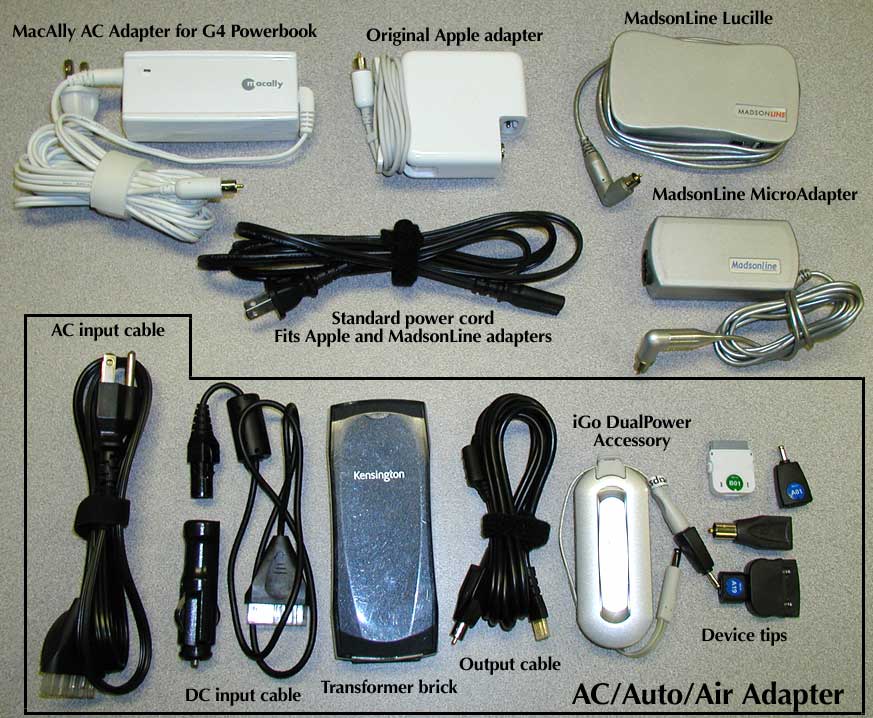
**A Few General Notes** -- It can be difficult to visualize how
  large these adapters are, especially in comparison with one
  another, so I put together a comparison photo of the various
  adapters to give you a better idea of the relative sizes and
  parts included. The top row shows the various stand-alone
  adapters; the bottom row shows the various parts of the
  Kensington/iGo Juice AC/Auto/Air system.

<http://www.tidbits.com/resources/803/Adapter-Showcase.jpg>

  A recent TidBITS Talk thread discussed a problem people were
  having with the PowerBook tip of the Kensington adapter. I'll
  say the same thing here that I did there; I've had problems with
  loosely fitting connections with several different AC adapters
  on my 15-inch PowerBook G4 - including several different Apple
  adapters, the Kensington, and the Lucille. I've seen the exact
  same adapters have no trouble at all on other iBooks and
  PowerBooks. My best guess is that the metal ring around the
  adapter tip can spread apart over time as it gets plugged
  and unplugged, and the tolerances on some recent PowerBooks
  (I haven't seen this on any iBooks, yet) are loose enough that
  the ring doesn't make solid contact. I've had success in the past
  by gently squeezing the ring to make it fit tighter. However, you
  must be careful, because if you squeeze too hard, you can distort
  the ring badly enough that it won't make good contact again.
  I've seen extreme cases of this more than once, where the tip
  became caught under something and was crushed. On adapters where
  that cord is permanently attached to the brick, that's it for
  the adapter; you now have an expensive paperweight. That's one
  advantage to the Juice and the MacAlly; if you crush the tip,
  you ought to be able to buy a replacement for a fraction of
  the price of replacing the whole adapter.

<http://db.tidbits.com/getbits.acgi?tlkthrd=2688>

  Of course, there are also advantages to having the input cord
  going to the wall as a detachable part. While Apple includes an
  input cord with a custom-shaped plug that matches the exterior
  of the case, the power socket behind it is an industry-standard
  AC input; you can buy cords that fit for $3 each at someplace
  like Radio Shack, and leave them plugged in around the building
  wherever there's a wall outlet that's awkward to get to. So when
  you move around the building - or between home and office - all
  you have to carry around is the brick, and you only have to crawl
  under each desk once.

  Overall, each of these units has something good to be said for it.
  The Apple AC adapter is a model of elegant design, with features
  like the charging indicator on the tip that aren't matched by any
  of the other AC adapters here - even if the occasional durability
  issue means it falls short of true elegance. MacAlly's is a good
  cheap second adapter. The Lucille offers a good balance between
  simplicity and versatility, while the iGo Juice is versatility
  transcendent, usable with a wide variety of power sources and a
  wide variety of devices, and letting you replace a multi-brick
  travelling suite with a single adapter. Any of them would be a
  good choice in the right circumstances. I currently travel with
  the Kensington/Juice in my suitcase, and an Apple adapter in my
  laptop case for immediate use; I will probably replace it with
  the Lucille on my next trip.


   PayBITS: If Travis's review helped you decide which
   AC adapter to buy, say thanks with a few bucks via PayBITS!
   <https://www.paypal.com/xclick/business=tbutler%40mac.com>
   Read more about PayBITS: <http://www.tidbits.com/paybits/>


Hot Topics in TidBITS Talk/31-Oct-05
------------------------------------
  by TidBITS Staff <[EMAIL PROTECTED]>

  The first link for each thread description points to the
  traditional TidBITS Talk interface; the second link points to
  the same discussion on our Web Crossing server, which provides
  a different look and which may be faster.


**iTunes 6 Gets Video** -- The capability to purchase video
  content such as music videos and television episodes brings
  up questions over whether the music and television companies
  are actually making any money on those sales. (10 messages)

<http://db.tidbits.com/getbits.acgi?tlkthrd=2758>
<http://emperor.tidbits.com/TidBITS/Talk/607/>


**Opening old MacWrite files** -- Is it possible to open an old
  MacWrite document? Several suggestions are offered. (3 messages)

<http://db.tidbits.com/getbits.acgi?tlkthrd=2759>
<http://emperor.tidbits.com/TidBITS/Talk/608/>


**Testing drives that don't support SMART** -- Last week's
  discussion of utilities that can diagnose SMART-enabled hard
  drives leads a reader to ask whether non-SMART drives can be
  similarly diagnosed. (2 messages)

<http://db.tidbits.com/getbits.acgi?tlkthrd=2761>
<http://emperor.tidbits.com/TidBITS/Talk/609/>


**iTunes Music Store for Australia at last** -- Australia gets its
  own iTMS finally, but some readers question why the song prices
  are higher than in the United States. (3 messages)

<http://db.tidbits.com/getbits.acgi?tlkthrd=2762>
<http://emperor.tidbits.com/TidBITS/Talk/610/>


**Sleeping Hard Drives** -- Last week's article on setting custom
  sleep times for hard drives elicits a link to Cocktail, a utility
  that looks as if it can set different spindown times for every
  drive. (2 messages)

<http://db.tidbits.com/getbits.acgi?tlkthrd=2763>
<http://emperor.tidbits.com/TidBITS/Talk/611/>


$$

 Non-profit, non-commercial publications may reprint articles if
 full credit is given. Others please contact us. We don't guarantee
 accuracy of articles. Caveat lector. Publication, product, and
 company names may be registered trademarks of their companies.

 For information: how to subscribe, where to find back issues,
 and more, see <http://www.tidbits.com/>. TidBITS ISSN 1090-7017.
 Send comments and editorial submissions to: <[EMAIL PROTECTED]>
 Back issues available at: <http://www.tidbits.com/tb-issues/>
 And: <ftp://ftp.tidbits.com/issues/>
 Full text searching available at: <http://www.tidbits.com/search/>
 -------------------------------------------------------------------


--
If you want to unsubscribe or change your address, use this link
http://emperor.tidbits.com/webx?unsub@@.3c557dc4!u=306a67f9