TidBITS#809/12-Dec-05
=====================

  Charles Maurer returns with a detailed discussion, informed by
  perception and painting, of how digital cameras can produce more
  naturalistic photos than film cameras. Mark Anbinder looks at the
  addition of NBC shows to the iTunes Music Store, Glenn Fleishman
  passes on news of new Wi-Fi driver options for Tiger users, and
  we examine updates to Firefox, Firefox's Flashblock extension,
  [EMAIL PROTECTED], the Prograph programming language, and "Take Control
  of Mac OS X Backups."
Topics:
    MailBITS/12-Dec-05
    DealBITS Drawing: Classic Solitaire
    Prograph Spelled Backwards Is Marten
    NBC Universal Brings More TV to iTunes
    Flashblock Update for Firefox 1.5
    Non-Apple Wi-Fi Options Expand for Mac Users
    Reality and Digital Pictures
    Take Control News/12-Dec-05
    Hot Topics in TidBITS Talk/12-Dec-05

<http://www.tidbits.com/tb-issues/TidBITS-809.html>
<ftp://ftp.tidbits.com/issues/2005/TidBITS#809_12-Dec-05.etx>

Copyright 2005 TidBITS: Reuse governed by Creative Commons license
   <http://www.tidbits.com/terms/> Contact: <[EMAIL PROTECTED]>
   ---------------------------------------------------------------

This issue of TidBITS sponsored in part by:
* READERS LIKE YOU! Support TidBITS with a contribution today! <----- NEW!
   <http://www.tidbits.com/about/support/contributors.html>
   Special thanks this week to Edwin Simmers, Peter Tatikian,
   Carter Brookes, and Neil Schwartzman for their kind support!

* SMALL DOG ELECTRONICS: Free shipping on select <------------------- NEW!
   items like Mac mini, LaCie Carte Orange, more!
   20-inch G5 iMac with SuperDrive only $1145
   Visit: <http://www.smalldog.com/> 800-511-MACS

* FETCH SOFTWORKS: With Fetch 5, FTP and SFTP are simpler <---------- NEW!
   than ever. Use it on Mac OS X to upload, download, mirror,
   and manage your Web site, eBay images, and data sets.
   Download your free trial version! <http://fetchsoftworks.com/>

* Web Crossing, Inc: Web Crossing offers integrated collaboration
   tools with a broad spectrum of functionality, but did you know
   adding discussions, blogs, podcasts, chat, polls, and calendars
   is point-click easy? Try a demo! <http://www.webcrossing.com/>

* Circus Ponies NoteBook: Never lose anything again. NoteBook <------ NEW!
   lets you take notes, clip content, and share information. Find
   anything instantly with automatic index pages. One-step Web
   publishing. Free 30-day demo! <http://www.circusponies.com/>

* Bare Bones Software's BBEdit 8.2 -- More than 100 new features
   and improvements including Subversion support, Text Factories,
   Codeless Language Modules, Documents Drawer, and much more!
   Demo or buy it today, visit <http://www.barebones.com/>.

* StuffIt Deluxe 10 from Allume Systems supports Automator,
   compresses JPEGs up to 30%, enables Spotlight to search in
   archives, can make self-extracting archives, and more!
   Upgrade for only $29.99! <http://www.stuffit.com/mac/deluxe/>

* BetterRAM.com launches new, easier to use site. Since 1992.
   Name brand quality. Value pricing. Lifetime Guarantee.
   Strong Mac line, PC RAM, Hard Drives, and more.  800-895-3493
   1GB Modules starting at $116.  <http://www.betterram.com/>
   ---------------------------------------------------------------

MailBITS/12-Dec-05
------------------

**Firefox 1.5 Released** -- The Mozilla Corporation has released
  Firefox 1.5, the latest version of the popular open source
  Web browser for Mac, Windows, and Linux. Important new features
  include an automated update capability, improved navigation
  performance, drag-and-drop reordering of tabs, improved
  pop-up blocking, a one-step method of clearing private data,
  more-descriptive error pages, automatic RSS discovery, better
  accessibility, a wizard for reporting broken Web sites, enhanced
  support for Mac OS X (including profile migration from Safari
  and Internet Explorer), and numerous security enhancements.
  Firefox 1.5 requires Mac OS X 10.2 or later and is a 9.4 MB
  download.

<http://www.mozilla.com/firefox/>

  Ironically after my article about simplifying installation in
  TidBITS-807_, the Firefox disk image provides only graphical
  instruction that's actively confusing. An arrow leads from
  the Firefox icon itself to a smaller, greyed-out version of the
  Firefox icon that is presumably being dragged, to judge from the
  non-Mac-like pointer and + badge, and then to a greyed-out icon
  that looks like the Applications folder. Unfortunately, it's all
  representational - the Applications folder is just a picture,
  and not a symbolic link, and there are no textual instructions
  to clarify what to do. I've already heard of people not realizing
  they had to copy the Firefox package and instead running it from
  the disk image. Worse, the instructions on the Firefox Web site
  say "double click the Firefox Disk Image to open it in Finder,
  and then drag the Firefox application onto your hard disk.
  Drag the icon to your Dock if you want it to appear there."
  I'm sure there are people who will promptly drag the Firefox
  icon from the disk image to the Dock, instead of copying it to
  the Applications folder and then dragging the copied version's
  icon to the Dock. Obviously, there's nothing all that hard here,
  but that's no reason not to make it easier yet.

<http://db.tidbits.com/getbits.acgi?tbart=08346>

  In comparison, applications that deserve kudos for using this
  installation technique include Jim Matthews's Fetch (of course!),
  James Thomson's PCalc, and Frank Reiff's A Better Finder Rename,
  with extra points to Rainer Brockerhoff for using the technique
  for his XRay utility since 2003. Some disk images don't force icon
  view if the user has Open New Windows in Column View set in the
  Finder preferences, which eliminates any graphical or textual help
  that would otherwise appear. I'm not yet sure how to force icon
  view in all situations. [ACE]

<http://www.fetchsoftworks.com/>
<http://www.pcalc.com/>
<http://www.publicspace.net/ABetterFinderRename/>
<http://www.brockerhoff.net/xray/>


[EMAIL PROTECTED] Moves to BOINC Client** -- If you're anything like me,
  you don't pay much, if any, attention to [EMAIL PROTECTED] clients you may
  have running on machines with CPU cycles to donate to the search
  for extraterrestrial life. But Jim Carr, one of the top members
  of the TidBITS SETI team, alerted me recently that the classic
  [EMAIL PROTECTED] client is being turned off as of 15-Dec-05, and everyone
  who wants to continue donating spare CPU cycles must move to the
  new BOINC (Berkeley Open Infrastructure for Network Computing)
  client that supports not just [EMAIL PROTECTED], but a variety of other
  distributed computing projects. The [EMAIL PROTECTED] page has the
  necessary instructions for downloading the latest BOINC client
  and requesting your account information. Unfortunately, it's a
  slightly obtuse process, and I wasn't able to convince BOINC to
  attach to the [EMAIL PROTECTED] project, but the error message implied
  temporary server problems (which the [EMAIL PROTECTED] folks have
  mentioned on their news page). I recommend waiting a bit before
  converting; either check the [EMAIL PROTECTED] site every so often to
  see if they've resolved their technical difficulties or look for
  another note in TidBITS. If you're new to the [EMAIL PROTECTED] project
  and want to join the TidBITS team, follow the third link below
  and click Join once there. [ACE]

<http://setiathome.berkeley.edu/>
<http://boinc.berkeley.edu/>
<http://setiathome.berkeley.edu/team_display.php?teamid=30293>


**DealBITS Drawing: GarageSale Winners** -- Congratulations to
  Doug Breckenridge of gmail.com, Peter Pinch of rcn.com, and
  Simon Sunatori of hyperinfo.ca, whose entries were chosen
  randomly in last week's DealBITS drawing and who each received
  a copy of iwascoding.com's GarageSale 1.9. Even if you didn't
  win, you can save 20 percent off the purchase price of GarageSale
  by placing an order using the third link below; this offer is
  open to all TidBITS readers through 22-Dec-05. If you're planning
  to attend Macworld Expo in San Francisco next month, you can find
  iwascoding.com and GarageSale at booth 948. Thanks to the 612
  people who entered, and keep an eye out for future DealBITS
  drawings! [ACE]

<http://www.iwascoding.com/GarageSale/>
<http://www.tidbits.com/dealbits/iwascoding2/>
<http://order.kagi.com/?3W91&lang=en>
<http://db.tidbits.com/getbits.acgi?tbart=08344>


DealBITS Drawing: Classic Solitaire
-----------------------------------
  by Adam C. Engst <[EMAIL PROTECTED]>

  Solitaire card games have long been a mainstay of computer gaming,
  especially for those who don't care for blood-and-guts first-
  person shooters. If you're looking for an implementation of
  Solitaire for the Mac, it's worth giving dogMelon's Classic
  Solitaire a try, since it includes cards with professionally
  designed graphics, 20 different Solitaire games and, most
  important for those of us who have never even heard of games
  like Idiot's Delight and La Grande Imperiale, an explanation
  of the rules for each in the online help.

<http://www.dogmelon.com.au/sol/Mac_Solitaire.shtml>

  In this week's DealBITS drawing, you can enter to win one of
  five copies of Classic Solitaire, each worth $29.95. Entrants who
  aren't among our lucky winners will receive a discount on Classic
  Solitaire, so be sure to enter at the DealBITS page linked below.
  All information gathered is covered by our comprehensive privacy
  policy. Be careful with your spam filters, since you must be able
  to receive email from my address to learn if you've won. Remember
  too, that if someone you refer to this drawing wins, you'll
  receive the same prize as a reward for spreading the word.

<http://www.tidbits.com/dealbits/classic-solitaire/>
<http://www.tidbits.com/about/privacy.html>


Prograph Spelled Backwards Is Marten
------------------------------------
  by Matt Neuburg <[EMAIL PROTECTED]>

  Prograph is back! Perhaps you have to be some kind of weird
  programming nerd to think this is intriguing news, but personally
  I think _anyone_ interested in programming, from a beginning
  learner to an old hand, should care. Prograph is a wonderful
  visual, dynamic, object-oriented programming language; instead of
  writing lines of textual code, you draw a diagram of how you want
  the data to flow. Not long after I reviewed it in 1996 ("Get Your
  Hands on Prograph" in TidBITS-312_), Prograph started to wither
  on the vine, and by the time Mac OS X came in, I had abandoned
  all hope of ever using it again.

<http://db.tidbits.com/getbits.acgi?tbart=01160>
<http://en.wikipedia.org/wiki/Prograph>

  It turns out, however, that what was withering was Pictorius's
  product, Prograph CPX. The Prograph language itself is an idea,
  and ideas are free. Unbeknownst to me, some nutty developers had
  reverse-engineered the Prograph language and the Prograph CPX
  environment, with a view to making Prograph available on BeOS.
  When BeOS died, the effort was ported to Mac OS X and is now
  available commercially under the name Marten.

<http://andescotia.com/products/marten/>

  I haven't tried Marten, and I have no idea to what extent or how
  easily it can be used to generate a native-looking application
  on Mac OS X, but I am told that the Marten editor is itself
  written in Marten, which is certainly something. And even if
  it can't be used to write the next killer app, it's so enjoyable
  and educational to express a task in the Prograph language and
  environment that those who, like me, have been pining for it
  will probably be more than happy to pay their $65 and give
  it a shot.


NBC Universal Brings More TV to iTunes
--------------------------------------
  by Mark H. Anbinder <[EMAIL PROTECTED]>

  When Apple introduced its new video-capable iPod in October, the
  early iTunes Music Store video offerings were limited to ABC and
  Disney Channel television programs. Don't get me wrong, I like
  "Desperate Housewives" and "Lost," but I yearned for this new
  service to explore more of its potential. Last week's Apple
  announcement of a deal with NBC Universal realizes that dream
  for me.

<http://www.apple.com/pr/library/2005/dec/06nbc.html>

  Now available is a much broader selection of entertainment,
  featuring such NBC drama as "Law & Order" and "Surface,"
  the nightly shows of Leno and Conan, science fiction
  masterpiece "Battlestar Galactica" from the Sci-Fi Channel,
  and the USA Network hit "Monk." But of more interest to me,
  since I can already watch all of those shows via DISH Network,
  is the collection of vintage NBC shows like "Adam-12," "Dragnet,"
  and even "Knight Rider," plus the first season of "Law & Order."

<http://www.apple.com/itunes/videos/>

  Episodes of each show are available for $1.99, with new episodes
  available the day after they air on television. (Currently, TV
  shows are available only in the U.S., and availability of other
  videos varies by country.) Just as music albums often offer songs
  for a total price lower than 99 cents each, TV series "seasons"
  are typically available for a lower total price than $1.99 per
  episode.

  NBC Universal and Apple are cleverly taking advantage of the
  recent surge in DVD sales of old TV shows. If you'll buy old
  "Bewitched" episodes on DVD, why not grab an old "Alfred Hitchcock
  Presents" episode to take on the morning commute? The programs are
  all commercial-free, in contrast to announcements last month that
  the NBC and CBS networks would offer 99-cent on-demand shows with
  commercials via DirecTV and Comcast Digital Cable, respectively.
  Noticeably absent is the NBC Nightly News Netcast with Brian
  Williams, available for free in Windows Media format on MSNBC.com
  each weeknight after 10 PM Eastern.

  Apple says iTunes Music Store customers have purchased more than
  three million videos since the service's debut less than two
  months ago, for viewing in iTunes or the Front Row application
  included with the latest iMac, or on an iPod. Add me to the
  list; my first TV show download, of the long-ago pilot episode
  of "Law & Order," is almost finished. Would you believe,
  considering how many times a day "Law & Order" airs on TV,
  I've never seen the pilot?


Flashblock Update for Firefox 1.5
---------------------------------
  by Glenn Fleishman <[EMAIL PROTECTED]>

  The Flashblock extension for Firefox lets you control whether
  Flash animations automatically start playing on Web pages
  (see "Firefox Flash Blocker" in TidBITS-794_). With the release
  of Firefox 1.5, I was bereft! No update! Andrew Lawrence pointed
  out via iChat that Flashblock had an update - the extension has
  forked into two separate versions. For Firefox 1.0.x, you can
  use Flashblock 1.3.3; for Firefox 1.5, Flashblock 1.5.

<http://flashblock.mozdev.org/>
<http://db.tidbits.com/getbits.acgi?tbart=08225>

  Installing extensions within Firefox is a breeze:

   1. Visit the Web page containing the extension.
   2. Find the install link.
   3. The extension should download (if it's blocked, see below);
      click Install.
   4. Quit Firefox and launch it again to load the extension.

  If the extension doesn't download in Step 3, that's due to
  Firefox's clever way of disallowing software installations
  from sites you haven't approved.

Here's how to approve the site:

   1. Click the download button or install button on the Web site.
   2. A gray bar appears across the top of the Firefox browser
      warning you the installation was blocked.
   3. Click the Edit Options button at the far right of this
      gray bar.
   4. The domain name is prefilled in the pop-up window;
      click Allow to add the domain to an approved list.
   5. Click the Close button.
   6. Try Step 1 again; if it works, go to Step 4 in the
      installation steps.


Non-Apple Wi-Fi Options Expand for Mac Users
--------------------------------------------
  by Glenn Fleishman <[EMAIL PROTECTED]>

  The Taiwan-based chipmaker Ralink may be the solution for many
  users of Mac OS X 10.4 Tiger trying to find a Wi-Fi adapter that
  works with their particular machine. Although few companies make
  Wi-Fi products that include or support Tiger drivers, several
  companies use chips from Broadcom, Apple's Wi-Fi chip supplier,
  which enables their products to work on a Mac without additional
  software.

  However, Broadcom's competitors have made inroads into the Wi-Fi
  market, and some products that worked six months ago - for
  instance, a Belkin 802.11g PCI Card - have been re-engineered
  to save costs and no longer use Broadcom chips. Manufacturers
  rarely directly disclose which chips are in which products to
  avoid making promises about the underlying technology; they're
  promising functionality (i.e., a Wi-Fi connection).

  That's what makes Ralink's unsupported drivers for Mac OS X 10.2
  through 10.4 and Linux so interesting: if you wind up with a
  Ralink-based device, you can still use it with your Mac. Ralink
  has been listening to its indirect Mac customers, because they
  recently updated their drivers for Mac OS X 10.4 Tiger, and they
  seem to release regular bug fix updates as well.

  Ralink's driver page contains downloads for supported products,
  but it's organized by internal chipset and product names. I hope
  some enterprising soul will figure out which products and versions
  from major makers use Ralink chips, expanding Mac users' options.

<http://www.ralinktech.com/supp-1.htm>

  Belkin's 802.11g PCI Card (part number F5D7000) claims to have
  Mac OS X 10.2 and 10.3 (not 10.4) compatibility on its detail
  page, but doesn't offer drivers for download via the linked page.
  Al Varnell wrote in point out that you must take a different
  route to find drivers by visiting Belkin's download section and
  navigating to the product. I have no idea why the drivers aren't
  properly linked in both directions! The drivers were updated
  in April, 2005 and include no mention of Tiger compatibility.
  (Belkin also has Panther drivers for other products.)

<http://catalog.belkin.com/IWCatProductPage.process?Merchant_Id=1&;
Section_Id=&pcount=&Product_Id=136479>
<http://www.belkin.com/support/download/download.asp?category=9&;
lang=1&mode=>

  There are now Tiger-supported USB 2.0 adapters for Macs - I found
  this out almost by accident. The ZyXEL AG-225H, a Wi-Fi hotspot
  detector with a built-in LCD screen, doubles as an 802.11a/b/g
  adapter using USB 2.0. ZyXEL provides Mac drivers for both Panther
  and Tiger; I haven't tested them but have been told that they work
  by other Mac users. I reviewed the ZyXEL unit, looking primarily
  at its Wi-Fi finding functions, for Mobile Pipeline back in
  September, 2005. It's about $75 from several online retailers.

<http://us.zyxel.com/support/download.php>
<http://www.mobilepipeline.com/showArticle.jhtml?articleID=171000509>

  Thanks to Dave Goldman for this tip!


Reality and Digital Pictures
----------------------------
  by Charles Maurer

  People often ask me if I think digital photography is as good as
  film or will ever become as good as film. I reply that for all but
  a few special purposes, digital is better already. Technically, my
  digital photographs are at least as good as the best conventional
  photographs I ever took with 2-1/4" x 3-1/4" (6 cm x 9 cm) film,
  and pictorially they are better. With my digital camera I can take
  pictures in the street that used to require a studio.

  In this article I shall explain what digital technology can do
  that conventional photography cannot - how computers can produce
  more naturalistic pictures, not how they can produce special
  effects. To do this I'm going to start with perception, pass
  through art, and enter computers by the back door. Although this
  is an unusual route, it approximates the way I think when taking
  a photograph and it provides the only way I know for negotiating
  the maze of manipulations offered by photo editors. Although I
  shall mention some specific products (all of them available for
  the Mac as well as Windows), I shall not describe any in depth.
  The difficult part of digital photography is figuring out what
  must be done in the computer and which application can do it.
  Knowing that, it is rarely difficult to figure out how to make
  the application do its job.

  This article is illustrated with a number of pictures. To see
  them appropriately, your monitor ought to be in rough calibration.
  If you have never calibrated your monitor, I suggest that you do
  it now. It takes about two minutes. Open the Displays preference
  pane, click the Color tab, click Calibrate to launch the Display
  Calibrator Assistant, select the Expert Mode checkbox, and then
  follow the instructions. When you come to the screen asking you
  to set the gamma, select 2.2.

  For one reason that will become clear, I find some version of
  Photoshop to be necessary. For this reason I shall assume its
  use as a photo editor, although you need not own it to understand
  the article. Along the way I shall mention the differences among
  the last three versions (CS, CS2 and Elements) that matter for
  my approach.


**Eye vs. Camera** -- To begin with, let's dispel the notion that
  a camera records what the eye can see. It does not and it cannot
  because a camera functions nothing like the eye. With a lens of
  normal focal length, a camera records an image with a diameter
  of approximately 45 degrees. It records the entire image at once
  and the image ends up as a print with a range of intensity from
  black to white of approximately one hundred to one. In contrast,
  the eye sees an area about 180 degrees across but it sees most of
  this with acuity that ranges from bad to dreadful. It sees sharply
  just in the central 1 to 3 degrees. To see a scene clearly, the
  eye must scan it and the brain must assemble the accumulated
  information. However, the eye rarely has time to sample more than
  small portions of a scene with its spot of clear vision so most
  of what you see has no optical source, it is an inference. Your
  brain infers information largely by generalizing from what it has
  encountered before. In doing this the eye and brain have to handle
  contrasts of light that exceed one million to one.

  In short, when you look at a snapshot you took at the beach, the
  limitations of the camera mean that three-quarters of the scene
  will have been lopped off, the range of tones will be compressed
  tenthousandfold, and the information that remains will never
  be what you saw. Any appearance of realism will be an inference
  informed by learning and shaped by convention. It is not realism
  but verisimilitude.

  Photographs may seem realistic but the technology of film prevents
  escaping photographic conventions, which are actually quite
  limiting. Less limiting is a paintbrush. A brush can produce every
  effect a camera can plus a great many more. Before photography,
  skilful and observant artists spent millennia working out how
  to represent reality on flat surfaces using this superior tool.
  Their work forms the most complete guide available on realistic
  ways to put pictures onto paper.

  Most artistic techniques cope with two basic problems, problems
  that reflect the architecture of the visual tissue of the brain:
  how to imply something about form and space using (1) areas of
  brightness and (2) lines. These problems are not discrete and
  isolated any more than the tissue of the brain is, they are two
  sides of the same coin, but it will simplify our thinking to
  make a fuzzy distinction between them.


**Contrast** -- The eye does not see light per se, it sees changes
  in light - contrast. If two objects do not contrast with one
  another, to the eye they meld into one. This fact makes
  controlling the contrast of adjacent details to be paramount
  in importance. However, the real contrast of any scene can
  rarely be reproduced. As I said, the range of reflectance from
  the lightest to the darkest objects in a scene is rarely less
  than one thousand to one and often exceeds one million to one,
  yet the range of reflectance of pigment against paper or canvas
  is approximately one hundred to one. On the other hand, even
  within a contrasty scene, small areas can have very little
  contrast indeed.

  From contrasting tones the brain infers three-dimensional objects.
  It does this through association, by matching patterns it has
  encountered before: a bright spot is a source of light, brilliant
  yellow may be fire and hot, areas that are darker tend to be
  removed from you or from light, bright areas tend to be near
  you or near light, tiny highlights on a face indicate sweat and
  heat, etc. To paint realistically, painters use associations
  like these to create optical illusions. This is easy because the
  eye scrutinizes only tiny areas at a time, so the brain cannot
  easily compare colours and tones across broad distances. As long
  as adjacent tones vary naturally, distant tones can be impossible
  optically yet still look right. You can see this in Rembrandt's
  painting of Belshazzar's Feast, linked below. The main source of
  light on the faces appears to be the writing on the wall, yet it
  is no brighter than the faces. It is not white but fiery gold, yet
  it is so far away from his face that nobody notices the optical
  absurdity. Also, with writing on the wall as the main light, the
  secondary light reflected off the invisible wall on the left ought
  logically to be much dimmer than it is.

<http://www.tidbits.com/resources/809/BelshazzarsFeast.jpg>

  In other parts of the painting Rembrandt increased contrast where
  he had to maneuver within too limited a range to limit himself
  to variations in brightness. Look at the woman's red dress to see
  an example. Not only do the folds look three-dimensional overall,
  each tiny portion of every fold looks three-dimensional, even if
  you restrict your eye to small areas, areas where there is little
  difference in brightness from highlight to shadow. Every tiny part
  of the dress contrasts with the part adjacent to it. Rembrandt
  could do this because he did not vary brightness alone, he varied
  hue and saturation as well - independently. If you open the
  picture in Photoshop and set the Info window to HSB, you can move
  the mouse around and see some of this variation that has survived
  the miniaturization of the painting. (The real thing, which
  somebody long ago trimmed to a smaller size and different angle,
  is 66" by 82" or 167 cm by 209 cm.)

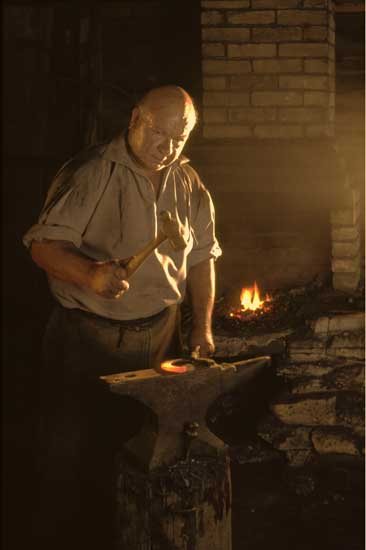
  Filmmakers and commercial photographers create realistic photos
  similarly, by "cheating" lamps that are put on the set as props,
  lighting the set so that the light seems to be coming from those
  props. An example is the picture of the blacksmith at the link
  below. A logical analysis shows that no illumination can have come
  from the fire, but the eye is not a logical analyser. However,
  cheating like this takes more time than cheating on your taxes,
  especially in a still photograph where the illusion does not flit
  past your eye. That photograph took me a day to plan and a day to
  execute. (Among other things, I needed to wrap the entire workshop
  in aluminum foil, to prevent light from coming through chinks
  in the walls.)

<http://www.tidbits.com/resources/809/Blacksmith.jpg>

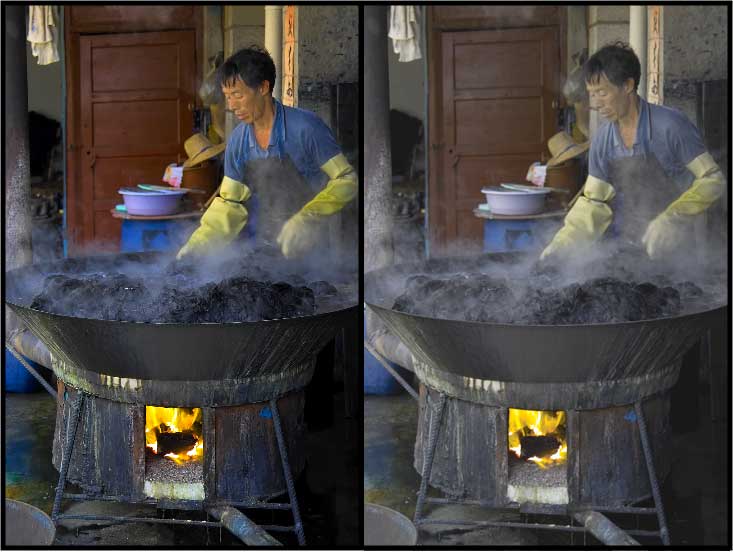
  On the other hand, equivalent results can often be obtained
  without cheating by using a good digital camera and re-balancing
  the light digitally. An example is the dyer in the picture linked
  below. The version on the right shows the scene as film would
  have caught it; the version on the left shows it as it felt
  and as I remember it to be. It is probable that before I took
  the picture, I noticed that the room light was bluer than the
  firelight - I do tend to notice such things - but my overwhelming
  perception was overwhelming heat and that heat is what I wanted
  to portray. To the visual system, so many cues to heat are
  present that the firelight in his face looks natural although
  it's logically absurd.

<http://www.tidbits.com/resources/809/Dyer.jpg>

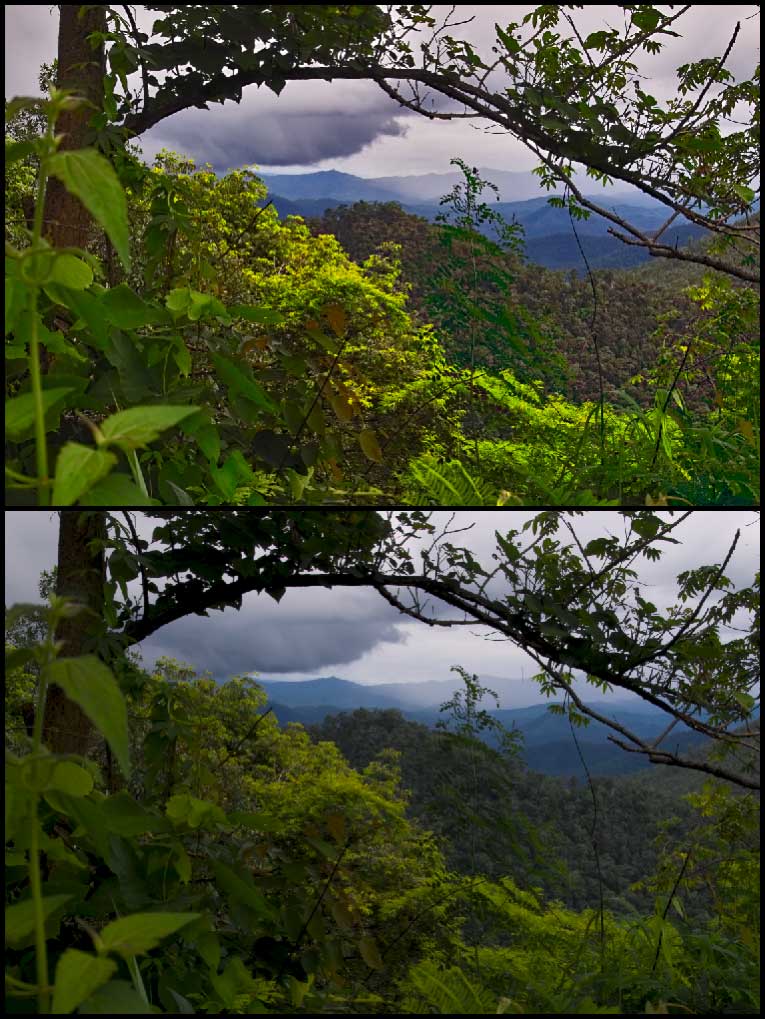
  The next example shows a more ordinary picture. The image on
  top shows what the scene looked like: a brightly lit bush in the
  foreground with a jungle of trees in the hills behind, gradually
  diminishing in size and clarity. However, although my brain
  perceived the bush to be bright, it was actually dark compared
  to the sky and the jungle was even darker. The scene presented
  a range of tones that nothing man-made can come close to
  reproducing. My camera's sensor "mechanically" compressed those
  tones into the image on the bottom. Slide film would have done
  the same. To make the picture look more realistic, I brightened
  the bush in the foreground and painted contrast into the jungle
  by varying saturation and brightness independently from each
  other and from hue.

<http://www.tidbits.com/resources/809/Jungle.jpg>

  To manipulate contrast in this way requires three things:

* Capturing the information that you want to bring out.

* Making that information visible by lightening shadows and/or
  darkening highlights.

* Adjusting colour not to make it look accurate - that is
  impossible - but to bring out whatever contrasts are necessary
  to make it look right

  To meet the first requirement, you need a raw, unprocessed image
  (not a JPEG) from a camera that can record a broad range of
  contrasts. In today's market this means a single-lens reflex
  camera. (For more information, see the "Image Quality" section of
  my article "Picking a Point-and-Shoot Camera: Panasonic DMC-FX7"
  in TidBITS-783_.) When I convert the file to a standard format
  (I prefer the generic TIFF to Adobe's PSD), I set its levels of
  tonality to run the full extreme from black to white, with the
  middle set to look as good as possible.

<http://db.tidbits.com/getbits.acgi?tbart=08136 >

  Lightening shadows and darkening highlights comes next, with
  Adobe's Shadows/Highlights control. Photoshop defines shadows
  and highlights as dark or light areas larger than a certain
  number of pixels across. CS, CS2 and Elements all enable adjusting
  the amount of lightening or darkening but CS and CS2 also enable
  adjusting the size of what Photoshop sees as a shadow or
  highlight. I find that adjustment to be very important, and
  I use it for maybe one photo in three.

  (Most of what Adobe left out of Photoshop Elements I do not
  care about - Elements is already more complex than it needs
  to be - but I found this one adjustment almost reason enough
  by itself to forgo Elements for the full Photoshop. The other
  reason is that Elements has limited facilities to handle 16-bit
  colour. Although 8-bit colour is usually sufficient, pulling
  apart tonality often requires finer intermediate colours to
  be present.)

  Now look at the Rembrandt picture again, at the detail on
  Belshazaar's cape. The detail stands out because it is formed
  by brush-strokes with extremely high contrast from one to the
  next, extremely high local contrast. I make detail stand out
  in a photograph the same way by using an incidental feature of
  PictureCode's Noise Ninja, which is primarily a noise-reduction
  package (and one of the best). This feature is a slider that
  enhances local contrast. I often use it by itself without any
  noise reduction at all.

<http://www.tidbits.com/resources/809/BelshazzarsFeast.jpg>
<http://www.picturecode.com/>

  Now comes the paint. If an artist wants to adjust a colour on
  his canvas, he may change its hue, or he may daub on spots of
  complementary colours to reduce its saturation, or he may add
  some black or white touches to reduce or increase its brightness.
  With digital photographs I want to do the same. The product
  that enables me to do this is Asiva Shift+Gain.

<http://www.asiva.com/>

  Shift+Gain is a Photoshop plug-in that lets you select areas or
  lines (useful to remove colour fringing) by any combination of
  hue, saturation, and brightness, and then alter those parameters
  individually. No other product can do this, except for a stand-
  alone package from Asiva that is too slow to use. Indeed,
  incredible as it may sound, Asiva has a U.S. patent on this
  approach to manipulating pictures.

  Shift+Gain works differently from any other application and took
  some time to understand. However, although it was confusing at
  first, it soon came to seem simple. To accomplish in Photoshop
  most of what I do in Shift+Gain would require far more skill
  and patience than I can supply.

  I find Shift+Gain to be an indispensable tool for digital
  photography - the only indispensable tool, the only tool for
  which I do not know of any functional equivalent. Unfortunately,
  it will not work in any application other than Photoshop, not
  even applications like GraphicConverter that can run most other
  Photoshop plug-ins. It is compatible with any recent version
  of Photoshop, but it does require Photoshop, which is why I
  am ignoring possible alternatives to Photoshop in this article.

  Those three sets of tools can handle nearly all the manipulations
  of contrast and colour that I have had any need for: (1) the
  controls in Photoshop CS/CS2 for levels, shadows and highlights,
  (2) the local-contrast control in Noise Ninja, and (3) Asiva
  Shift+Gain. Occasionally I also use one of Asiva's other plug-ins,
  which work similarly but do slightly different things. I have
  found that Asiva's plug-ins, combined with Photoshop's basic
  selection tools, obviate the need for masking to achieve ordinary
  pictorial effects.

  Only one of Photoshop's colour adjustments do I find to be
  particularly useful. Sometimes, after I have adjusted the
  colours to bring out contrasts, the picture shows an overall tint.
  Now, no tint exists on its own, a tint is merely an offset from
  a standard of comparison. In a photograph, the eye's standard is
  usually a pure white highlight or the paper's margin. If a neutral
  white or grey looks coloured in comparison, then we see a tint.
  Removing a tint is usually a simple matter of shading the picture
  just enough to neutralize that white or grey. Every other colour
  changes a bit, but the contrasts among them will remain. It's
  difficult to remove a tint manually because the brain adapts so
  readily to changes in colour that a wide range of adjustments
  seems okay until you print out the picture. Photoshop can remove
  a tint mechanically; the mechanism is hidden in the Match Color
  command.

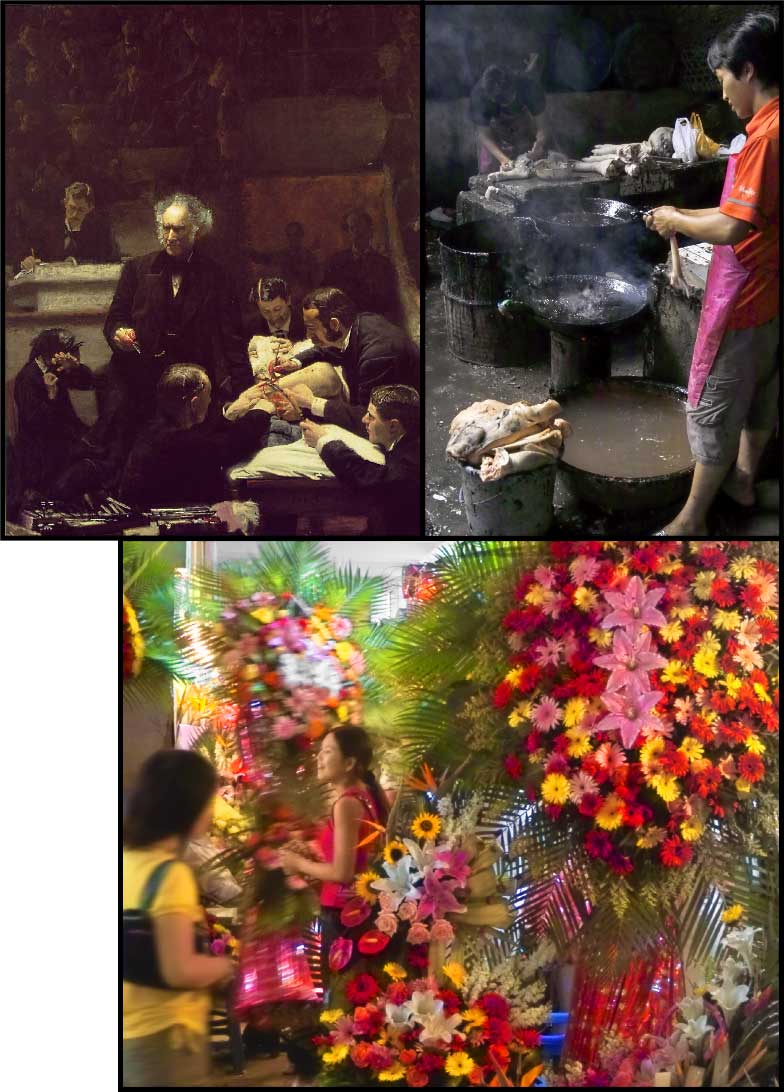
  One final consideration about colour comes with dim light. In
  sunlight we see in colour; in moonlight we see in monochrome;
  in transitional "mesopic" levels of dim light we see partially
  in monochrome and partially in colour. When painters want to
  represent dim light, they portray it mesopically. You can see
  this with the musician at the back of the Rembrandt and you
  can see it even better in the Gross Clinic by Thomas Eakins,
  the picture on the left at the link below. The students in the
  shadows are nearly monochromatic but the monochrome contains hints
  of colour, often quasi-random streaks and blotches. (Note that
  the original painting is 96" by 78" or 243 cm by 198 cm.)

<http://www.tidbits.com/resources/809/GrossAbattoirFlowers.jpg>

  Film does not portray dim light in this way, nor do most digital
  sensors, but the Foveon sensor does. (See "Sense & Sensors
  in Digital Photography" in TidBITS-751_ and my followup for
  a discussion of sensor types.) Film and digital sensors generate
  low levels of granular noise. When a normal amount of light
  strikes the film or sensor, the noise is usually hidden within the
  image, but when little light strikes it, the noise becomes more
  evident. At some dim exposure to light the image disappears within
  the noise: that defines the limit of sensitivity. The random dots
  of this noise can be smoothed over but detail becomes smoothed
  over with them and at the limit of sensitivity, all detail
  disappears. However the Foveon image sensor works differently so
  its granularity looks different. The Foveon shows fewer specks
  but replaces them with intrusions of incorrect colour. At first
  this reduces saturation then, at the lowest levels of sensitivity,
  it causes random streaks and blotches.

<http://db.tidbits.com/getbits.acgi?tbart=07860>
<http://db.tidbits.com/getbits.acgi?tbart=07906>

  Reduced saturation and random streaks and blotches of colour are
  exactly the techniques that artists use to represent dim light,
  and the Foveon's noise can be used to do the same. I smooth out
  the granular noise with Noise Ninja - there is rarely so much of
  this that Noise Ninja loses any detail - then I use Shift+Gain
  on selected areas to control the discolouration. My goal is
  sufficient discolouration to add contrast for the eye but not
  so much as to be noticed. You can see the effect in the Chinese
  abattoir to the right of the Gross Clinic painting you just
  loaded.

  Do note, though, that desaturation and blotchiness are not the
  norm in Foveon photos. They are normally hidden in depths of black
  and become evident only if you bring them out by pushing the
  sensor to its limits. More normal is the picture of the flower
  market - the third one on the page. I took both pictures indoors
  and exposed them at ISO 1600.


**Perspective** -- So far we have been talking about how to
  represent space using tonality, now let's shift to representing
  space using lines. This is the problem of perspective.

  During the Italian Renaissance, artists worked out a geometry of
  linear perspective, geometry that appears superficially to fit
  perceptual norms. In fact, however, it does not. The "laws" of
  linear perspective need usually to be broken, else the picture
  will look wrong.

  The laws of perspective dictate that parallel receding lines
  converge. They converge if they are receding horizontally like
  railway tracks and they converge if they are receding vertically
  like skyscrapers seen from the street. But consider vertical
  perspective. If the angle of view portrayed is only a little bit
  upward, then your brain may not infer that objects are converging
  at a distance above you, your brain may infer that the objects
  are not plumb. Of course, if those objects are walls of buildings,
  then your brain concludes that they are not falling inwards, for
  just as you assume that boards are straight, so do you assume that
  walls are plumb. However, for the same reason - because you assume
  that walls are plumb - buildings look more natural when all the
  vertical lines are upright and parallel. You can see an example
  of this issue in the two images of the temple pictured at the
  link below. A correction like the top image with film would have
  required the careful adjustment of a view camera on a tripod
  but it took me two minutes in Photoshop. (Elements or CS can
  fix perspective but CS2 makes it easier through a new Lens
  Correction item in the Filter > Distort sub-menu.)

<http://www.tidbits.com/resources/809/VerticalLines.jpg>

  The same adjustment is useful for horizontal lines. When
  horizontal lines converge, buildings can appear to be constructed
  on a hill and roofs can seem to have unusual inclines. To minimize
  ambiguity, vertical lines ought to be plumb and horizontal lines
  ought to be level unless the reason for them not to be is obvious.
  Clear verticals and horizontals provide a frame of reference that
  lets oblique lines stand out.

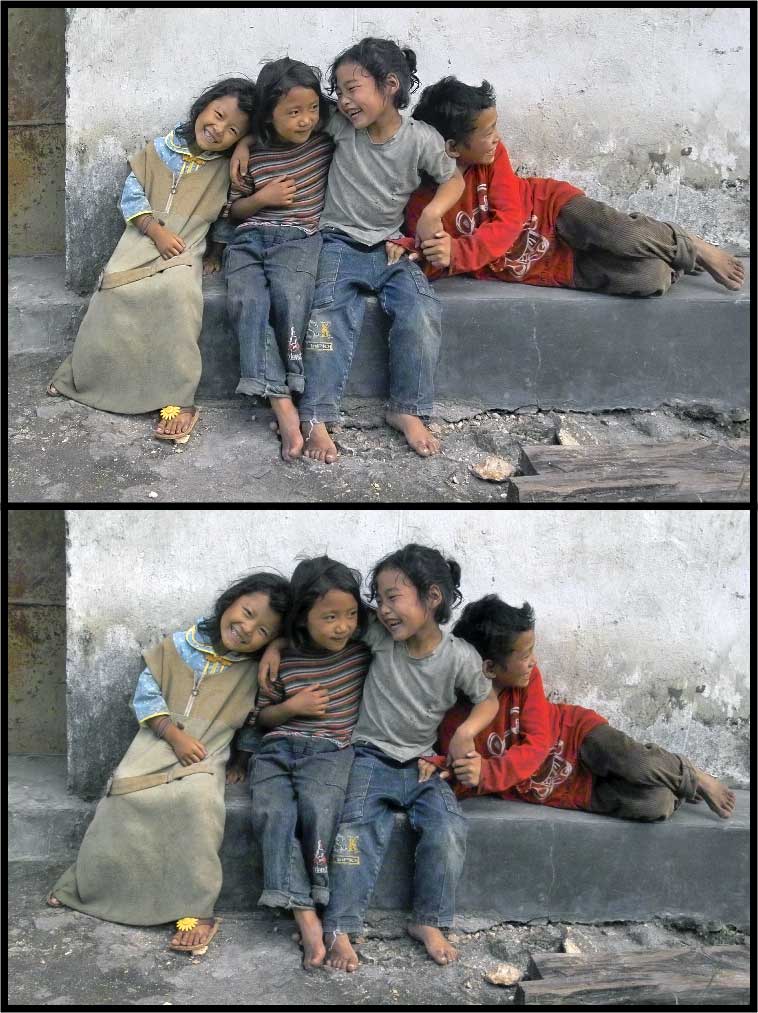
  Pictures of buildings obviously benefit from this approach, but
  often pictures of people do too, although more subtly. You can
  see an example in these two pictures of children, linked below.
  The picture on the top is stronger because the children are
  sitting on a level platform, not a tilted one.

<http://www.tidbits.com/resources/809/Children.jpg>

  In fact, the laws of linear perspective need to be violated even
  when photographing something straight on. If you look straight
  at a picket fence or a wall of bookshelves, an optically correct
  perspective would have the lines of the fence or bookshelves
  converging both to the left and to the right. This would look
  so silly that nobody would paint them this way. For the same
  reason, camera lenses are corrected to distort linear perspective
  so that a rectilinear object casts a rectilinear image.

  This presents an interesting problem that can be solved with
  a brush or computer but not with film. The farther out from the
  centre an object extends, the farther its lines will be pulled
  apart and thus the more it will be enlarged, yet objects in
  the centre will never be enlarged, distorting relative sizes.
  The wider the lens's angle of view, the greater the distortion.
  This distortion can be seen with any wide-angle lens and becomes
  disproportionately more severe the wider the angle of view.
  When straight lines are not involved - in many landscapes - it
  often looks more natural when relative sizes are maintained at
  the expense of convergence. This can be approximated in Photoshop
  CS2 by adding convex "barrel" distortion, a distortion that
  reduces the rectilinear correction of the lens.

  (Note that only CS2 offers that control. CS2 also makes it
  significantly easier than CS or Elements to correct converging
  and tilting lines, once you find the new controls. In CS2, all of
  the lens corrections are buried under Filters > Distort, although
  File > Render still shows the subset of corrections that is shared
  with CS and Elements.)

  Of course, adding convex distortion is unacceptable if straight
  lines are involved. A certain amount of convex distortion may not
  be noticed in landscapes, but curvature stands out absurdly in
  pictures containing buildings. An alternative fudge is to squeeze
  the picture from the sides. To do this I use a $20 Photoshop
  plug-in called Squeeze.

<http://www.theimagingfactory.com/>

  I also ought to mention the portrayal of depth through having only
  one plane of the picture in focus. This effect can be achieved
  with a brush, but it rarely is, because it does not mirror what
  the eye sees or the brain perceives. The eye sees only tiny spots
  sharply, and it sees tiny spots wherever it looks: from these the
  brain perceives infinite depth of field. To control attention and
  suggest different qualities, a painter will vary the softness of
  edges across a picture, but this variation is much more subtle
  than a mis-focussed lens.

  To vary hardness and softness within a picture, I used to use
  a view camera that allowed me to tilt and swivel the lens, and
  I varied the character of the light. A digital camera makes this
  a lot easier. My digital camera usually provides infinite depth
  of field with no special measures and I can use digital techniques
  to control softness like a painter, as I did in the flower market
  example previously shown. The flowers just behind the smiling girl
  are soft, but the ferns behind them are sharp, as is every other
  object in the picture except for the woman moving into it.

  This was possible for two reasons, both tied to the camera's
  image sensor. First, the ISO speed of negative film is based on
  the least exposure necessary for acceptable snapshots. To extract
  high quality usually requires doubling the metered exposure.
  In contrast, to extract the best quality from my digital SLR,
  I usually halve the exposure. That is two f-stops' difference,
  which represents a lot of depth of field. On top of that, the
  sensor in my camera is smaller than 35mm film, which means the
  same f-stop gives more depth of field. The difference is 1-2/3
  stops. Thus, for any given amount of light, I obtain nearly four
  f-stops' more depth of field than I would get were I shooting
  35mm negative film.

  When everything is sharp within a photograph, photographic
  compositions open up. People don't just look at my pictures,
  they look inside them, combing them for detail - and they
  find it, because I have controlled the details' contrast. With so
  much information to look at, my 8" x 10" (A4) printer seemed too
  small. Next week you can read a discussion of printers and my
  search for a larger one.

  Finally, to finish up my comparison of the various versions
  of Photoshop, I ought to mention two new features of CS2 that
  are useful for preparing enlargements, a "spot healing brush"
  and "smart sharpening." The former I find to be a modest but
  significant convenience, but the latter is an important feature.
  It tightens up a lens's inescapable spreading of points into
  blurry circles, and it reduces blur from movement. In my mind,
  this feature combined with CS2's improved distortion controls
  makes the upgrade from CS worth the purchase. I detest a Windows-
  like copy-protection scheme that Adobe have begun to employ - it
  prohibits the fair use of your purchase if you work in different
  locations - but I swear at CS2 less often than I did at its
  predecessors because it permits me to hide from sight the vast
  number of menus that I never use and to edit or remove keyboard
  shortcuts. With CS2, no longer do windows fly about the screen
  and change their colour because one of my fingers inadvertently
  touched a key.

   PayBITS: If you found Charles's discussion of visual perception
   and digital pictures useful, please support Doctors Without
   Borders: <http://www.msf.org/msfinternational/donations/>
   Read more about PayBITS: <http://www.tidbits.com/paybits/>


Take Control News/12-Dec-05
---------------------------
  by Adam C. Engst <[EMAIL PROTECTED]>

**"Take Control of Mac OS X Backups" Updated to 1.2** -- Do you
  have an effective strategy for backing up your work files, not
  to mention your growing collection of iTunes purchases and digital
  photos? Don't wait until disaster strikes. Get help now by reading
  our latest release of "Take Control of Mac OS X Backups," which
  has already helped thousands of Mac users. In this significant
  1.2 update, you'll find the latest advice for developing a backup
  strategy that fits your budget and style. The ebook now covers
  the many changes made to backup hardware and software in the past
  10 months, looks at Apple's Backup 3 for .Mac users, and offers
  more than 20 pages of detailed directions for using the popular
  Retrospect backup software. It also includes new sections about
  backing up photos and video.

  "Take Control of Mac OS X Backups" is now 138 pages and costs $10.
  If you own an earlier version, you can download the update for
  free by clicking the Check for Updates button in the lower-left
  corner of your ebook's first page.

<http://www.takecontrolbooks.com/backup-macosx.html?14!pt=
TRK-0014-TB809-TCNEWS>


**"Take Control of Buying a Digital Camera" 2.0 Released** --
  Anyone who wants to buy the right digital camera at the right
  price can now find up-to-date info and more tips in the second
  edition of "Take Control of Buying a Digital Camera," written
  by Seattle-based professional photographer and instructor
  Larry Chen. Larry walks readers through the entire purchase
  process, providing help with budgeting and understanding what
  types of photos you want to take, friendly advice about the
  many possible camera features, expert guidance on reading camera
  reviews and evaluating picture quality, and suggestions on
  where to shop. The ebook, which we mentioned briefly last week,
  comes packed with photography tips, case studies, and color
  photos illustrating the discussions, plus a significantly
  enhanced section about buying a digital SLR camera. Readers
  will find a 2-page printable shopping worksheet, which they
  can print out, annotate as they read, and take with them when
  they shop. The ebook also includes an appendix summarizing popular
  cameras in different categories and a glossary covering common
  photography terms.

  The second edition of "Take Control of Buying a Digital Camera"
  has grown to 107 pages and costs $10, though it's 50 percent
  off through 26-Dec-05 as part of our holiday consumer electronics
  ebook sale. If you own the first edition, you can download the
  update for free by clicking the Check for Updates button in
  the lower-left corner of your ebook's first page.

<http://www.takecontrolbooks.com/buying-digicam.html?14!pt=
TRK-0015-TB809-TCNEWS>


Hot Topics in TidBITS Talk/12-Dec-05
------------------------------------
  by TidBITS Staff <[EMAIL PROTECTED]>

  The first link for each thread description points to the
  traditional TidBITS Talk interface; the second link points to
  the same discussion on our Web Crossing server, which provides
  a different look and which may be faster.


**Applications folder symlinks ease installation** -- Readers
  discuss various ways of installing applications more easily.
  (8 messages)

<http://db.tidbits.com/getbits.acgi?tlkthrd=2807>
<http://emperor.tidbits.com/TidBITS/Talk/650/>


**Moving over user accounts without migration assistance** -- So
  exactly how do you move a user account from an old Mac to a shiny
  new one, without using Unix? (2 messages)

<http://db.tidbits.com/getbits.acgi?tlkthrd=2809>
<http://emperor.tidbits.com/TidBITS/Talk/654/>


**Bluetooth cell phones for Mac OS X** -- You're a Mac user and
  you want a Bluetooth-capable cell phone that's compatible with
  iSync and Salling Clicker, and that you can use as a modem to
  connect to the Internet from your Mac. TidBITS Talk readers come
  up with a couple of suggestions, but the pickings seem to be
  slim. (3 messages)

<http://db.tidbits.com/getbits.acgi?tlkthrd=2811>
<http://emperor.tidbits.com/TidBITS/Talk/656/>


**New DRM causing problems playing audio CDs?** Is a Mac's
  inability to play music CDs a new form of DRM or, more likely,
  just a bad drive? (7 messages)

<http://db.tidbits.com/getbits.acgi?tlkthrd=2812>
<http://emperor.tidbits.com/TidBITS/Talk/657/>


$$

 Non-profit, non-commercial publications may reprint articles if
 full credit is given. Others please contact us. We don't guarantee
 accuracy of articles. Caveat lector. Publication, product, and
 company names may be registered trademarks of their companies.

 For information: how to subscribe, where to find back issues,
 and more, see <http://www.tidbits.com/>. TidBITS ISSN 1090-7017.
 Send comments and editorial submissions to: <[EMAIL PROTECTED]>
 Back issues available at: <http://www.tidbits.com/tb-issues/>
 And: <ftp://ftp.tidbits.com/issues/>
 Full text searching available at: <http://www.tidbits.com/search/>
 -------------------------------------------------------------------


--
If you want to unsubscribe or change your address, use this link
http://emperor.tidbits.com/webx?unsub@@.3c557dc4!u=306a67f9