TidBITS#864/29-Jan-07
=====================
  Issue link: <http://db.tidbits.com/issue/864>
  We have oodles of useful articles this week. Adam offers
  instructions on managing your TidBITS subscriptions with our new
  subscription management interface, coverage of several possible
  security exploits, and an explanation of how MacRabbit's CSSEdit 2
  helped untangle a knotty CSS problem. Glenn Fleishman then provides
  a brief glance at the new remote control software Copilot and some
  thoughts on limitations of Apple's new 802.11n-capable AirPort
  Extreme Base Station. Jeff Carlson passes on news about when Adobe
  Lightroom 1.0 will ship, Andrew Laurence examines the trouble caused
  by the new Daylight Saving Time rules in the United States, and
  Chris Pepper looks at the new MacFUSE software for mounting foreign
  file systems on your Mac's Desktop. Plus, we're pleased to announce
  the second edition of Joe Kissell's best-selling "Take Control of
  Mac OS X Backups" and a DealBITS drawing for Clickable Bliss's
  Billable.

Articles
    TidBITS Archive CD Introductory Offer Ending
    More Macworld Expo Commentary
    Manage Your TidBITS Subscriptions
    DealBITS Drawing: Billable
    Security Holes: Two Closed, One Opened
    Photoshop Lightroom 1.0 Set to Ship
    Daylight Saving Time May Bite the Out-of-Date
    Fog Is My Copilot
    AirPort Extreme 802.11n Throughput Limits
    MacFUSE Explodes Options for Mac File Systems
    CSSEdit 2 to the Rescue!
    Take Control News/29-Jan-07
    Hot Topics in TidBITS Talk/29-Jan-07


------------ This issue of TidBITS sponsored in part by: --------------

* READERS LIKE YOU! Support TidBITS with a contribution today!
  <http://www.tidbits.com/about/support/contributors.html>
  Special thanks this week to Howard Deutch, Jeff Kennedy,
  Lee Moffitt, and Scott Darlington for their generous support!

* SMALL DOG ELECTRONICS: Save on Black Core Duo
  MacBooks! 2 GHz, 80 GB, SuperDrive, MagSafe
  AC adapter, iSight, new, never used - Only $1169!
  Visit: <http://www.smalldog.com/tb/> -- 800-511-MACS

* GET FETCH 5 FOR FREE! Fetch Softworks makes Fetch, the original
  Macintosh FTP client, free for educational and charitable use.
  Fetch 5.2 includes WebView, FTPS, and droplet shortcuts.
  Apply today at <http://fetchsoftworks.com/edapply>!

* WebCrossing Neighbors Creates Private Social Networks
  Create a complete social network with your company or group's
  own look. Scalable, extensible and extremely customizable.
  Take a guided tour today <http://www.webcrossing.com/tour>

* MARK/SPACE, INC: Connecting the coolest gadgets from Dell,
  Garmin, HP, HTC, Motorola, Palm, Samsung, Sony and others to
  Mac OS X. Address Book, iCal, iPhoto, iTunes and more. See
  what you've been missing! <http://www.markspace.com/bits>

* CheckIt System Performance Suite bundles three top Mac utilities!
  TechTool Platinum diagnoses and repairs your disk, Spring Cleaning
  organizes your files and Retrospect Express backs up your data.
  Buy today for only $79.99! <http://www.allume.com/tidbits/>

* Microsoft: Supporting professional Mac users with Office 2004.
  Supporting the Mac community through tech support newsgroups,
  user group appearances, our new team blog, and more!
  Save up to 25%! <http://www.microsoft.com/mac/go/promotions/>

* ROGUE AMOEBA SOFTWARE: With a Name Like Rogue Amoeba,
  It's Gotta Be Good. Good software with a bad attitude,
  only for Mac OS X. Free downloads from
  <http://www.rogueamoeba.com/ad/tb/>

* DealBITS: Get the word out about your product AND generate sales!
  It's simple: give away a few copies and offer a discount to entrants.
  A DealBITS drawing is quick to set up and can easily pay for itself.
  For more info and rates, visit <http://www.tidbits.com/dealbits/>.

---------- Help support TidBITS by supporting our sponsors ------------


TidBITS Archive CD Introductory Offer Ending
--------------------------------------------
  by Adam C. Engst <[EMAIL PROTECTED]>
  article link: <http://db.tidbits.com/article/8826>

  If you've been thinking about picking up a copy of the TidBITS
  Archive CD, I encourage you to act soon, because the $29.95
  introductory offer expires 31-Jan-07, and the price will be going up
  to $49.95 after that. For details of what's included, see
  "Introducing the TidBITS Archive CD" (2007-01-08).

<http://www.tidbits.com/cd/>
<http://db.tidbits.com/article/8797>


More Macworld Expo Commentary
-----------------------------
  by Adam C. Engst <[EMAIL PROTECTED]>
  article link: <http://db.tidbits.com/article/8827>

  Our second MacNotables presentation of Macworld Expo is now
  available, and I strongly encourage everyone to listen to this one.
  It was big fun, with the panel giving host Chuck Joiner a hard time
  about his recommendation of Adobe Soundbooth, which as he so
  obligingly told us, helped him "clean up dirty audio." Talk about
  being given a line! I also moderated a panel of Take Control authors
  talking about what they'd seen at the show in relation to their Take
  Control titles. Lastly, sometimes it helps to put a face with a
  name. If you've been wondering what I look like, at least at the end
  of a grueling day of presentations and interviews, check out this
  picture, taken and annotated by our buddy Andy Ihnatko.

<http://www.macnotables.com/wordpress/macnotables-703-macnotables-on-stage-at-macworld-expo-2/>
<http://www.macworld.com/weblogs/mwpodcast/2007/01/mwpodcast73/>
<http://www.flickr.com/photos/andyi/367732692/>


Manage Your TidBITS Subscriptions
---------------------------------
  by Adam C. Engst <[EMAIL PROTECTED]>
  article link: <http://db.tidbits.com/article/8828>

  Would you like to change the address at which you receive TidBITS
  each week? Perhaps you'd like to switch from the plain text to the
  HTML edition? Maybe you're tired of reading in your Web browser and
  would prefer to have TidBITS delivered to you automatically each
  week? All that is now easily done with our integrated Manage Mailing
  List Subscriptions page. If you're having any trouble with your
  subscription, please check there first before asking for help (the
  less time I spend fixing subscription problems, the more time I have
  to write articles for you to read).

<http://www.tidbits.com/list/>

  I mentioned the new interface a few months back (see "Behind the
  TidBITS Curtain," 2006-09-11), but since then, Michael Landis of Web
  Crossing and I have improved it further, adding AJAX smarts and
  turning it into a tool that handles not only existing subscriptions,
  but also helps anyone who wants to change their address or subscribe
  for the first time.

<http://db.tidbits.com/article/8673>

  The Manage Mailing List Subscriptions page walks you through a
  branching process, depending on whether or not you already have an
  account. First, you enter your email address. If it doesn't match
  one in our database, you have the option of trying another address
  or creating a new account. If your address does match one in our
  database, you're asked for your password, and of course, if you
  don't know your password, you can request a new one via email and
  pick up again once you have it. (The one problem the Manage Mailing
  List Subscriptions page can't help with is if you need a new
  password but can't receive mail at the subscribed address. In that
  case, send us email and we'll help.)

<mailto:[EMAIL PROTECTED]>

  After you're logged in, the Manage Mailing List Subscriptions page
  shows you all the public mailing lists we run - whether or not
  you're subscribed - and all the private lists (such as update
  notification lists for various Take Control ebooks) to which you're
  currently subscribed. To subscribe to a list, you merely select the
  appropriate checkbox; to unsubscribe, deselect a checkbox. Click the
  Submit link when you've made your choices. You can make multiple
  changes if you like; the color of the confirmation message changes
  to acknowledge each separate change.

  Note that if you unsubscribe from a private list, the only way to
  resubscribe is via the approach you initially used - likely the
  Check for Updates page for a particular ebook.


DealBITS Drawing: Billable
--------------------------
  by Adam C. Engst <[EMAIL PROTECTED]>
  article link: <http://db.tidbits.com/article/8829>

  18 years ago, before Tonya and I started TidBITS, I was working as a
  Mac consultant and tracking my time with a program called Timeslips
  (see "Slip Slidin' Away," 1992-02-17). I remember it as having more
  features than I needed, features which consequently made using the
  program somewhat clumsy. Timeslips exists only for Windows now, but
  there's a brand new Mac OS X-native program called Billable that
  looks clean and easy to use. With Billable, you can set up clients
  with individual hourly rates, track the services you perform for
  those clients on an hourly or flat fee basis (Billable includes a
  timer for tasks performed at the Mac), and generate PDF or plain
  text invoices based on the services you've performed.

<http://db.tidbits.com/article/3220>
<http://clickablebliss.com/billable/>

  Billable 1.0 was initially released in September 2006, and the new
  Billable 1.1 makes it possible to add taxes, generates invoice
  numbers according to your scheme, increases the customization
  options for invoices, and automatically saves and backs up data. You
  can export the data to XML, making possible communication with other
  applications, such as your accounting package. Billable is worth a
  look for any Mac user earning a living billing by the hour; be sure
  to check out Clickable Bliss's well-done screencasts explaining
  Billable's operation and features.

  In this week's DealBITS drawing, you can enter to win one of four
  copies of Billable 1.1, each worth $24.95. Entrants who aren't among
  our lucky winners will receive a discount on Billable, so be sure to
  enter at the DealBITS page linked below. All information gathered is
  covered by our comprehensive privacy policy. Be careful with your
  spam filters, since you must be able to receive email from my
  address to learn if you've won. Remember too, that if someone you
  refer to this drawing wins, you'll receive the same prize as a
  reward for spreading the word.

<http://www.tidbits.com/dealbits/billable/>
<http://www.tidbits.com/about/privacy.html>


Security Holes: Two Closed, One Opened
--------------------------------------
  by Adam C. Engst <[EMAIL PROTECTED]>
  article link: <http://db.tidbits.com/article/8830>

  Apple last week released AirPort Extreme Update 2007-001, fixing a
  problem on Core Duo-based Mac minis, MacBooks, and MacBook Pros that
  could cause crashes or worse. The fix is related to a number of
  other repairs to low-level wireless hardware drivers that Apple made
  last year in response to a proof-of-concept exploit that could -
  theoretically - have enabled a nearby attacker to hijack a Mac via
  its wireless connection (see the series "To the Maynor Born: Cache
  and Crash").

<http://docs.info.apple.com/article.html?artnum=305031>
<http://db.tidbits.com/series/1268>

  If Software Update offers you the AirPort Extreme Update 2007-001,
  you should install it for safety's sake, and because it may fix some
  other bugs, but the likelihood of the security hole being exploited
  is nil. If you see any new problems after updating (we've heard a
  few anecdotal reports), check out MacFixIt's wireless
  troubleshooting tutorial. The update is a 7.4 MB download available
  via Software Update or as a standalone download.

<http://www.macfixit.com/article.php?story=2005093011343164>
<http://www.apple.com/support/downloads/airportextremeupdate2007001.html>

  Apple also released Security Update 2007-001, which resolves a
  possible exploit related to how QuickTime 7.1.3 handles RTSP URLs.
  The bug was identified by Kevin Finisterre and the pseudonymous
  "LMH" of the Month of Apple Bugs project. It's a 5.9 MB download
  available via Software Update or as separate downloads for Mac OS X
  10.4 Tiger and Mac OS X 10.3.9 Panther.

<http://docs.info.apple.com/article.html?artnum=304989>
<http://projects.info-pull.com/moab/MOAB-01-01-2007.html>
<http://projects.info-pull.com/moab/>
<http://www.apple.com/support/downloads/securityupdate2007001universal.html>
<http://www.apple.com/support/downloads/securityupdate2007001panther.html>

  Meanwhile, the Month of Apple Bugs project has found another bug
  that has captured the interest of people in the security community
  whose opinions I value. It turns out that Mac OS X's Software
  Update, when fed a file with a sufficiently malformed name, can be
  caused to crash or - in theory - to execute that bugaboo of the
  security crowd, "arbitrary code." (In other words, Software Update
  could be caused to run code that could replicate itself, delete
  data, or have other harmful effects. I say "in theory" because
  there's no known way yet to make that happen, but it's possible.)

  Although the demonstration of the bug on the Month of Apple Bugs
  page doesn't work in my testing, a source showed me a variant that
  did demonstrate that Software Update improperly handles malformed
  file names. If a bad guy could figure out how to embed dangerous
  code in a malformed file name, that file could be fed to Software
  Update via a link you clicked in a Web browser or through an email
  attachment you opened. Turning off Software Update won't make any
  difference, and in fact, there's nothing users can do to eliminate
  the risk of being exploited. Luckily, that risk is very low.

<http://projects.info-pull.com/moab/MOAB-24-01-2007.html>

  Apple should fix the bug, as it did with the QuickTime bug, and Mac
  users should continue to be careful about clicking links on dodgy
  Web sites, avoid opening email attachments from unknown senders, and
  install security updates when released by Apple. As is usually the
  case, the revelation of this bug changes nothing for the Macintosh
  community; basic safe computing provides all the security necessary
  to render this potential exploit moot.


Photoshop Lightroom 1.0 Set to Ship
-----------------------------------
  by Jeff Carlson <[EMAIL PROTECTED]>
  article link: <http://db.tidbits.com/article/8831>

  Adobe announced that its digital photo management tool, Photoshop
  Lightroom, has finished its beta phase and will begin shipping in
  mid-February. Version 1.0 costs $300, but Adobe is offering it at an
  introductory price of $200 through 30-Apr-07, no doubt to win over
  photographers trying to decide between it and Apple's Aperture.

<http://www.adobe.com/products/photoshoplightroom/>
<http://www.apple.com/aperture/>

  In addition to becoming a full release, Photoshop Lightroom 1.0
  incorporates advanced keywording tools in the Library module, an
  improved import dialog, and a Key Metadata Browser for locating
  images easily. The Develop model introduces Virtual Copies and
  Snapshot tools for working on multiple versions of a photo without
  saving multiple copies on disk. Adobe also added tools for cloning
  and healing images at the pixel level, in addition to a Hue,
  Saturation, and Luminance tool for tweaking colors.

  Photoshop Lightroom requires Mac OS X 10.4.3 or later, a 1 GHz
  PowerPC G4 processor or faster (including Intel-based Macs, since
  the program is a universal binary), at least 768 MB of RAM, and a
  minimum screen resolution of 1024 by 768. The beta 4.1 version of
  Lightroom is still available for download, and expires on 28-Feb-07.

<http://labs.adobe.com/technologies/lightroom/>


Daylight Saving Time May Bite the Out-of-Date
---------------------------------------------
  by Andrew Laurence <[EMAIL PROTECTED]>
  article link: <http://db.tidbits.com/article/8832>

  Beginning this year, Daylight Saving Time in the United States
  begins earlier and runs later than in prior years. Under the new
  rules, Daylight Saving Time begins on the second Sunday in March and
  ends on the first Sunday in November. Previously, it began on the
  first Sunday in April and ended on the last Sunday in October. This
  change was signed into law as part of the Energy Policy Act of 2005.

<http://en.wikipedia.org/wiki/Energy_Policy_Act_of_2005>

  This change means that any device which automatically changes its
  clock to match Daylight Saving Time, such as a VCR, either needs to
  be updated with new rules, or must have its clock changed manually
  on the affected dates. Apple included the new rules for Mac OS X
  10.4 Tiger in the 10.4.6 update. (The 10.4.5 update also updated the
  Daylight Saving Time rules for changes in Australia and other
  locations.) Currently Apple has only released updates for Mac OS X
  10.4 Tiger.

<http://docs.info.apple.com/article.html?artnum=303411>
<http://docs.info.apple.com/article.html?artnum=303179>


**Turning the Hands** -- Unless updates are issued for prior releases
  of Mac OS X, the clocks on computers running 10.3 or earlier will
  not show the correct time for three weeks in March and one week in
  November, in perpetuity. During those weeks, a number of things
  might go wrong. Messages created in Apple's Mail client (and
  probably others) will have the wrong timestamp, possibly resulting
  in users' messages being missed by their recipients. Events in iCal
  will display incorrectly, possibly causing people to miss
  appointments. Similarly, anyone collaborating on documents, and
  resolving changes based on timestamp, will be thrown askew.
  Authentication to network-based services (email, file servers, etc)
  might fail, as servers may refuse connection attempts if they appear
  to be too far outside the norm. (Kerberos servers, such as those
  available in Mac OS X Server, behave in this manner.)

  In order to avoid these problems, folks using older releases will
  have to change their computers' clocks manually to the new "correct"
  time when Daylight Saving Time takes effect on 11-Mar-07, and then
  again on 01-Apr-07 (when those earlier versions of Mac OS X try to
  change it based on the old rules). Users will similarly have to
  adjust their computers' clocks on 28-Oct-07 and 04-Nov-07.

  There are two options for updating clocks. If your computer uses a
  time server to set the date and time automatically, you can simply
  adjust the time zone (in the Time Zone pane of the Date & Time
  system preferences) to a zone that is an hour earlier or later, as
  appropriate. If your computer does not use a time server, you can
  simply adjust the time in the Date & Time pane of the Date & Time
  system preference. Either way, there may be problems with software
  that calculates time internally using Coordinated Universal Time
  (UT, also known as Greenwich Mean Time or GMT).

<http://en.wikipedia.org/wiki/Coordinated_Universal_Time>
<http://en.wikipedia.org/wiki/Greenwich_Mean_Time>


**Apple's Responsibility** -- We hope Apple will issue updates for Mac
  OS X 10.3 Panther and 10.2 Jaguar, else users will have to adjust
  their computers' clocks every year, twice on every Daylight Saving
  Time start and end date, for a total of four manual adjustments per
  year. An Apple representative declined to comment on "future plans
  or possible future software updates."

  Unlike other operating system vendors, including Microsoft, Red Hat,
  and Sun, Apple has not posted sufficient information regarding how
  the change in Daylight Saving Time affects their products, nor which
  products are patched or unpatched. This situation is sadly familiar,
  for they likewise do not post life cycle support schedules for Mac
  OS X (again in contrast with Microsoft, Red Hat, and Sun), leaving
  customers to guess whether they can expect patches for security
  vulnerabilities. In this case, it's a simple matter of making sure
  the clock is right, and Apple's silent, de facto message of "upgrade
  to Tiger" is woefully inappropriate.

<http://www.microsoft.com/windows/timezone/dst2007.mspx>
<http://kbase.redhat.com/faq/FAQ_80_7909.shtm>
<http://sunsolve.sun.com/search/document.do?assetkey=1-26-102775-1>
<http://www.microsoft.com/windows/lifecycle/default.mspx>
<http://www.redhat.com/security/updates/eol/>
<http://www.sun.com/software/solaris/lifecycle.xml>


**Other Software** -- Some calendaring software may also require an
  update, as did Microsoft Entourage. The recent Microsoft Office for
  Mac 11.3.3 update fixed Entourage 2004's Daylight Saving Time rules.
  Microsoft told TidBITS that Entourage X would not be updated for the
  new Daylight Saving Time rules. In other words, if you use Entourage
  X for calendaring, you're really going to want to upgrade to
  Entourage 2004. (If you use Entourage with a Microsoft Exchange
  server, you should coordinate updates with your Exchange
  administrator, as Exchange must also be updated with the new rules.)

<http://www.microsoft.com/mac/downloads.aspx?pid=download&location=/mac/download/Office2004/Office2004_1133.xml>

  Happily, a fix for Mac OS X 10.3 Panther (both the desktop and
  server versions) has appeared in the form of an unofficial installer
  from Ian Ward Comfort of Stanford University that updates the
  necessary zoneinfo files and the ICU data archive to enable Cocoa
  applications like iCal to function correctly. You can also see Ian's
  shell script if you're concerned about running the installer.
  Finally, a Web site - DSTPatch.com - has sprung up to track
  available vendor patches; any system administrator or network
  administrator would do well to check it out.

<http://www.stanford.edu/~icomfort/panthertz/Panther-TZ-2007a.dmg>
<http://www.stanford.edu/~icomfort/panthertz/patch-panthertz.sh>
<http://dstpatch.com/>

  If you're wondering why we bother with Daylight Saving Time at all
  (and different parts of the United States, along with various other
  countries, do not), you're not alone. The main rationale in the
  United States is energy conservation, but other stated benefits
  include increased opportunities for outdoor activities and fewer
  traffic injuries.

<http://www.energy.ca.gov/daylightsaving.html>


Fog Is My Copilot
-----------------
  by Glenn Fleishman <[EMAIL PROTECTED]>
  article link: <http://db.tidbits.com/article/8833>

  Fog Creek Software has released a new version of its remote-desktop
  software Copilot, which now offers support for Mac OS X. The
  software, based on the open-source VNC (virtual network computing)
  system, is designed and priced to enable remote technical support
  through screen sharing and remote keyboard/mouse control.

<https://www.copilot.com/>
<http://en.wikipedia.org/wiki/VNC>

  Copilot 2.0 is a hosted solution sold at $5 per day per remote
  connection or at per-minute rates that start at 25 cents per minute
  (pay as you go) and can include as many as 5,000 minutes for $200
  per month. Copilot can tunnel through networks that use private
  local network addresses assigned via a NAT (network address
  translation) gateway, the most common method in homes and small
  businesses for sharing a broadband connection.

  Copilot works under Mac OS X 10.2 or later (Safari, Camino, or
  Firefox required) and with Windows 98 and later (Internet Explorer 6
  or later or Firefox required). The browser requirement is due to the
  Web site setup and registration, and cookies must be turned on.

  Unlike Netopia's Timbuktu Pro, which requires routable Internet
  addresses and cannot easily punch through NAT, Copilot doesn't
  include a software license. The controller and remote user each
  download copies of the software, and the controller pushes a short
  registration code - via email, instant message, or even via a phone
  call - that the remote user enters to allow the remote machine to be
  accessed by the controller. The controller can pay for the
  connection or have the recipient of support pay; credit cards and
  PayPal are accepted.

<http://www.netopia.com/software/products/tb2/mac/>

  A similar product with a greater range of features is Mac HelpMate
  Remote, part of an application oriented towards dedicated Macintosh
  tech support and available as part of the Professional Edition
  subscription of $600 per year. The Professional Edition allows one
  connection at a time; the $2,500 per year Enterprise Edition offers
  unlimited simultaneous connections.

<http://www.macworkshops.com/machelpmate/>


AirPort Extreme 802.11n Throughput Limits
-----------------------------------------
  by Glenn Fleishman <[EMAIL PROTECTED]>
  article link: <http://db.tidbits.com/article/8834>

  The configuration manuals for the new 802.11n-based AirPort Extreme
  Base Station were posted last week on Apple's support Web site, and
  they offer some insight into whether you should immediately purchase
  the new equipment or not. (See "AirPort Extreme Updated,"
  2007-01-15.) Most tellingly, one of the manuals shows that 802.11n's
  highest bandwidth modes may not be available in most people's
  preferred network configuration.

<http://www.apple.com/support/manuals/airport/>
<http://www.apple.com/airportextreme/>
<http://db.tidbits.com/article/8813>

  The new AirPort Extreme Base Station can use either of two frequency
  ranges for wireless networking - 2.4 gigahertz (GHz), which is the
  range used for the original AirPort (802.11b), and for the original
  AirPort Extreme (802.11g); and 5 GHz, used for 802.11a, a standard
  Apple never previously supported.

  The wireless data protocols that use 2.4 GHz and 5 GHz bands divvy
  up spectrum into channels, each of which is about 20 megahertz (MHz)
  wide; no spec previously allowed more than 54 megabits per second
  (Mbps) of raw data in a channel. The 802.11n spec ups the bandwidth
  ante to 65 Mbps of raw data per channel, and uses two radios and
  other techniques to more than double that to 150 Mbps of raw
  throughput.

  In ideal circumstances, 802.11n can reach up to 300 Mbps of
  throughput by using a special wide channel mode in which 40 MHz of
  spectrum (two channels) are used simultaneously. The latest draft of
  the protocol, still in progress, forces 802.11n equipment to drop
  from wide to normal channels if the device detects any other network
  using the same channels. However, even the occasional capability to
  use wide channels can boost overall throughput to 100 Mbps.

  Now Apple's "Designing AirPort Extreme 802.11n Networks" manual
  notes that wide channels can be used only in 5 GHz, not in the 2.4
  GHz range. This could be limiting, because your real-world
  throughput might not exceed 50 Mbps, only about twice the real-world
  throughput of the original 802.11g-based AirPort Extreme and not
  nearly as much of a speed improvement as promised. According to
  chipmakers I've spoken with, Apple has chosen to not offer wide
  channels at this point in 2.4 GHz, but could upgrade firmware later;
  the 802.11n specification doesn't require equipment makers to offer
  wide channels in either band. In some countries, wide channels won't
  be legal in 5 GHz.

<http://manuals.info.apple.com/en/DesigningAirPortExtreme802.11nNetworks.pdf>
<http://www.macworld.co.uk/news/index.cfm?RSS&newsID=17059>

  Apple suggests in "Designing AirPort Extreme 802.11n Networks" that
  you can easily set up a combination network by using older and newer
  AirPort equipment. If you already own an AirPort Extreme or other
  base station, you could connect its WAN (wide area network or
  broadband) port directly to a new 802.11n AirPort Extreme Base
  Station using one of the three ports on its built-in Ethernet
  switch. You could set the new 802.11n Extreme to use 5 GHz, and
  leave the old unit available for older Wi-Fi clients. This would
  give you the best of both worlds: the highest possible speeds for
  any new, 802.11n equipment, and better performance - through reduced
  congestion - for older hardware.

  By the way, it's possible that Apple TV, which uses 802.11n, will
  work only in the 5 GHz band. It's not clear in the AirPort Extreme
  manual, which illustrates an Apple TV being connected but fails to
  note which band is in use.

<http://www.apple.com/appletv/>


MacFUSE Explodes Options for Mac File Systems
---------------------------------------------
  by Chris Pepper <[EMAIL PROTECTED]>
  article link: <http://db.tidbits.com/article/8835>

  With Amit Singh's release of MacFUSE at Macworld Expo 2007, the Mac
  now embraces a much broader array of file systems, improving
  cross-platform compatibility, network connectivity, security, and
  convenient integration with a variety of online services. In short,
  MacFUSE promises to let Mac users access foreign file systems - such
  as NTFS, Flickr, Gmail, or even an RSS feed - as though they're
  normal disks in the Finder. To see MacFUSE in action, watch Amit's
  video demonstration.

<http://googlemac.blogspot.com/2007/01/taming-mac-os-x-file-systems.html>
<http://code.google.com/p/macfuse/>
<http://video.google.com/videoplay?docid=3138515991250095768>


**File Systems Are Deep Magic** -- As a general rule, accessing disks
  and managing files on them (via partitions and file systems) is
  considered low-level operating system technology, and restricted
  from "normal" (non-root) users. In Unix terms, file systems are
  superuser (root) territory. With one-person systems (including most
  Mac OS X computers), working with file systems can be more trouble
  than it's worth, especially since kernel programming is a great deal
  more demanding than writing normal ("user-space") programs. While
  Mac OS X and Linux offer multiple ways for users to work with file
  systems, they're still nowhere near as common or easy to develop as
  applications.

  The FUSE (Filesystem in USErspace) project was created to alleviate
  these problems on Linux. FUSE comes in two parts: a kernel module to
  handle the privileged operations, and a simple non-kernel API to
  host plug-in file system modules. FUSE/MacFUSE by itself does
  nothing - it just provides the kernel plumbing for hosting file
  systems and the API for its plug-ins. The various FUSE modules
  provide compatibility with a bewildering wealth of file systems,
  including sshfs (enabling SFTP servers to be mounted directly on the
  Desktop), NTFS-3g (providing full read/write access to Windows
  partitions, as opposed to Tiger's built-in read-only NTFS support -
  yes, this includes Boot Camp), and dozens of others.

<http://fuse.sourceforge.net/>
<http://code.google.com/p/macfuse/wiki/FILESYSTEMS_TESTED>
<http://fuse.sourceforge.net/wiki/index.php/FileSystems>

  WARNING: MacFUSE is still very much beta software, so you shouldn't
  use it unless you're prepared for problems. In other words, make
  sure you have two backups before you begin! That said, reports to
  date have been consistently positive.

  The MacFUSE project uses a Mac kernel extension instead of the Linux
  kernel module, and the same module API as its Linux cousin, so Mac
  users can take advantage of existing FUSE modules. In addition to
  the aforementioned sshfs and NTFS, modules tested with MacFUSE
  include WebDAV, FTP, Beagle, SpotlightFS, and the CryptoFS and EncFS
  encrypted file systems. Additional modules (not yet tested with
  MacFUSE) offer access to Sun's ZFS, music on an iPod, iTunes &
  iPhoto shares, Flickr, GMail, wikis, blogs, etc.

  If you're intrigued by the concept of mounting remote file systems
  as disks but not ready to install a beta kernel extension on your
  Mac, Interarchy may be a better option. Its FTP Disk technology
  includes bidirectional synchronization, enabling Interarchy to
  simulate a MacFUSE-style file system mount for FTP, SFTP, and WebDAV
  (HTTP and HTTPS) servers, appearing on your Desktop just like an
  AppleShare or Samba file server.

<http://www.interarchy.com/>


**Getting the Goods** -- Despite having been out for only a couple
  weeks, MacFUSE has already generated considerable interest - there
  are several different efforts under way to provide graphical
  interfaces to MacFUSE and various file system modules. Hopefully it
  will be possible to use MacFUSE file systems from Apple's Connect To
  Server dialog, but Apple doesn't currently support this.

  MacFUSE Core - comprised of the kernel module, user-space support
  files, and header files needed for building additional modules - is
  available in both binary and source code formats (binary is
  recommended; compiling from source requires Apple's Xcode Tools,
  available free from the Apple Developer Connection site). Most FUSE
  plug-ins currently require compilation by the end user, often with
  tweaks for differences in MacFUSE, although over time these fixes
  should get built into the official FUSE plug-ins so they require no
  special treatment on the Mac. SpotlightFS and sshfs are currently
  also available as installers; additional plug-ins should follow.

<http://code.google.com/p/macfuse/downloads/list>
<http://code.google.com/p/macfuse/wiki/HOWTO>
<http://connect.apple.com/>


CSSEdit 2 to the Rescue!
------------------------
  by Adam C. Engst <[EMAIL PROTECTED]>
  article link: <http://db.tidbits.com/article/8836>

  I had to work with some automatically generated CSS code in a Web
  Crossing blog the other day, and I was having a devil of a time
  figuring exactly what styles were controlling the CSS box I wanted
  to manage. Since the code is generated automatically, it's hard to
  figure out exactly what is loading when, so I decided to try a new
  CSS program I've been playing with for a bit, CSSEdit 2 from
  MacRabbit. I'm by no means sufficiently proficient in CSSEdit to
  write a full review at the moment, but I just had to tell you about
  a few of its truly amazing features.

<http://macrabbit.com/cssedit/>

  First off, CSSEdit features a Live Web Preview window that loads
  pages from anywhere on the Internet, presumably using Apple's WebKit
  technology to display them. That's tremendously useful in today's
  Web, where few pages exist as static HTML files, but are instead
  built from a database or via numerous includes (code snippets that
  exist in separate files on the server and are "included" in a Web
  page's HTML code when loaded in a browser). The fact that CSSEdit
  can view the page live, after it has been generated from its
  constituent parts on the back end, is key.

<http://www.tidbits.com/resources/864/live-web-preview.gif>

  The next cool part is that once you've loaded a page, you can click
  the Override button to display an Override palette that lets you
  display a style sheet whose styles will then override the styles in
  play in CSSEdit's Live Web Preview window. You don't have to start
  from scratch; one of the options in the Override palette is Extract
  and Override, which extracts the Web page's style sheet, and opens
  it as a new Untitled style sheet in CSSEdit. Any changes you make to
  that style sheet are immediately reflected in the Live Web Preview.

  But here's what made my day. In the Live Web Preview window, you can
  click an X-Ray button to display a status line at the bottom of the
  window. Then, any item you click in the Live Web Preview window
  shows a highlight around its CSS box, and the cascade of tags and
  styles that control that box is shown in the status line. So, for
  the box I was trying to manage (I wanted to move it up 20 pixels or
  so), the status line looked like the linked graphic.

<http://www.tidbits.com/resources/864/x-ray.gif>

  Remember, I had no control over how this page was laid out, but I
  could tell that the box I wanted to manage was controlled by the
  "div.content" selector. For reasons that are too complicated to go
  into, I had overridden the page's normal style sheet with one of my
  own. So, I created a #content selector in my style sheet. But it
  didn't help! Since I'm no CSS expert, I despaired of solving the
  problem. Then I remembered that CSS styles cascade, and perhaps I
  needed to work with a higher-level box. So I clicked the td item and
  saw that CSSEdit highlighted a slightly larger box. Aha! Clicking
  the next two items, tr and tbody, didn't do anything, but clicking
  table highlighted an even bigger box yet. Clicking td#contentId
  reduced the size of the box, and clicking the next few items clearly
  started highlighting too-large areas.

  So my #content selector hadn't worked, but what about #contentId? I
  changed the name of the selector to "#contentId", but that didn't
  change anything either. Then I realized that what I needed to affect
  was the table inside the contentId selector, so I created a
  "#contentId table" selector, and the box in question promptly moved
  up 20 pixels. Success! A few numeric tweaks later, and I'd solved my
  problem.

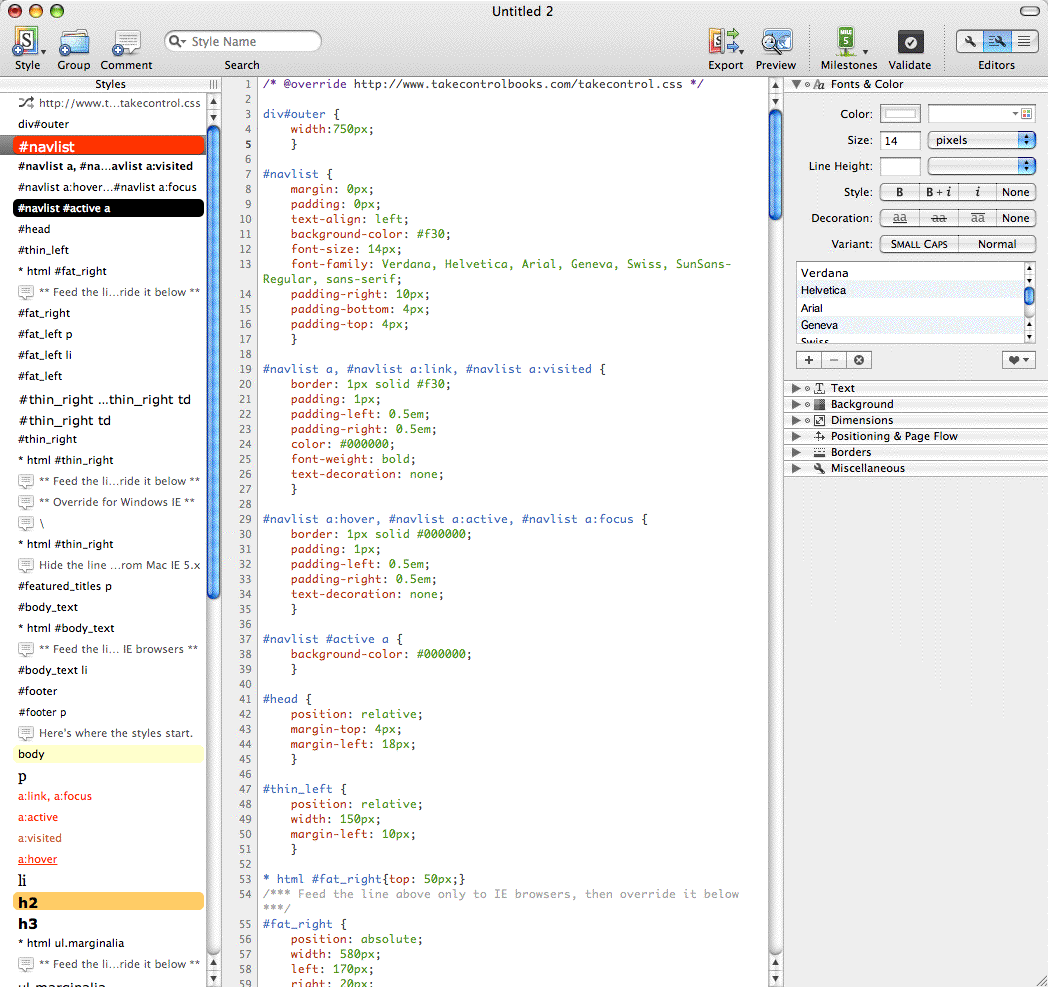
  As I said previously, don't assume that this is all that CSSEdit can
  do. It offers a nice interface for building CSS files without having
  to know all the myriad options. And it provides an elegant way of
  organizing and rearranging all the messy bits in your CSS file,
  making it much easier to read and understand for the future. If
  you're working with CSS, you owe it to yourself to take a look at
  this program. For novices like me, it makes CSS far more
  approachable, and I imagine it would enable experts to test and
  implement changes far more quickly than the traditional methods of
  working with static files.

<http://www.tidbits.com/resources/864/style-sheet-window.gif>

  CSSEdit 2 costs $30 and requires Mac OS X 10.4 or higher. There's a
  demo available as a free download that restricts saving to CSS files
  containing no more than 2,500 characters.


Take Control News/29-Jan-07
---------------------------
  by Adam C. Engst <[EMAIL PROTECTED]>
  article link: <http://db.tidbits.com/article/8837>

**How Old Is Your Most Recent Backup?** If you don't have a good
  answer to the title's question, we hope you'll check out the second
  edition of "Take Control of Mac OS X Backups," by Joe Kissell, since
  it explains how to set up, use, and restore from a backup system
  that fits your budget and lifestyle.

<http://www.takecontrolbooks.com/backup-macosx.html?14@@!pt=TRK-0014-TB864-TCNEWS>

  We've thoroughly updated this new edition to cover current topics:
  what you should know before installing Windows on a Mac (and how to
  back up Windows-related files); expanded info on special cases like
  backing up photos and movies, backing up installed applications, and
  backing up while traveling; and a look at how Leopard's Time Machine
  might play into a backup strategy. It also now offers instructions
  on how to set up easy-to-use backups for a friend or relative and
  issues surrounding rolling your own backups with Unix command-line
  tools.

  You can also listen to a podcast of Joe talking about backups in a
  recent MacVoices interview.

<http://www.macvoices.com/wordpress/macvoices-728-joe-kissells-latest-updates-on-backing-up-your-mac>

  (We've sent email to owners of the first edition who asked to be
  notified of updates. Those who purchased after 01-Nov-06 can
  download the second edition for free; let us know if you didn't
  receive that message. If you bought the book before 01-Nov-06, click
  the Check for Updates button in your copy to receive a 50%
  discount.)


Hot Topics in TidBITS Talk/29-Jan-07
------------------------------------
  by TidBITS Staff <[EMAIL PROTECTED]>
  article link: <http://db.tidbits.com/article/8838>

**How to Google Earth** -- Tristan Engst's first TidBITS article
  generates its first TidBITS Talk thread filled with encouragement
  and well-wishes. (5 messages)

<http://emperor.tidbits.com/TidBITS/Talk/1111/>


**iPod vending machine** -- Yes, you can buy iPods and accessories
  from vending machines now. But can you get an iPod _and_ a candy
  bar? The pieces are all there, but no one has implemented that
  brilliant convergence... yet. (2 messages)

<http://emperor.tidbits.com/TidBITS/Talk/1112/>


**Using the Apple USB Modem** -- A reader runs into a problem where
  plugging in a flash drive or SD memory card via an IOGEAR USB port
  expander and memory card reader hangs up the connection established
  by the Apple USB Modem. (4 messages)

<http://emperor.tidbits.com/TidBITS/Talk/1113/>


**Ordering from (and selling on) Amazon** -- After noting an apparent
  drop in sales momentum for Joe Kissell's "Real World Mac Maintenance
  and Backups" at Amazon.com, readers discuss the online retailer's
  complex mosaic of storing and shipping inventory. (4 messages)

<http://emperor.tidbits.com/TidBITS/Talk/1114/>


**Parallels backwards?** Might a future version of Parallels Desktop
  be capable of running Mac OS X on non-Apple hardware? (5 messages)

<http://emperor.tidbits.com/TidBITS/Talk/1115/>


**Info-Mac CD 3rd Edition from 1993 for patent busting** -- A lawyer
  is looking for an old Info-Mac disc to establish prior use in a
  patent case. (5 messages)

<http://emperor.tidbits.com/TidBITS/Talk/1116/>


**iTunes audio plug-ins?** Is it possible to manipulate the output of
  music playback to mimic environments such as concert halls? An
  iTunes plug-in would seem to be the solution, but other software
  might be better suited. (3 messages)

<http://emperor.tidbits.com/TidBITS/Talk/1117/>


$$

This is TidBITS, a free weekly technology newsletter providing timely
news, insightful analysis, and in-depth reviews to the Macintosh and
Internet communities. Feel free to forward to friends; better still,
please ask them to subscribe!

Non-profit, non-commercial publications and Web sites may reprint or
link to articles if full credit is given. Others please contact us. We
do not guarantee accuracy of articles. Caveat lector. Publication,
product, and company names may be registered trademarks of their
companies. TidBITS ISSN 1090-7017.

Copyright 2007 TidBITS: Reuse governed by Creative Commons license.

Contact us at:    <[EMAIL PROTECTED]>
TidBITS Web site: <http://www.tidbits.com/>
License terms:    <http://www.tidbits.com/terms/>
Full text search: <http://www.tidbits.com/search/>
Subscriptions:    <http://www.tidbits.com/about/list.html>
Account help:     <http://www.tidbits.com/about/account-help.html>


--
If you want to unsubscribe or change your address, use this link
http://emperor.tidbits.com/webx?unsub@@.3c557dc4!u=306a67f9