TidBITS#888/16-Jul-07
=====================
  Issue link: <http://db.tidbits.com/issue/888>
  Where do you get your Mac-related news and information? Adam digs
  further into the results of the TidBITS 2007 Reader Survey and comes
  up with some surprising answers. Also in this issue, Brian Tanaka
  shares the secret of how he tracks his billable hours: OfficeTime.
  Rounding out the news, we note the releases of QuickTime 7.2, iTunes
  7.3.1, MacBook Pro EFI Firmware Update 1.3, Firmware Restoration CD
  1.3, Microsoft Office 2004 11.3.6, and a major update to "Take
  Control of Running Windows on a Mac." Lastly, if you're a new iPhone
  owner with a weak stomach, you may not want to watch the video of
  the device's losing battle with a high-powered blender.

Articles
    Apple Releases QuickTime 7.2, iTunes 7.3.1
    MacBook Pro EFI Firmware Update 1.3 Released
    Microsoft Office 2004 11.3.6 Addresses Security Issues
    An iPhone in a Blender?
    Track Project Time with OfficeTime
    TidBITS 2007 Reader Survey Results: News & Info Sources
    Take Control News/16-Jul-07
    Hot Topics in TidBITS Talk/16-Jul-07


------------ This issue of TidBITS sponsored in part by: --------------

* READERS LIKE YOU! Support TidBITS with a contribution today!
  <http://www.tidbits.com/about/support/contributors.html>
  Special thanks this week to David Alan Kurtz, Steve Meyer,
  John Hayden, and John Schultz for their generous support!

* SMALL DOG ELECTRONICS: TidBITS Exclusive for July 16 - July 30:
  BLACK 2.0 GHz Core 2 Duo MacBook, 2 GB RAM / 120 GB hard
  drive, SuperDrive/AP/BT, brand new, one-year warranty. Only
  $1379! Order yours today at <http://www.smalldog.com/tb/>

* GET FETCH 5 FOR FREE! Fetch Softworks makes Fetch, the original
  Macintosh FTP client, free for educational and charitable use.
  Fetch 5.2 includes WebView, FTPS, and droplet shortcuts.
  Apply today at <http://fetchsoftworks.com/edapply>!

* WebCrossing Neighbors Creates Private Social Networks
  Create a complete social network with your company or group's
  own look. Scalable, extensible and extremely customizable.
  Take a guided tour today <http://www.webcrossing.com/tour>

* MARK/SPACE, INC: New, from the makers of The Missing Sync, comes
  SyncTogether, a brand new app for syncing contacts, calendars,
  notes and more between multiple Macs and one or more user
  accounts. $49.95 for 3 Macs. <http://www.markspace.com/bits>

* Microsoft's MacBU: Supporting Mac users with Office 2004.
  Supporting the Mac community through tech support newsgroups,
  user group appearances, our new team blog, and more!
  Check out our team blog at <http://blogs.msdn.com/macmojo/>

* VMware Fusion. Say goodbye to the Windows desktop and run any PC
  program on your Intel-based Mac just as though it were a Mac app.
  50% off for a limited time - Only $39.99 - Buy Online Now!
  <http://www.tidbits.com/about/support/vmware-fusion.html>

---------- Help support TidBITS by supporting our sponsors ------------


Apple Releases QuickTime 7.2, iTunes 7.3.1
------------------------------------------
  by Jeff Carlson <[EMAIL PROTECTED]>
  article link: <http://db.tidbits.com/article/9073>

  Apple has updated QuickTime and iTunes, resolving issues with the
  H.264 video codec and fixing bugs. The primary changes in QuickTime
  7.2 are fixes for several potential security vulnerabilities related
  to playback of malformed movie files or visiting maliciously crafted
  Web sites. However, more interesting is one other long-overdue
  change: movies can now be viewed full screen in QuickTime Player, a
  feature previously available only after purchasing a QuickTime Pro
  license. This update also adds two export formats: Movie to iPhone
  creates an .m4v video, while Movie to iPhone (Cellular) creates a
  smaller .3gp video. QuickTime 7.2 also rolls in unspecified updates
  to the H.264 codec and other bug fixes. It's available via Software
  Update or as stand-alone downloads for Mac (a 51.4 MB download) or
  Windows (a 19.3 MB download).

<http://docs.info.apple.com/article.html?artnum=305947>
<http://www.apple.com/support/downloads/quicktime72formac.html>
<http://www.apple.com/support/downloads/quicktime72forwindows.html>

  iTunes 7.3.1, according to Apple, "addresses a minor problem with
  iTunes 7.3 accessing the iTunes Library." As such, the new version
  rebuilds your library, so it's a good idea to make sure you have a
  recent backup before you update. iTunes 7.3.1 is available for Mac
  (a 33.8 MB download) or Windows (a 47.6 MB download).

<http://www.apple.com/support/downloads/itunes731formac.html>
<http://www.apple.com/support/downloads/itunes731forwindows.html>

  There has been discussion in TidBITS Talk of these updates causing
  problems with Microsoft Office 2004 and some other applications that
  rely on Mac OS X's Rosetta translation environment for PowerPC-based
  applications running on Intel-based Macs. From what we can tell
  based on a discussion at Apple's site and from MacFixIt reports, the
  problem relates to update_prebinding failing to run properly during
  the update process. Once update_prebinding has been run successfully
  by typing "sudo update_prebinding" in Terminal or by reapplying the
  Mac OS X 10.4.10 combo updater, all should be well unless Java SE
  6.0 Release 1 Developer Preview 6 has also been installed; it must
  be uninstalled according to the directions at MacFixIt before
  running update_prebinding.

<http://emperor.tidbits.com/TidBITS/Talk/1377/>
<http://discussions.apple.com/thread.jspa?threadID=1039074&start=0&tstart=0>
<http://www.macfixit.com/article.php?story=20070713094450677>
<http://www.apple.com/downloads/macosx/apple/macosx_updates/macosx10410comboupdatev11intel.html>


MacBook Pro EFI Firmware Update 1.3 Released
--------------------------------------------
  by Jeff Carlson <[EMAIL PROTECTED]>
  article link: <http://db.tidbits.com/article/9077>

  Apple has released MacBook Pro EFI Firmware Update 1.3, which "fixes
  a display issue on 2.2/2.4 GHz 15-inch MacBook Pro models,"
  according to the minimal text on Apple's download page. MacFixIt
  speculates that this update fixes a color distortion problem
  introduced in the earlier MacBook Pro Software Update 1.0, which is
  required prior to applying the latest firmware update.

<http://www.apple.com/support/downloads/macbookproefifirmwareupdate13.html>
<http://www.macfixit.com/article.php?story=20070713091025918>
<http://www.apple.com/support/downloads/macbookprosoftwareupdate10.html>

  Apple also released Firmware Restoration CD 1.3. This utility (a
  22.5 MB download) burns a CD that can be used to start up and repair
  an Intel-based Mac that won't work due to an interrupted or failed
  firmware update. The CD won't restore a machine's firmware if a
  firmware update was successfully applied. Needless to say, download
  the utility and burn a CD before applying the MacBook Pro EFI
  Firmware Update.

<http://www.apple.com/support/downloads/firmwarerestorationcd13.html>


Microsoft Office 2004 11.3.6 Addresses Security Issues
------------------------------------------------------
  by Jeff Carlson <[EMAIL PROTECTED]>
  article link: <http://db.tidbits.com/article/9078>

  Microsoft has released Microsoft Office 2004 for Mac 11.3.6 Update,
  which addresses vulnerabilities in Excel and fixes a bug in
  Entourage. In Excel, an attacker could "overwrite the contents of
  your computer's memory with malicious code," according to Microsoft.
  The Entourage issue concerns data loss when using Microsoft Exchange
  public folders. Additionally, the Japanese postal code dictionary
  has been updated. The update, which can be applied most easily via
  the Microsoft AutoUpdate utility, is a 15.4 MB download and requires
  the Microsoft Office 2004 for Mac 11.3.5 Update to have been applied
  previously.

<http://www.microsoft.com/mac/downloads.aspx?pid=download&location=/mac/download/Office2004/Office2004_1136.xml>
<http://go.microsoft.com/fwlink/?LinkId=93157>


An iPhone in a Blender?
-----------------------
  by Adam C. Engst <[EMAIL PROTECTED]>
  article link: <http://db.tidbits.com/article/9074>

  This is just painful to watch. There's a company called Blendtec
  that makes a high-powered blender. To showcase its capabilities,
  they've done a number of hilarious "Will It Blend?" videos that
  feature a wide variety of objects being subjected to blending.
  They've destroyed a can of fake cheese, old toilet components, and
  even a garden hose. But for their latest spin de force, Blendtec put
  an iPhone into their demon blender, and... well, you'll just have to
  see what happens for yourself. Don't try this at home, not that any
  sane person would.

<http://www.willitblend.com/videos.aspx?type=unsafe&video=iphone>


Track Project Time with OfficeTime
----------------------------------
  by Brian Tanaka <[EMAIL PROTECTED]>
  article link: <http://db.tidbits.com/article/9019>

  I'm forever juggling multiple projects. Naturally, I must track the
  hours I spend on each project so I can bill my clients, and over the
  years I've tried a variety of time tracking applications. A few
  months ago, I switched to OfficeTime, and I think it's the best of
  the bunch I've tried.

<http://www.officetime.net/>

  OfficeTime will benefit anyone who tracks time spent on multiple
  activities. It's simple enough to be quick to learn, yet it has
  substantial features that make it truly useful. In day-to-day use,
  it always seems to do just what I want it to do - no more and no
  less.

  Sessions - periods of time you track - are organized by user-defined
  project names. For example, if you have three clients, you could
  have a project for each of them. In reports, sessions are neatly
  grouped within their respective projects. Each session can also
  optionally belong to a category. Categories are types of tasks you
  perform, such as Writing or Programming, and can have a default
  dollar-per-hour rate.

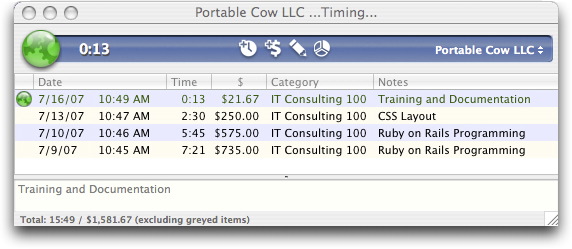
  Timing is simple. The QuickStart menu lists all your projects, and
  the first 10 are bound to keyboard shortcuts Command-0 through
  Command-9. To begin timing, pick a project off the list, use the
  keyboard shortcut, or select a project from the pop-up menu in the
  main OfficeTime window. All fields in the timer window, such as
  elapsed time, are editable on the fly. Each session also contains a
  Notes field. Pausing, stopping, starting, and re-starting the timer
  can all be done from either the keyboard or a menu.

<http://www.tidbits.com/resources/2007-07/timer-window.jpg>

  Speaking of rates, though the rate is set by the default category
  (if one is defined) for each project, for each timed session you may
  choose a different category (and possibly a different rate), or you
  can even simply change the rate for the current session regardless
  of category. You can also change categories, define a new category,
  or not use a category at all. In other words, when you start a timed
  session, if you like the defaults, you're all set. If you don't, you
  can change whatever aspects you don't like, right where you are,
  while the timer ticks away. This is an example of one of
  OfficeTime's strengths: it employs logical conventions to make basic
  use fast and simple, and yet it allows a refreshing degree of
  flexibility as you work.

  Another especially useful feature is the capability to switch
  between projects rapidly. If, for example, I'm in the middle of a
  project, and something comes up that forces me to work on another
  project for 15 minutes, I simply change project timers quickly and
  easily.

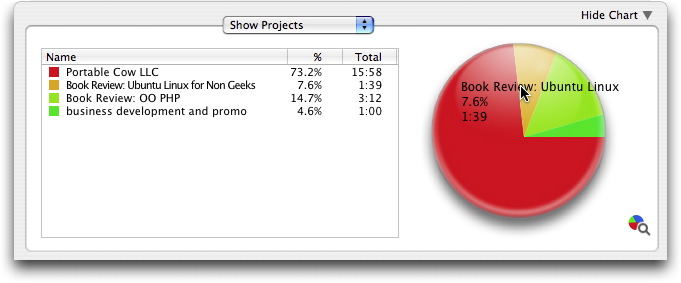
  The necessary reporting and graphing features are done well. For
  example, if I want to see how I've spent my time during the current
  day and how much money I've earned, I simply press Command-T. A
  quick report appears that shows all the projects I've worked on, how
  long I worked on them, and how much money I've earned - both by
  project and total for the day. Plus, the report includes a nice
  color-coded pie chart that shows at a glance that, for instance, I
  spent too much time today reviewing my Getting Things Done lists and
  not enough time writing code!

<http://www.tidbits.com/resources/2007-07/pie-chart.jpg>

  Generating a new report with a different time period or with data
  from one particular project or category requires simply choosing a
  few options from the pop-up menus. There are also keyboard shortcuts
  for common time periods: today, last week, this month, and so on.
  You can quickly see how much time you've spent on the currently
  timed project over the entire life of the project by simply pressing
  Command-R.

  When you reach the end of your billing cycle, you can generate
  invoices in OfficeTime, or simply copy and paste data from the
  OfficeTime reports into an email message or your own billing
  template in another application.

  OfficeTime synchronizes with iCal and Address Book, is a universal
  binary, and costs $40. It requires Mac OS X 10.4 or later. A fully
  functional demo version is available as a 9.5 MB download and
  expires after 21 days.

<http://www.officetime.net/download.html>

  [Brian Tanaka is a freelance writer, IT consultant, Web developer,
  and the author of "Take Control of Permissions in Mac OS X."]

<http://briantanaka.com/>
<http://www.takecontrolbooks.com/permissions-macosx.html?14@@!pt=TB888>


TidBITS 2007 Reader Survey Results: News & Info Sources
-------------------------------------------------------
  by Adam C. Engst <[EMAIL PROTECTED]>
  article link: <http://db.tidbits.com/article/9075>

  We've been busy with other things, but we haven't forgotten the
  results of our recent reader survey, which garnered responses from
  over 3,500 people. In the first installment (see "TidBITS 2007
  Reader Survey Results: Who Are You?," 2007-03-12), I looked at what
  the results said about who reads TidBITS. This time I'm instead
  focusing on how our readers acquire technical news and information.
  I have a few charts that illustrate the numbers, which you can view
  either by visiting the linked graphic or just reading this article
  on our Web site, where graphics now appear inline within the
  article.

<http://emperor.tidbits.com/webx?displaySurvey@@.3c8dc29b>
<http://db.tidbits.com/article/8904>

  In the survey, we asked about the ways in which you acquire Mac- and
  tech-related news and information. The table below summarizes the
  answers.

    News Source          (1)  (2)  (3)  (4)   (5)     Rank
    ------------------------------------------------------
    Email newsletters    48   119  363  687  2177    15008
    Web sites            52   215  706  949  1422    13506
    Personal email      255   732  825  638   820    10846
    Print magazines     541   738  746  598   638     9837
    Discussion forums   589   918  707  498   501     9043
    In-person           753   974  766  419   291     8130
    RSS feeds          1261   641  350  226   705     8022
    Aggregator sites   1357   665  486  268   345     6942
    Podcasts           1383   799  415  285   267     6701
    Personal blogs     1294   871  527  289   151     6528


  First, some notes. Remember, 1 is "Never," 2 is "Infrequently," 3 is
  "Sometimes," 4 is "Often," and 5 is "Regularly." What that means is
  that email newsletters are ignored entirely by 48 people, read
  infrequently by 119, read sometimes by 363, read often by 687, and
  read regularly by 2,177.

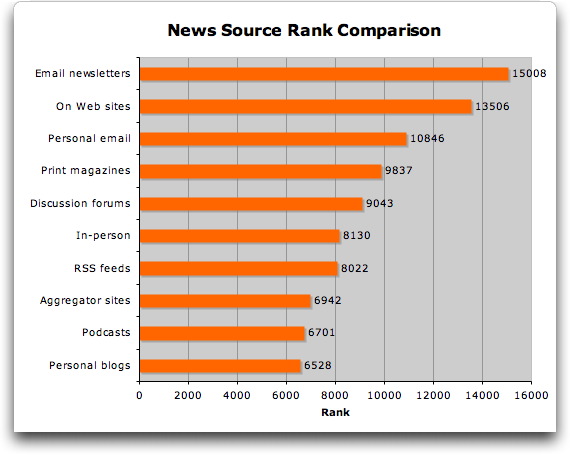
  The last column, "Rank," is a calculation of the column number (1
  through 5) multiplied by the number of votes in each column, all
  added together to provide a single method of comparison. The goal
  with Rank is to work around the problem that it's difficult to scan
  the middle rows and make sense of the fact that nearly as many
  people said they never read discussion forums as those who read them
  often or regularly.

  I've sorted this table and the corresponding chart by Rank, making
  it easy to see, in a bit of a tautology, that TidBITS readers, most
  of whom read TidBITS in email, get news via email newsletters
  frequently. Even without TidBITS itself skewing those results, email
  newsletters would likely be popular with our readers, many of whom
  have been using the Internet for a long time and would thus have
  stuck with habits formed before blogs, podcasts, and RSS were even
  conceived of. TidBITS readers also rely heavily on going to Web
  sites directly for information - sites like Macworld and MacFixIt
  are examples of sites you visit directly for news and information.

<http://www.tidbits.com/resources/2007-07/rank-comparison.jpg>
<http://www.macworld.com/>
<http://www.macfixit.com/>

  To my mind, what's most telling about these results are the
  extremes; the people who never use a particular news source versus
  those who use one regularly. On the other end of the spectrum from
  email and direct visits to Web sites, we can see that TidBITS
  readers for the most part seldom rely on blogs, podcasts, or
  aggregator sites for their information.

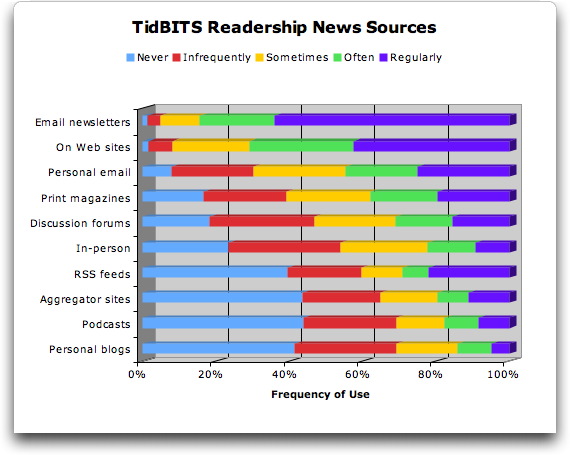
  There's one significant anomaly that becomes obvious when the data
  is visualized as a stacked bar chart. In terms of pure rank, RSS
  ends up fairly low, but as you can see in the chart, that's because
  RSS seems to be an all-or-nothing proposition. Lots of people never
  use RSS or do so only infrequently, and only a handful use it
  sometimes or often, but a rather large number of people rely on it
  regularly.

<http://www.tidbits.com/resources/2007-07/rank-components.jpg>

  With that data in mind, I want to look at each of these methods of
  acquiring news, in terms of the user audience for whom each method
  makes sense, and the goals in using each method.


**Email Newsletters** -- For many of us who have been on the Internet
  for years, email newsletters remain the best way to receive news and
  information. They're mixed in with other messages, making it easy to
  read through as you deal with other mail. Plus, there's a comfort in
  knowing that anything received and stored in your email archive can
  be found later. Email clients generally make it easy to read
  everything that appears.

  But all these advantages work against email newsletters too. Many
  people are unsubscribing from mailing lists of all types in an
  effort to reduce email overload created by too many messages and the
  ever-increasing influx of spam. And while email clients make it easy
  to read mail, they seldom aid in skimming the contents of messages
  that you may not want to read in their entirety. My understanding is
  that while younger people always have email addresses, they're much
  less likely to use them in favor of comment and discussion features
  in walled garden Web sites like MySpace or Facebook.

<http://www.myspace.com/>
<http://www.facebook.com/>

  From a publisher's point of view, I think email newsletters are
  incredibly valuable, because if someone invites you to contact them
  regularly via email, that's a far more powerful communication
  channel than anything else. But managing a large mailing list,
  handling bounces, and dealing with subscription problems takes a
  non-trivial amount of time and effort, and once you've sent
  something out in email, you can't update it or fix mistakes, as is
  possible with Web-based publications.


**Web Sites** -- TidBITS readers go directly to Web sites for
  information nearly as much as they rely on email newsletters, which
  makes sense, since I suspect TidBITS readers are likely to have
  established a collection of must-visit sites to be read regularly.
  (I do this via a workspace in OmniWeb and by Command-clicking a
  folder of bookmarks in Safari to open numerous sites in tabs.) With
  many sites, the desired information appears on the initially loaded
  page, eliminating any need for further navigation. When you're
  looking for headlines, a Web site provides them in their original
  context and intended presentation.

  In short, a Web site remains the core of any publishing project,
  although to read Web sites effectively requires that you focus in on
  a relatively small set that you can digest in your available time.


**Personal Email** -- I included personal email as a method of
  gathering news and information largely because it's how I pick up on
  a large amount of what's going on. It's essentially electronic
  word-of-mouth, and works well because there's nothing better than
  another person for evaluating what might interest you. In other
  words, using your actual friends and colleagues (not just other
  Internet users, as is done by social bookmarking sites like Digg and
  del.ico.us) as editors is perhaps the most effective way to discover
  interesting news.

<http://www.digg.com/>
<http://del.icio.us/>

  The problem, of course, is that you must have a large personal
  network of people who know what interests you and have sufficient
  incentive to alert you to important articles. Many people don't have
  such a network, and thus must rely on other methods of discovering
  what's hot.


**Print Publications** -- Of course, print magazines and newspapers
  have long selected the news that most people read, and they remain
  unparalleled at that role, if only because they can hire
  professional editors who spend their lives determining what is and
  is not interesting. The downside is that print publications are
  generally not free - as with Internet-based content - and usually
  have advertising in addition to the subscription fees that offset
  the cost of printing and distribution.

  The fact that TidBITS readers rely heavily on print publications
  fits with the demographics of the audience - older people are more
  likely to have established trusted sources of information, to have
  disposable income to spend on subscriptions, and to prefer reading
  on paper.

  That said, print is a tough world, and we're seeing publications
  that competed largely on timeliness moving entirely online in favor
  of a mixed print/online model. In my mind, the only way a print
  publication is likely to succeed in today's world is if it's
  publishing sufficiently in-depth content that readers want to devote
  all their attention to it in an offline environment. I could read
  The New Yorker online, but I far prefer to focus on its lengthy
  articles (nicely interspersed with cartoons) on paper while sitting
  on the couch.

<http://www.newyorker.com/>


**Discussion Forums** -- I was initially a little confused that people
  rated discussion forums as highly as they did, until I considered
  that a discussion forum provides a large network of like-minded
  people. Sending a link to a bunch of friends individually requires
  effort and knowing lots of people. But on a discussion forum, it's
  easy both to inform lots of people about interesting events quickly,
  and, on the consumption side, to read what others in the group think
  is interesting.

  Relying on discussions in a mailing list or Web forum for news
  probably isn't an effective way to learn what's going on overall,
  but if you want to keep up on the discussions for other
  information-gathering reasons, the news that seeps in is likely
  highly topical and timely.


**In-person** -- Very few of our respondents regularly get their news
  and information in person, which shouldn't be surprising, if only
  because we're likely to spend most of our time with people who have
  roughly the same sources of information that we do. However, this
  method of news acquisition ranked as highly as it did due to large
  numbers of people saying that they get information in-person
  infrequently or sometimes - perhaps at Macintosh user group
  meetings. In other words, talking with friends, relatives, and
  colleagues can provides the occasional bit of information, but few
  people rely heavily on word-of-mouth these days.


**RSS Feeds** -- As I said before, TidBITS readers either use RSS
  (Really Simple Syndication) heavily or hardly at all - there's no
  in-between. (And to answer the people who said they didn't even know
  what RSS is, it's a technology that any Web-enabled site can use to
  publish frequently updated information in a manner that many RSS
  programs, including Safari and the popular NetNewsWire, can present
  in a coherent, easily scanned display.)

<http://en.wikipedia.org/wiki/RSS>
<http://www.newsgator.com/Individuals/NetNewsWire/>

  I've been thinking about the bifurcation of the RSS numbers, and I
  think what's going on is that signing up to receive an email
  newsletter is in essence an informal agreement that you'll read
  whatever is sent. RSS embodies the other extreme, where your goal is
  to _avoid_ reading as much as possible. I've heard from a number of
  people who subscribe to an insane number of feeds - often several
  hundred - and when I ask how they find the time to read all that
  content, they usually admit that they seldom read more than a tiny
  proportion of what comes through. But what's important is that
  scanning all the headlines gives them a sense of what's happening
  with a minimal time commitment.

  As a result, I think RSS lends itself to use by specific professions
  and personality types. For instance, our editor Glenn Fleishman also
  runs a number of blogs related to Wi-Fi networking and other
  wireless technologies. To keep up with everything that's happening,
  it's important that he be able to scan a very large number of sites
  and publications with the understanding that most of what he sees
  won't interest him at all. Anyone who finds themselves needing to
  extract needles from haystacks will find RSS useful. Similarly,
  there are people who aren't so much looking for needles, but who
  need to know a very small amount about many different topics; if
  they discover that they need to know more, they'll dive in further.
  Politicians may fall into this category - even a local politician
  may find the quick RSS overview of local publications and blogs to
  be helpful in identifying areas that might become important.

  For many people, though, RSS isn't about either finding needles or
  getting the big picture for professional reasons. Instead, I think
  it meets a psychological need to feel informed, to feel as though
  you know what's happening in the world, or at least in some specific
  subset of the world. People who feel this need are the sort who used
  to read (or at least skim) the New York Times from front to back
  every day. Personally, I think this is a dangerous need in today's
  world, since the Internet can provide far more information - even
  just in headline form - than anyone can hope to absorb. But it's
  something that news junkies are dealing with now, and will have to
  continue to deal with in the future, because the amount of news
  available will continue to increase.


**Aggregator Sites** -- The fact that TidBITS readers don't use RSS
  much appears to carry over to aggregator sites such as MacSurfer and
  the new Apple Investor News, which is focused on business news
  related to Apple. These sites do a good job of collecting and
  presenting news headlines from elsewhere on the Web - often using
  RSS, in fact. I suspect the problem is the raw number of headlines,
  and just as with RSS, people can feel overwhelmed.

<http://www.macsurfer.com/>
<http://www.appleinvestornews.com/>

  These sites become useful primarily when the headlines they choose
  to collect and the way they present them happen to resonate with the
  type of information you want and how you consume it.


**Podcasts** -- Despite the hype of the last few years, podcasts have
  not made significant inroads with TidBITS readers as a way of
  acquiring news. Perhaps they're not sufficiently oriented toward
  news (though some certainly are, such as Your Mac Life and the
  MacNotables podcast Tonya and I participate in), or not sufficiently
  timely (few are updated as frequently as Web publications), or not
  sufficiently professional - personal blogs seem to fall into roughly
  the same boat.

<http://www.yourmaclifeshow.com/>
<http://www.macnotables.com/>

  I love podcasts, but frankly, not very many of them. It's not that
  most of them aren't good, but that listening to audio is far more
  time-consuming than reading, and I simply don't have time to keep up
  with many. Those who must suffer through long commutes or frequent
  travel, or who like to listen to iPods while exercising may have
  more time that can be spent listening to podcasts.


**Personal Blogs** -- Bringing up the bottom of the list are personal
  blogs; it appears that the TidBITS readership doesn't participate in
  a big way in the blogosphere, at least when it comes to news. I
  can't say that I'm particularly taken aback by this result, since
  while individual blog posts may provide interesting insight into an
  event, more often than not, they merely point to an original article
  on another site. So unless you find a blogger whose interests
  parallel yours, and who is particularly effective at noticing those
  events that you want to read about, relying on a personal blog would
  seem a relatively haphazard approach to learning about what's
  happening.


**Other** -- In the event that we missed entire ways that people
  obtain Mac-related news and information, our survey solicited reader
  suggestions as well. Most suggestions were specific examples of a
  method of obtaining news, but a few bona fide trends emerged.

* Books. Because we were thinking about frequently updated news and
  information, we didn't include books among the answers, but readers
  said that books remain a significant way in which they learn more
  about the Mac. Can't argue with that!

* Conferences. Similarly, we didn't think about conferences, which
  generally occur too infrequently to be useful from a news
  perspective. But of course, conferences are a great source of less
  timely information, and Macworld Expo in particular was cited as a
  key source.

* Search engines. Although search engines are really just a way of
  finding particular Web sites, enough people mentioned using Google
  to search for Mac-related information that I decided to include it
  here. With a search engine, you're waiting to look for information
  until you need it, rather than letting it come to you, but that's a
  totally legitimate (and perhaps more sane) method of learning.

* Apple Stores. Lastly, quite a few people mentioned that they learn
  at Apple Stores, either in the classes or from staffers at the
  Genius Bars. Although that would seem to fall into the "In-person"
  category, it feels sufficiently different to be called out. The fact
  that Apple Stores have turned into a useful informational resource
  is impressive, and Apple deserves credit for making them work beyond
  the realm of commerce.


**Future Analysis** -- That's it for this time; as I continue to pore
  through the results of the reader survey I'll write more about the
  specific places you acquire your information, the kinds of articles
  you like in TidBITS, and what you'd like to see more of.


Take Control News/16-Jul-07
---------------------------
  by Adam C. Engst <[EMAIL PROTECTED]>
  article link: <http://db.tidbits.com/article/9076>

**Run Windows on a Mac with Up-to-Date Advice** -- We've just released
  version 2.5 of "Take Control of Running Windows on a Mac," bringing
  this essential 148-page book completely up-to-date. It's loaded with
  all the details you need to run Windows on a Mac successfully with
  Apple's Boot Camp 1.3 beta, Parallels Desktop 3.0, the release
  candidate of VMware Fusion, or the free public beta of VirtualBox.

<http://www.takecontrolbooks.com/windows-on-mac.html?14@@!pt=TRK-0034-TB888-TCNEWS>

  Written by best-selling author and TidBITS Senior Editor Joe
  Kissell, the book, which now covers both Windows XP and Vista, also
  includes real-world advice about installing Windows, dealing with
  tricky peripherals, sharing files between Windows and Mac OS X,
  backing up a Windows installation, avoiding Windows malware, and
  more. And, of course, for anyone just getting into virtualization,
  the $10-off coupon for Parallels Desktop 3.0 makes buying the $10
  book a no-brainer.

  If you already own "Take Control of Running Windows on a Mac,"
  please note that we're offering a free update to anyone who bought
  it after 01-Sep-06, and a 25% discount to those who purchased before
  that. We've sent email with the necessary links to those people;
  drop us a note if you missed yours.


Hot Topics in TidBITS Talk/16-Jul-07
------------------------------------
  by TidBITS Staff <[EMAIL PROTECTED]>
  article link: <http://db.tidbits.com/article/9079>

**State of Mac Support for GPS** -- Following Adam's review of GPS
  devices last year, what's the current state of the art? And more
  importantly, how is the Mac support? (9 messages)

<http://emperor.tidbits.com/TidBITS/Talk/1366/>


**Best FM transmitter** -- There are lots of devices designed to play
  music from an iPod over your car's stereo system, but how do they
  stack up? And is a wired cassette adapter a better alternative? (12
  messages)

<http://emperor.tidbits.com/TidBITS/Talk/1367/>


**PDF "resolution"** -- A PDF file is resolution-independent, but the
  quality of the imagery can vary if it includes bitmapped pictures
  (such as JPEG photos, for example). (8 messages)

<http://emperor.tidbits.com/TidBITS/Talk/1368/>


**FTC abandons net neutrality** -- The Federal Trade Commission in the
  United States has decided to abandon the notion of net neutrality,
  which could open the door to variable pricing for delivering
  Internet content. (1 message)

<http://emperor.tidbits.com/TidBITS/Talk/1369/>


**Open Message AppleScript for Mail** -- If you want Apple's Mail
  application to open messages in separate windows based on a rule,
  download this collection of AppleScript scripts. (1 message)

<http://emperor.tidbits.com/TidBITS/Talk/1372/>


**Trading In-Home Wi-Fi for Powerline Networking** -- A reader shares
  his unhappy experiences with Powerline networking following Kevin
  van Haaren's article last week. (1 message)

<http://emperor.tidbits.com/TidBITS/Talk/1373/>


**Apple "Proof of Purchase Coupons"** -- Just what is the use of the
  Proof of Purchase Coupons that come with Apple products? A few
  readers have used them in the past to get replacement system discs.
  (7 messages)

<http://emperor.tidbits.com/TidBITS/Talk/1375/>


**Jogging with your iPod in a Thunderstorm** -- Could jogging with an
  iPod have caused a man to be struck by lightning? Despite the
  contents of a medical report, some readers want more information
  before drawing a direct link. (6 messages)

<http://emperor.tidbits.com/TidBITS/Talk/1376/>


**Updaters cause problems for Office and other Rosetta apps** -- Some
  people experienced problems with applications that run under Rosetta
  on Intel-based Macs after updating to QuickTime 7.2 and iTunes
  7.3.1. Could Java be a cause? (4 messages)

<http://emperor.tidbits.com/TidBITS/Talk/1377/>


**ProCare** -- Recent changes to Apple's ProCare support program are
  leaving some users unhappy. (2 messages)

<http://emperor.tidbits.com/TidBITS/Talk/1378/>


$$

This is TidBITS, a free weekly technology newsletter providing timely
news, insightful analysis, and in-depth reviews to the Macintosh and
Internet communities. Feel free to forward to friends; better still,
please ask them to subscribe!

Non-profit, non-commercial publications and Web sites may reprint or
link to articles if full credit is given. Others please contact us. We
do not guarantee accuracy of articles. Caveat lector. Publication,
product, and company names may be registered trademarks of their
companies. TidBITS ISSN 1090-7017.

Copyright 2007 TidBITS: Reuse governed by Creative Commons license.

Contact us at:    <[EMAIL PROTECTED]>
TidBITS Web site: <http://www.tidbits.com/>
License terms:    <http://www.tidbits.com/terms/>
Full text search: <http://www.tidbits.com/search/>
Subscriptions:    <http://www.tidbits.com/about/list.html>
Account help:     <http://www.tidbits.com/about/account-help.html>


--
If you want to unsubscribe or change your address, use this link
http://emperor.tidbits.com/webx?unsub@@.3c557dc4!u=306a67f9