TidBITS#891/06-Aug-07
=====================
  Issue link: <http://db.tidbits.com/issue/891>
  Apple is announcing new products this week, but not until Tuesday
  (be sure to check the TidBITS site for full coverage). In the
  meantime, we have a feast of Mac news and features, starting with
  Matt Neuburg's look at why you may want to spend more time with the
  new LaunchBar 4.3. Adam finally unloads some old hardware using
  Freecycle, and Glenn Fleishman was last seen playing Bejeweled on
  his iPhone, oblivious to all else. We also note Microsoft Office
  2008 living up to its name by slipping until January, but at the
  same time the company released a beta of Remote Desktop Connection
  (RDC) Client 2.0 and a new beta of its XML converters for Windows
  Office 2007 files. A heap of software updates also passed our desks
  this week: Security Update 2007-007, Safari 3.0.3 beta, iPhone
  1.0.1, AirPort Extreme Update 2007-004, and iTunes 7.3.2 from Apple;
  Fusion 1.0 from VMware; The Missing Sync for Windows Mobile 4.0 from
  Mark/Space; and BBEdit 8.7 from Bare Bones. Lastly, it has finally
  happened: Fake Steve Jobs has been unmasked.

Articles
    Apple Releases Mac OS X, Safari 3, and iPhone Security Updates
    AirPort Extreme Update 2007-004 Released
    iTunes 7.3.2 Fixes Unspecified Bugs
    VMware Announces Fusion 1.0 Release
    Microsoft Office 2008 Slips to January
    Microsoft Releases RDC and XML Converter Betas
    BBEdit 8.7 Bulks Up
    Missing Sync 4.0 Supports Latest Windows Mobile Devices
    Fake Steve Jobs Finally Unmasked
    PopCap Pops iPhone Productivity
    Curing Your LaunchBar Addiction
    Freecycle: Disposing of Good Old Stuff
    Hot Topics in TidBITS Talk/06-Aug-07


------------ This issue of TidBITS sponsored in part by: --------------

* READERS LIKE YOU! Support TidBITS with a contribution today!
  <http://www.tidbits.com/about/support/contributors.html>
  Special thanks this week to Lawrence Orr, Alia Michaels,
  Norman Cohen, and Harvey Cain for their generous support!

* FETCH SOFTWORKS: Fetch 5.2 makes FTP and SFTP easy!
  Upload, download, mirror, and manage your Web site. Dozens of
  new features to make file transfers easier and more reliable.
  Get your free trial version at <http://fetchsoftworks.com/>!

* WebCrossing Neighbors Creates Private Social Networks
  Create a complete social network with your company or group's
  own look. Scalable, extensible and extremely customizable.
  Take a guided tour today <http://www.webcrossing.com/tour>

* Bare Bones Software's BBEdit 8.6 -- Latest version offers a
  major interface overhaul, new prefs, text clippings, improved
  JavaScript, new Ruby/SQL/YAML/Markdown support, code folding.
  Over 160 new features in all! <http://www.barebones.com/>.

* MARK/SPACE, INC: The Missing Sync provides the very best in
  synchronization for Mac users with BlackBerry, Palm OS, or
  Windows Mobile devices. Integrates with Address Book, iCal,
  Entourage, iPhoto, and iTunes. <http://www.markspace.com/bits>

* Microsoft's MacBU: Supporting Mac users with Office 2004.
  Supporting the Mac community through tech support newsgroups,
  user group appearances, our new team blog, and more!
  Check out our team blog at <http://blogs.msdn.com/macmojo/>

* VMware Fusion. Say goodbye to the Windows desktop and run any PC
  program on your Intel-based Mac just as though it were a Mac app.
  $20 rebate offer through 31-Dec-07 for filling out an online survey.
  Visit: <http://www.tidbits.com/about/support/vmware-fusion.html>

* New Parallels Desktop 3.0: Run Windows on your Mac natively!
  We erased the border between the Windows and Mac worlds. 10% Off
  Upgrade! <http://www.tidbits.com/about/support/parallels-upgrd.html>
  $10 Off New! <http://www.tidbits.com/about/support/parallels.html>

---------- Help support TidBITS by supporting our sponsors ------------


Apple Releases Mac OS X, Safari 3, and iPhone Security Updates
--------------------------------------------------------------
  by Adam C. Engst <[EMAIL PROTECTED]>
  article link: <http://db.tidbits.com/article/9095>

  Apple has released a trio of security updates to block a variety of
  possible malicious actions that could compromise the security of
  your Mac or your iPhone.

  Security Update 2007-007 could be nicknamed the James Bond release,
  both for its version number and for the number of now-blocked
  exploits that involve "enticing the user" to perform some seemingly
  innocuous task like visiting a Web page, clicking an FTP URL,
  opening a PDF file, or (perhaps this isn't so innocuous) running
  zgrep. Components of Mac OS X that are updated include bzip2,
  CFNetwork, CoreAudio, cscope, gnuzip, iChat, Kerberos,
  mDNSResponder, PDFKit, PHP, QuartzComposer, Samba, SquirrelMail,
  Tomcat, WebCore, and WebKit (after reading that list, I'm shaken,
  not stirred). See Apple's site for full details. The easiest way to
  get Security Update 2007-007 is via Software Update, but stand-alone
  downloads are available for Mac OS X 10.3.9 (48.7 MB), Mac OS X
  Server 10.3.9 (63.3 MB), Mac OS X 10.4.10 for PowerPC-based Macs
  (14.2 MB), Mac OS X 10.4.10 for Intel-based Macs (25.7 MB), Mac OS X
  Server 10.4.10 for PowerPC-based Macs (23.8 MB), and Mac OS X Server
  10.4.10 for Intel-based Macs (35.3 MB).

<http://docs.info.apple.com/article.html?artnum=306172>
<http://www.apple.com/support/downloads/securityupdate20070071039.html>
<http://www.apple.com/support/downloads/securityupdate20070071039server.html>
<http://www.apple.com/support/downloads/securityupdate200700710410ppc.html>
<http://www.apple.com/support/downloads/securityupdate200700710410universal.html>
<http://www.apple.com/support/downloads/securityupdate200700710410serverppc.html>
<http://www.apple.com/support/downloads/securityupdate200700710410serveruniversal.html>

  Safari 3 Beta Update 3.0.3 addresses four exploits for Windows,
  three of which also apply to the Mac version of Safari 3 and to the
  WebCore and WebKit components of Mac OS X that are used by earlier
  versions of Safari and many other applications (Security Update
  2007-007 includes the fixes for those not running Safari 3). The
  fixes are for the usual things - bad guys could cause Safari to
  crash, lure you to a spoofed Web site, or execute arbitrary code.
  There's no reason to think any of this has ever happened in the
  wild, but there's also no reason to avoid this update, given that
  Safari 3 is still in beta anyway and can only improve. It's unclear
  if there are any changes in this update that aren't
  security-related. The update is available via Software Update or as
  a 14 MB download from Apple's Safari page.

<http://docs.info.apple.com/article.html?artnum=306174>
<http://www.apple.com/safari/download/>

  Lastly, the iPhone sees its first software update with iPhone v1.0.1
  Update. The major changes revolve around security related to
  browsing Web pages with the iPhone's version of Safari. In fact, two
  of the four fixes in iPhone v1.0.1 Update are also in Security
  Update 2007-007 and Safari 3 Beta Update 3.0.3, emphasizing the
  shared code between Mac OS X and the iPhone.

<http://docs.info.apple.com/article.html?artnum=306173>

  A few undocumented feature modifications crept into this release,
  too. The Favorites list for the Phone now supports up to 50 contacts
  instead of 20; you can automatically BCC yourself in the Mail
  application; and support for more speakers and other accessories
  developed for the iPod has been added.

<http://mossblog.allthingsd.com/20070803/secret-new-iphone-features/>

  Note that this update is available only through iTunes, as with iPod
  updates. iTunes will download it automatically sometime within the
  next week and present it as an option for you to install the next
  time you sync; if you want to install it manually, use the Check for
  Updates button or menu item in iTunes. To verify that the update has
  occurred, navigate in the iPhone to Settings > General > About and
  look for version "1.0.1 (1C25)".


AirPort Extreme Update 2007-004 Released
----------------------------------------
  by Adam C. Engst <[EMAIL PROTECTED]>
  article link: <http://db.tidbits.com/article/9096>

  Feh! Other than the fact that AirPort Extreme Update 2007-004 is
  available for Intel-based MacBooks, MacBook Pros, and Mac minis;
  that it "improves the reliability of AirPort connections," and that
  it's available via Software Update or as a 745K download, Apple
  isn't saying anything interesting. Oh, it also reportedly requires
  Mac OS X 10.4.10, and is available in English, German, French, and
  Japanese.

<http://www.apple.com/support/downloads/airportextremeupdate2007004.html>


iTunes 7.3.2 Fixes Unspecified Bugs
-----------------------------------
  by Adam C. Engst <[EMAIL PROTECTED]>
  article link: <http://db.tidbits.com/article/9106>

  Apple has released iTunes 7.3.2, saying only that the update
  "provides bug fixes to improve stability and performance," although
  iPhone Atlas is speculating that there are iPhone-related changes
  based on which files have been modified. The update is available via
  Software Update as a 34 MB download or from Apple's iTunes download
  page. MacFixIt is reporting the usual spate of odd behaviors that
  follow any update, likely related to some form of local file
  corruption, so it's worth making sure you have a backup of your
  iTunes Library before updating.

<http://www.iphoneatlas.com/2007/08/02/itunes-732-appears-to-include-iphone-related-bug-fixes/>
<http://www.apple.com/itunes/download/>
<http://www.macfixit.com/>


VMware Announces Fusion 1.0 Release
-----------------------------------
  by Joe Kissell <[EMAIL PROTECTED]>
  article link: <http://db.tidbits.com/article/9099>

  VMware has announced that after seven months of beta testing, Fusion
  version 1.0 will ship today, 06-Aug-07. Fusion is VMware's
  virtualization software that enables Intel-based Macs to run Windows
  alongside Mac OS X; it competes closely with Parallels Desktop for
  Mac.

<http://www.vmware.com/products/fusion/>
<http://www.parallels.com/en/products/desktop/>

  Among Fusion's notable features are Unity, a mode in which windows
  from Windows applications intermingle with windows from Mac
  applications - including full support for Exposé and minimizing
  windows to the Dock; support for 64-bit guest operating systems (if
  your Mac has a 64-bit processor); multiple virtual processors for
  Windows applications that require them; and the capability to run
  virtual appliances (packages that contain one or more pre-configured
  applications, along with an operating system) from VMware's Virtual
  Appliance Marketplace.

  Some of the known issues in Release Candidate 1 of Fusion still
  exist. For example, when using Fusion to run a copy of Windows Vista
  installed under Boot Camp, you must reactivate Windows each time you
  switch between Boot Camp and Fusion. VMware plans to address this
  and other problems in future releases. Fusion retails for $79.99 and
  a free 30-day evaluation version is available.

<http://www.vmware.com/download/fusion/eval.html>


Microsoft Office 2008 Slips to January
--------------------------------------
  by Adam C. Engst <[EMAIL PROTECTED]>
  article link: <http://db.tidbits.com/article/9098>

  In what one may perceive as either a major or minor delay,
  Microsoft's Macintosh Business Unit (MacBU) has announced that
  Office 2008 for the Mac will now ship in mid-January 2008 in the
  United States, with worldwide availability scheduled for the first
  quarter of 2008. That probably translates to a public unveiling at
  Macworld Expo in San Francisco on 14-Jan-08. Previously, Office 2008
  had been scheduled for release in the second half of 2007, but
  according to the MacBU, the slip was required to achieve the
  necessary level of quality. User comments on Microsoft's Mac Mojo
  blog tend toward the testy, with a number of people expressing
  disappointment about the delay while simultaneously acknowledging
  that quality is key.

<http://blogs.msdn.com/macmojo/archive/2007/08/02/office-2008-coming-january-2008.aspx>
<http://www.microsoft.com/presspass/press/2007/jan07/01-09MacworldPR.mspx>


Microsoft Releases RDC and XML Converter Betas
----------------------------------------------
  by Adam C. Engst <[EMAIL PROTECTED]>
  article link: <http://db.tidbits.com/article/9091>

  Okay, it's still in beta, but Microsoft has brought the Remote
  Desktop Connection (RDC) Client for Mac 2.0 into the modern age. RDC
  enables a Macintosh to control remote Windows machines running
  Terminal Services or Remote Desktop Services (that includes the
  Business, Enterprise, and Ultimate versions of Windows Vista,
  Windows XP Professional, and Windows Server 2003). Microsoft has
  given this latest update a redesigned user interface, dynamic screen
  resizing, customizable preferences, support for multiple sessions,
  better compatibility with Windows Vista, and support for local
  printing. It's a universal binary, requires Mac OS X 10.4.9 or
  later, and is a 4 MB download. This version of the beta expires
  31-Mar-08.

<http://www.microsoft.com/mac/downloads.aspx?pid=download&location=/mac/download/MISC/RDC2.0_Public_Beta_download.xml>

  Also released was the 0.2b update to the Office Open XML File Format
  Converter that includes improvements for converting Word's .docx
  files and adds support for PowerPoint .pptx files. (See "Microsoft
  Office Open XML File Format Converter in Beta," 2007-05-21, for more
  details.) Remember, you need Office 2004 11.3.4 or later (the
  current version is 11.3.6), or Office X 10.1.9 or later to open
  converted documents. This version of the converter expires on
  31-Dec-07; it's a 21.1 MB download.

<http://www.microsoft.com/mac/downloads.aspx?pid=download&location=/mac/download/Office2004/ConverterBeta_0_2.xml>
<http://db.tidbits.com/article/8995>


BBEdit 8.7 Bulks Up
-------------------
  by Adam C. Engst <[EMAIL PROTECTED]>
  article link: <http://db.tidbits.com/article/9104>

  Bare Bones Software has released BBEdit 8.7, a notable update to the
  company's powerful HTML and text editor. Significant changes include
  support for smart folders as sources for text factories and
  multi-file search operations, the capability to re-open on launch
  documents that were open as of the last quit, support for
  alternative terminal applications, AppleScript improvements, better
  language module support for Python, and support for the programming
  language Lua. Bare Bones also rewrote BBEdit's File Group feature,
  which lets you collect a set of files and folders into a single
  persistent (and automatically updated) window, and enhanced the disk
  browser feature that makes it easy to browse through text files on
  disk. Numerous other changes and bug fixes round out the release;
  it's overall cleaner and more functional. BBEdit 8.7 requires Mac OS
  X 10.4 or later and is a universal binary. The update is a 15.2 MB
  download and is free to registered users of BBEdit 8.5 or later;
  owners of versions 8.0 to 8.2.6 can upgrade for $30. New copies cost
  $125 for individuals or $49 for educational customers.

<http://www.barebones.com/products/bbedit/>
<http://www.barebones.com/support/bbedit/arch_bbedit87.shtml>
<http://www.barebones.com/support/bbedit/updates.shtml>


Missing Sync 4.0 Supports Latest Windows Mobile Devices
-------------------------------------------------------
  by Adam C. Engst <[EMAIL PROTECTED]>
  article link: <http://db.tidbits.com/article/9097>

  Mark/Space has released The Missing Sync for Windows Mobile 4.0,
  which makes it possible to sync data between a Mac and Windows
  Mobile-based smartphones, notably adding compatibility with devices
  running the latest Windows Mobile 6. So if you've managed to avoid
  the intense gravitational pull of the iPhone and are instead using a
  Windows Mobile smartphone like the HTC Touch, Motorola Q9, or the
  Samsung Blackjack, The Missing Sync for Windows Mobile 4.0 can now
  import videos taken with the device and encode DRM-free QuickTime
  video from the Mac for playback on devices that support MP4 video.
  This new version also logs calls made on the smartphone and lets you
  sort and search them in a Call Log application on the Mac. All calls
  have basic information, but integration with Address Book on the Mac
  provides additional data about known contacts, and you can easily
  create contacts from call log data. Professionals who bill for their
  time can even export call log data to Excel or a database
  application. SMS messages are logged and transferred to the Mac too,
  with the same Address Book integration, providing a record of what
  could be important communications on the Mac. (Unfortunately, SMS
  support isn't available on the Palm Treo 700 and 750.)

<http://www.markspace.com/missingsync_windowsmobile.php>

  These new features come in addition to previous support for syncing
  contacts from Address Book and Entourage, calendar events with iCal
  and Entourage, notes and voice recordings, Office files, photos with
  iPhoto, unprotected music from iTunes, and more.

  The Missing Sync for Windows Mobile 4.0 costs $39.95 as an
  electronic download; CD versions will be available soon for $49.95.
  Upgrades for owners of 3.0 are free for anyone who purchased on or
  after 01-Jun-07; purchases before that date and of certain other
  Missing Sync products are entitled to a $24.95 upgrade. The product
  requires Mac OS X 10.4.9 on the Mac and works with devices using
  Windows Mobile 2002 (also called Pocket PC 2002), Windows Mobile
  2003, Windows Mobile 5, and Windows Mobile 6. Visit Mark/Space's Web
  site to see if your Windows Mobile device is supported.

<http://www.markspace.com/missingsync_wm_upgrade.php>


Fake Steve Jobs Finally Unmasked
--------------------------------
  by Adam C. Engst <[EMAIL PROTECTED]>
  article link: <http://db.tidbits.com/article/9105>

  On the Internet, it's said, no one knows you're a dog. But this
  ability to adopt an alternate identity can lead to a firestorm of
  speculation followed by backlash when popular personalities turn out
  to be carefully constructed characters, as happened with the
  lonelygirl15 hoax on YouTube.

  Closer to home, we in the Macintosh world have long been amused by a
  clever writer making no bones about the fictional nature of his
  work, a blog titled "The Secret Diary of Steve Jobs" but more
  commonly known by its domain: "Fake Steve Jobs," sometimes shortened
  to FSJ. The hunt for the real person behind the fake Steve Jobs has
  been on for some time, with numerous Macintosh personalities being
  proposed for the position, including our ever-hilarious friend Andy
  Ihnatko, Wired's Leander Kahney, Take Control author Scott Knaster,
  and even yours truly. I was flattered, but my only fictional alter
  ego is the hard-boiled detective Ace MacKenzie.

<http://en.wikipedia.org/wiki/Lonelygirl15>
<http://fakesteve.blogspot.com/>
<http://db.tidbits.com/author/Ace+MacKenzie>

  At long last, Fake Steve has been revealed. Brad Stone of the New
  York Times followed the crumbs and stumbled on Daniel Lyons, a
  senior editor at Forbes, who admitted to his alter ego without any
  hesitation, according to Stone. He wondered only why no one had
  ferreted him out earlier.

<http://www.nytimes.com/2007/08/06/technology/06steve.html/partner/rssnyt/>

  Lyons managed to maintain his secret for over a year, and his blog
  has become extremely popular among Apple watchers during that time,
  thanks to a combination of snarky commentary and that omnipresent
  question of just who the writer really was. While few people know
  how Steve Jobs talks in private, Lyons's ability to uncork Jobs's id
  into a stream of consciousness that seemed vaguely credible made it
  a must-read.

  Fake Steve's popularity has even risen to the point where Da Capo
  Press will in October publish a satirical novel by Lyons entitled
  "Options: The Secret Life of Steve Jobs, a Parody." When alerted to
  the identity of his evil twin via instant message, the real Steve
  Jobs told the New York Times that he had no interest in reading the
  book, although both he and Bill Gates have acknowledged reading the
  blog.

  The real question is, will "The Secret Diary of Steve Jobs" remain a
  must-read now that Fake Steve has been unmasked? Or will readers
  jump ship for the Fake Steve Ballmer or the Fake Bill Gates?

<http://fakesteveballmer.blogspot.com/>
<http://fakebill.wordpress.com/>


PopCap Pops iPhone Productivity
-------------------------------
  by Glenn Fleishman <[EMAIL PROTECTED]>
  article link: <http://db.tidbits.com/article/9093>

  Darn you, PopCap! Darn you to heck for all e-ternity! Sorry, that
  might be a little severe, but just when I was actually experiencing
  an increase in my workday productivity as I've gotten used to the
  capabilities and limitations of my iPhone, PopCap Games decided to
  release a Web version of its Bejeweled game that's tailored for the
  iPhone.

<http://static.popcap.com/iphone/>

  This so-called game is actually a mind virus that aliens - PopCap
  executives and programmers - have distributed in an effort to sap
  the life force of human beings, softening us up for probing and
  later conquest and consumption. The fact that this Web-based version
  uses AJAX and can be played at no cost over both EDGE and Wi-Fi
  networks due to its low bandwidth requirements reveals the insidious
  nature of the plot.

<http://www.tidbits.com/resources/2007-07/bejeweled-iphone.gif>

  You score points in Bejeweled by lining up three or more gems either
  horizontally or vertically. You can line up gems by swapping the
  position of any two gems adjacent to the left, right, top, or
  bottom. The simple description belies the mind-numbing intensity
  with which you can play the game. My wife Lynn had to delete
  Bejeweled from her handheld organizer years ago because (before we
  had children to occupy us) she could play a continuous game for
  hours.

  I, for one, welcome our new alien overlords. All hail Bejeweled!
  Now, if you'll excuse me, I have to play just one more game.


Curing Your LaunchBar Addiction
-------------------------------
  by Matt Neuburg <[EMAIL PROTECTED]>
  article link: <http://db.tidbits.com/article/9094>

  LaunchBar, from Objective Development, has just been updated to
  version 4.3, and I'm in serious trouble. I just can't stop playing
  with it. The purpose of LaunchBar is to increase your productivity;
  the idea is to work _through_ it, not to look _at_ it.

<http://www.obdev.at/products/launchbar/>

  LaunchBar, as you surely know from our extensive earlier coverage,
  is a launcher that lets you open things by typing an abbreviation.
  LaunchBar indexes the contents of your computer, and uses
  intelligent guesswork and learning to match things instantly to the
  abbreviation you type. Thus, with LaunchBar you don't need to use
  the mouse, the Finder, or your memory: you don't need a knowledge of
  where anything is on your computer (because LaunchBar knows), and
  you don't need to memorize your abbreviations (because LaunchBar is
  intelligent).

<http://db.tidbits.com/search/LaunchBar>

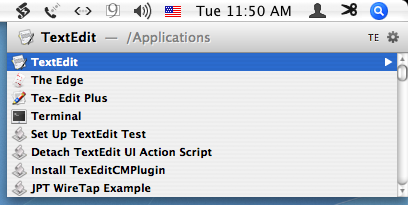
  Thus, in the simplest case, such as opening an application, the
  sequence goes: (1) Get LaunchBar's attention, by typing its hot key
  shortcut; (2) type the abbreviation; (3) press Return. So, for
  example, with my configured hot key and LaunchBar's learned
  abbreviations, to open TextEdit, I type Control-Space TE. LaunchBar
  offers a list of possible matches; you select the one you like
  (using the keyboard) and hit Return. After two or three uses, when
  you're sure that LaunchBar's first guess will be right, you don't
  bother to examine the list. And now you needn't bother with Return
  either: in LaunchBar 4.3, I just press Control-Space TE, and
  continue holding down the final E for a moment to open TextEdit.
  That's LaunchBar's new Instant Open feature. By the way, rather than
  bothering with Apple's Dock or Command-Tab application switcher, I
  tend to use LaunchBar even to switch to an application that's
  already open, especially because I think of applications in terms of
  names, not icons.

<http://www.tidbits.com/resources/2007-07/LBinAction.png>

  To accompany Instant Open, there is also now Instant Send. (This
  came as a shock to me because I was previously unaware even of
  ordinary Send; note that you must quit and relaunch running
  applications the very first time you run LaunchBar 4.3 after
  installation for Instant Send to work.) You can select text in an
  application and tell LaunchBar to process it; how it processes it
  depends on what you ask LaunchBar to launch. For example, in this
  article, I've selected and copied the word "TextEdit". Now I type
  Control-Space, to get LaunchBar's attention. If I then type
  Command-V (for Paste), I've "sent" the word "TextEdit" as a command
  to LaunchBar, so if I press Return, TextEdit will open. But there's
  more: if instead I type Control-Space Command-Shift-V, LaunchBar
  accepts "TextEdit" not as a command but as text; and if I now press
  Tab, I can type an abbreviation to determine where to "send" that
  text. For example, Control-Space Command-Shift-V Tab WIKI Return
  causes "TextEdit" (the contents of the clipboard) to be looked up in
  Wikipedia in my browser! Well, Instant Send eliminates several of
  those steps; the sequence now goes: select "TextEdit" in my document
  (and _don't_ bother to copy it!), press and _hold_ Control-Space
  (Instant Send to LaunchBar, as text, ready to "send" to another
  command), and type WIKI and Return.

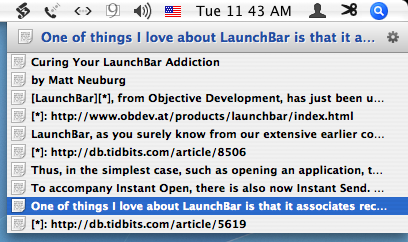
  One of things I love about LaunchBar is that it associates recently
  opened documents with their applications; forgivably but
  unfortunately, it can do this only with Cocoa applications. (I've
  long been obsessed with this kind of functionality, as in "Now Menus
  Reincarnated as Action Menus," 1999-10-25.) For example, if I press
  Control-Space TE, to get LaunchBar thinking about TextEdit, I can
  then press Space to see a list of all TextEdit's recently opened
  documents - and of course then I can choose one to open, still
  without using the mouse. This feature has just gotten smarter too;
  LaunchBar can now actually dive into text documents and display
  their contents directly in its menus! I have no idea how I'm going
  to use that feature; I'm too busy playing with it to worry about
  that just now.

<http://db.tidbits.com/article/5619>
<http://www.tidbits.com/resources/2007-07/textInLB.png>

  LaunchBar also has a built-in calculator. Again, I was unaware of
  this, but with its new improvements I'm likely to use it all the
  time, especially thanks to Instant Send. If I select "44/7" in some
  application and hold down Control-Space (for Instant Send as text),
  I then just press the Equals key and Return to get the result; it is
  displayed in big letters in a translucent window, and I can then
  press Command-C (for Copy) to capture it.

  Similarly, LaunchBar's Open Location feature responds to Instant
  Send as well. This is a feature I already use a great deal. When I'm
  not in my browser and I want to go to some online URL, I use
  LaunchBar instead of switching to the browser. Control-Space
  Command-L brings up a text field where I can type the URL;
  Control-Space GOO Space brings up a text field where I can type a
  Google search. Well, now if I see a URL in some application where I
  can't merely click it, I can select it, press and hold Control-Space
  to send it to LaunchBar as text, and then press Return to open it in
  my browser.

  LaunchBar has many other features that I am clearly not utilizing
  sufficiently, if at all. I confess, my eyes tend to glaze over when
  I try to read all the way through the online help. (Hint: When
  you've summoned LaunchBar, press Control-Right Arrow to see a pop-up
  menu of the many commands you can employ at that point.) And it has
  many new features I haven't mentioned or fully understood; check the
  release notes for a full listing. None of this does my addiction to
  LaunchBar any good; in fact, I'll probably be spending more time
  than ever with LaunchBar. So much for curing the addiction!

<http://www.obdev.at/products/launchbar/releasenotes.html>

  LaunchBar 4.3 costs $19.95 (free for registered users of earlier 4.x
  releases). It's a 1.1 MB download, and can be used free for
  evaluation purposes, with a limitation on how many items you can
  launch. It works with Mac OS X 10.2 and later, so almost no one
  should be left out in the cold.

<http://www.obdev.at/products/launchbar/download.html>


Freecycle: Disposing of Good Old Stuff
--------------------------------------
  by Adam C. Engst <[EMAIL PROTECTED]>
  article link: <http://db.tidbits.com/article/9100>

  Reduce, reuse, recycle. We've all heard this waste minimization
  mantra of the environmental movement, but most of the emphasis tends
  to go on recycling. Important as it is, recycling should in fact be
  the second-to-last resort (ahead of the landfill, of course). When
  seeking to minimize the amount of waste, it's best to reduce
  consumption to begin with, and to reuse those items that you do
  acquire, recycling only that which is left.

  This is one of the reasons I'm such a proponent of using older Macs
  and peripherals for as long as possible; if you choose to put an
  older Mac to work in some secondary task after buying a new one,
  that's reuse, and is way better than sending that Mac off for
  recycling.


**Ancient Engines** -- At some point, though, keeping old equipment
  going becomes more effort and investment than it's worth. We
  experienced this recently, since we had an Apple LaserWriter Select
  360 from 1994 and a Canon PC-6 photocopier from 1995 that were both
  having trouble with print quality. The problems stemmed, I believe,
  from refilling the pair's toner cartridges rather than purchasing
  new cartridges. Although toner refilling seems like an excellent way
  to cut costs and reduce waste, I can't personally recommend it. The
  LaserWriter had taken to printing small dots in particular parts of
  the page, and the photocopier periodically (perhaps due to humidity)
  printed horribly blotchy pages. The problem is that toner cartridges
  for these devices can cost between $50 and $100, and many (if not
  most) are refurbished anyway.

  So we were faced with paying between $100 and $200 to keep the
  printer and photocopier running, with all the quirks they'd
  developed over the years: recalcitrant manual feeds, the
  LaserWriter's funky Asante FriendlyNet Ethernet to LocalTalk Bridge
  that required specific resetting after every power outage (see
  "Printer Sharing and Print Spooling in Mac OS X," 2003-03-31), an
  output tray that constantly fell off the photocopier, and so on. In
  other words, although the printer and photocopier were fairly
  functional, they were clearly declining in utility. Similarly, our
  standalone Sharp fax machine from 1996, though functional, always
  messed up if we fed it more than one page at a time. It was time to
  update some hardware.

<http://db.tidbits.com/article/7129>

  Rather than buy a separate printer, photocopier, and fax machine,
  since none of them receive use more than once a week or so, we
  decided to spend $400 on an all-in-one device with a color laser
  engine. Although we also have an Epson Photo Stylus 870 color inkjet
  printer for photo printing, we detest the constant cleaning and
  fussing with expensive cartridges. The best-liked all-in-one seemed
  to be the Epson AcuLaser CX11NF, which combines a color laser
  printer with scanning, faxing, and copying. It connects directly to
  our Ethernet network, has an automatic document feeder, and in
  general has been a good replacement for the LaserWriter,
  photocopier, and fax machine.

<http://www.macworld.com/2006/08/reviews/epsoncx11nf/>

  What to do with the old hardware? We decided to store the fax
  machine in the attic as a backup, since it's not inconceivable that
  we could end up with a need to fax something with a signature fairly
  urgently. But the LaserWriter and photocopier would just be taking
  up more attic space, since we could always fall back on the inkjet
  printer for printouts, and photocopying is never essential. It was
  time to pass them on to someone else, and frankly, someone who
  wouldn't expect us to help care for them. In other words, we weren't
  about to pass them on to a friend or relative.


**Enter Freecycle** -- Back when we moved from Seattle to Ithaca in
  2001, I tried selling some items on eBay, but quickly gave up on the
  idea because it was just way too much work for the reward. (Oddly,
  an eBay study found that Ithacans sell more items to international
  buyers than any other ZIP code in the United States.) Also, I wasn't
  sufficiently certain of the functionality of these devices that I
  felt comfortable selling them - in theory I could have listed them
  in eBay such that they were local to Ithaca, or I could have posted
  a note on craigslist for Ithaca. But in either case, even with full
  disclosure, if the buyer had trouble, I would have felt bad. (I've
  since learned that craigslist has a "free" section, but at least in
  Ithaca, it's used relatively sporadically.)

<http://www.ithacajournal.com/apps/pbcs.dll/article?AID=/20070706/NEWS01/707060321/1002>
<http://www.craigslist.org/>

  I had heard about the Freecycle Network, an Internet service that
  connects people with stuff to give away with people who want free
  stuff, but until this point I had never tried it. It turned out to
  be extremely simple. I went to the Freecycle Groups page to find the
  Ithaca group, followed the link to its Yahoo Groups mailing list,
  subscribed, and read the ground rules (this is important, since some
  things - like the required Subject tags - are not inherently obvious
  to a newcomer), and then sent a pair of email messages to the list,
  describing the LaserWriter and photocopier.

<http://www.freecycle.org/>
<http://www.freecycle.org/group/>

  My messages were approved by the moderator around noon on a
  Saturday. Four hours later, I had a note from someone who wanted the
  LaserWriter, and two hours after that, a message from someone who
  wanted the photocopier. I waited a day to see if other requests came
  in (one did, for the photocopier), and then I replied to the first
  two people, setting up a pick-up time and giving them directions.
  The first guy arrived on time, chatted ever so briefly, loaded the
  printer into his truck, and left in about two minutes. The woman who
  wanted the photocopier chatted a bit longer when she arrived, since
  it turned out she was opening a store downtown, which led to the
  realization that we had mutual friends (that sort of thing always
  happens in Ithaca). Even still - total time to disposal: five
  minutes.

  While I was receiving the Freecycle mailing list messages, I also
  saw a note from someone who was moving and needed packing peanuts. I
  happened to have a few boxes and bags full of styrofoam peanuts that
  I hadn't gotten around to donating to a package store, so I sent her
  a message saying that she'd be welcome to pick them up. Since she
  lived only a few miles away, she hopped right over to get them. No
  fuss, no muss, less crud in the garage.

  So I'm extremely happy with Freecycle, and I anticipate using it a
  bunch in the future to get rid of random things that I don't want to
  sell because they're too old or sketchy, or not-for-resale items
  that companies didn't want back and that are just cluttering my
  office. I don't expect to acquire much, if anything, via Freecycle,
  since I'm at the stage of life where more isn't better. I did have
  to resist temptation when someone offered a free 1890s antique pool
  table in excellent condition, since we have no space for such a
  behemoth. But I can remember back to when Tonya and I were just
  getting started, and being able to make use of other people's
  castoffs would have been incredibly helpful.

  I've been raving about my success in ditching my old hardware to
  friends, some of whom have said they would be uncomfortable with
  people coming to their houses for pickup. That's easily dealt with,
  since you can set an alternate location for pickup if you want,
  trading a bit of convenience for additional privacy.


**Other Regiving Networks** -- It appears that there has been some
  controversy surrounding Freecycle itself, with the founder defending
  his trademark vigorously and accepting corporate support from Waste
  Management, Inc. From what I can tell, the controversies don't
  particularly affect the individual local groups, which are all run
  by volunteer moderators. However, there are also plenty of other
  groups, such as the ReUseIt Network, that support the general
  concept of "regiving" unwanted items. A quick survey of these found
  that most were smaller than comparable Freecycle groups. The Ithaca
  Freecycle group has over 5,400 members, which is pretty impressive
  when you consider that the population of Ithaca is only about
  30,000, and the surrounding Tompkins County is around 100,000.

<http://en.wikipedia.org/wiki/Freecycle_Network#Controversies>
<http://www.reuseitnetwork.org/>
<http://en.wikipedia.org/wiki/Regiving>

  Whatever the specific approach you choose, I strongly encourage
  everyone to consider Freecycle, another regiving network, or an
  appropriate charity when you're trying to figure out how to dispose
  of old hardware, software, or just about anything else. If we're
  going to expend valuable resources creating the objects that inhabit
  our everyday lives, let's at least extract as much use out of them
  as possible. Now to get rid of the elderly QMS PS-410 laser printer
  in the attic that the LaserWriter Select 360 replaced...


Hot Topics in TidBITS Talk/06-Aug-07
------------------------------------
  by TidBITS Staff <[EMAIL PROTECTED]>
  article link: <http://db.tidbits.com/article/9101>


**Accessing Bare Hard Drives** -- Readers discuss devices that let you
  mount a "bare" internal hard drive and debate whether it's wise to
  run a drive without an enclosure permanently. (10 messages)

<http://emperor.tidbits.com/TidBITS/Talk/1401/>


**Buttons & Jobs** -- A Wall Street Journal article about Steve Jobs
  focuses on his apparent loathing of buttons, and readers point to
  the benefits of touchscreen replacements. (4 messages)

<http://emperor.tidbits.com/TidBITS/Talk/1402/>


**Stewing Over Safe Sleep** -- Readers relate their experiences (pro
  and con) with the Safe Sleep feature in modern Mac laptops. (9
  messages)

<http://emperor.tidbits.com/TidBITS/Talk/1403/>


**Curing Your LaunchBar Addiction** -- Matt Neuburg's article on the
  latest version of LaunchBar generates a description of other new
  features in LaunchBar. (1 message)

<http://emperor.tidbits.com/TidBITS/Talk/1405/>


**CS3 and Intel Macs?** What are your impressions of running Adobe
  Creative Suite 3 on the latest Intel-based Macs? (4 messages)

<http://emperor.tidbits.com/TidBITS/Talk/1406/>


**Quicken online banking** -- A question about how Quicken handles an
  E-Trade account invites speculation about how the companies treat
  Mac and Windows users. (3 messages)

<http://emperor.tidbits.com/TidBITS/Talk/1407/>


**Freecycle: Disposing of Good Old Stuff** -- Adam's article on
  Freecycle prompts discussion of using old Macs versus giving them
  away or recycling their parts. (3 messages)

<http://emperor.tidbits.com/TidBITS/Talk/1408/>


$$

This is TidBITS, a free weekly technology newsletter providing timely
news, insightful analysis, and in-depth reviews to the Macintosh and
Internet communities. Feel free to forward to friends; better still,
please ask them to subscribe!

Non-profit, non-commercial publications and Web sites may reprint or
link to articles if full credit is given. Others please contact us. We
do not guarantee accuracy of articles. Caveat lector. Publication,
product, and company names may be registered trademarks of their
companies. TidBITS ISSN 1090-7017.

Copyright 2007 TidBITS: Reuse governed by Creative Commons license.

Contact us at:    <[EMAIL PROTECTED]>
TidBITS Web site: <http://www.tidbits.com/>
License terms:    <http://www.tidbits.com/terms/>
Full text search: <http://www.tidbits.com/search/>
Subscriptions:    <http://www.tidbits.com/about/list.html>
Account help:     <http://www.tidbits.com/about/account-help.html>


--
If you want to unsubscribe or change your address, use this link
http://emperor.tidbits.com/webx?unsub@@.3c557dc4!u=306a67f9