TidBITS#896/17-Sep-07
=====================
  Issue link: <http://db.tidbits.com/issue/896>
iPhone news continues to grab headlines, with Apple providing the
details on how early iPhone adopters can get their $100 credits, a
tale about how using the iPhone headset while driving could get you
pulled over, making the decision between an iPhone and an iPod
touch, and Glenn's scoop on the Devicescape Connect application for
more easily connecting to Wi-Fi hotspots. But the Mac is far from
dead, as Adam's look at the Mac OS market share among students at
Cornell University shows. Adam also looks at how iPhoto 7 finally
plugs some glaring holes present since the first releases of the
program and examines what the first public beta release of Eudora 8
means for normal users (not much, and Adam offers some thoughts on
where the world of email is going). Finally, gather around the camp
fire as security analyst Rich Mogull tells a scary ghost story about
his efforts to exorcise demons from FileVault.
Articles
iPhone $100 Store Credit Process Posted
Apple Releases iMac, iLife, Pro Application Updates
Handsfree iPhone Call Leads to Ticket
Deciding Between the iPhone and iPod touch
DealBITS Discount: Save 20% on Name Munger
Mac Market Share Rising at Cornell University
iPhoto 7 Fills Glaring Holes
Connect More Easily to Wi-Fi Hotspots with the iPhone
Penelope Project Ships Eudora 8.0.0b1
The Ghost in My FileVault
Hot Topics in TidBITS Talk/17-Sep-07
------------ This issue of TidBITS sponsored in part by: --------------
* READERS LIKE YOU! Support TidBITS with a contribution today!
<http://www.tidbits.com/about/support/contributors.html>
Special thanks this week to Simon Watson, John Murison,
Scott McKinley, and Stonewall Ballard for their generous support!
* GET FETCH 5 FOR FREE! Fetch Softworks makes Fetch, the original
Macintosh FTP client, free for educational and charitable use.
Fetch 5.2 includes WebView, FTPS, and droplet shortcuts.
Apply today at <http://fetchsoftworks.com/edapply>!
* WebCrossing Neighbors Creates Private Social Networks
Create a complete social network with your company or group's
own look. Scalable, extensible and extremely customizable.
Take a guided tour today <http://www.webcrossing.com/tour>
* MARK/SPACE, INC: Introducing SyncTogether, Mac-to-Mac syncing
of contacts, calendar events and tasks, notes and more. Perfect
for a single user with multiple Macs or groups that need to sync
selected iCal calendars. <http://www.markspace.com/bits>
* Microsoft's MacBU: Supporting Mac users with Office 2004.
Supporting the Mac community through tech support newsgroups,
user group appearances, our new team blog, and more!
Check out our team blog at <http://blogs.msdn.com/macmojo/>
* VMware Fusion. The most seamless way to run Windows on your Mac.
Buy VMware Fusion today and get $20 off the purchase price.
Rebate offer valid through December 31, 2007.
Visit: <http://www.tidbits.com/about/support/vmware-fusion.html>
* New Parallels Desktop 3.0: Run Windows on your Mac natively!
We erased the border between the Windows and Mac worlds. 10% Off
Upgrade! <http://www.tidbits.com/about/support/parallels-upgrd.html>
$10 Off New! <http://www.tidbits.com/about/support/parallels.html>
---------- Help support TidBITS by supporting our sponsors ------------
iPhone $100 Store Credit Process Posted
---------------------------------------
by Glenn Fleishman <[EMAIL PROTECTED]>
article link: <http://db.tidbits.com/article/9181>
It's rare that a price cut provokes outrage, but Steve Jobs's
announcement of a $200 drop in the retail cost of the iPhone raised
ire ("Apple Introduces iPod Touch, Wi-Fi iTunes Store, and New
iPods," 2007-09-10). Within two days, he put some salve on folks who
felt they'd paid the chump tax, offering $100 Apple Store credit and
promising the tools to obtain the credit would be live this week
("Apple to Offer $100 iPhone Rebate for Early Purchasers,"
2007-09-10). A page at Apple's site is now live to carry out that
task, and we hear that complaints at Apple Stores have dropped off
significantly now that the details are available.
<http://db.tidbits.com/article/9152>
<http://db.tidbits.com/article/9159>
<http://www.apple.com/iphone/storecredit/>
Apple wisely offers a FAQ that explains precisely who qualifies for
which price rollback. In short, if you bought an iPhone on or before
21-Aug-07, still own it, and haven't received other credits, you get
the $100 store credit. If you purchased an iPhone on or after
22-Aug-07, you can obtain the full difference in price by going back
to the Apple Store where you bought it with the receipt by 19-Sep-07
or calling the Apple Online Store if that's where you purchased it.
Apple doesn't mention that if you purchased the iPhone within the
last 30 days from AT&T, you may be able to get a difference in price
minus a restocking fee. Nor does Apple note that some credit cards
offer short-term price protection benefits.
<http://www.apple.com/iphone/storecredit/faq.html>
The process of obtaining the credit is simple, although more
complicated than necessary. In Step 1, you enter your phone number
and the serial number on the back of the iPhone (it's also located
in the Settings application under General). If your details are
valid, Apple sends you an SMS (text message) with a six-digit code
you enter in Step 2 along with your phone number again (in case you
return to the page later). If that code is valid, in Step 3 you're
presented with a credit in the form of a credit number and PIN,
which you can copy and paste, save as a PDF, or print on paper. The
credit can be used at a retail Apple Store or the Apple Online
Store. Although you cannot use the credit within iTunes for music or
video, according to Connie Guglielmo of Bloomberg, you can purchase
iTunes gift cards. The process worked perfectly for me.
<http://www.bloomberg.com/apps/news?pid=20601204&sid=aUqXWnmwmWwU>
The credit apparently never expires, as there is no expiration
information anywhere. That conforms with many states' laws in which
certain forms of credit or gift balances are not allowed to expire
or have fees deducted from them for "maintenance." However, you have
to request your rebate by 30-Nov-07.
Now as to my point about why the process could be simpler. If you
registered your iPhone, Apple already has an Apple account for you,
your serial number, and your phone number. Why not simply email you
a link if you qualify and tell you to pick up your credit coupon?
They know who qualifies because their system checks that when you
enter data.
The reason they're not offering this simpler option is that the
percentage of redemption would be higher than if they require us to
go through this process. Already, Apple is paying 50 or 60 cents on
the dollar to offer store credit, given their internal margins and
markups. They're keeping our loyalty, which is worth something, too.
And the lower redemption rate they'll see from employing a process
with a deadline means that they will instead probably pay out closer
to 20 to 30 cents on the dollar over all eligible phones, if that.
Apple Releases iMac, iLife, Pro Application Updates
---------------------------------------------------
by Jeff Carlson <[EMAIL PROTECTED]>
article link: <http://db.tidbits.com/article/9187>
Apple has rolled out several bug-fix updates in the last week
targeting specific machines or applications. The updaters are
available via Software Update or as stand-alone downloads. They
include:
* iMac Software Update 1.1 provides unspecified bug fixes for 20-inch
and 24-inch aluminum iMacs with 2.0, 2.4, and 2.8 GHz processors.
It's a 5.1 MB download.
<http://www.apple.com/support/downloads/imacsoftwareupdate11.html>
* Keyboard Software Update 1.2 is also geared toward iMac owners as
well as purchasers of the new aluminum keyboard. The update fixes
problems with the keyboard's special features and is a 35.3 MB
download.
<http://www.apple.com/support/downloads/keyboardsoftwareupdate12.html>
* Compatibility Update for QuickTime 7.2 "delivers increased
compatibility with iLife," and is an 18.1 MB download.
<http://www.apple.com/support/downloads/compatibilityupdateforquicktime72.html>
* iTunes 7.4.1 (for Mac and for Windows) adds support for the latest
iPods and adds the new ringtone maker. The Mac version is a 38.3 MB
download; the Windows version is a 49.1 MB download.
<http://www.apple.com/support/downloads/itunes741formac.html>
<http://www.apple.com/support/downloads/itunes741forwindows.html>
* Pro Application Support 4.0.2 "addresses issues with keyboard
interface reliability for Apple's professional applications and is
recommended for all users of Final Cut Studio," according to Apple.
The update is a 7.6 MB download.
<http://www.apple.com/support/downloads/proapplicationsupport402.html>
Handsfree iPhone Call Leads to Ticket
-------------------------------------
by John M. Stafford <[EMAIL PROTECTED]>
article link: <http://db.tidbits.com/article/9180>
I was driving from Cherrydale to Ballston, Virginia, last week
talking on my cell phone to my brother, who was wishing me a happy
birthday. Being a safe driver, I was using the stock headset that
shipped with my iPhone so that I could keep both hands on the wheel
and give maximum attention to my driving.
Two Arlington County police cars, operated by Officers Wright and
Horvath, pulled up alongside me on Lee Highway and proceeded to
follow me as I turned left and proceeded south on Glebe Road. Just
before the intersection with Wilson Boulevard, Officer Wright turned
his lights on and signaled me to pull over, which I did.
"License and registration."
Mindful that I had two officers tailing me, I couldn't think of any
traffic laws that I had violated: "Officer, why did you pull me
over?"
"Under Virginia State Law it is illegal to wear headphones," he
replied.
"I'm wearing the hands-free device that came with my iPhone," I
said, and I showed him my iPhone.
Officer Wright took my license and proceeded back to his cruiser.
Meanwhile, Officer Horvath came up to my window and asked to see my
headphones. And I showed him the iPhone, the headphones, and the
docking cable I have installed in my truck to play my iPhone or iPod
through my stereo.
Officer Horvath then walked back to Officer Wright's cruiser without
saying anything.
<http://scoot.net/gallery/bbs/IMG_0348.jpg>
Now considering that in jurisdictions like Washington, D.C., and New
York, it is mandatory that one use a hands-free device with a cell
phone, it struck me as very odd that here I am in Virginia being
pulled over for using one.
Yet, as you can see from the picture of my summons, using a
hands-free device in the State of Virginia can be legally
problematic.
<http://scoot.net/gallery/bbs/IMG_0351_2.jpg>
[John sent this story via email, and we reproduced it with his
permission. He notes that he didn't try to get out of the ticket,
because he'd like to see how this plays out. -Glenn]
Deciding Between the iPhone and iPod touch
------------------------------------------
by Adam C. Engst <[EMAIL PROTECTED]>
article link: <http://db.tidbits.com/article/9183>
Tonya and I have been thinking about buying an iPod touch so we
don't have to buy an iPhone, or rather, so we don't have to pay a
monthly fee just to own an iPhone that we wouldn't use much for
calling. Of course, that raises the question of just how much of an
"iPhone without the phone" the iPod touch really is. Bill Palmer at
iProng has done just such a comparison now, and it appears that the
primary concerns from our perspective are the missing Mail, Notes,
Google Maps, and Weather applications; the Calendar application
being read-only (you can't add events - how lame is that?); and
apparently inferior screen quality. Other differences that seem less
noticeable or that make sense given that the iPod touch is not a
phone include no EDGE support, no Bluetooth, no external volume
buttons, no built-in speakers, a plastic stand instead of a dock, a
less-durable back surface, and no camera.
<http://www.iprong.com/article.php?id=3003>
I suspect the ever-enthusiastic iPhone hacking community will come
up with a way to reinstall the missing applications from the iPhone
back onto the iPod touch, but that's pure speculation, and not
something on which I'd base a buying decision.
Might there be a way to buy an iPhone but avoid the monthly bill?
Although it's possible to activate an iPhone with an AT&T prepaid
GoPhone plan, the cheapest plan that iTunes presents, according to
the screenshots Erica Sadun linked to in TUAW, is $49.98 per month,
which includes 200 minutes and unlimited data usage. Since I'm more
trying to reduce the overall cost of ownership rather than avoid the
two-year contract, dropping the price from $60 per month to $50
isn't a big win. At least I hear that AT&T has updated their network
to stop alerting prepaid iPhone users to every $0.00 data usage.
<http://www.tuaw.com/2007/07/01/prepaid-iphone-in-a-nutshell/>
Now that the iPhone price has dropped $200, the 8 GB iPod touch is
only $100 cheaper than the 8 GB iPhone. So what about buying an
iPhone and using INdependence? Previously known as iActivator,
INdependence is a hack application that promises to activate an
iPhone without signing up for a monthly plan, although like many
hack applications it's definitely not for the faint of heart. If it
worked, it would enable use of an iPhone without the calling or cell
data communication capabilities, which might be just about perfect.
<http://iphone.fiveforty.net/wiki/index.php/INdependence>
The only nagging question is if it's ethical to work around what
Apple and AT&T intend with a "hacktivated" iPhone. After all,
Apple's pricing undoubtedly takes into account the monthly revenue
the company will accrue from its deal with AT&T, so using an iPhone
in this hacked fashion would damage both companies' bottom lines.
What's your opinion?
<http://emperor.tidbits.com/TidBITS/Talk/1485/>
DealBITS Discount: Save 20% on Name Munger
------------------------------------------
by Adam C. Engst <[EMAIL PROTECTED]>
article link: <http://db.tidbits.com/article/9167>
Congratulations to Mark Hom of gmail.com, Mike Johnson of iwon.com,
Bob Leedom of comcast.net, and Larry Whitehead of uab.edu, whose
entries were chosen randomly in the last DealBITS drawing and who
received a copy of Sonora Graphics' Name Munger, worth $10. Also
receiving a copy is Alexa MeeKwon Whitehead, who referred Larry to
DealBITS. But don't fret if you didn't win, since Sonora Graphics is
offering all TidBITS readers a 20 percent discount on Name Munger
through 26-Sep-07, dropping the price to $8. To take advantage of
this offer, use coupon code "SGNM-DealBITS-0907" when ordering.
Thanks to the 555 people who entered this DealBITS drawing, and we
hope you'll continue to participate in the future!
<http://db.tidbits.com/article/9166>
<http://sonoragraphics.com/namemunger.html>
Mac Market Share Rising at Cornell University
---------------------------------------------
by Adam C. Engst <[EMAIL PROTECTED]>
article link: <http://db.tidbits.com/article/9177>
So what is Apple's market share? It's a tricky number to figure out
in the best of times, and I've often argued that it's an essentially
meaningless statistic anyway, since companies like Dell and HP sell
heavily into business settings where the users have no say in what
they'll use, whereas Macs are purchased primarily by individuals
spending their own money. They're completely different markets.
But the situation becomes more interesting if you have an
apples-to-apples comparison. In chatting with friends at Cornell
University, I learned that Cornell keeps statistics on the operating
systems used by the 6,842 students connecting to the Ethernet-based
ResNet, Cornell's Residence Hall Network Service. (This is not all
Cornell students, just those living in the dorms.)
<http://www.cit.cornell.edu/resnet/>
The ResNet breakdown is quite a bit different from the single-digit
percentages often associated with the Mac market share and shows
Apple in a much more favorable light. Overall, Macs are used by 21
percent of Cornell dorm dwellers, compared with 78 percent using
PCs.
Most of the Macintosh share is of course Mac OS X, though 4 percent
claim to be running Windows on an Intel-based Mac (which means
theyre also almost certainly running Mac OS X), and a mere 0.12
percent are running Mac OS 9 or older (that's 8 hardy souls, if you
were wondering).
On the Windows side, Windows XP has the lion's share, at 49 percent,
with Windows Vista at 22 percent. Windows XP Media Center Edition
comes in at 7 percent (students rely on their computers for music
and video entertainment, so this percentage isn't surprising), and
other versions (Windows NT/2000, Windows Me, and Windows 95/98) are
in use by only 23 students - just enough for two soccer teams and a
referee.
In terms of serious geekery, Unix/Linux is in use by only 0.53
percent of students (about 36), and 5 students are apparently still
relying on "Other" operating systems. I like to think there's one
person each running ProDOS, OS/2, TRS-DOS, AmigaOS, and the BeOS,
though I can't imagine that all of those support Ethernet.
Needless to say, you can't extrapolate to the wider world from these
numbers - just because 21 percent of Cornell students living in the
residence halls use Macs, it doesn't mean that Apple has 21 percent
of the overall market. Nor does it mean that Apple has 21 percent of
the college student market, since students attending an Ivy League
university like Cornell very well may have different demographics
than students going to other colleges and universities. If you have
access to similar statistics at other institutions, send them to me
and I'll investigate further.
Even if you can't extrapolate, you can look at historical trends,
since Cornell publishes a page with the basic Mac versus Windows
statistics for ResNet subscribers. Although Mark Anbinder tells me
that the numbers before 1999 may suffer from under-reporting (since
students weren't required to list their operating system when they
signed up), several facts jump out at me from these numbers.
<http://www.cit.cornell.edu/resnet/history.html>
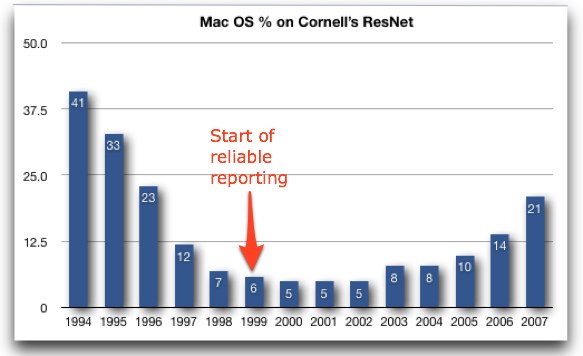
First, in the first few years, Mac OS percentages were much higher
(41 percent, falling to 12 percent in the first four years). That
could have been due to a much higher percentage of Macs, but I
suspect Mac users of that time were more likely than Windows users
to sign up for ResNet due to easier networking configurations. Or
perhaps Mac users were simply more likely than Windows users to
report their platform when signing up. Either way, the numbers
probably aren't all that valid.
Second, from 1999 on, when students were required to list their
platform when signing up, the percentage of Mac OS-using students on
ResNet dropped slightly from 6 percent to 5 percent, and then
started rising again, to 10 percent in 2005. That's not impressive,
but the next two years' percentages are: 14 percent in 2006, and
this year's 21 percent. That's a huge jump, as you can see in this
graph.
<http://www.tidbits.com/resources/2007-09/MacOS-at-Cornell.jpg>
So one way or another, Apple's market share among Cornell students
connecting to ResNet has increased from 5 percent in 2002 to 21
percent in 2007. Clearly, Apple is back in higher education, at
least in this little corner of the world.
iPhoto 7 Fills Glaring Holes
----------------------------
by Adam C. Engst <[EMAIL PROTECTED]>
article link: <http://db.tidbits.com/article/9179>
I've been critical of iPhoto on several counts since the program's
release in 2002. Could you imagine, for instance, that iPhoto would
require you to import every photo on your digital camera even when
its predecessor Image Capture provided a selective import
capability? And what was with forcing you to title photos and name
film rolls in the Info pane, rather than selecting and editing the
default name, as has been possible with files and folders in the
Finder since 1984?
Well, I'm pleased to note that Apple has taken advantage of the
20-month wait between iPhoto 6 and iPhoto 7 to fix both of these
long-standing omissions. You can title photos and name events (which
are essentially film rolls, in the old terminology) just by clicking
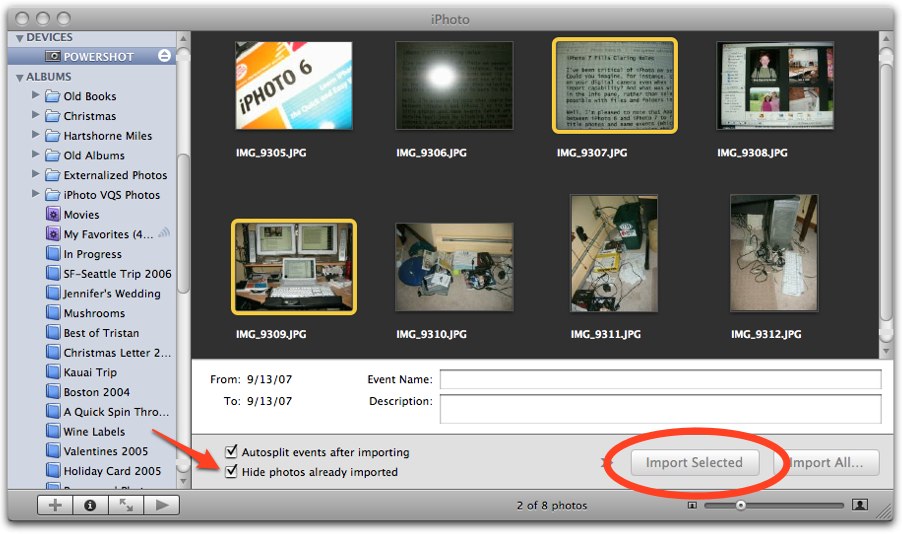
the name and editing the default text. And when you connect a camera
or slot a media card into your reader, the new import screen
provides an Import Selected button along with Import All. Even
better, if you import some photos but not all, a Hide Photos Already
Imported checkbox makes sure the imported photos don't appear in the
import screen. Plus, the import process doesn't have to examine each
previously imported photo on the camera to see if it's a duplicate;
previous versions of iPhoto could skip already imported photos, but
the import process took just as long as if it was importing each
photo for real.
<http://www.tidbits.com/resources/2007-09/iPhoto-import.jpg>
The final area that wasn't quite as embarrassing, but which hadn't
seen any notable attention from Apple since the earliest versions of
iPhoto, is its print feature. In the past, you could select various
different styles in the Print dialog: Contact Sheet, Full Page,
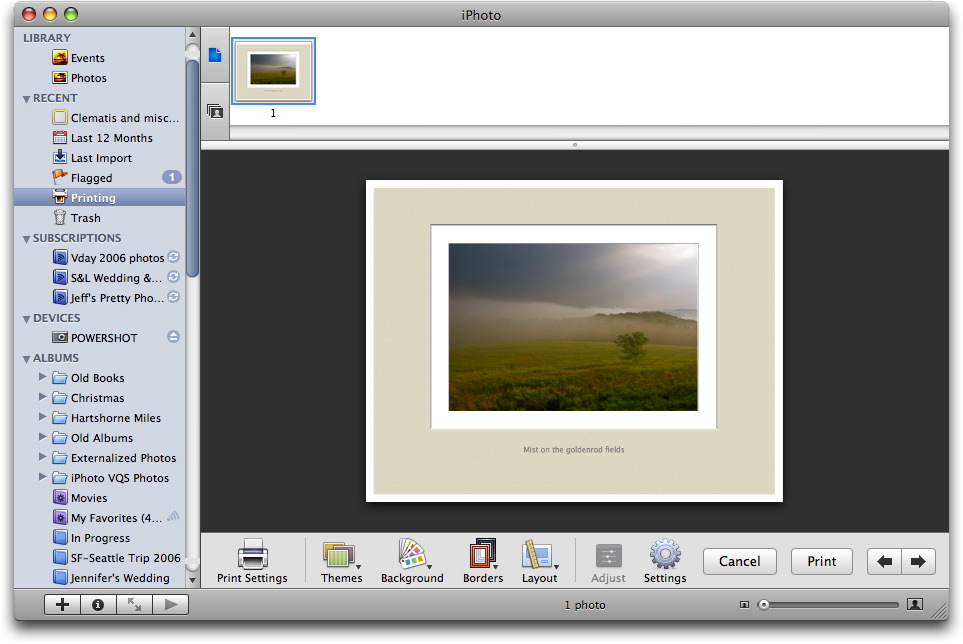
Greeting Card, N-Up, Sampler, and Standard Prints. In iPhoto 7,
Apple has completely reworked printing, providing the concept of a
"Print Project" with five themes: Standard, Contact Sheet, Simple
Border, Simple Mat, and Double Mat. For each of them you can set
background color (white, gray, or black), different border styles,
and different layouts (some of which offer caption fields, and a
Settings dialog lets you tweak fonts). While you're fiddling with
print options, a Printing item appears in the Recent list of the
Source pane, so you don't have to finish your fiddling in a single
session - iPhoto remembers where you are until you print or cancel.
<http://www.tidbits.com/resources/2007-09/iPhoto-print.jpg>
The only previous style that I can't see how to replicate in iPhoto
7 is Greeting Card, which let you print a photo such that it would
appear on the front of a double- or quad-folded piece of paper. This
isn't to imply that the Greeting Card style was useful; you couldn't
add text or embellish the card in any other way, and for all
practical purposes, the Card (parallel to Calendar and Book) feature
of iPhoto 6 replaced the Greeting Card print style. Cards don't
appear to have changed much from iPhoto 6 to iPhoto 7, and you can
still print them to your own printer in addition to ordering
professionally printed ones from Apple.
Connect More Easily to Wi-Fi Hotspots with the iPhone
-----------------------------------------------------
by Glenn Fleishman <[EMAIL PROTECTED]>
article link: <http://db.tidbits.com/article/9182>
Devicescape has released a simple application for the iPhone that
lets you connect to Wi-Fi hotspots without all the fuss of tapping
in user names and passwords, clicking Accept buttons, or remembering
WEP and WPA encryption keys. Devicescape's Connect application
requires the Nullriver AppTapp installer, a third-party hack that
enables easy installation of software on the iPhone. (I've been
testing a version of Connect released before the Nullriver
integration.)
<http://devicescape.com/pub/>
<http://www.tidbits.com/resources/2007-09/iphone-connect.jpg>
<http://iphone.nullriver.com/beta/>
**Usage** -- The way Devicescape accomplishes this minor miracle - and
obviates the single most annoying factor in using the iPhone outside
of one's home and office - is via its flagship software, which
comprises client software on a device, handheld, or laptop, and an
account at the company's Web site in which you store passwords and
account information. The software and service are free. (I wrote a
full account of Devicescape's approach in "Devicescape Aims to Ease
Wi-Fi Hot Spot Connection Pain," 2007-05-07.)
<http://db.tidbits.com/article/8931>
At the My Devicescape Web site, you set up an account and enter any
Wi-Fi hotspot and network information that you want to include. For
instance, I store my home and work WPA keys on their site.
Devicescape automates the login process for dozens of for-fee
hotspot networks and aggregators of hotspots, including T-Mobile
HotSpot, AT&T WiFi, Fon, Boingo, iPass, and others, as well as
dozens of free networks that require some confirmation step or login
account to use. Devicescape plans to offer easy ways to purchase
service from some networks in the future as part of their revenue
plan. (You're providing Devicescape with various passwords, and
while they appear to me to be a trustworthy organization with an
extremely strong understanding of security, you should factor in
that a third party would have the burden of protecting your password
and use passwords that differ from those you use for other secure
services, like banking.)
<https://my.devicescape.com/>
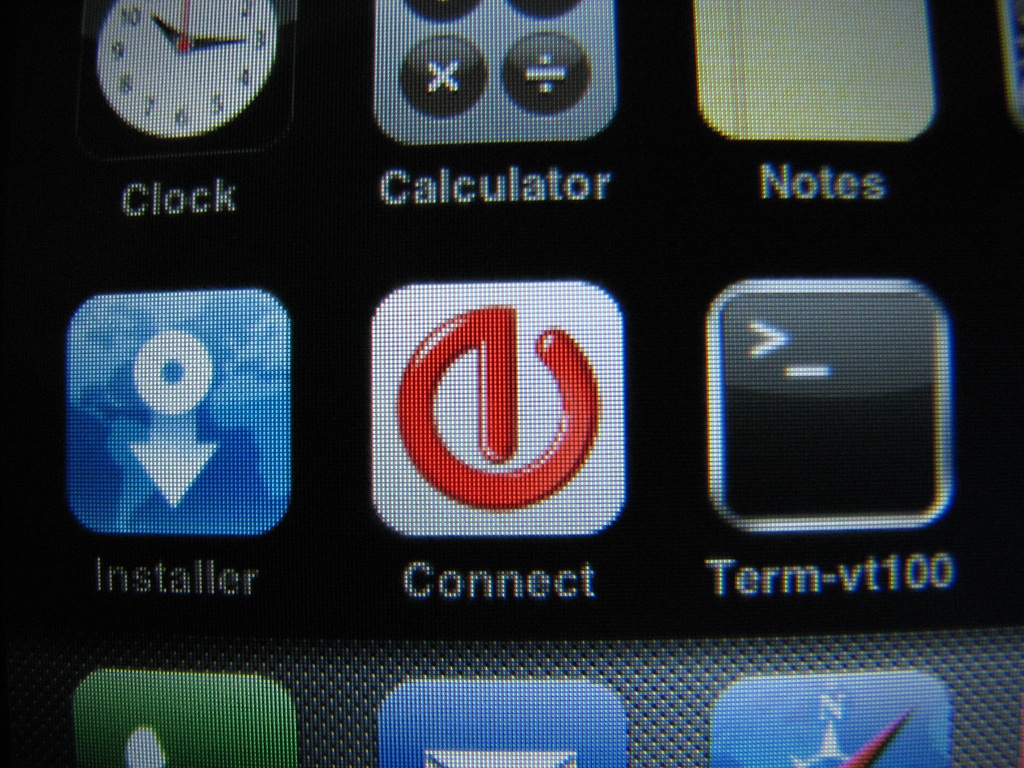
With the Devicescape iPhone application, when you're at a hotspot
for which you've entered your connection information, simply tap the
Connect application and click Login. Devicescape connects to the
local network, tunnels your login request through the hotspot's DNS
service (clever, that), receives back an encrypted set of login
details, and then passes those credentials on to the hotspot. For
free networks, the system knows to "click" the right button, sending
a Web request with the correct response in it. (The Devicescape
software for laptops, handhelds, and a few phones works much the
same way; you also get the benefit of every device you use having
the same network access without re-entering details.)
I've been using Connect for over a week and have tested it at a few
T-Mobile locations. It's rather marvelous to tap Login, and be on
the network. It's the way the iPhone should work - and now does.
While Steve Jobs extols the ubiquitous availability of Wi-Fi, he and
the company have done nothing to make connections easy except when
accessing home and work networks with little or no security or
access limitations. Devicescape bridges that gap. (And "easy" is
relative even with normal password-protected networks given the
silly manner in which you have to type in passwords.)
There's just one missing feature from Connect that you find in the
full Devicescape software: buddy lists. With buddy lists, you can
choose which other Devicescape users - your friends and colleagues -
can access networks you manage, making it easy to provide trusted
users access to your own protected networks. These buddies' copies
of Devicescape download an encrypted set of network passwords. You
can revoke a buddy's access or update your network password and the
system handles that seamlessly, too, transmitting it to any buddy
who needs it. This buddy list feature, when Devicescape adds it to
the iPhone, will be a big plus for iPhone users who roam among
household and work networks.
And while Devicescape isn't emphasizing this, the company told me in
a briefing a few days ago that they had unearthed the business-grade
Wi-Fi authentication client software in the iPhone OS that's also
found in Mac OS X. This client - an 802.1X supplicant, if you must
know the technical name - would let iPhone users connect to Wi-Fi
networks that don't use a gateway page or simple static shared
encryption keys. 802.1X allows a device to connect to a Wi-Fi
network with a user name and password (among other kinds of
credentials), and then the network system assigns a unique
encryption key to that user. It's the only safe approach for larger
networks, and is used widely. Connect could provide a tool for
corporate users to connect their iPhones securely to their work
networks, too - not just to hotspots - if Devicescape opts to enable
that feature.
**Installation and Set Up** -- The Nullriver installer makes it a
breeze to install Connect. You download the AppTapp installer
software and launch it on a computer to which your iPhone is
connected and iTunes is not launched. (Turn off automatic syncing in
iTunes, too, as if it launches while AppTapp is working its magic,
you could have a botched install.) AppTapp downloads the 90 MB or so
restore firmware file from Apple, patches it, and updates the
iPhone. (The usual provisos apply: Not supported by Apple. Could
turn your iPhone into a brick. The next firmware update could break
AppTapp or Connect. And so on.)
After the iPhone reboots, you have a new Installer application on
the home screen. Tap it, and you can select Connect from a list of
applications to install. Install Connect, and it appears on the home
screen. Connect has been included in a small list of preferred
applications by Nullriver.
When you first launch Connect, it provides you with a code that you
must enter at the My Devicescape Web site in the account you set up.
This code uniquely identifies your iPhone. The copy of Connect
running on your iPhone can communicate with the Devicescape servers
after you enter the code over either a Wi-Fi network you're already
connected to or AT&T's EDGE servers.
**Best Networks** -- While you could cobble together free and paid
logins at networks you frequent or expect to use, your best
Connect-compatible deal is Boingo Wireless, a hotspot aggregator
that resells access to tens of thousands of locations in the United
States, including dozens of airports. Boingo charges $21.95 per
month for unlimited U.S. access. Their worldwide footprint is
100,000 locations, for which they charge $39 per month for unlimited
access. Both are month-by-month rates with no commitment or
cancelation penalty.
<http://www.boingo.com/>
In the United States, Boingo resells access to most major networks;
T-Mobile HotSpot is the big exception. T-Mobile charges $20 to $40
per month for unlimited use at about 8,500 locations, with the price
varying by whether you're a T-Mobile voice subscriber and the
duration of your contract. Devicescape supports T-Mobile, too.
<http://hotspot.t-mobile.com/>
While you can log into Boingo through a partner login in the Web
gateway interface at nearly all the locations they support, that
involves tedious data entry each time, instead of a single click
with Connect. And some Boingo locations don't have the partner
login, but you won't know which until you're traveling.
Devicescape's gap-filling software makes me hope that hotspots pile
on and promote Connect as a simpler option to get online. It's a
benefit to Apple and AT&T to make the iPhone work with fewer
interruptions and less friction - and the less we all use AT&T's
cellular EDGE network, the better that network performs. I hope
Apple considers bundling Connect in a future release - or making
Devicescape its first certified application developer.
Penelope Project Ships Eudora 8.0.0b1
-------------------------------------
by Adam C. Engst <[EMAIL PROTECTED]>
article link: <http://db.tidbits.com/article/9151>
Nearly 11 months after Qualcomm announced that the venerable email
client Eudora would transition to an open source platform based on
the Thunderbird client, we have a public beta release! (For the
original announcement, see "Eudora Goes Open Source with
Thunderbird," 2006-10-16.) The Penelope project has released Eudora
8.0.0b1, an in-progress look at how those aspects of email that were
unique to Eudora are gradually being grafted on top of the
Thunderbird core.
<http://db.tidbits.com/article/8710>
<http://wiki.mozilla.org/Penelope>
<http://wiki.mozilla.org/Penelope_Releases>
Somewhat confusingly, two things have actually been released, Eudora
8.0.0b1 in its entirety, and a Thunderbird extension called Penelope
that provides Eudora-like key mappings, icons, toolbar layout, and
column layout. Eudora 8.0.0b1 includes the Penelope extension; it's
available separately for Thunderbird users who prefer the Eudora
look-and-feel changes.
<http://wiki.mozilla.org/Penelope_Extensions>
Eudora 8.0.0b1 requires Mac OS X 10.2 or later and is a universal
binary. The Windows version reportedly works under Windows 98 or
later, with Windows XP recommended.
**First Impressions** -- I've spent a little time with Eudora 8.0.0b1,
pointing it at my Gmail (POP) and .Mac (IMAP) email accounts (I
never recommend trusting primary email to an unknown email client).
Although rough edges abound, I was able to send and receive mail,
and to perform some basic configurations to set it up in such a way
that I could imagine using the program. It was nice to see a few old
friends from the Eudora interface, such as a Transfer menu that
makes it easy to file messages into deeply nested mailboxes,
type-to-select in mailboxes, and most notably, the Option-click
feature to select similar messages.
But realistically, Eudora 8.0.0b1 is by no means ready for normal
users yet. Too many things are simply not fully functional, such as
importing mail and filters from the Mac version of the original
Eudora (without which any serious test cannot be performed). Other
notable Eudora features that seem to be missing include stationery
for boilerplate messages, the extremely useful Reply Quoting
Selection command, quote bars instead of angle brackets, the ability
to drag one or more messages to the To line to add senders,
Command-clicking to open URLs in the background, and much more. Of
course, because Eudora is now open source, you can see all the
outstanding bugs and missing features that others have requested,
and enter new issues you discover while using the program. Most
interesting about the Bugzilla bug tracking database is that you
can, if you're logged in, vote for bugs you'd like to see fixed most
quickly, and leave comments about bug reports as well.
<https://bugzilla.mozilla.org/buglist.cgi?product=Penelope>
<https://bugzilla.mozilla.org/page.cgi?id=voting.html>
Steve Dorner, Eudora's primary developer for many years, said, "Our
goal for the first release was something developers could use well
enough to want to improve. I think we are probably well past that
for Windows. Maybe about there for the Mac." That's a worthy point -
as open source, Eudora needs first to attract developers who see it
as an interesting code base upon which to improve. Only then is the
program likely to become something that regular users will want to
run.
**Three Prongs of Email** -- Of course, the subtext in any discussion
of a Eudora beta is the question of whether or not long-standing
Eudora users will find the program sufficiently familiar and capable
to switch to it once a final version is released. Also related is
the question of just how long it will be before that release.
Complicating the issue is that there are two significant trends in
email right now. First is typified by Apple Mail, which has become a
highly capable email client in its own right, but which stands out
because of the many ways that Apple has ensured its deep integration
into the Mac OS X experience. There's no question that using a
client other than Mail is swimming against the current, and certain
bits of functionality are simply lost to those who choose something
other than Mail. In Windows, Outlook fills this role.
The second trend is the Web services approach, as exemplified by
Google's Gmail and Yahoo Mail. Although the early generations of
webmail services were 98-pound weaklings that regularly had sand
kicked in their faces at the beach by muscular standalone email
clients, advances in Web application capabilities have made them
significantly more usable and powerful, and their developers have
taken the opportunity to rethink some key aspects of email, giving
Gmail a conversation-based display and a heavy reliance on search,
for instance. These webmail clients assume constant connectivity and
generally embody a different philosophy of email - it becomes
something that's unrelated to a specific program, computer, or
location. Plus, the Web-based services generally offer very good
anti-spam capabilities (since they can apply filtering at the server
level and take advantage of commonalities across millions of
subscribers).
So the decision of which email client to use comes down to where you
fall in the triangle whose corners are occupied by long-standing
email client programs like Eudora, heavily integrated programs like
Apple Mail, and Web-based services like Gmail.
Traditional programs like Eudora, Mailsmith, PowerMail, and
Thunderbird generally offer the best performance in heavy use
situations, the most flexible and powerful features, and years of
familiarity to users. But at the same time, it's difficult or
impossible for their developers to make money, and even the open
source Thunderbird is having issues with its role within the
Firefox-focused Mozilla Foundation. It seems clear that the time of
the independent email client is on the wane, although it's a crying
shame that we'll lose notable refinement and power when it happens.
Avoiding Apple Mail is going to become increasingly difficult as
Apple and other Mac developers continue to integrate it ever more
deeply into Mac OS X. That's a good thing if you use only Macs and
have access to your own machines at all times, but even though Apple
has improved Mail in notable ways, the program doesn't show
significant signs of innovation. Perhaps the Leopard version of Mail
will push the envelope more, but it's hard to see what incentive
Apple would have to do so, given the lack of competition.
And lastly, relying on Web-based services is becoming both the hip
thing to do and a real option for those of us with more than minimal
needs. The problem in large part is seamless import of existing
archives, although it's not clear to me that people used to
standalone clients with multiple windows and dedicated interface
elements will be entirely happy with a Web-based interface, no
matter how whizzy.
The best compromise might be to use Mail with Gmail's POP
capabilities, though it might be cleaner if Google added IMAP
support to Gmail so there was a connection between the local and
remote mail stores (and potentially a good way to import mail into
Gmail without losing date and time stamps). I'll be considering that
possibility once Leopard ships; until then I'm going to stick with
the classic Eudora. If it ain't broken...
The Ghost in My FileVault
-------------------------
by Rich Mogull <[EMAIL PROTECTED]>
article link: <http://db.tidbits.com/article/9176>
All men have fears.
Many fear those physical threats wired into our souls through
millions of years of surviving this harsh world. Fears of heights,
confinement, venomous creatures, darkness, or even the ultimate fear
of becoming prey can paralyze the strongest and bravest of our
civilization.
These are not my fears.
I climb, crawl, jump, battle, and explore this world; secure in my
own skills. My fears are not earthly fears. My fears are not those
of the natural world. This is a story of confronting my greatest
terror, living to tell the tale, and wondering if the threat is
really over.
The tale starts, as they always do, on a dark and stormy night.
It was the beginning of August and I had just arrived in Sydney,
Australia to begin a two-week tour speaking on security issues
throughout Australia and Asia. I was staying in a hotel overlooking
Darling Harbor, one of the main tourist spots in the city. My room
was on the top floor, with a large wall-sized window filled with an
expansive view of the harbor and downtown Sydney. Australia is in
the midst of a drought, but that evening the sky was filled with
dark clouds glowing with the lights of the metropolis. I remember,
in my innocence, thinking the view was beautiful, especially the
strange glow where the city met the night. At least, that's what I
thought caused the glow; now, I'm not so sure.
I was half-drugged from the combination of jet lag and the pill I
took to help me sleep, but I remember noticing some oddness with my
mail. Apple Mail was showing a large amount of spam in my Inbox;
strange, since SpamSieve normally catches nearly all of it. I didn't
think much of it, or much of anything as the drugs and fatigue
brought me down, and I drifted off to the restless sleep of the
traveler.
The next morning I woke up, washed the sleep from my eyes, and
settled in front of my MacBook Pro to catch up on email before
heading off to meetings for the next few hours.
Something was wrong. Very wrong.
My Inbox was flooded with the evil detritus of the seductive false
dreams offered by spam. I restarted SpamSieve, which returned an
error telling me its corpus was corrupt.
"Reboot" the former Windows sysadmin in me commanded, and I
restarted my Mac. I should have resisted that instinct, because with
that one reboot I left the world as we know it, and entered a dark
dimension of shadows that changed me forever.
The system rebooted normally and I logged in, but that's where
sanity ended. I first noticed my Dock; no longer the small,
customized list of my favorite applications, but a gargantuan beast
taking up inches of my screen with the default applications of a
neophyte. On the menu bar only half of my usual icons appeared, and
the mighty Quicksilver was no longer among them.
I launched Mail, and was prompted to set up my first account. I
launched Safari, and was greeted not by Penny Arcade (my home page
of choice), but the default Apple News page. I frantically started
clicking, but application after application had reset to the default
settings of a newborn Mac. Worst of all, Parallels had reset itself
and could no longer see the Windows virtual machine I use to access
everything at work.
I was on day two of a two week trip on the other side of the world.
This was bad. Really bad.
I rebooted again, and again, and every time my system did something
different. Sometimes settings stayed, sometimes they vanished, or
some settings would stick while others disappeared. My menu bar
rotated applications; I never knew what would work and what wouldn't
after logging in. "New" large files seemed corrupt - any utilities I
downloaded failed to open, and file attachments were all corrupt,
yet most large files on the system before... the event... were still
fine. I first thought "virus," but as a security expert I take
rigorous precautions and the chances of an infection were very low.
Only one thing could explain such unnatural behavior.
"Ghosts," I thought to myself, "why did it have to be ghosts?"
As a chill settled into my spine I shut the lid of the MacBook Pro
and left for my meetings. Walking the streets of Sydney I could feel
the evil emanating from my bag, casting a pall wherever I walked.
My meetings finished and I raced back to my hotel room. Lacking the
chickens, goats, salt, or newts for a proper exorcism I had nothing
to rely upon but my technical skills. I did try chanting while
holding a chicken sandwich and plastic knife, but hotel security
convinced me that course of action wouldn't bring the results I
desired.
I cracked my knuckles, hunched over the keyboard, and began battling
the evil head on. After more reboots and some experimentation I
realized that there was something wrong with my FileVault. Built
into Mac OS X, FileVault - if you enable it - encrypts your home
directory as a sparseimage file, protecting your data if someone
steals your laptop. I've been a security professional for a long
time, and last year decided it was time to follow my own advice and
protect my laptop (you can read more about how I use FileVault on my
blog).
<http://securosis.com/2007/09/12/tutorial-how-to-use-mac-filevault-safely/>
Whatever this supernatural creature was, it was restricted to that
encrypted prison. When I logged into my separate maintenance/backup
account (you do have a secondary admin-level account for
troubleshooting, don't you?), everything behaved normally. It was
only when logged in under my primary account, the encrypted one,
that my computer was possessed. Normally when FileVault fails, it
fails hard, corrupting the encrypted data and destroying your home
directory. My case was something... different... and supported my
theories of the supernatural. I could log in fine, and run most of
my applications, but settings and data randomly corrupted and
behavior varied from login to login. Facing two weeks with nearly no
ability to get my normal work done, I was starting to get desperate.
It was time to call in a warrior to fight the demons - the mighty
DiskWarrior.
DiskWarrior is a popular Mac utility known for nearly miraculous
saves of corrupt hard drives (see "Shootout at the Disk Repair
Corral," 2007-09-07). Earlier, walking to my appointments, I saw a
Mac store on the street. I packed up and sprinted over, grabbed a
copy of DiskWarrior, and rushed back to my hotel. (And yes, I did
pay for it first; troubleshooting is way harder when you're rotting
in an Australian prison.)
<http://www.alsoft.com/DiskWarrior/>
<http://db.tidbits.com/article/7451>
All for naught. I booted off the DiskWarrior CD and scanned my
drive, but whatever haunted my system was more powerful than even
this epic hero of saved drives.
I tried a few other desperate actions. At this point I realized
there was some strange corruption to my FileVault image; not enough
to keep me out or ruin my data, but enough to cause all this strange
behavior. I tried to disable FileVault, but there wasn't enough
space on my hard drive to decrypt all that data. I tried deleting or
moving files to an external drive, but FileVault wouldn't recognize
or recover the free space. I sacrificed file after file, including
default applications, all in vain.
In the end I realized that the only way to defeat this demon would
be to travel back in time and warn myself of the impending doom. Or
restore from a backup. (You do have a recent and functional backup,
don't you?) Since I lacked the proper tools in Australia to build a
functioning time machine, I'd just have to wait until I returned
home and could restore from the backup I made using SuperDuper
before leaving.
For the rest of my trip I'm amazed that airport security never
picked up on the danger hiding in my bag (okay, as a security expert
it's not all _that_ surprising). I traveled from Sydney to Perth, to
Singapore, to Malaysia with nary a suspicious glance from any of the
innocents surrounding me. Since none of my settings would save, I
logged in using my backup (unencrypted) account and carried on as
best I could (thank goodness for webmail).
Two weeks later I returned home and restored from my last backup,
banishing the poltergeist from my Mac. Everything was back to
normal, and I pulled what few files I changed on the trip from my
external drive. Thinking back, I vaguely remember forcing a shutdown
on the plane when logging off seemed to hang. I'm now certain that
it was this forced shutoff (by holding the Power key for ten
seconds) that created a dimensional hole between our world and the
next, allowing the malevolent spirit to inhabit my drive. Either
that or it corrupted the encryption, but not enough to lock me out.
It was only my backups, extra maintenance account, and some basic
investigative skills that kept me from being completely crippled.
I also realized that I'd taken an incredible risk. A complete backup
of my hard drive is important, and externally bootable (which is
convenient), but if that corruption was also in my backup my files
may have been banished to the nether-world forever. I thought I was
safe, but I was taking far more risk than I realized. Coming home I
realized I also need file-level backups of my data within the
FileVault, so I rushed to the Take Control site to consult Joe
Kissell's "Take Control of Mac OS X Backups" on backup strategies.
Soon we'll all have a Time Machine built into our Macs (and
hopefully it will work well), but until then we'll have to take the
extra steps ourselves to protect our data.
<http://www.takecontrolbooks.com/backup-macosx.html>
For now, life is normal. I'm back in my home town of Phoenix,
Arizona without a cloud in the sky. I'm working again, but I have
yet to banish the lingering fear that my beloved laptop is now a
portal to a darker world.
[Rich Mogull been working in the security world for 17 or so years,
and breaking computers (usually by accident) even longer. After
about 10 years in physical security (mostly running large
events/concerts), he made the mistake of getting drunk in Silicon
Valley and telling someone he worked in security. Next morning he
woke up with a job as an IT security consultant. Thats not totally
true, but its far more amusing than his full biography. He
currently works as an independent security consultant and writer
through Securosis.com and previously spent seven years as an analyst
with Gartner. Rich has also worked as a paramedic, done stints as a
firefighter and with Rocky Mountain Rescue, and recently retired
from ski patrol when he moved to sunny Arizona. He still dabbles in
disaster medicine, when nature cooperates.]
<http://www.securosis.com/>
Hot Topics in TidBITS Talk/17-Sep-07
------------------------------------
by Jeff Carlson <[EMAIL PROTECTED]>
article link: <http://db.tidbits.com/article/9186>
**Aircard to Airport for Wireless I-Net** -- A reader seeks advice on
how to use an Aircard (a cellular Internet gateway) to provide
Internet access to other machines on the network. (3 messages)
<http://emperor.tidbits.com/TidBITS/Talk/1463/>
**Solar Software** -- Does Mac software exist to monitor power output
from solar panel arrays? (1 message)
<http://emperor.tidbits.com/TidBITS/Talk/1466/>
**Forgotten admin password - no OS X CD** -- How do you reset a Mac's
administrator password if you don't have a Mac OS X install disc? (8
messages)
<http://emperor.tidbits.com/TidBITS/Talk/1467/>
**Monitor for MacBookPro Intel** -- A reader seeks help for an
external display that's not showing everything onscreen that he
expects. (5 messages)
<http://emperor.tidbits.com/TidBITS/Talk/1470/>
**Redirecting Apple Mail** -- How do you redirect email from Apple
Mail to a Yahoo Mail account, and can it be automated with Mail
rules? (2 messages)
<http://emperor.tidbits.com/TidBITS/Talk/1471/>
**iPhone Radio Interference** -- Why do some GSM phones cause
interference with radio signals and speakers? Hint: it's not limited
to the iPhone. (9 messages)
<http://emperor.tidbits.com/TidBITS/Talk/1473/>
**Choosing Mac-Compatible Skype Hardware** -- After Joe Kissell
documented his efforts to find a headset that worked with Skype,
other readers chime in with their findings. (2 messages)
<http://emperor.tidbits.com/TidBITS/Talk/1475/>
**Can you live just with a laptop computer?** A reader is considering
getting rid of his desktop Mac and using a MacBook Pro as his sole
machine. What advantages and limitations is he likely to encounter?
(46 messages)
<http://emperor.tidbits.com/TidBITS/Talk/1476/>
**Efficacy of T-Mobile [EMAIL PROTECTED] -- A reader wonders about the
utility of T-Mobile's hardware for using Wi-Fi calling at home and
cellular connections elsewhere. (3 messages)
<http://emperor.tidbits.com/TidBITS/Talk/1478/>
**Ringtones for iPhone** -- Apple is now offering ringtones for the
iPhone via iTunes. Surely there must be a better way to create your
own ringtones without feeling ripped off. (12 messages)
<http://emperor.tidbits.com/TidBITS/Talk/1479/>
**Ads on the Internet** -- Debate over ad placement in the new TidBITS
Web site leads to discussion of the economics of running a Web site
and Internet service provider. (2 messages)
<http://emperor.tidbits.com/TidBITS/Talk/1480/>
**Handsfree iPhone Call Leads to Ticket** -- Using the earbuds that
come with the iPhone (which double as a handsfree microphone) is
apparently illegal in many states, because you can't drive with both
ears covered. (19 messages)
<http://emperor.tidbits.com/TidBITS/Talk/1481/>
**Making Ringtones using only iTunes (not for the iPhone)** -- Do you
want to use song snippets on a phone other than an iPhone for
ringtones? Here's a way to do it in iTunes. (2 messages)
<http://emperor.tidbits.com/TidBITS/Talk/1482/>
**One more Eudora question: importing address book** -- Has anyone
successfully transferred a Eudora address book under Windows to
Eudora for Mac? (2 messages)
<http://emperor.tidbits.com/TidBITS/Talk/1483/>
**Ethics of hacktivating an iPhone** -- A program lets you activate an
iPhone without having to commit to a two-year contract. Is this
ethical? (3 messages)
<http://emperor.tidbits.com/TidBITS/Talk/1484/>
$$
This is TidBITS, a free weekly technology newsletter providing timely
news, insightful analysis, and in-depth reviews to the Macintosh and
Internet communities. Feel free to forward to friends; better still,
please ask them to subscribe!
Non-profit, non-commercial publications and Web sites may reprint or
link to articles if full credit is given. Others please contact us. We
do not guarantee accuracy of articles. Caveat lector. Publication,
product, and company names may be registered trademarks of their
companies. TidBITS ISSN 1090-7017.
Copyright 2007 TidBITS: Reuse governed by Creative Commons license.
Contact us at: <[EMAIL PROTECTED]>
TidBITS Web site: <http://www.tidbits.com/>
License terms: <http://www.tidbits.com/terms/>
Full text search: <http://www.tidbits.com/search/>
Subscriptions: <http://www.tidbits.com/about/list.html>
Account help: <http://www.tidbits.com/about/account-help.html>
--
If you want to unsubscribe or change your address, use this link
http://emperor.tidbits.com/webx?unsub@@.3c557dc4!u=306a67f9