TidBITS#924/14-Apr-08
=====================
  Issue link: <http://db.tidbits.com/issue/924>
  Do you find dialing the phone to be an unnecessary hassle,
  considering that all your phone numbers are stored somewhere on your
  Mac? Matt Neuburg does too, so read on for his review of the slick
  new phone dialing tool Dialectic. Also this week, Tonya makes the
  difficult (and not entirely successful) jump from Eudora to Apple
  Mail, Jeff explains how to configure Mail to avoid iCal spam, and
  Adam looks at the new Apple Enthusiast site and VMware Fusion video
  contest. We also note that the audio edition of TidBITS is now
  available in the iTunes Store's podcast directory for easy
  subscriptions. On the release front, we point to a slew of firmware
  updates from Apple, a major upgrade for the macro utility Keyboard
  Maestro, the long-promised Final Cut Server, and the "Macworld Mac
  OS X Hints Superguide." Lastly, in the TidBITS Watchlist, we note
  the releases of Airfoil Speakers for Linux, Apple's Aluminum
  Keyboard Firmware Update and Pro Applications Update 2008-01,
  iGlasses 2.1, OmniWeb 5.7, and Adobe's Photoshop Lightroom 1.4.1 and
  Camera Raw 4.4.1.

Articles
    Apple Releases Various Firmware Updates
    Keyboard Maestro 3.0 Adds New Triggers and Actions
    Final Cut Now Ready to Serve
    TidBITS Podcast Now in iTunes Store
    Configure Mail to Prevent iCal Spam
    VMware Fusion Video Contest
    Apple Enthusiast Offers New Take on News Aggregation
    Take Control News: Find 200+ Tips in the Mac OS X Hints Superguide
    Dialectic Simplifies Dialing Any Type of Phone
    Reluctantly Switching from Eudora to Apple Mail
    TidBITS Watchlist: Notable Software Updates for 14-Apr-08
    Hot Topics in TidBITS Talk/14-Apr-08


------------ This issue of TidBITS sponsored in part by: --------------

* READERS LIKE YOU! Support TidBITS with a contribution today!
  <http://www.tidbits.com/about/support/contributors.html>
  Special thanks this week to Tom Verhoeff, Charly Avital,
  Douglas E. Throp, and Kevin Fong for their generous support!

* Fetch Softworks: With Fetch 5.3, FTP and SFTP are simpler
  than ever. Use it on Mac OS X to upload, download, mirror,
  and manage your Web site, eBay images, and data sets.
  Download your free trial version! <http://fetchsoftworks.com/>

* WebCrossing Neighbors Creates Private Social Networks
  Create a complete social network with your company or group's
  own look. Scalable, extensible and extremely customizable.
  Take a guided tour today <http://www.webcrossing.com/tour>

* Bare Bones Software's BBEdit 8.7 -- Latest version offers a
  major interface overhaul, new prefs, text clippings, improved
  JavaScript, new Ruby/SQL/YAML/Markdown support, code folding.
  Over 160 new features in all! <http://www.barebones.com/>.

* MARK/SPACE, INC: The Missing Sync provides the very best in
  synchronization for Mac users with BlackBerry, Palm OS, or
  Windows Mobile devices. Integrates with Address Book, iCal,
  Entourage, iPhoto, and iTunes. <http://www.markspace.com/bits>

* VMware Fusion. The most seamless way to run Windows on your Mac.
  Backed by nearly a decade of proven virtualization technology.
  Try VMware Fusion today for free, or order online for only $79.
  Visit: <http://www.tidbits.com/about/support/vmware-fusion.html>

* StuffIt Deluxe 12: breakthrough compression of MP3 files, PDFs,
  iWork and MS Office files! Reduce JPEG file sizes with no loss in
  quality, burn to CD/DVD, back up archives to iDisk and more. Buy
  today for only $59.99! <http://www.stuffit.com/mac/deluxe/tb/>

* ConceptDraw Business Suite: Take control over your business
  workflow with this powerful set of tools. Mind Mapping, Project
  Management, Business Graphics - all easily created on your Mac!
  Right now Special Price: $449! <http://www.conceptdraw.com/tb>

* MacUpdate Parallels Bundle: Get Parallels and 9 more top Mac apps
  for only $64.99 (regularly $474.76)! MacUpdate sold over 27,000
  bundles in 2007, and this year's bundle will be even more popular.
  Time-limited offer starts 4/16! <http://www.mupromo.com/?ref=4703>

---------- Help support TidBITS by supporting our sponsors ------------


Apple Releases Various Firmware Updates
---------------------------------------
  by Adam C. Engst <[EMAIL PROTECTED]>
  article link: <http://db.tidbits.com/article/9554>

  Apple has released firmware updates for a number of Macintosh
  models, including the MacBook Air (2.3 MB), MacBook (1.8 MB),
  MacBook Pro (3.1 MB), and iMac (1.6 MB). In each case, all Apple
  will admit to is that the update "fixes several issues to improve
  the stability" of each Mac. Otherwise, I've seen one report that the
  update fixes problems with the MacBook Pro's closed lid mode. Late
  in the week, Apple also released the MacBook Air Bluetooth Firmware
  Update 1.0 (1.2 MB).

<http://www.apple.com/support/downloads/macbookairefifirmwareupdate10.html>
<http://www.apple.com/support/downloads/macbookefifirmwareupdate12.html>
<http://www.apple.com/support/downloads/macbookproefifirmwareupdate15.html>
<http://www.apple.com/support/downloads/imacefifirmwareupdate13.html>
<http://www.apple.com/support/downloads/macbookairbluetoothfirmwareupdate10.html>

  It doesn't appear as though these firmware updates apply to all
  models of the MacBook, MacBook Pro, and iMac; the updates don't
  appear in Software Update and refuse to install manually on at least
  my MacBook and Tonya's MacBook Pro - both early versions of those
  models. Apple says nothing online about which models need these
  updates, so I recommend relying on Software Update; if a firmware
  update appears in Software Update, install it, but if not, don't
  bother trying a manual installation.

  To complete the firmware update process, follow the instructions in
  the updater application that launches automatically after the
  installer finishes. And, though this should be obvious, don't do
  anything that could interrupt the process. If you do, you'll need a
  Firmware Restoration CD to restore your Mac's firmware. Apple just
  released Firmware Restoration CD 1.6 (30 MB), which supports the
  Xserve (Early 2008), MacBook (13-inch Late 2007), iMac (20-inch Mid
  2007), and the iMac (24-inch Mid 2007). Previous versions of
  Firmware Restoration CD support other models, although it's not
  clear if all models are supported.

<http://www.apple.com/support/downloads/firmwarerestorationcd16.html>


Keyboard Maestro 3.0 Adds New Triggers and Actions
--------------------------------------------------
  by Adam C. Engst <[EMAIL PROTECTED]>
  article link: <http://db.tidbits.com/article/9553>

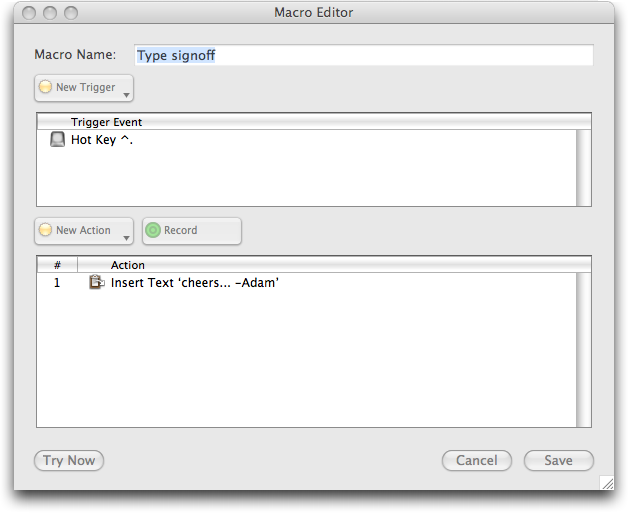
  Peter Lewis of Stairways Software has released Keyboard Maestro 3.0,
  a major upgrade to the macro utility, which also helps users switch
  among programs and windows, and store and retrieve multiple
  clipboards. New ways of creating and working with macros in Keyboard
  Maestro 3.0 include the capability to record macros, enabling and
  disabling of individual macros and macro groups, and the capability
  to test macros and individual actions as you're creating them. In
  addition to existing triggers (modified hot keys, application
  events, time, and palette clicks), macros can now be triggered via
  AppleScript, via a built-in Web server, and by unmodified letter
  keys (which is occasionally useful). Keyboard Maestro also adds or
  improves on a number of actions, such as executing an inline Unix or
  AppleScript script, brief display of results from Unix and
  AppleScript scripts, executing Automator actions, logging out,
  recording macros, simulating a horizontal scroll wheel, and resizing
  windows. Of particular interest is a new PC Switcher Pack from
  Rakesh Kumar that provides macros to simulate the keyboard shortcuts
  people switching from Windows to the Mac would be accustomed to on
  the PC.

<http://www.keyboardmaestro.com/>
<http://www.tidbits.com/resources/2008-04/Keyboard-Maestro.png>
<http://www.keyboardmaestro.com/documentation/3/whatsnew>
<http://www.keyboardmaestro.com/documentation/3/macroexamples.html#macroexamples_switcherpack>

  One tip for anyone trying Keyboard Maestro - some of the sample
  macros may use keys you're used to performing other actions. I was
  quite surprised to discover that Keyboard Maestro had remapped
  Option-Delete to act like Forward Delete (instead of the delete
  backward by word function that I like in many applications), and
  even more surprised when F1 played a random song from iTunes instead
  of launching BBEdit. Of course, the sample macros are easily deleted
  or adjusted.

  Keyboard Maestro 3.0 requires Mac OS X 10.4 or later and is a
  universal binary. New copies cost $36, with upgrades priced at $18
  for anyone who purchased Keyboard Maestro 2 between July 2004 and
  October 2007; anyone who purchased after 01-Nov-07 is entitled to a
  free upgrade.

<http://enquiry.stairways.com/>


Final Cut Now Ready to Serve
----------------------------
  by Jeff Carlson <[EMAIL PROTECTED]>
  article link: <http://db.tidbits.com/article/9560>

  With most Apple products, the wait between the announcement and
  shipping  can seem unending (see the iPhone, Apple TV, and Leopard
  for recent examples). It's rare to forget about something new from
  Apple, but that's exactly what I did with Final Cut Server, which
  started shipping this week. Apple announced the software along with
  Final Cut Studio 2 in April 2007, at which point availability was
  expected during the third quarter last year (see "Apple Announces
  Final Cut Studio 2, Final Cut Server," 2007-09-07).

<http://www.apple.com/finalcutserver/>
<http://db.tidbits.com/article/8953>

  No doubt it fell off my radar because it's not geared toward most
  consumers. Final Cut Server is an industrial-strength asset
  management tool, designed to keep track of terabytes of video,
  audio, photos, and other materials that need to be at hand for film
  and video pros. It can catalog assets, generate low-resolution
  thumbnails and proxies, allow multiple editors to check materials in
  and out (with version control), output projects using Compressor,
  and more. A Java-based client program enables cross-platform access
  to the server.

  Final Cut Server requires a Mac running an Intel Core Duo or later,
  or a 1.8 GHz or faster PowerPC G5 processor, AGP or PCI Express
  Quartz Extreme graphics card, Mac OS X 10.5 or later, QuickTime
  7.4.1 or later, and Final Cut Pro 6.0.2 or later for Final Cut Pro
  integration. Two pricing configurations are available: one server
  and 10 concurrent client licenses costs $999; one server and
  unlimited client licenses runs $1,999.


TidBITS Podcast Now in iTunes Store
-----------------------------------
  by Adam C. Engst <[EMAIL PROTECTED]>
  article link: <http://db.tidbits.com/article/9552>

  At long last we've worked through all the picky little details so
  the audio versions of our articles are now listed in the podcast
  directory of the iTunes Store. Nothing much changes otherwise -
  we've been producing audio versions of our articles for quite a few
  months, but subscribing to them in iTunes is now merely a matter of
  following this link and clicking the Subscribe button in iTunes.
  Clicking the Podcast link on our site's navigation bar will also
  take you to iTunes, and you can of course also search for TidBITS in
  the iTunes Store; we hope being listed will bring more people to our
  podcast.

<http://www.itunes.com/podcast?id=276986548>

  Because these are audio versions of individual articles (so they can
  be listened to directly on our Web site as well), they're generally
  quite short, with most lasting between 3 and 5 minutes and one
  paragraph news items around 1 minute. Longer articles generally top
  out at 10 to 15 minutes. I mention this because if you have a 30
  minute commute, you might find it awkward to keep fiddling with your
  iPod to move to the next article after one finishes.

  To work around this problem (making it possible to drive more safely
  - see "Use iPods Cautiously While Driving," 2007-04-09), simply
  create a smart playlist in iTunes that selects all the tracks whose
  album matches "TidBITS". Then sync that smart playlist to the iPod
  and access it via the Playlists menu rather than the Podcasts menu.
  You could also do this on the fly: select the TidBITS podcast in the
  Podcasts menu and press and hold the center button for a second to
  create an On-The-Go playlist, from which you can play all the
  articles in the order listed. You may wish to turn off the shuffle
  setting on your iPod as well.

<http://db.tidbits.com/article/8939>

  We're not trying to do a fancy-pants podcast with snazzy music and
  professional-level editing that would require time and money we'd
  rather spend elsewhere, but I hope you enjoy being able to get your
  TidBITS fix audibly while you're driving, doing yard work, or at the
  gym.


Configure Mail to Prevent iCal Spam
-----------------------------------
  by Jeff Carlson <[EMAIL PROTECTED]>
  article link: <http://db.tidbits.com/article/9561>

  Checking my schedule in iCal, I found an unexpected morning event
  called "Hello Dear." Did my wife send me a geeky greeting?
  Double-clicking the event to learn more (because iCal under Leopard
  now requires a double-click, a frustration I keep meaning to write
  about but haven't had the time) revealed that the event was most
  certainly not from my wife, but from some spammer promising that a
  large sum of cash is ready to be couriered to me.

  What, now there's spam in my iCal calendars?

  Yes, courtesy of a preference in Apple's Mail application that is no
  doubt intended to be a "feature." Instead, it's a vector for
  unwanted intrusion. Here's what happened:

  Yesterday I received a spam message that included an .ics file - a
  calendar event generated in this case by Google Calendar. The
  message was flagged as Junk and banished to the proper folder, but
  not before the .ics file was automatically passed to iCal, where the
  event was created.

  For people who set up meetings and send reminders, this feature is
  clever. In iCal under Leopard, you double-click an event, click the
  Edit button, and then click the Add Attendees link to include the
  email addresses of people who should be notified of the event. When
  they receive the email message, Mail (or other software that can
  handle .ics attachments) sends the meeting information to iCal where
  the event is added. That way, for example, even if I missed the memo
  that TidBITS was having a staff meeting, it would still appear on my
  calendar.

  But just as it's a bad idea to allow Safari to open downloaded files
  automatically (see "Significant Safari Exploit Discovered,"
  2007-09-07), this capability to create iCal events automatically is
  an invitation to wrongdoing. I don't have the scripting chops to
  tell if such an event could do damage to your data, but at the very
  least it's a nuisance and if lots of spammers started using this
  technique, all the spurious events could overwhelm your calendar.

<http://db.tidbits.com/article/8436>

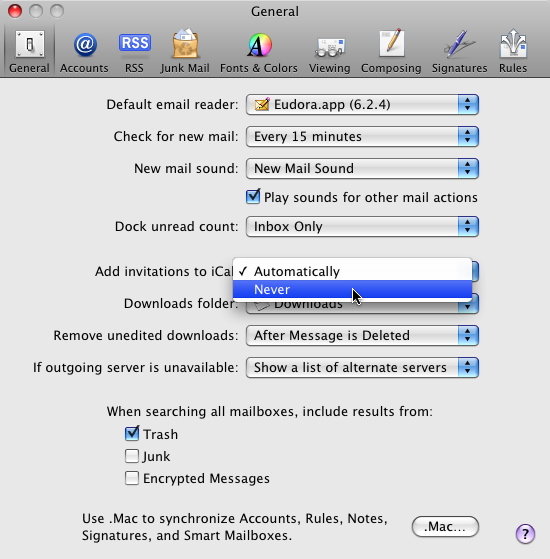
  Fortunately, there's an easy fix: In Mail, go to Mail > Preferences
  and click the General icon (if it's not already selected). From the
  "Add invitations to iCal" pop-up menu, choose Never. When a message
  containing an .ics attachment arrives, it won't automatically be
  added to your calendar; you'll need to double-click the attached
  file to do that.

<http://www.tidbits.com/resources/2008-04/mail_auto_ical.jpg>

  Note, too, that iCal can subvert this choice. In iCal's preferences,
  click the Advanced icon and make sure that "Automatically retrieve
  invitations from Mail" is also unchecked.

  Although this wasn't the case with the message I received, some
  events require a reply when you attempt to delete them. According to
  an Apple support discussion, you can disable Internet access and
  then delete the event, or install John Maisey's freeware iCal Reply
  Checker.

<http://discussions.apple.com/thread.jspa?messageID=6991955>
<http://www.nhoj.co.uk/icalreplychecker/>

  I can see how automatic data handling can be convenient, but we're
  at a point on the Internet where there's no reason to leave open
  doors that shouldn't be. At the very least, any event passed to iCal
  should be intercepted and presented to the user as a confirmation
  dialog.


VMware Fusion Video Contest
---------------------------
  by Adam C. Engst <[EMAIL PROTECTED]>
  article link: <http://db.tidbits.com/article/9556>

  The Fusion team at VMware is aiming to have some fun in their
  ongoing virtualization competition with Parallels. Through
  15-May-08, they're running a contest in which people who have
  switched to VMware Fusion from Parallels Desktop or Virtual PC can
  create 60-second videos about the experience. Everyone who submits a
  video will receive a VMware Fusion t-shirt and bumper sticker, and
  the winner will walk away with a MacBook Air and a copy of VMware
  Fusion. All the videos will be shown on the Switch to Fusion
  mini-site after the close of the contest.

<http://www.vmware.com/landing_pages/switchtofusion/video-contest.html>
<http://www.vmware.com/landing_pages/switchtofusion/>

  Although VMware has put together a PDF with necessary instructions
  and tips for making a good video, if you're intimidated by the task,
  you can also write up a blog post about the switch and post that to
  get a free VMware Fusion bumper sticker and a chance to win an iPod
  touch. Another PDF explains what's necessary for the blog post
  entries.

<http://www.vmware.com/files/images/landing/mac/switchtofusion-video-contest-instructions.pdf>
<http://www.vmware.com/files/images/landing/mac/switchtofusion-blog-post-instructions.pdf>

  Be sure to read the contest terms and conditions carefully, since
  they lay out the judging criteria for both videos and blog posts.


Apple Enthusiast Offers New Take on News Aggregation
----------------------------------------------------
  by Adam C. Engst <[EMAIL PROTECTED]>
  article link: <http://db.tidbits.com/article/9557>

  Frank Cioffi's MWV News Portals has raised the curtain on another
  news headline aggregation site, called Apple Enthusiast. Following
  in the footsteps of the company's Apple Investor News, Apple
  Enthusiast scours the RSS feeds of numerous Macintosh publications
  and sites, including TidBITS, to present headlines and links to
  original articles. What sets Apple Enthusiast apart from other
  aggregation sites is that it performs content analysis on articles
  and sorts them into categories, separating out Mac news from iPhone
  news, and homing in on product reviews, tips and tricks, developer
  news, iPhone and iPod touch software, games, Steve Jobs, and much
  more. Interestingly, there's relatively little overlap with Apple
  Investor News, showing just how much information is out there for
  people interested in Apple.

<http://www.appleenthusiast.com/>
<http://www.appleinvestornews.com/>


Take Control News: Find 200+ Tips in the Mac OS X Hints Superguide
------------------------------------------------------------------
  by Adam C. Engst <[EMAIL PROTECTED]>
  article link: <http://db.tidbits.com/article/9555>

  The most useful pieces of advice about using your Mac are often
  short, focused tips that solve a particular problem or make a
  specific program work just the way you want. That's what you'll find
  in the "Macworld Mac OS X Hints Superguide, Leopard Edition," the
  latest ebook from our friends at Macworld. Written by the undisputed
  king of tips, Rob Griffiths, the ebook presents a cornucopia of over
  200 tips to help you get the most out of Mac OS X 10.5 Leopard.
  Culled from Rob's MacOSXHints.com site, and with contributions from
  other Macworld experts, the book's advice covers a wide range of
  topics and experience levels, from basic tips any Mac user can
  easily implement to power user tweaks that go way beyond the basics,
  employing Terminal, Automator, and AppleScript to maximize your
  Mac's mileage. The 70-page ebook is now available for $12.95 from
  the Take Control Books Web site, and a print version is also
  available for $19.95.

<http://www.takecontrolbooks.com/mw-macosx-hints-leopard.html?14@@!pt=TB924>

  Rob covers a lot of territory, with tips relating to new Leopard
  features like Screen Sharing and Spaces, others that cover existing
  features like screen savers and keyboard shortcuts, and
  hardware-related tips for printing and working with discs. He also
  helps you get the most out of standard Apple applications, including
  Mail (find and remove large attachments from your mail store), iCal
  (learn how to add and work with URLs easily in events), Safari (want
  to invoke bookmarks with voice commands?), and iTunes (check out the
  AppleScript to update podcasts manually), as well as iChat, Preview,
  and Dashboard.

  If you've wondered about using Unix commands in Terminal to
  customize your Mac beyond what the graphical interface offers, or if
  you've wanted to get more comfortable with Terminal, the book
  provides a nice foundation. It covers the basics of using Terminal
  and has a generous collection of tips sprinkled throughout that will
  get you typing (or pasting) simple command strings in order to tweak
  your Mac in useful and interesting ways. It also has info for those
  who are already comfortable with Terminal, covering new commands in
  Leopard, searching from the command line, and more.


Dialectic Simplifies Dialing Any Type of Phone
----------------------------------------------
  by Matt Neuburg <[EMAIL PROTECTED]>
  article link: <http://db.tidbits.com/article/9559>

  From the metaphorical pen of the pleonastically named Jonathan
  Nathan comes Dialectic, an application that dares to ask the
  question: "Dialing the phone? How much fun can _that_ be?"

<http://www.jonn8.com/>
<http://www.jonn8.com/dialectic/>

  With Dialectic, it can be fun. A lot of fun. Or at least it can be
  non-painful. Which, if you find dialing the phone as painfully
  difficult as I do, is just as good. Yes, dear reader, in this
  degenerate age of instant messaging and Twitter, phones do still
  exist. In fact, there are more phones than ever (as anyone trying to
  get a little peace and quiet in the aisles of Trader Joe's can
  readily attest; is there no one besides myself left on this earth
  who knows how to shop without shouting?). And there are more _kinds_
  of phone than ever. Your "phone" these days might be a VoIP
  application, such as Skype or Vonage. You might be phoning through
  an Asterisk software PBX, or a Cisco IP Phone. You might have
  Bluetooth-enabled cell phone. You might have a good old-fashioned
  landline. Whatever it is, Dialectic can dial through it.

<http://www.traderjoes.com/>
<http://skype.com/useskype/>
<http://www.vonage.com>
<http://www.asterisk.org/>
<http://www.cisco.com/en/US/products/ps6788/Products_Sub_Category_Home.html>

  (How can a computer dial a landline phone? Well, you might have a
  modem in your computer, unused and forgotten since the day you
  installed broadband Internet access. So whip out that old RJ-12
  cable and let the modem dial the phone for you! Or, in a pinch, you
  could hold the phone's handset up to your computer's speakers.)

  But it isn't just _how_ you can dial; it's _what_ you can dial.
  Dialectic includes a terrific lookup feature that sees and parses
  your Address Book and any of a number of other contact lists you may
  have, such as Entourage's internal address book, Now Contact, and so
  on. So if all I remember is someone's name, just typing that name is
  enough to present me with the known phone numbers for that person,
  and I can click one to dial it. Dialectic also includes an amazing
  menu that presents your entire Address Book in hierarchical form
  (this feature alone, effectively subsuming the author's JABMenu
  utility, could be worth the whole price of the application).
  Recently and frequently dialed numbers reside in menus of their own.
  And of course there is a service and a contextual menu item, so that
  in any application, if you can see and select a phone number, you
  can dial it.

<http://www.microsoft.com/mac/products/entourage2008/>
<http://www.nowsoftware.com/products/nudc5/learn.asp>
<http://www.jonn8.com/jabm/>

  Dialectic comes with too many additional extras for me to describe
  here. You can dial manually by clicking on a number-pad window; you
  can convert mnemonic letters (1-800-MY-IPHONE) to numbers; you can
  time your calls; you can take notes on a call; and of course calls
  are automatically logged. It integrates in cool ways with LaunchBar
  and similar launchers. Plus, Dialectic is scriptable with
  AppleScript and provides numerous hooks so that an AppleScripter can
  both drive and customize it heavily. You can even dial a number by
  speaking, thanks to the system's Speech Recognition technology.

<http://www.obdev.at/products/launchbar/>

  The one thing to be wary of is getting started. Dialectic comes with
  about a zillion preferences, and it won't behave completely
  coherently unless you set them up appropriately before dialing your
  first number. This is not at all difficult, but in this age of
  congenital resistance to reading manuals, those expecting Dialectic
  to work automatically out of the box are in for a surprise. (For
  example, you really should tell Dialectic your local area code, so
  that phone numbers starting with your area code are dialed as local
  numbers; and of course you really should tell it how you want to
  dial, if you don't want it to use your computer's speakers.)

  Speaking of preferences, I can't resist mentioning how slick,
  beautiful, and ingeniously compact Dialectic's interface is. This
  includes not only the Preferences window, which readily and easily
  accommodates all zillion preferences, but also its main window,
  which is intended to float unobtrusively in some obscure corner of
  your screen while at the same time accessing nearly all of the
  application's functionality. When I first saw this interface, my
  immediate reaction was: "Wow! This should be a contender for the
  next Apple Design Awards!"

<http://guide.apple.com/ada/>

  (Conflict-of-Interest Warning: When I first saw this interface, I
  was in the employ of Jon Nathan, assigned to draft Dialectic's
  online help. I did not write the application's current online help,
  but some of my draft text is incorporated in it, and I was paid for
  this work. I also helped catch bugs, and made numerous interface and
  functionality suggestions. So when I praise Dialectic, I am praising
  both an erstwhile employer and myself. Nevertheless, I assure you
  that I truly do admire Dialectic, and I use it every day.)

  Dialectic is the successor to Jon's Phone Tool (JPT). It is
  rewritten from the ground up; for one thing, JPT was an AppleScript
  Studio application, whereas Dialectic is Cocoa/Objective-C, so it's
  much faster and slicker. Dialectic requires Mac OS 10.4 Tiger or
  10.5 Leopard. It is available as a 14-day free trial (a 5.4MB
  download). It costs $25, or $10 to registered JPT users.

<http://www.jonn8.com/jpt/>
<http://www.jonn8.com/dialectic/Dialectic.dmg>
<http://www.jonn8.com/dialectic/html/jptupgrade.html>


Reluctantly Switching from Eudora to Apple Mail
-----------------------------------------------
  by Tonya Engst <[EMAIL PROTECTED]>
  article link: <http://db.tidbits.com/article/9564>

  After months of hemming and hawing, I recently took the plunge and
  switched from Eudora to Apple Mail. I had thought that - as Eudora
  users go - I was a relative lightweight, but now I'm not so sure. I
  followed Adam's wake into Eudora, letting him set the software up
  for me and then serving as his editor for "Eudora 4.2: Visual
  QuickStart Guide" from Peachpit Press. However, I seem to have
  picked up more power-user procedures along the way than I had
  realized, and I've found that Mail thinks about filtering in exactly
  the opposite of how I'd set up Eudora, and that it requires far more
  effort for complex searches, which it turns out that I do often.

  On the plus side, I'm liking Mail's spam filtering, I'm ending up
  with far fewer email windows open at once, and I do enjoy some of
  Mail's "trendy 3-D junk."

  Based on plaintive email I'm receiving, it seems that many people
  are reluctantly contemplating a switch away from Eudora to an email
  client that's more actively supported or that has a more modern
  interface. I wrote this article to share my difficulties in making
  the switch in hopes of improving the experience for those who may
  follow (or choose not to follow) in my path.


**Clean Up First** -- The standard geek advice on the switch is that
  you shouldn't use Mail's tools to import your old data from Eudora.
  Instead, you should use Andreas Amamn's donationware Eudora Mailbox
  Cleaner. To be fair, one geek I know, John Baxter, suggested via
  Twitter that I just start afresh, and that might, frankly, have been
  simpler.

<http://homepage.mac.com/aamann/Eudora_Mailbox_Cleaner.html>

  My first step was to clean and organize my Eudora mailboxes and
  delete some old mail I didn't need. I should have taken this step
  further, and especially concatenated older mailboxes that no longer
  needed to be individual, since Mail works better with fewer
  mailboxes and a more shallow hierarchy. I next made a copy of
  ~/Documents/Eudora Folder, just in case. I also sorted my
  ~/Documents/Eudora Folder/Attachments Folder by size and removed all
  attachments that looked like I didn't want them and were over 5 MB
  in size. [Editor's note: Also, either delete the contents of your
  Junk folder in Eudora, or create a manually activated filter to move
  to the Trash attachments for all messages, select the contents of
  Junk, and choose Special > Filter Messages. -Adam]

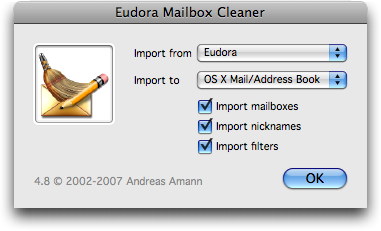
  Running Eudora Mailbox Cleaner is a simple matter of dropping your
  Eudora Folder on the Eudora Mailbox Cleaner icon and then indicating
  what you want converted: email messages and mailboxes, nicknames,
  and filters. I selected all three. I mistakenly thought that Eudora
  Mailbox Cleaner would run through my Eudora data and then, when it
  finished, give me some sort of "Import to Mail" option, or give me a
  file that I would then import into Mail. Big mistake.

<http://www.tidbits.com/resources/2008-04/Eudora_Mailbox_Cleaner.png>

  In fact, Eudora Mailbox Cleaner whacks your data right into Mail and
  into Address Book. Your messages and mailboxes go into Mail, your
  filters go into Mail as rules, and your nicknames (and nickname
  groups) pop into Address Book. Automatically moving Eudora stuff
  into Mail and Address Book isn't a bad thing, if Eudora Mailbox
  Cleaner works on the first try. However, it took me four tries
  before it worked properly. Each time Eudora Mailbox Cleaner got
  stuck, I used the status info shown above its progress bar to delete
  the problematic nickname or mailbox from Eudora. Nothing that I
  deleted was particularly important. (On the final pass, Eudora
  Mailbox Cleaner took about 45 minutes on my 2 GHz Intel Core 2 Duo
  MacBook Pro to convert my 2 GB Eudora Folder.)

  I thus ended up with four copies of mailboxes and rules in Mail,
  plus four copies of every Eudora nickname in Address Book. Sigh. It
  was easy to delete the extra imported mailboxes, and easy to delete
  the extra rules, except that - and I realized this later - I
  retained the wrong set of rules, so they didn't match my retained
  mailboxes. This led to Mail creating new duplicate mailboxes on the
  fly and some late-night begging on my part to Adam to make my email
  work. I found it extremely unsettling to be without email not
  because I'd chosen to go offline, or because a server is flaking
  out, but because I, myself, had made a user error. Had I realized
  that Eudora Mailbox Cleaner worked this way, I would have deleted
  everything from Mail after each of the first three failed imports. I
  also might have tried exporting my nicknames to vCard format first
  and then imported them into Address Book, using Eudora vCard Export,
  also by Andreas Amann.

<http://homepage.mac.com/aamann/Eudora_vCard_Export.html>

  Next, I had to rebuild each mailbox in Mail to make its messages
  appear. I found that I couldn't select multiple mailboxes to apply
  the Mailbox > Rebuild command: each one had to be selected
  individually, although I could start rebuilding one before the
  previous one finished. You could make a keyboard shortcut to speed
  this up, as I did, but fortunately, Eudora Mailbox Cleaner comes
  with a script that automates this task, and learning about this
  script is just one of the many reasons why, ahem, I wish I had read
  all of the somewhat lengthy Read Me first and more fully thought out
  my switching procedure before I jumped in.

  My advice is this: if you need to get a few mailboxes working,
  rebuild them by hand. Otherwise, let the script run while you go out
  for a meal or even overnight. The script frequently switches Mail to
  be the active application, so it's not practical to work on your Mac
  while it runs. As a point of reference, it took about 15 minutes for
  Eudora Mailbox Cleaner to rebuild the 166 mailboxes that I did not
  rebuild by hand. Once your mailboxes are rebuilt, note that you have
  In and Out boxes from Eudora that are separate from Mail's In,
  Draft, and Sent boxes.

  It was also easy to delete the extra Address Book entries; Address
  Book has a command for removing duplicates. But because I hadn't
  cleaned up my nicknames first, I now have a number of wacky Address
  Book entries, including some remnants of what I think is Eudora's
  recently used addresses feature. Fortunately, I hadn't much used
  Address Book before (I currently use Now Contact), so I can slowly
  weed these out as Mail suggests odd options for auto-filling email
  addresses. In fact, avoiding Address Book as my primary contact
  manager is now especially appealing, since I can use it only for
  desired Mail nicknames. If I used it for everyone I know, it would
  offer too many unwanted options when autofilling an email address in
  Mail. This seems like a misstep on Apple's part.


**Work Flow** -- The next big problem is that I had set up Eudora to
  show me only the new messages I wanted to read. This technique,
  known as a "saved search" in Eudora, has prolonged Eudora's life for
  me and many others, since it is so handy (Adam first promoted this
  technique in "A New Way to Use Eudora," 2004-12-20). To accomplish
  this, I created a filter for each person (and mailing list) from
  whom I routinely receive mail - about 100 filters all told. In each
  case, the filter puts matching messages into a mailbox associated
  with that person (or mailing list). I then put each of those
  mailboxes into one of three folders - People (who I work with),
  Family, or Friends. Next, I set up a saved search that would show me
  unread mail from mailboxes in those three folders, and depending on
  my available time, I'd sometimes change the criteria to concentrate
  on mail from colleagues in the past 5 days, or if it was the
  weekend, I could see only mail from family and friends. An advantage
  to this strategy was that after I'd read a message, if I wanted to
  keep it, it was likely already filed into an appropriate mailbox, so
  I didn't have to take any further action.

<http://db.tidbits.com/article/7934>

  I also made a point of checking my raw In mailbox regularly for
  messages from strangers, and to delete wayward spam that made it
  past the two spam filters - our server-side Postini filter and
  Eudora's local SpamWatch filter. These two filters were working
  increasingly poorly, and the spam I was receiving was increasingly
  crude and upsetting. Although I know I could have solved that
  problem in other ways, this awful spam was the final straw that
  caused me to decide to switch. So far, Mail's spam filter is working
  far better than Eudora's was.

  Unfortunately, Mail's rules and smart mailboxes assume a different
  approach, and it has taken me about a week of working with Mail to
  get my head around it. If Mail supported searching on "folders" that
  hold groups of mailboxes, I could stick with my current strategy,
  but since Mail doesn't offer this feature, I had to reconfigure
  everything. In Mail, if you want to go with the flow, you let
  everything pour into your Inbox, filtering out only mailing lists
  whose messages you wouldn't want to mix in with others in a smart
  mailbox. You then use smart mailboxes to look at different groups'
  messages in your Inbox.

  That sounds pretty easy to set up, and it took only one session in
  Address Book to make reasonably good groups and get those smart
  mailboxes working - I ended up with four mailboxes for four discrete
  groups of people who I frequently exchange email with. However, I
  was then faced with the problem that after I read my messages in my
  smart mailbox, they were still, in fact, in my Inbox. If I wanted to
  file them for archival purposes or to indicate some future action
  that I should take, I had to move them manually in some way to
  another location. For a while, I thought I'd try Mail Act-On 1.3.3,
  which is intended to help with this problem, but whose Leopard
  compatibility is still in beta.

<http://www.indev.ca/MailActOn.html>

  However, I felt reluctant to base my entire email strategy on
  third-party software that might make it difficult to upgrade to the
  next major version of Mail as quickly as I might need to.

  So, I tried enabling my rules (from the old filters that came in
  from Eudora) that filter incoming email from individual people into
  their individual mailboxes, instead of into the Inbox, which takes
  care of a lot of my post-reading filing. The messages still show up
  in my smart mailboxes, but when I consider them read, I can either
  delete them or do nothing, and if I do nothing, they remain in their
  appropriate person-specific mailbox. I know that some people are
  comfortable with a huge Inbox of read messages that are unfiled, but
  I prefer a more finely grained organizational system.

  I've found it valuable to check each rule to be sure it does what I
  want, so I turn on five or so in a session, reconfiguring them as
  needed, and then watch what comes in to see if it's going to the
  right place. This didn't work well when I had Mail set to check for
  messages every 5 minutes and I was getting a high volume of
  messages, because Mail didn't like having to display messages in my
  smart mailboxes while it was checking and filtering. This is akin to
  Eudora, where sometimes incoming messages would appear shortly after
  it would seem that they should have, but Eudora would let me
  continue working without a fuss. [Editor's note: In Eudora, bring
  the Task Progress window to the front to make it filter right away;
  otherwise it waits until it senses idle time. -Adam] I recently set
  Mail to check for new email every 30 minutes, and that seems to
  help, since I'm less likely to be trying to work with a smart
  mailbox when Mail is also trying to work with it. However, my email
  volume has been light recently, so the jury is still out on how well
  all this will work.

  Manual filing is still more difficult in Mail than it was in Eudora.
  The contextual menu is awkward to use, and the dragging method is
  hard because I have so many mailboxes to use as potential targets. I
  have been slowly reorganizing my mailboxes to put frequent targets
  at the top. Mail insists on alphabetizing mailboxes, so I renamed
  some mailboxes to begin with an asterisk in order to group them at
  the top without nesting them. I expect that my entire mailbox
  organization strategy will evolve over time so that the strongest
  organizational criterion becomes frequency of use instead of topics
  or relationships.

  What I know now, after a week of using Mail, is that some of my
  initial troubles with filing related to my overall mousing speed and
  my lack of having scheduled enough time to settle into Mail. For
  example, it took me a few days to realize that, when dragging a
  message out of the viewing pane and into a different mailbox to file
  it manually, I was dragging downward too much and not enough to the
  left toward the sidebar. Dragging more slowly and making an effort
  to drag to the left helped enormously. If you drag down too quickly,
  Mail thinks you want to select multiple messages in the viewing
  pane. I still mis-drag about 20 percent of the time. Another problem
  directly related to my impatience was that I never hovered over a
  top-level mailbox long enough to realize that it was spring loaded,
  so I was often adjusting my sidebar before I filed a message just to
  bring the target mailbox into view. It is much easier to just wait a
  moment for a spring-loaded mailbox to pop open!

  I'm still having trouble with ad-hoc searching in Mail. The basic
  search functionality is easy to use, but doesn't allow the kind of
  boolean searching I do often. Nested smart mailboxes can help with
  this, but they perform slowly on my system and are annoying to set
  up for a quick ad-hoc search. And, I miss Eudora's Option-click
  feature where you could Option-click any bit of metadata on a
  message - such as the Sender or the Subject - in a mailbox listing,
  and immediately see all other messages with that metadata grouped
  together. Joe Kissell, author of various editions of "Take Control
  of Apple Mail" (the Leopard edition is slated for early May; I'm
  acting as guinea pig and editor), suggested that I learn how to type
  important bits of search syntax directly, that I search in Spotlight
  in the Finder, or that I look into the $29.95 MailTags plug-in.

<http://www.takecontrolbooks.com/leopard-apple-mail.html>
<http://www.indev.ca/MailTags.html>


**Two Specific Fixes** -- My first few days in Mail were especially
  disconcerting due to a few special problems that I encountered. You
  might run into similar ones, so I've noted them here.

  The first problem was that each time I launched Mail, I had to enter
  two passwords for my incoming email accounts and two passwords for
  those same accounts' outgoing servers. My keychain seemingly could
  not remember them. This was a drag, but, again, Joe's draft came to
  the rescue, advising me to launch Keychain Access, choose Keychain
  Access > Keychain First Aid, and then repair my keychain (honestly,
  if I didn't edit these ebooks, I'd never be able to get my Mac to do
  anything).

  The second problem that I had to figure out on my own was that Mail
  wouldn't let me move messages out of one of my inboxes - the
  messages kept bouncing back as though the destination mailboxes were
  locked, or radioactive, or something. The fix related to a setting
  for the account where I was having messages also kept on the server
  for a week after delivery. Apparently that was a no-no.

  Change can be painful, and changing to Mail so far has been more
  time-consuming and more frustrating than I'd anticipated. My biggest
  mistakes were not preparing enough in advance and not giving myself
  more time to get comfortable before I needed to be up and running
  effectively. Although I'm starting to settle in, I sense that I am
  pushing Mail with the volume of email that I receive and the amount
  of work that I want it to do for me, so although I don't think I'm
  moving back to Eudora, I'll be keeping my eye out for other options,
  such as the new Outspring Mail, covered in "Outspring Mail Promises
  Intelligent Filing" (2008-03-31).

<http://www.outspring.com/index.php?option=content&task=view&id=64>
<http://db.tidbits.com/article/9540>


TidBITS Watchlist: Notable Software Updates for 14-Apr-08
---------------------------------------------------------
  by TidBITS Staff <[EMAIL PROTECTED]>
  article link: <http://db.tidbits.com/article/9551>

* Pro Applications Update 2008-01 from Apple updates Final Cut Studio
  2, bringing Final Cut Pro up to version 6.0.3 and Compressor to
  version 3.0.3. According to Apple, the update "addresses specific
  customer issues, installation issues, compatibility updates, general
  performance issues and improves overall stability." A valid Final
  Cut Studio 2 serial number is required to download the update.
  (Free, 63.7 MB)

<http://www.apple.com/support/downloads/proapplicationsupdate200801.html>

* Photoshop Lightroom 1.4.1 and Camera Raw 4.4.1 fix a set of problems
  that prompted Adobe to pull the 1.4 and 4.4 updates of the software
  a few weeks ago. Those earlier updates incorrectly modified EXIF
  time and date information on photos and prevented Olympus JPEG files
  from rendering correctly. The import performance was also degraded
  in Lightroom 1.4 compared to version 1.3. The updates also add
  support for Canon EOS 450D (Digital Rebel XSi/EOS Kiss X2), Nikon
  D60, Sony A350, and others, and update printer driver compatibility
  under Mac OS X 10.5 Leopard. Windows versions of the updates are
  also available. (Free; Lightroom 1.4.1, 42.9 MB; Camera Raw 4.4.1,
  12.5 MB)

<http://www.adobe.com/support/downloads/detail.jsp?ftpID=3891>
<http://www.adobe.com/support/downloads/detail.jsp?ftpID=3893>

* OmniWeb 5.7 from The Omni Group is a fairly major release to the
  company's feature-packed Web browser. OmniWeb 5.7 improves ad
  blocking, adds a "Mail Contents of This Page" command to the File
  menu, gives the option to display PDFs inline or download them,
  improves PDF handling, and reduces the CPU usage and memory
  footprint. A number of nagging crashes were also resolved. ($14.95
  new, free upgrade, 12.9 MB)

<http://www.omnigroup.com/applications/omniweb/>

* iGlasses 2.1 from Ecamm Network adds digital zoom to the video
  utility, along with support for seven additional video applications:
  Skitch, Pixelmator, Cha-Ching, WebEx Meeting Center, Arkaos VJ,
  Acorn, and ooVoo. Other changes include support for using a CamTwist
  video source and bug fixes to work with iMovie '08 properly and to
  fix problems with pan and zoom using the Apple Remote in Leopard.
  iGlasses 2.1 also resets the demo period, so those who have
  previously tried the program can try it again. ($9.95 new, free
  upgrade, 875K)

<http://www.ecamm.com/mac/iglasses/>

* Aluminum Keyboard Firmware Update 1.0 from Apple updates the
  firmware of both the wired and wireless versions of the aluminum
  Apple Keyboard to put a stop to unexpected key repeats. Apple claims
  the update also addresses other issues. The update requires Mac OS X
  10.5.2, and if you're installing from a MacBook or MacBook Pro, be
  sure to plug in your computer's power cord before installing. (Free,
  1.5 MB)

<http://www.apple.com/support/downloads/aluminumkeyboardfirmwareupdate10.html>

* Airfoil Speakers for Linux 1.0 from Rogue Amoeba allows Airfoil for
  Mac 3 or Airfoil for Windows 2.5 to stream music over a network to a
  system running a supported version of Linux. This software doesn't
  include any other Airfoil functionality, and is labeled
  "unsupported" by Rogue Amoeba. (Free, 187K)

<http://www.rogueamoeba.com/airfoil/speakers.php>


Hot Topics in TidBITS Talk/14-Apr-08
------------------------------------
  by Jeff Carlson <[EMAIL PROTECTED]>
  article link: <http://db.tidbits.com/article/9565>

**Printer-Friendly Mode Returns to TidBITS** -- Readers respond to the
  addition of a printer-friendly version of TidBITS articles (and we
  respond by adding support for images!). (9 messages)

<http://emperor.tidbits.com/TidBITS/Talk/1939>


**Is the net killing any of us?** A New York Times article about the
  supposed health dangers of blogging makes readers cry foul. (3
  messages)

<http://emperor.tidbits.com/TidBITS/Talk/1940>


**Problems with Eudora on OS X 10.5 (Leopard)?** Running Eudora under
  Leopard seems to affect readers differently, prompting one person to
  suggest that a stable Eudora under Tiger is better than the features
  offered by Leopard. (8 messages)

<http://emperor.tidbits.com/TidBITS/Talk/1941>


**Are There Any OS X Viruses in the Wild?** While we acknowledge that
  the Mac isn't immune to malware, are there any active viruses out
  there? (16 messages)

<http://emperor.tidbits.com/TidBITS/Talk/1942>


**Time Machine via AirPort Disk Is Unsupported, Apple Says** -- This
  much-requested feature, which appeared in the last AirPort update,
  turns out to have been a mistake. But will it remain, or be
  improved? (3 messages)

<http://emperor.tidbits.com/TidBITS/Talk/1943>


**AT&T Lowers Cancellation Fee** -- Is the new policy a result of
  newfound good will toward customers, or just a way to comply with
  laws? This discussion also brings up the question of how much money
  AT&T is actually making from iPhone sales and contracts. (7
  messages)

<http://emperor.tidbits.com/TidBITS/Talk/1944>


**How to Fix Corrupt Eudora Mailboxes** -- Adam's direct experience
  with Eudora corruption brings up stories of other data failures and
  how people manage their email. (8 messages)

<http://emperor.tidbits.com/TidBITS/Talk/1945>


**Audio Processing Software** -- A reader inquires about audio
  processing programs such as Peak LE, Sound Studio, and others.  (7
  messages)

<http://emperor.tidbits.com/TidBITS/Talk/1946>


**Disappearing movies on iTunes Store and Apple TV Store** -- The
  iTunes Store's movie selection appears to be ever-shifting, based on
  the studio's demands, with movies such as Spider-Man 3 now absent.
  (2 messages)

<http://emperor.tidbits.com/TidBITS/Talk/1947>


**Central storage of common files** -- Is it possible to store shared
  data such as bookmarks, contacts, and music on a drive attached to a
  Time Capsule and make it available across the network?  (1 message)

<http://emperor.tidbits.com/TidBITS/Talk/1948>


**Any questions for George Carlo PhD?** Readers debate the works of a
  researcher with strong opinions on the effects of wireless
  technology. (5 messages)

<http://emperor.tidbits.com/TidBITS/Talk/1950>


$$

This is TidBITS, a free weekly technology newsletter providing timely
news, insightful analysis, and in-depth reviews to the Macintosh and
Internet communities. Feel free to forward to friends; better still,
please ask them to subscribe!

Non-profit, non-commercial publications and Web sites may reprint or
link to articles if full credit is given. Others please contact us. We
do not guarantee accuracy of articles. Caveat lector. Publication,
product, and company names may be registered trademarks of their
companies. TidBITS ISSN 1090-7017.

Copyright 2008 TidBITS: Reuse governed by Creative Commons license.

Contact us at:    <[EMAIL PROTECTED]>
TidBITS Web site: <http://www.tidbits.com/>
License terms:    <http://www.tidbits.com/terms/>
Full text search: <http://www.tidbits.com/search/>
Subscriptions:    <http://www.tidbits.com/about/list.html>
Account help:     <http://www.tidbits.com/about/account-help.html>


--
If you want to unsubscribe or change your address, use this link
http://emperor.tidbits.com/webx?unsub@@.3c557dc4!u=306a67f9