TidBITS#954/17-Nov-08
=====================
  Issue link: <http://db.tidbits.com/issue/954>
  The iPhone and virtualization software hold sway in this issue, with
  Rich Mogull sharing the story of how he used his iPhone to avoid
  sleeping on an airport floor, Chris Pepper passing along methods of
  sending SMS messages for free, and David Strom comparing five
  applications for transferring files to an iPhone. On the
  virtualization front, last week saw both the release of Parallels
  Desktop 4.0 and our latest ebook, Joe Kissell's "Take Control of
  VMware Fusion 2." The rest of the issue is a grab bag: Glenn
  Fleishman looks at a new laptop recovery utility and the release of
  Safari 3.2, and Adam explains how he figured out how to make
  VoiceOver read an important button in the Take Control cart. In the
  TidBITS Watchlist, we cover Firefox 3.0.4, Coda 1.6, PDFpen 4.0.2,
  iLife Support 8.3.1, and NeoOffice 2.2.5 Patch 3. Finally, please
  welcome our latest sponsor, MacSpeech, and note that the next issue
  of TidBITS will appear 01-Dec-08.

Articles
    No TidBITS Issue on 24-Nov-08
    Safari 3.2 Fixes Security Flaws
    Laptop Recovery Software Uses Wi-Fi and Flickr
    MacSpeech Sponsoring TidBITS, Joins Returning Sponsors
    Parallels Releases Parallels Desktop 4.0
    iPhone Saves Weary Road Warrior
    Send SMS Messages for Free on the iPhone
    Wrangle Windows on a Mac with 'Take Control of VMware Fusion 2'
    Comparing Five iPhone File Transfer Apps
    Improving the HTML Accessibility of Our Cart
    TidBITS Watchlist: Notable Software Updates for 17-Nov-08
    Hot Topics in TidBITS Talk/17-Nov-08


------------ This issue of TidBITS sponsored in part by: --------------

* READERS LIKE YOU! Support TidBITS with a contribution today!
  <http://www.tidbits.com/about/support/contributors.html>
  Special thanks this week to Tad Davis, Marc Chavannes,
  Keith Holzman, and Bruce Hobbs for their generous support!

* Fetch Softworks: With Fetch 5.3, FTP and SFTP are simpler
  than ever. Use it on Mac OS X to upload, download, mirror,
  and manage your Web site, eBay images, and data sets.
  Download your free trial version! <http://fetchsoftworks.com/>

* WebCrossing Neighbors Creates Private Social Networks
  Create a complete social network with your company or group's
  own look. Scalable, extensible and extremely customizable.
  Take a guided tour today <http://www.webcrossing.com/tour>

* Bare Bones Software's BBEdit 9.0 -- A burly upgrade introducing new
  capabilities like Projects, non-modal Find and Multi-File Search,
  editing in browsers, text completion, Scratchpad, new Ruby module,
  better JavaScript, ObjC, Obj-C++, YAML <http://www.barebones.com/>

* MARK/SPACE, INC: If you have a smartphone, we can sync it!
  Sync your address book, calendar, notes, music, pictures, and
  more from your BlackBerry, Windows Mobile or Palm OS mobile
  phone to your Mac. <http://www.markspace.com/bits>

* VMware Fusion. The most seamless way to run Windows on your Mac.
  Backed by nearly a decade of proven virtualization technology.
  Try VMware Fusion today for free, or order online for only $79.
  Visit: <http://www.tidbits.com/about/support/vmware-fusion.html>

* Microsoft's MacBU: Supporting Mac users with Office 2008.
  Straighten up your Office with the latest updates to Word,
  Excel, PowerPoint, and Entourage. Update today at Mactopia!
  <http://www.microsoft.com/mac/downloads.mspx>

* ConceptDraw Office adds real business power to Microsoft Office
  and Apple's iWork. Whether you need project management, business
  graphics, or mind mapping, it's all easily created on your Mac!
  Buy today for only $499! <http://www.conceptdraw.com/tb>

* Circus Ponies NoteBook: The easy way to get organized
  on the Mac. Control your notes. Track your tasks. Manage
  your projects. Organize your life. Try NoteBook right now,
  free for 30 days! <http://www.circusponies.com/tidbits>

* MacSpeech Dictate -- Speech Recognition for the Mac.
  It's so good you may give up typing altogether.
  Save 10% by using coupon code DICTATE10 until 15-Dec-08
  when buying from <http://www.macspeech.com/>

---------- Help support TidBITS by supporting our sponsors ------------


No TidBITS Issue on 24-Nov-08
-----------------------------
  by Jeff Carlson <[EMAIL PROTECTED]>
  article link: <http://db.tidbits.com/article/9860>

  We can't be the only ones asking ourselves: is it really November
  already? We've had a busy year, and as we push toward the end of
  2008 and prepare for Macworld Expo in January, we're going to
  recuperate next week and celebrate the Thanksgiving holiday in the
  United States.

  We won't be asleep the entire time, of course - we just can't help
  ourselves. We'll no doubt continue to post to the TidBITS Web site.
  Check back at the site or subscribe to the our RSS feed or Twitter
  stream to keep up with everything we're writing.

<http://www.tidbits.com/>
<http://db.tidbits.com/feeds/tidbits.rss>
<http://twitter.com/TidBITS>


Safari 3.2 Fixes Security Flaws
-------------------------------
  by Glenn Fleishman <[EMAIL PROTECTED]>
  article link: <http://db.tidbits.com/article/9855>

  Apple has released Safari 3.2, which addresses a host of
  vulnerabilities, mostly in the version for Windows XP and Vista. A
  full rundown of changes is found in the security note. Most of the
  flaws relate to image handling and parsing under Windows. Several
  fixed bugs are cross-platform, and, among other improvements, close
  holes that could allow disclosure of information in forms to
  unintended users. In particular, Safari adds anti-phishing
  protection using Google's list of suspected malicious sites.

<http://support.apple.com/kb/HT3298>

  Most surprisingly, the Windows version of Safari was using zlib
  1.2.2, an open-source library of compression algorithms designed to
  avoid stepping on (and being encumbered by) any patents. The 1.2.3
  release came out in July _2005_ to fix known flaws in the previous
  release. Someone was apparently asleep at the switch in using the
  older library. zlib was likely used in handling compressed Web
  pages, an option that many servers employ to reduce the time spent
  and bandwidth used in transmitting HTML.

<http://en.wikipedia.org/wiki/Zlib>
<http://www.zlib.net/>

  Safari 3.2 can be automatically updated through Software Update
  under Mac OS X or Windows with Safari installed. The new release may
  also be downloaded separately for Mac OS X 10.4 Tiger (25 MB), Mac
  OS X 10.5 Leopard (39 MB), or Windows XP/Vista (19 MB).

<http://www.apple.com/support/downloads/safari32fortiger.html>
<http://www.apple.com/support/downloads/safari32forleopard.html>
<http://www.apple.com/support/downloads/safari32forwindows.html>


Laptop Recovery Software Uses Wi-Fi and Flickr
----------------------------------------------
  by Glenn Fleishman <[EMAIL PROTECTED]>
  article link: <http://db.tidbits.com/article/9853>

  The latest laptop-recovery application is a kind of mash-up, using
  several systems to provide information about a laptop's location and
  who's currently using it. GadgetTrak's new MacTrak ($59.95, one-time
  fee) uses Skyhook Wireless's Wi-Fi Positioning System, the same
  technology that's part of how the iPhone and iPod touch determine
  location. MacTrak also uses Flickr as a way to post photos snapped
  of someone using a machine identified as lost or stolen.

<http://www.gadgettrak.com/products/mac/>
<http://www.skyhookwireless.com/howitworks/wps.php>

  There are already several programs available that let you install
  software that's regularly checking for an activation signal to leap
  into action if your laptop is marked (in various ways) as being out
  of your hands. For a full rundown, see "Help! I'm Being Held
  Captive, and All I Have Is a Wi-Fi Network!," 2008-05-03.

<http://db.tidbits.com/article/9627>

  But MacTrak appears to have - or at least disclose - the most
  accurate way to track a missing computer. Skyhook's WPS relies on
  being in areas that have enough Wi-Fi signals to pinpoint a
  location, and on having an active network over which to perform
  queries. It's likely that a stolen laptop would wind up on a network
  in a city, unless thieves are becoming savvy and keeping computers
  locked down.

  MacTrak also uniquely transmits collected information directly to
  you, uploading it to Flickr (if you have an account set up, which is
  free for limited uploads), and sending via email. GadgetTrak says
  they don't run a monitoring center but will help connect users with
  law enforcement if asked.

  I'd love to see the face of a police officer, used to dealing with
  unrecoverable machines, when you walk in with a picture of the
  thief, a set of GPS coordinates with a map, and information about
  the network on which the thief connected.


MacSpeech Sponsoring TidBITS, Joins Returning Sponsors
------------------------------------------------------
  by Adam C. Engst <[EMAIL PROTECTED]>
  article link: <http://db.tidbits.com/article/9861>

  We're pleased to welcome as our latest long-term sponsor, MacSpeech,
  the only company providing speech recognition software for the
  Macintosh since IBM exited the field in 2003. IBM's withdrawal also
  left the Windows world with a clear leader: Dragon
  NaturallySpeaking. By 2006, New York Times columnist David Pogue,
  who had long used dictation software to avoid unnecessary typing,
  found Dragon NaturallySpeaking to be extremely accurate even when
  speaking at full speed, and more accurate than MacSpeech's product
  at the time, iListen 1.7. Seeing that it wasn't productive to
  continue developing its own speech recognition engine, MacSpeech
  licensed Dragon NaturallySpeaking's underlying dictation technology
  from Nuance, and built it into a new product, MacSpeech Dictate,
  released in February 2008. Demand has been high, stretching
  MacSpeech's ability to keep up, but after some busy months, the
  company recently shipped MacSpeech Dictate 1.2. The new version adds
  the capability to spell out unusual words or acronyms, phrase
  training that enables users to fix incorrectly recognized words
  right away, and a Move command for verbal editing.

<http://www.macspeech.com/>
<http://www.nytimes.com/2006/07/20/technology/20pogue.html>
<http://www.macspeech.com/product_info.php?products_id=592>

  It's great to see MacSpeech supporting the Macintosh community
  through a TidBITS sponsorship, and with it, MacSpeech joins a number
  of other companies that have started sponsoring TidBITS again after
  a hiatus. Most recently, Circus Ponies rejoined our sponsor ranks
  after shipping NoteBook 3.0, a significant update to their powerful
  note-taking software. Microsoft's MacBU also restarted their
  sponsorship not long ago, in part to help us drive the development
  of the TipBITS feature of our Web site (more on TipBITS soon, but
  check out the upper right side of our Web site for helpful tips
  about Macs and Mac software). And of course, we're especially
  grateful to our longest-running sponsors: Fetch Softworks (Fetch),
  Bare Bones Software (BBEdit, Yojimbo, and Mailsmith), Mark/Space
  (The Missing Sync, SyncTogether), VMware (VMware Fusion), and CS
  Odessa (ConceptDraw). It may be relatively easy to put up a blog
  these days, but a serious Internet publication requires non-trivial
  hardware, software, staff salaries, development costs, travel, and
  other expenses. Put bluntly, without the support of our sponsors and
  direct contributions from our readers, we wouldn't be able to keep
  publishing TidBITS. Thank you, all!

<http://www.circusponies.com/>
<http://www.microsoft.com/mac/>
<http://fetchsoftworks.com/>
<http://www.barebones.com/>
<http://www.markspace.com/>
<http://www.vmware.com/products/fusion/>
<http://www.conceptdraw.com/>
<http://www.tidbits.com/about/support/contributors.html>


Parallels Releases Parallels Desktop 4.0
----------------------------------------
  by Joe Kissell <[EMAIL PROTECTED]>
  article link: <http://db.tidbits.com/article/9850>

  Now that VMware Fusion 2 has had a couple of months in the limelight
  (see "VMware Fusion 2.0 Released," 2008-09-16), Parallels has
  stepped back onto the stage with the release of Parallels Desktop
  version 4.0. The new version adds a boatload of features, improves
  performance, and generally makes it harder than ever for consumers
  to choose between the two leading options for running Windows on an
  Intel-based Mac.

<http://db.tidbits.com/article/9773>
<http://www.parallels.com/desktop/>

  The new version of Parallels claims higher performance than version
  3.0, while using less of your Mac's CPU power and increasing battery
  life on Mac notebooks. In part, the performance improvements come
  from an Adaptive Hypervisor, which improves the way Parallels
  balances its own needs against those of Mac OS X. If you have lots
  of RAM or CPU cores in your Mac, you can now assign up to 8 cores
  and 8 GB of RAM to each virtual machine. Parallels Desktop 4 also
  has improved 3D graphics, including 256 MB of video RAM and support
  for DirectX 9, DirectX Pixel Shader 2.0, and OpenGL 2.0.

  Parallels Desktop 4 includes support for Intel's VT-x2
  virtualization technology, which Parallels says increases the
  software's performance up to 50 percent. However, no currently
  shipping Mac model has a CPU that supports VT-x2 - it's a technology
  available only in Intel's Nehalem processors, which are expected to
  begin appearing in consumer-grade computers in mid-to-late 2009. So
  it may take some time (and a new Mac) before you can realize this
  promised speed improvement. (Support for VT-x2 is also built into
  VMware Fusion 2, by the way.)

  Apart from performance improvements, Parallels 4 offers numerous new
  usability features. For example, in addition to single-window,
  full-screen, and Coherence modes (the latter of which interleaves
  windows from Windows applications with those from Mac OS X),
  Parallels now has a Modality view, in which your entire Windows
  desktop is scaled down to the size of your choice - but remains live
  and responsive to mouse and keyboard input. This lets you keep an
  eye on activity in a background virtual machine without switching
  windows or views. A new Clips tool lets you easily capture portions
  of your Windows screen and send the screenshots directly to your Mac
  OS X clipboard. SmartMount lets external hard drives and other
  removable storage devices appear in both Mac OS X and Windows at the
  same time, while SmartConnect lets you specify which operating
  system should take control of various USB devices when they're
  attached.

  Parallels now supports 64-bit guest operating systems, assuming your
  Mac has a 64-bit processor (that is, a Core 2 Duo or Xeon). The new
  version also offers a feature previously available in Parallels
  Server (which starts at $1,248.75): the capability to run Mac OS X
  Server as a guest operating system. (VMware Fusion 2 also has this
  feature.) The more-expensive server product does offer more power
  and flexibility for running Mac OS X Server, but at least the basic
  capability is now available to any Parallels Desktop user.

  Included with Parallels Desktop 4 is a Parallels-branded version of
  Kaspersky Internet Security, now with a 12-month subscription
  (version 3 included only a 6-month subscription), plus full versions
  of Acronis True Image 11 Home (a backup utility) and Acronis Disk
  Director Suite 10 (a tool for partitioning Windows disks); together,
  these three programs retail for $177. Astute observers may notice
  that these are the same three programs previously bundled with the
  now-discontinued Parallels Desktop Premium Edition package, which
  sold for $99.99.

  The features mentioned here are only a few of those that have been
  added to Parallels 4; for a complete list, see the Parallels Web
  site.

<http://www.parallels.com/products/desktop/upgrade/>

  The retail price of Parallels Desktop remains $79.99. Registered
  users of earlier versions can upgrade for $39.99; those who
  purchased Parallels Desktop 3.0 since 01-Sep-08 get a free upgrade.
  A free trial version is also available. Parallels Desktop 4 is a 172
  MB download.

<http://www.parallels.com/download/desktop/>


iPhone Saves Weary Road Warrior
-------------------------------
  by Rich Mogull <[EMAIL PROTECTED]>
  article link: <http://db.tidbits.com/article/9849>

  Road warrior. It's not a lifestyle I always enjoy, and it's a silly
  term, but thanks to my day job as an industry analyst, that's what I
  am. I average a couple of business trips every month as I wander the
  globe attending various security conferences and client meetings. I
  probably fly somewhere around 75,000 miles a year, which guarantees
  that I experience all the best the inefficient and callous airlines
  have to offer. But sometimes, just sometimes, all this experience
  provides a bit of a competitive advantage over my fellow travelers
  when the inevitable problems crop up.

  Last week I was headed from my home in Phoenix to speak at a small
  event in Dallas when a line of thunderstorms parked themselves over
  the runway in Dallas for a little mischievous socializing. Having
  once experienced a real wind-shear-on-landing incident in Mexico
  City thanks to incompetent air traffic control, I wasn't all that
  upset as we diverted to Austin while things cleared up. Since I'd
  had only one night at home after a week-long trip to a conference in
  Moscow, I was so exhausted and acclimated to airports and airplanes
  that I didn't get nearly as upset as many of my fellow travelers.
  Let's face it, it's hard to beat the acceptance of one's fate caused
  by jet lag, low blood sugar, and lack of sleep.

  After an hour in the sleepy Austin airport, the word came down that
  we were stuck waiting for a morning flight. Since this was a weather
  delay, the airline wasn't responsible for lodging. You could feel
  the tension rise as everyone scrambled for a place to sleep. I felt
  sorry for my fellow passengers without the financial resources to
  find a bed for the night, but not so sorry that I was going to join
  them on the airport floor.

  Diverted flights are always troublesome - especially in a closed
  airport. In the past, I would start hunting for local hotels by
  either calling someone with Internet access, or maybe finding a
  wireless connection and searching the major travel sites myself.
  Even at best, it usually takes 30 to 60 minutes to find a
  conveniently located hotel, make a reservation, and arrange
  transportation. But thanks to my iPhone I secured lodging and was on
  the shuttle within 15 minutes, and three screen taps.

  Here's how I did it. Once I knew we were stuck in Austin, I launched
  iWant - a free iPhone application that helps you find local services
  ranging from hotels and restaurants to gas stations, ATMs, and movie
  theaters. I tapped on the icon for hotels and was presented a list
  of lodging options sorted by distance from my current location. At
  the top of the list was the Hilton Austin Airport. I tapped on its
  name, and the address, phone number, and small map popped up. A tap
  on the phone number, and my phone connected me to the hotel. A few
  minutes later, I had secured a reservation and was headed to the
  shuttle pickup.

<http://phobos.apple.com/WebObjects/MZStore.woa/wa/viewSoftware?id=284945674&mt=8>

  That was it - three taps and a short phone call. As I headed out of
  the airport to the shuttle pickup I could see fellow travelers
  either setting up camp for the night, or frantically calling
  friends, family, or travel offices to find a bed. I suspect that I
  was sitting in my room ordering room service before most of them
  made it out of the airport. And based on the bleary eyes the next
  morning, I had a considerably more restful evening than most.

  I realize I may sing the praises of my iPhone a little too often
  here, but the truth is that as a frequent traveler I've never had
  such a useful tool at my disposal. Whether it involves using the GPS
  and Maps application when navigating the confusing streets of
  Moscow, locating food and lodging in Dallas, or providing hours of
  entertainment in lonely hotel rooms around the world, the iPhone is
  far more helpful than any other smartphone I've ever used.


Send SMS Messages for Free on the iPhone
----------------------------------------
  by Chris Pepper <[EMAIL PROTECTED]>
  article link: <http://db.tidbits.com/article/9854>

  When Apple and AT&T announced that iPhone 3G service plans would not
  include SMS (Short Message Service) text messages with the base
  plans, and SMS messages would be billed for either individually or
  in prepaid blocks, I was annoyed, along with pretty much everybody
  else. To make the highway robbery even more egregious, AT&T (like
  many other cellular carriers) now charges SMS recipients, as well as
  senders.

<http://www.wireless.att.com/answer-center/main.jsp?t=solutionTab&solutionId=54645>

  That's why I was delighted when Jeff Carlson pointed out that AIM on
  the iPhone could send SMS messages for free (see "Send SMS for Free
  via AIM on iPhone," 2008-07-13). Unfortunately, the iPhone AIM app
  is lousy. It's unstable, and messages I send from it are rarely
  received.

<http://db.tidbits.com/article/9690>

  However, several alternatives exist for both phones and computers.
  Note that these vary by cellular carrier - I concentrate here on
  AT&T options that work in the United States; your mileage may vary
  elsewhere.


**Method 0: Plain SMS** -- You can send SMS from a phone. 500 SMS
  messages are included "free" with the standard AT&T data plan for
  the original (EDGE) iPhone. For the new iPhone 3G, the base data
  plan doesn't include any SMS messages. You can pay $5 per month for
  200 messages, $15 for 1,500 messages, or $20 for an unlimited number
  of messages. Or, if you don't plan on sending and receiving more
  than 25 SMS messages in a month, you can pay $0.20 per message by
  not signing up for any plan. Astronomically expensive!

<http://www.wireless.att.com/cell-phone-service/specials/iphone-info.jsp>
<http://www.physorg.com/news129793047.html>


**Method 1: AIM-to-SMS Gateway** -- For computer users, Jeff's method
  is fine - AOL's AIM-to-SMS gateway works consistently. My issues
  were with the iPhone AIM client. On the Mac, iChat and AOL's Mac
  client are reliable, and another iPhone client using AOL's IM
  service would presumably have been fine. This morning, in a quick
  search for "AIM" in the iPhone App Store, I found 5 chat clients
  that claim AIM compatibility. But I barely use instant messaging
  since I started using Twitter, so determining if they work more
  reliably than the iPhone AIM client is left as an exercise to the
  reader.


**Method 2: Email-to-SMS Gateways** -- My favorite way to send SMS
  messages to iPhone-using friends is via email from either my Mac or
  my iPhone to their 10-digit cellular number @txt.att.net.
  txt.att.net is AT&T's email-to-SMS gateway; it generates an SMS
  message that looks something like an email message, with minimal
  'FRM' & 'SUBJ' headers adapted from the original message, and
  forwards that as an SMS message to the specified 10-digit cell phone
  number. Longer email messages are broken into multiple SMS messages.
  Now that I realize my iPhone 3G-using recipients pay for incoming
  SMS messages (including gatewayed spam!), I'll probably use this
  approach less, and avoid long messages which would be fragmented and
  thus charged as multiple SMS messages.

<http://www.wireless.att.com/answer-center/main.jsp?t=solutionTab&solutionId=KB63037>

  Email-generated SMS messages are easy to recognize - they come from
  strange-looking phone numbers, like "1 (010) 100-010" for the 10th
  message I received from the gateway.

  Unfortunately, these gateways are generally specific to individual
  carriers - AT&T's gateway works only for AT&T subscribers. Teleflip
  used to offer such a multi-carrier service, but the company has gone
  bankrupt. Notepage offers a long list of gateways. If you're not
  sure which gateway to use, try sending an SMS message from your
  phone to your email address (which will likely entail an SMS charge
  on the cellular bill) - the email should show a valid return address
  at the appropriate SMS gateway. Some SMS programs allow this, while
  others accept only phone numbers as recipients.

<http://www.notepage.net/smtp.htm>


**Method 3: SMS Web Pages** -- Many cellular carriers, including
  Verizon Wireless and Sprint, offer public Web pages for sending SMS
  messages to their subscribers. In contrast, AT&T's page is available
  only to logged-in AT&T customers, although hopefully that means it
  can reach any SMS number. I am not aware of a Web page which enables
  non-AT&T subscribers to send text messages to AT&T subscribers.

<https://text.vzw.com/customer_site/jsp/messaging_lo.jsp>
<http://messaging.sprintpcs.com/textmessaging/compose>
<https://www.wireless.att.com/olam/gotoPhone.olamexecute?event=goToSMS&reportActionEvent=A_PHON_SEND_MSG_SUB>


**Method 4: SMS Applications & Widgets** -- There are a variety of
  applications and Dashboard widgets that you can use on a
  full-fledged computer to send SMS messages. Many of these charge the
  sender, although they appear to operate across cellular carriers. I
  suspect they use commercial gateways which have the same access to
  cellular providers as other providers, but nobody except AOL appears
  to do this for free.

<http://www.versiontracker.com/php/qs.php?str=sms&srchArea=macosx%7Cmacosx-all>


**Method 5: Mobile Phone Under External Control** -- Additionally,
  several Mac programs exist that can instruct a mobile phone to send
  SMS messages, generally via Bluetooth or USB. The VersionTracker
  link immediately above lists a few. Obviously, there's no difference
  in price when using this method, but it may be easier to type out a
  message on a real computer keyboard.


**MMS: Multimedia Messaging Service** -- In addition to SMS for short
  text messages, MMS enables mobile phone users to send one another
  pictures and short videos. The iPhone lacks MMS support, although
  Mail is perfectly suitable for sending attachments to an MMS
  gateway, if you'd like to reach a non-iPhone cell phone that does
  support MMS. Messages sent to iPhone cellular numbers via
  @mms.att.net are silently dropped.

<http://www.sms411.net/2006/07/how-to-send-email-to-phone.html>

  SMS messaging may not be used in the United States to the extent it
  is elsewhere, but I hope these resources make it a bit easier - and
  cheaper - to stay in touch with friends and family.


Wrangle Windows on a Mac with 'Take Control of VMware Fusion 2'
---------------------------------------------------------------
  by Adam C. Engst <[EMAIL PROTECTED]>
  article link: <http://db.tidbits.com/article/9856>

  Modern Intel-based Macs have numerous options for running Windows,
  but for people accustomed to Mac OS X, installing and configuring
  Windows is easier said than done. Whether it involves dealing with
  drivers, sharing files between Windows and Mac OS X, or determining
  optimal RAM settings, Joe Kissell's new "Take Control of VMware
  Fusion 2" provides Mac users with real-world advice on the best ways
  to install and use Windows via the popular virtualization software
  VMware Fusion 2. The 130-page ebook, which was brought to life via a
  collaboration between TidBITS Publishing and VMware, starts with a
  look at basic concepts and then jumps into the action with steps for
  installing Windows for use in VMware Fusion in these scenarios:

<http://www.takecontrolbooks.com/vmware-fusion-2.html?14@@!pt=TB954>

* When installing a new copy of Windows XP or Windows Vista

* From an already-installed copy of Windows under Boot Camp, VMware
  Fusion 1.x, Parallels Desktop, Virtual PC, or an actual PC

* From a slipstream disc that contains Windows plus service packs,
  updates, drivers, and settings

* On the MacBook Air, which lacks an internal optical drive

* With Mac OS X Leopard Server as a guest operating system

* For running a virtual appliance that encapsulates both an operating
  system and a ready-to-run application

  After installation, Joe turns his attention to working with Windows
  in a VMware Fusion virtual machine, explaining key details like how
  to remap mouse buttons, simulate missing keys, configure keyboard
  shortcuts, switch display modes, and work with external devices.
  Other important topics covered include:

* Pros and cons of different ways of using Boot Camp and Fusion

* Thorough explanations of how to configure the options in Fusion's
  Settings window to get the most out of the software

* Real-world advice for smart ways to make Windows and Mac
  environments simultaneously available on the same computer

* Comparisons of options for sharing files between your Windows and
  Mac environments

* Important details on keeping your copy of Windows secure, backed up,
  and updated

* The basics of working with Fusion from the command line for advanced
  users

  The ebook also includes a coupon for 10 percent off VMware Fusion 2,
  an $8 savings. And be sure to check out our new cover graphic!

<http://www.takecontrolbooks.com/tc-graphics/cover_vmware_fusion_2.gif>


Comparing Five iPhone File Transfer Apps
----------------------------------------
  by David Strom <[EMAIL PROTECTED]>
  article link: <http://db.tidbits.com/article/9858>

  I have been a latecomer to the iPhone party, but one of the things
  that I first noticed, aside from the glaring lack of cut-and-paste,
  is a more important omission: I want to be able to copy any file on
  my main Mac to my iPhone and be able to view the file on the iPhone
  when I am away from my desk. This would come in handy for reminders
  that I don't want to key in from the phone, or viewing instruction
  manuals such as the wonderful Take Control ebooks.

  While iTunes makes it relatively easy to move photos, videos, and
  music from my desktop Mac to the iPhone, I want to have access to
  all the other data on my desktop too.

  It's an odd omission: all traditional iPods have the capability to
  act as a hard drive on which you can store files (you must select
  Enable Disk Use in the Summary pane in iTunes when the iPod is
  connected to your computer). Luckily, there is a solution -
  actually, several solutions, all of which require you to download
  one of the apps claiming to offer this feature to your iPhone or
  iPod touch. Sadly, none of them allow the simple configuration of
  being able to plug your iPhone into your computer via USB and drag
  files over to it. But since the iPhone is chock full of
  connectivity, there are several ways to skin the file transfer cat.
  I tested a variety of apps that connect your computer and iPhone in
  some interesting, and sometimes confusingly clever, ways.


**Sharing Methods** -- There are essentially two ways of updating
  information to an iPhone: push and pull. Push means that you move a
  file from your Mac to your iPhone by doing something on your
  computer. Pull means the opposite - that you move the file to your
  iPhone by doing something on the iPhone itself. Which is the better
  method? It really depends on how you work and what you are going to
  do with the file on your iPhone other than view it. For example, if
  you are going to use your phone as a relay to move a file from your
  Mac at work to your Mac at home, then you will have to push it one
  way and pull it the other. I tend to like the pull method myself,
  but read on and you'll see what is involved.

  Some caveats: if you are running the older iPhone 1.x software or a
  version of Mac OS X older than 10.4 Tiger, now is the time to
  upgrade because all of these apps require at least the iPhone 2.x
  software and Tiger. Also, make sure you have some extra storage
  space available on your iPhone; while the individual apps aren't
  storage intensive, by the time you collect a bunch of files you may
  not have room left for your songs, podcasts, and videos. Finally,
  any file that you move over to your iPhone is accessible only
  through the particular file transfer app that put it there, unlike
  on your Mac where you're able to use any application to access any
  file. This rigidness takes some getting used to.


**The Competitors** -- I compared five of the most popular iPhone file
  transfer apps, three of which are standalone apps that you must
  purchase. The remaining two apps are free, but require that you pay
  for an online account with a particular Web service if you are
  really going to use them. The five are Avatron's Air Sharing,
  Magnetism Studios' FileMagnet, Hey Mac Software's Briefcase,
  Evernote, and Sharpcast's SugarSync.

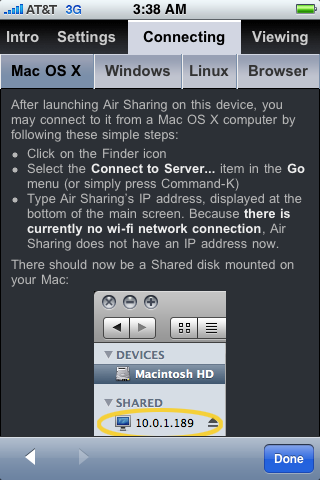
* My favorite file sharing app is Avatron's $7 Air Sharing, which was
  extremely easy to set up and worked without needing any additional
  software. An extra bonus is that it offers support for the Mac,
  Windows, and Linux machines. It works over your local Wi-Fi network,
  and provides simple instructions that walk you through the process
  of connecting to a network drive and sharing documents. When you
  install the Air Sharing app, you set up a shared network disk on
  your iPhone that you can access from the Mac OS X Finder, from
  Windows Explorer, or even from a Web browser. There are only two
  catches: First, Air Sharing works on the push model, meaning that
  you must add files to your iPhone from your computer, by copying the
  file into the iPhone's shared network disk.  Second, both the iPhone
  and the computer must be on the same Wi-Fi network; the app doesn't
  work across the Internet.

<http://www.avatron.com/products/>
<http://www.tidbits.com/resources/2008-11/AirSharing-Help.png>

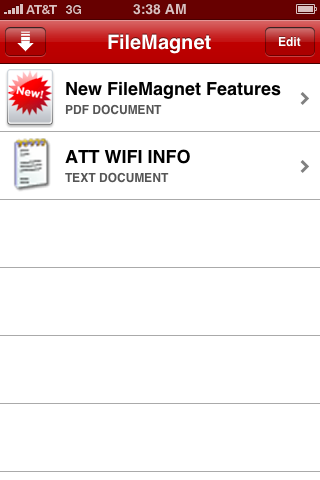
* Magnetism Studios' $5 FileMagnet works similarly to Air Sharing in
  that it transfers files over a local Wi-Fi network, but there are a
  few differences. First, if you are running it in Windows, you need
  iTunes, which presumably isn't an issue if you have an iPhone.
  Second, you need to install the iPhone app and a free desktop client
  application - FileMagnet Uploader - to communicate with your iPhone.
  Once you install FileMagnet Uploader, you can push files from your
  computer to the iPhone by simply dragging and dropping them from the
  Finder or Windows Explorer to the FileMagnet Uploader window.
  Additionally, once you run FileMagnet Uploader you don't have to
  worry about any connection settings; FileMagnet will find your
  desktop and send the files to your iPhone.

<http://www.magnetismstudios.com/filemagnet/>
<http://www.tidbits.com/resources/2008-11/FileMagnet-Browsing.png>

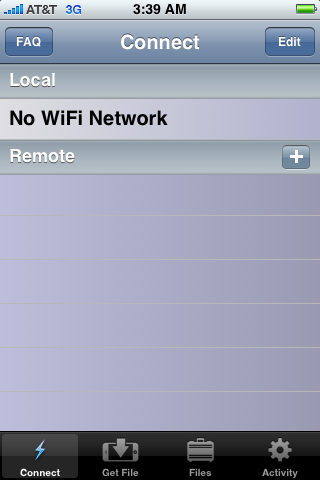
* Hey Mac Software's $5 Briefcase and free Briefcase Lite work on the
  pull model: you create a shared network folder on your desktop Mac,
  and then connect to it with your iPhone over a Wi-Fi network. If the
  shared folder contains many files, it takes several minutes to open
  on the iPhone. The process of navigating and copying documents
  differs substantially between Briefcase Lite and the full version of
  Briefcase. In Briefcase Lite, the process is cumbersome because you
  can copy only a single file at a time. If you want to copy multiple
  files at a time, or entire folders, or connect to your shared
  network folder across the Internet, you must upgrade to the full
  version of Briefcase - the capability to connect over the Internet
  alone justifies the $5 cost. The full version of Briefcase also
  enables you to share files directly between iPhones and eliminate
  the Mac entirely. Commendably, setting up Briefcase on your Mac
  doesn't require any desktop software, though it's a bit inconvenient
  to find the user manual, which is on Hey Mac's blog. Finally, as you
  browse your files on your iPhone, you can designate those that you
  want to leave in the Briefcase files area, place any photos in your
  iPhoto library, or send them immediately to be viewed on your
  desktop Mac display while your iPhone is connected.

<http://www.heymacsoftware.com/briefcase/>
<http://www.tidbits.com/resources/2008-11/Briefcase-Connection.png>

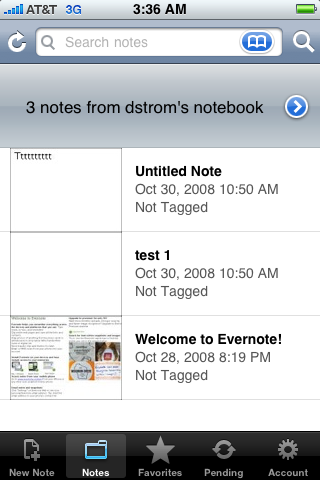
* Evernote, from the company of the same name, creates its own
  repository of shared "notes" that can contain text, photos, and
  recorded voice messages (but not arbitrary files). You can add
  content to the repository using a free desktop client application,
  via email to a special address assigned to you by Evernote, via a
  Web browser bookmarklet, or from the iPhone itself. Once you have
  information in your online repository, you can access it from a Web
  browser on any computer or via the Evernote iPhone app. Evernote's
  primary strength is that it gives you a lot of control over what
  gets moved back and forth, and it utilizes both push and pull
  methods. This approach seems useful for synchronizing activities and
  assets across a widely distributed workgroup, even if only some of
  the members have iPhones. But as a personal file-sharing solution
  between your iPhone and your computer, it feels like overkill (and
  won't actually move files other than those that can be made into
  notes). The free account entitles you to upload a skimpy 40 MB of
  files per month; if you want more, $45 a year bumps that to 500 MB a
  month, which still seems parsimonious in comparison to SugarSync,
  next up. The paid account also offers SSL encryption for your
  transfers.

<http://www.evernote.com/>
<http://www.tidbits.com/resources/2008-11/Evernote-Browsing.png>

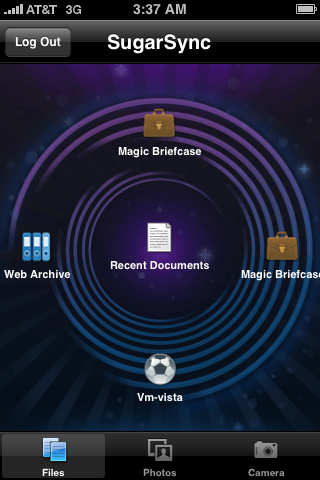
* Finally, we come to SugarSync, by Sharpcast. SugarSync relies on
  software that synchronizes a folder on your Mac or on a Windows
  machine with an online service, accessible from SugarSync Manager, a
  Web browser, or the iPhone with the free iPhone app. You can try
  SugarSync for 45 days with a gigabyte of storage, after which you
  have to sign up for a plan - the basic one costs $2.49 per month or
  $24.99 per year for 10 GB of storage. For a more detailed review of
  SugarSync, see Joe Kissell's review in "SugarSync Sweetens Online
  Syncing" (2008-08-30). Like Evernote, SugarSync seems excessive for
  just moving files between your home computer and iPhone, but if you
  need its other features or want to access shared files constantly,
  it could be a big win.

<http://www.sugarsync.com/>
<http://db.tidbits.com/article/9751>
<http://www.tidbits.com/resources/2008-11/SugarSync-Main.png>


**More Sharing Apps** -- There is one other product, DigiDNA's free
  DiskAid, that enables you to transfer files via USB between an
  iPhone or iPod touch and either a Mac or Windows-based PC, just as I
  indicated would be useful at the start of this article. However,
  once you have a file on your iPhone, you can't view it or even know
  that it is present without using DiskAid to view the contents of the
  iPhone again. I don't like the fact that the file lurks hidden
  inside your iPhone, so I'd rather use one of the other solutions.

<http://www.digidna.net/diskaid/download.php>

  For other solutions, including plug-ins for the iPhone's Safari
  browser and open source apps, I recommend checking out Pure-Mac's
  iPhone File Transfer Apps page.

<http://www.pure-mac.com/iphone/filetransfer.html>

  Good luck transferring your files, and let me know if you have found
  other solutions that work well for you.


  [David Strom has held editor-in-chief positions at Network Computing
  print, Tom's Hardware.com digital, and now freelances for the New
  York Times and numerous IT publications for Ziff Davis, IDG, CMP,
  and TechTarget. He is a professional speaker, podcaster, and
  consultant, and he blogs at strominator.com.]

<http://strominator.com/>


Improving the HTML Accessibility of Our Cart
--------------------------------------------
  by Adam C. Engst <[EMAIL PROTECTED]>
  article link: <http://db.tidbits.com/article/9852>

  We're nice people, really, we are. But let me tell you, there's
  nothing that makes you feel crummier than having to explain to
  someone who's visually impaired that your shopping cart works with
  screen readers... except for the key Download Ebook button on the
  final screen.

  We aren't, by any means, experts in Web accessibility, so it was
  utterly maddening that our custom shopping cart with eSellerate
  worked perfectly, except for the download buttons. I made sure the
  graphic had an ALT tag, but that wasn't enough. Next, I added a
  TITLE tag to the link itself, but eSellerate's system stripped that
  out when rendering the actual page. I was stumped, but hoped that
  the TITLE tag would make a difference when eSellerate tweaked their
  system to allow it through.

  Unfortunately, when they made that change for me, it made no
  difference at all. But discovering that the TITLE tag wasn't helpful
  sent us into a paroxysm of testing, and after much trial and error
  (I'll remember Command-F5 as the shortcut for toggling VoiceOver for
  a long time now), we finally figured it out. I have no idea if this
  problem is at all common, or merely an artifact of customizing code
  that a separate shopping cart application then must render, but
  here's our solution.

  The code that I entered into eSellerate's custom layout editor, when
  rendered as HTML on our actual receipt page, turned into this
  (slightly edited to avoid confusing our content management system):

    nbsp;nbsp;nbsp;nbsp;
    <a title="Click here to download ebook!"
href="http://store1.esellerate.net/isapi/tcobacktomymac11.zip?dl=GR3HR4rydqd4XBOdFfV4&sessionid=1235&file=\tcobacktomymac11.zip";>
    <img src="/store/i/pub186525909/lay301527449/p/tc-download-ebook.gif"
Width="130" Height="25" border="0" alt="Click here to download book!" />
</a>
<br>

  The image's ALT tag was necessary, but it wasn't sufficient. I had
  to make two seemingly unrelated changes to enable VoiceOver to read
  the "Click here to download book!" ALT text.

* The image's SRC tag had to become absolute, rather than relative.
  That was easily done by linking to the graphic on our site with a
  full URL.

* The entire chunk had to be wrapped in an HTML block tag like P or
  DIV. I opted for DIV, but interestingly, VoiceOver failed if the DIV
  enclosed the four non-breaking spaces that were there previously.
  That was also easily handled by replacing the non-breaking spaces
  with a bit of CSS to indent the button.

  Here's what my new code looks like, with those important changes
  made.

    <div style="padding-left: 30px; padding-bottom: 5px;">
    <a title="Click here to download ebook!"
href="http://store1.esellerate.net/isapi/tcobacktomymac11.zip?dl=07CsOupdUps8Sukc3Y04&sessionid=1406&file=\tcobacktomymac11.zip";>
    <img
src="http://www.takecontrolbooks.com/tc-graphics/tc-download-ebook.gif";
Width="130" Height="25" border="0" alt="Click here to download book!" />
</a>
    </div>

  To give you an idea of how we figured this out, we took chunks of
  HTML that worked fine from other areas and inserted bits of them in
  place of the code that didn't work. We first stumbled on the need
  for an absolute URL while some temporary text accidentally provided
  the block element that was also required. After realizing that
  temporary text was important, we narrowed down our tests until we
  realized that enclosing the chunk in HTML block tags would do the
  job.

  We know there are other aspects of our Web site and PDF approach
  that aren't ideal from the perspective of the visually impaired, but
  at least people using VoiceOver should now be able to navigate the
  entire Take Control site.


TidBITS Watchlist: Notable Software Updates for 17-Nov-08
---------------------------------------------------------
  by Doug McLean <[EMAIL PROTECTED]>
  article link: <http://db.tidbits.com/article/9851>

* Firefox 3.0.4 from Mozilla is a relatively minor update to the
  popular Web browser with changes focusing on various security and
  stability issues. Other enhancements include support for the
  Icelandic and Thai languages, and beta support for the Bulgarian,
  Esperanto, Estonian, Latvian, Occitan, and Welsh languages.
  Additionally, the internal public suffix list has been updated to
  include new domain suffixes. Finally, two bugs affecting saved
  passwords and proxy settings have been fixed. (Free update, 17.2 MB)

<http://en-us.www.mozilla.com/en-US/firefox/>
<http://www.mozilla.org/security/known-vulnerabilities/firefox30.html>

* Coda 1.6 from Panic updates the Web site development tool with
  several new features. Chief among them is added support for plug-ins
  that extend functionality. Users can write their own plug-ins or
  download ones created by other users. Panic's Web site includes a
  Code Developer Zone, where one can learn more about creating
  plug-ins. Other additions include a Smart Spelling feature that can
  check non-code text, increased Subversion support, added
  find-and-replace capabilities, and an Open Quickly window that
  simplifies the process of finding and editing files. ($99 new, free
  update, 20 MB)

<http://www.panic.com/coda/>
<http://www.panic.com/coda/developer/howto/plugins.php>

* PDFpen 4.0.2 from SmileOnMyMac is a minor update to the PDF editing
  utility. Changes include an optional command to force OCR of an
  entire document, Bates numbering capabilities (a standard numbering
  system used in legal documents), improved support for Preview, and a
  variety of other small fixes and improvements. All changes have also
  been made to the pro version, PDFpenPro. ($49.95/$99.95
  PDFpen/PDFpenPro, free update, 12.2 MB)

<http://www.smileonmymac.com/PDFpen/>

* iLife Support 8.3.1 from Apple is a minor security update to the
  suite of iTunes, iPhoto, iWeb, iDVD, iMovie, and GarageBand under
  Mac OS X 10.4.11 Tiger. According to Apple's support page, "This
  update improves overall stability and addresses a number of other
  minor issues." More specifically, the update addresses three bugs
  that cause program crashes and arbitrary code executions when
  viewing certain malicious TIFF and JPEG files. The update is
  necessary only for Tiger, and can be downloaded via Software Update
  or as a standalone download. (Free, 11.7 MB)

<http://www.apple.com/support/downloads/ilifesupport831.html>
<http://support.apple.com/kb/HT3276>

* NeoOffice 2.2.5 Patch 3 from NeoOffice updates the open-source
  productivity suite with security-related bug fixes, Mac OS X
  Services support, and experimental Snow Leopard support. The
  update's extended Mac OS X Services support now enables NeoOffice
  Services menu items to open the corresponding Mac OS X applications.
  However, only services that read data are supported; for example,
  language conversion services are excluded. Finally, NeoOffice is now
  capable of running on Apple's recently released Mac OS X 10.6 Snow
  Leopard developer seed. This update includes all bug fixes from
  previous NeoOffice 2.2.5 patches. (Free update, 5.5 MB)

<http://www.neooffice.org/>


Hot Topics in TidBITS Talk/17-Nov-08
------------------------------------
  by Jeff Carlson <[EMAIL PROTECTED]>
  article link: <http://db.tidbits.com/article/9859>

**Running the Numbers with Steve Jobs** -- A reader points out that
  iTunes serves up more sustained downloads than copies of Firefox 3
  when it was released to "record-breaking" numbers. (1 message)

<http://emperor.tidbits.com/TidBITS/Talk/2293>


**PDFs on iPhone/iPod touch** -- What's the best way to view PDFs on
  an iPhone or iPod touch? And are secured PDFs readable? (4 messages)

<http://emperor.tidbits.com/TidBITS/Talk/2294>


**Securing Your Disks with PGP Whole Disk Encryption** -- Readers
  respond to Joe Kissell's article on PGP's latest offering with tales
  of woe. (2 messages)

<http://emperor.tidbits.com/TidBITS/Talk/2295>


**Unlocked iPhone as Modem** -- Can an unlocked iPhone be used as a
  tethered modem? More importantly, is the iPhone actually unlocked or
  is it jailbroken? (2 messages)

<http://emperor.tidbits.com/TidBITS/Talk/2297>


**Automator to convert MP3's?** A reader wants to convert a large
  number of AIFF files to MP3, but is Automator the right tool for the
  job? (4 messages)

<http://emperor.tidbits.com/TidBITS/Talk/2298>


**Safari 3.2 vs WebKit** -- The latest version of Apple's Web browser
  does not include some of the impressive advancements that appear in
  newer WebKit builds. What's the holdup? (3 messages)

<http://emperor.tidbits.com/TidBITS/Talk/2299>


$$

This is TidBITS, a free weekly technology newsletter providing timely
news, insightful analysis, and in-depth reviews to the Macintosh and
Internet communities. Feel free to forward to friends; better still,
please ask them to subscribe!

Non-profit, non-commercial publications and Web sites may reprint or
link to articles if full credit is given. Others please contact us. We
do not guarantee accuracy of articles. Caveat lector. Publication,
product, and company names may be registered trademarks of their
companies. TidBITS ISSN 1090-7017.

Copyright 2008 TidBITS: Reuse governed by Creative Commons license.

Contact us at:    <[EMAIL PROTECTED]>
TidBITS Web site: <http://www.tidbits.com/>
License terms:    <http://www.tidbits.com/terms/>
Full text search: <http://www.tidbits.com/search/>
Subscriptions:    <http://www.tidbits.com/about/list.html>
Account help:     <http://www.tidbits.com/about/account-help.html>


--
If you want to unsubscribe or change your address, use this link
http://emperor.tidbits.com/webx?unsub@@.3c557dc4!u=306a67f9