TidBITS#978/11-May-09
=====================
  Issue link: <http://db.tidbits.com/issue/978>
  Amazon's Kindle DX ebook reader was last week's big news, and Adam
  offers a look at what's new, along with thoughts about what sort of
  content the Kindle is best suited to provide. Also this week, Mark
  Anbinder returns with coverage of FileMaker's new Bento app for the
  iPhone, Doug McLean explains a new Apple policy regarding
  water-damaged iPhones, and Neale Monks eulogizes AppleLust founder
  David Schultz. For something a little different, Doug also looks at
  an innovative tool created by the San Francisco Museum of Modern Art
  to display their massive permanent collection on the Web. In the
  world of software releases, we look briefly at Fireworks CS4 10.0.3
  Updater, Apple's Xserve LOM Firmware Update 1.2, BBEdit 9.2,
  OmniFocus 1.6.1, SousChef 1.2, Apple's iMac EFI Firmware Update 1.4,
  and Tweetie 1.1. Don't miss entering this week's DealBITS drawing
  for a free copy of the iTunes synchronization program SuperSync!

Articles
    Apple Refreshes Wet iPhone Replacement Policy
    FileMaker Reaches iPhone with $4.99 Bento App
    DealBITS Drawing: Win a Copy of SuperSync
    RIP: David Schultz of AppleLust
    Kindle DX Offers Larger Screen, Native PDF Support
    SFMOMA's ArtScope Offers New Way To Browse Museum Collections
    TidBITS Watchlist: Notable Software Updates for 11-May-09
    ExtraBITS for 11-May-09
    Hot Topics in TidBITS Talk for 11-May-09


------------ This issue of TidBITS sponsored in part by: --------------

* READERS LIKE YOU! Support TidBITS with a contribution today!
  <http://www.tidbits.com/about/support/contributors.html>
  Special thanks this week to Peter J. Paul, Kenneth Prager,
  Irwin Mortman, and Larry Hannah for their generous support!

* GET FETCH 5 FOR FREE! Fetch Softworks makes Fetch, the original
  Macintosh FTP client, free for educational and charitable use.
  Fetch 5.3 includes a new look and Leopard technology support.
  Apply today at <http://fetchsoftworks.com/edapply>!

* WebCrossing Neighbors Creates Private Social Networks
  Create a complete social network with your company or group's
  own look. Scalable, extensible and extremely customizable.
  Take a guided tour today <http://www.webcrossing.com/tour>

* Bare Bones Software's BBEdit 9.2 -- A burly upgrade with new
  Sleep command, LassoScript support, plus enhancements to Projects
  and core features like Find and Multi-File Search windows,
  editing in browsers, and text completion. <http://barebones.com/>

* THE MISSING SYNC FOR iPHONE: Sync notes, tasks, files and
  documents between your iPhone or iPod touch and a Mac. The
  Missing Sync for iPhone provides two-way syncing over Wi-Fi.
  Learn more - <http://www.markspace.com/bits>

* Microsoft's MacBU: Supporting Mac users with Office 2008.
  Straighten up your Office with the latest updates to Word,
  Excel, PowerPoint, and Entourage. Update today at Mactopia!
  <http://www.microsoft.com/mac/downloads.mspx>

* ConceptDraw Office adds real business power to Microsoft Office
  and Apple's iWork. Whether you need project management, business
  graphics, or mind mapping, it's all easily created on your Mac!
  Buy today for only $499! <http://www.conceptdraw.com/tb>

* It's time to speak up with MacSpeech Dictate! Get the all-new
  MacSpeech Dictate with spelling and phrase training. Speech
  Recognition so good, the only thing it can't do is speak for you.
  Learn more at <http://tidbits.com/about/support/macspeech.html>

---------- Help support TidBITS by supporting our sponsors ------------


Apple Refreshes Wet iPhone Replacement Policy
---------------------------------------------
  by Doug McLean <[email protected]>
  article link: <http://db.tidbits.com/article/10262>

  Apple has recently revised its replacement policy regarding
  water-damaged iPhones. The company still won't replace your damaged
  device for free if its Liquid Submersion Indicator has been
  activated (see "Liquid Submersion Indicators Reveal Accidental
  Dips," 2009-02-17), but you can now purchase a $199 replacement
  phone. While $199 isn't cheap, it's still $400 to $500 less than
  purchasing a new iPhone without a 2-year contract.

<http://db.tidbits.com/article/10080>

  According to coverage at Ars Technica, an Apple Store sales rep
  indicated that whatever generation your damaged iPhone was, the
  replacement would be the same (e.g. if you soak a 3G iPhone, your
  replacement would also be a 3G iPhone). Other sources note that the
  $199 replacement phones are refurbished models, meaning they've been
  previously returned to and tested by Apple, and come with 1 year
  warranties.

<http://arstechnica.com/apple/news/2009/05/apple-changes-water-damaged-iphone-replacement-policy.ars>
<http://www.ifoapplestore.com/db/2009/05/04/report-water-damaged-iphones-now-swappable/>

  Just why Apple has decided to revise its replacement policy is
  unknown. Speculation ranges from Apple's need to unload extra
  inventory as a likely refresh of the iPhone approaches, to general
  improvements to Apple's repair policies, to Apple recognizing the
  possibility that damage could be unfairly attributed to water (it's
  possible that the Liquid Submersion Indicator could be activated by
  an event that didn't damage the iPhone). Whatever the reason, this
  new policy will certainly be welcomed by those suffering from watery
  misfortune.


FileMaker Reaches iPhone with $4.99 Bento App
---------------------------------------------
  by Mark H. Anbinder <[email protected]>
  article link: <http://db.tidbits.com/article/10259>

  Widening its arsenal of approachable but powerful database
  solutions, FileMaker, Inc. has released an iPhone and iPod touch
  version of Bento, the company's database software geared towards
  individuals. Designed for people who don't need the relational
  database features or networking capabilities of FileMaker Pro, the
  Mac-only Bento has become popular by offering templates for common
  database uses and themes that simplify making attractive interfaces.

<http://www.filemaker.com/products/bento/iphone.html>
<http://www.filemaker.com/products/bento/>

  Bento for iPhone and iPod touch, available in the App Store for
  $4.99, can be used as a standalone database application or to
  synchronize data between handheld and desktop databases using Bento
  2 on a Mac. The company includes templates for such common data
  tracking needs as expenses, recipes, to-do lists, event planning,
  charitable donations, and more. As with the desktop version of
  Bento, users may create their own databases (called "libraries" to
  make the idea sound less scary, and more like something a normal
  human would want to use) and modify them on the fly.

<http://itunes.apple.com/WebObjects/MZStore.woa/wa/viewSoftware?id=314638461&mt=8>

  FileMaker's example libraries are somewhat limited, as is often the
  case, especially considering the many iPhone apps that offer better
  interfaces and more features than would be possible in a Bento
  library. When considering whether Bento could be useful to you,
  think about data that you might want to track that's sufficiently
  specific that no one would have come up with an app for it - photos
  of and details about your house plants, the members of a club you
  manage, that sort of thing.

  Adam and I had the opportunity to preview Bento for iPhone last
  week, and while no doubt there will be some iPhone and iPod touch
  users who install Bento purely for handheld use, the killer feature
  of this software is its integration with Bento on a Mac. Why? Handy
  as it is to be able to enter data on an iPhone when you're out and
  about, we think most users will want to do data entry on a real
  keyboard whenever possible, and access the info when away from the
  computer.

  Unfortunately, Bento's syncing feature is hobbled by the same
  limitation as Apple's Keynote Remote app: it works only if both the
  handheld and the Mac are on the same Wi-Fi network subnet. This
  means it won't work if your Mac uses a wired network or one of the
  many incompatible enterprise wireless networks that create logical
  subnets for different devices connected to the same access point. A
  FileMaker representative says the company is aware of the problem,
  and plans to "make it a priority to address in an update." Creating
  an ad-hoc network on your Mac for your iPhone to connect to will
  help in some such situations.

  Bento's capability to interact with data from core iPhone apps like
  Contacts is especially slick. Not only can it display names and
  phone numbers, but it also enables the user to add additional fields
  like a nickname, phonetic pronunciation, and instant message screen
  name that will remain associated with the address book entry. So
  far, while Bento for Mac lets users manipulate calendar and to-do
  entries in iCal, these libraries can't be synced to the iPhone
  version of Bento.

  At just $4.99 for your iPhone or iPod touch, Bento is a useful tool
  by itself, but we think it will be most effective when paired with
  the $49 desktop software. We'd also like to see FileMaker help users
  break Bento libraries out into standalone apps for the iPhone and
  iPod touch. After all, if you come up with the ultimate library for
  tracking details about house plants, you very well may want to make
  it available to other iPhone users.


DealBITS Drawing: Win a Copy of SuperSync
-----------------------------------------
  by Adam C. Engst <[email protected]>
  article link: <http://db.tidbits.com/article/10264>

  iTunes is a fine program in many ways, but its designers seem never
  to have considered how it might be used in a family situation, or
  even by a single user with multiple computers. Just because you have
  multiple Macs, or use a Windows PC at work, doesn't mean you want
  each one to have a completely independent iTunes library.
  Unfortunately, moving music, movies, and playlists from one library
  to another is a hassle.

  Enter SuperSync, from the company of the same name. Its claim to
  fame is that it can synchronize two or more iTunes libraries on
  networked computers - across a LAN or the Internet. It can move the
  music files themselves, update iTunes, and even update just metadata
  changes like play counts, ratings, and so on. The program is
  extremely flexible and customizable, which can make for a complex
  interface, but that's a small price to pay for being able, for
  instance, to synchronize just certain playlists, or only videos in
  .m4v format. And the fact that you can do it bidirectionally means
  that you don't have to worry about changes on one Mac being
  overwritten by changes on another. SuperSync even works under
  Windows, if you want to sync your Mac's music with your Windows
  machine at work. Other useful features include the capability to
  compare and merge libraries, find duplicate tracks and corrupt
  files, access your music library over the Web, and listen to your
  music from an iPhone, iPod touch, or even TiVo. SuperSync costs $29
  for a 2-pak version, $39 for a 5-pak, and $49 for a 10-pak, but you
  can enter to win a 5-pak in our DealBITS drawing this week.

<http://supersync.com/>

  Entrants who aren't among our lucky winners will receive a discount
  on SuperSync, so be sure to enter at the DealBITS page. All
  information gathered is covered by our comprehensive privacy policy.
  Remember too, that if someone you refer to this drawing wins, you'll
  receive the same prize as a reward for spreading the word.

<http://www.tidbits.com/dealbits/supersync/>
<http://www.tidbits.com/about/privacy.html>


RIP: David Schultz of AppleLust
-------------------------------
  by Neale Monks <[email protected]>
  article link: <http://db.tidbits.com/article/10268>

  David Schultz, creator of the AppleLust Web site, died in October of
  2008. For various reasons, those Mac writers who knew him best
  seemed to have lost touch with him, and the news of his death will
  come as a surprise to many. So while writing a few words about David
  six months after his death may seem too late to make a worthwhile
  obituary, David's influence on the Mac world was significant enough
  that his passing deserves mention.

  David Schultz was both a Macintosh evangelist and an old-school
  academic, a professor of philosophy no less. His writing was always
  erudite, and even those who wouldn't agree with him had to admit his
  arguments were intelligent and consistently relevant. He loved the
  Macintosh even when it wasn't fashionable to do so, during those
  grim years of the 1990s when the media barely ever mentioned Apple
  without throwing in the adjective "beleaguered."

  He jumped onto the Internet feet-first, creating the AppleLust Web
  site as a place where he and other writers could express their
  thoughts about the Mac platform at a depth that didn't really exist
  in print magazines at the time. For David, using a Mac was a
  philosophical statement.

  David's health was never good, but despite constant pain and a
  series of operations that included three kidney transplants, he
  never lost heart. When I lived in Nebraska for a few years, we would
  meet up from time to time to do some amateur astronomy, and his
  almost childlike love of science and the stars shone through every
  time. David could be stubborn and volatile, and a frustrating
  opponent when we disagreed, but he was always honest, polite, and
  articulate. He'll be missed.

  Since David's death, the applelust.com domain has been taken over by
  another user. Former AppleLust webmaster Marc Messer, along with
  Chris and Tyler at MacHighway, have archived much of the original
  site, while Tim Robertson at MyMac is working to bring some of
  David's most notable writings back online as well.

<http://applelust.macosjournal.com/>
<http://www.mymac.com/userinfo.php?id=David%20K%20Schultz>


Kindle DX Offers Larger Screen, Native PDF Support
--------------------------------------------------
  by Adam C. Engst <[email protected]>
  article link: <http://db.tidbits.com/article/10261>

  Bucking the trend for ever-smaller devices, Amazon has announced the
  Kindle DX, a scaled-up version of the company's much-discussed ebook
  reading device. Along with a larger screen, the Kindle DX provides a
  native PDF reader, finally making it compatible with the most common
  digital format for highly formatted electronic documents.

  Apart from the larger screen, native PDF support, capability to
  rotate the screen to landscape mode, and increased internal storage,
  the Kindle DX is almost exactly like the recently released Kindle 2
  (see "Amazon Announces Kindle 2 Ebook Reader," 2009-02-09). Such
  standard features include 3G wireless connectivity that's built into
  the purchase price, integration with Amazon's online store for quick
  purchasing of books, long battery life, and text-to-speech on select
  titles.

<http://db.tidbits.com/article/10056>

  The Kindle DX will be available "this summer" (read, "sometime
  before September 2009") for $489; it's available for pre-ordering
  now if you want to get into the queue early. The $359 Kindle 2
  remains available. Unfortunately, both Kindles are sold only in the
  United States at this time, with Amazon blaming the limitation on
  "import/export laws and other restrictions."

<http://www.amazon.com/dp/B0015TCML0/?tag=tidbitselectro00>
<http://www.amazon.com/dp/B00154JDAI/?tag=tidbitselectro00>


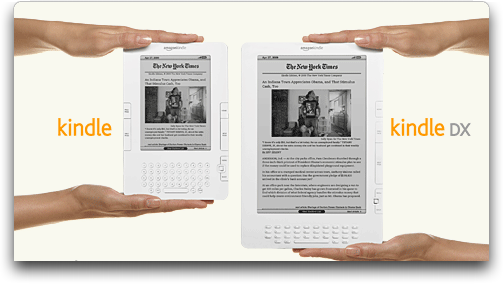
**Specs** -- The big news for the Kindle DX is, of course, the large
  E-Ink screen. It's 9.7 inches (24.6 cm) measured diagonally, up from
  the Kindle 2's 6-inch (15.24 cm) screen. It has a 824 by 1200 pixel
  resolution at 150 ppi (pixels per inch), and offers 16 levels of
  grays. In comparison, the Kindle 2 screen offers only 600 by 800
  pixel resolution, but at 167 ppi and with the same shades of gray.

<http://www.tidbits.com/resources/2009-05/Kinde-screens.png>

  The larger screen increases the physical size of the Kindle DX
  significantly, bumping it up to 10.4 by 7.2 by 0.38 inches (26.4 by
  18.3 by 0.97 cm) and increasing the weight from 10.2 ounces (289 g)
  to 18.9 ounces (535 g).

  Although an improvement on the Kindle 2 and original Kindle, the
  Kindle DX's screen is still rather small - a standard size for a
  trade paperback is 7 by 9 inches (17.8 by 22.9 cm), giving it a
  diagonal size of 11.5 inches (29.2 cm). Textbooks are larger yet,
  often at 8.5 by 11 inches (21.6 by 27.9 cm). However, the overall
  physical dimensions of the Kindle DX are fairly close to that trade
  paperback size, which is quite comfortable to hold.

  The lower pixel density than the Kindle 2 may make for fuzzier
  fonts, and the larger screen could be more sluggish to redraw -
  remember that the E-Ink screen must be redrawn in its entirety for
  each page flip. We won't know until people have had a chance to
  compare the two side-by-side in a few months.

  Amazon also increased the internal storage of the Kindle DX, giving
  it 4 GB of memory, up from 2 GB in the Kindle 2. Not all of that is
  available for user content, with the usable space at 3.3 GB for the
  Kindle DX and 1.4 GB for the Kindle 2.

  Finally, the Kindle DX must have some sort of an orientation sensor,
  since it can automatically rotate the display from portrait to
  landscape when you turn the device, just like the iPhone and iPod
  touch. There's no indication of any other accelerometer-based
  functionality at this time.


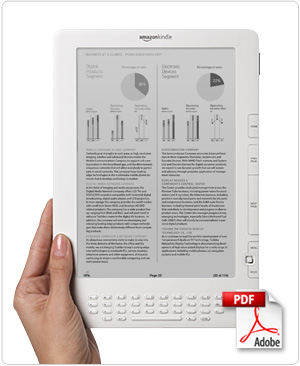
**PDF, at Long Last** -- The main advantage of the larger screen is
  that, for the first time with a Kindle, PDF documents will not have
  to be converted to simple HTML and reflowed to fit a tiny screen.
  Almost all magazines and many books - particularly technical books,
  textbooks, and reference works like cookbooks - have significant
  effort put into their layout, to the point where the content is
  almost worthless without the layout. That has made the Kindle and
  Kindle 2 nearly useless for layout-intensive content.

  The Kindle DX, however, will be capable of showing full-page PDFs
  such that they can be read without zooming in, as is often necessary
  on the tiny iPhone and iPod touch screens. Of course, that will be
  dependent on the text on those pages - text that may be readable on
  paper in a large format textbook may still be too small to read
  comfortably when shrunk down to the Kindle DX's screen.

<http://www.tidbits.com/resources/2009-05/Kindle-DX.jpg>

  This has the potential to be a big deal for the Kindle.


**Aiding the Industry** -- Amazon needs content for the Kindle DX, and
  to that end has reached an agreement with three leading textbook
  publishers to make textbooks available for the Kindle DX. The goal,
  of course, is for students to be able to carry around a Kindle DX
  rather than a backpack stuffed with heavy textbooks. Not
  incidentally, it would ensure that every student buys a new copy of
  every textbook, as opposed to now, when textbooks are commonly
  purchased used and resold at the end of the semester. Textbook
  publishers would be insane not to get behind the Kindle DX in a big
  way if it takes off initially.

  The $489 cost of the Kindle DX seems steep for students, but
  textbooks aren't cheap either, even when purchased used, and
  students are a captive audience - they must buy the textbooks for
  their courses. Kindle versions of textbooks could be significantly
  cheaper than paper versions, partly because of the elimination of
  printing and distribution costs, and partly by eliminating the
  "losses" due to sales of used copies. Although details haven't yet
  been revealed, five universities will be "piloting" the Kindle DX in
  the next academic year. They include Princeton University, Reed
  College, Arizona State University, Case Western Reserve University,
  and the University of Virginia's Darden School of Business.

  The other source for content for the Kindle DX will be newspapers.
  Amazon has signed deals with the New York Times, the Washington
  Post, the Boston Globe, and the San Francisco Chronicle to offer
  reduced prices for long-term subscription commitments. It's not
  clear what that means just yet, but I do think that the larger
  screen size will make for a notably better newspaper reading
  experience, though I can't see the Kindle stemming the flood of red
  ink gushing from the newspaper industry.

  In terms of traditional books, Amazon CEO Jeff Bezos said that the
  company has continued to add titles that can be read on the Kindle,
  starting with 90,000 titles 18 months ago for the original Kindle's
  launch, 230,000 titles in February 2009 for the Kindle 2's launch,
  and 275,000 now.

  That said, we've been trying for months to make TidBITS available on
  the Kindle, but have been almost entirely ignored by Amazon. In
  theory, making our Take Control ebooks available for the Kindle DX
  should be fairly easy (it doesn't require human intervention), but
  there's no indication from Amazon yet about how publishers will be
  able to submit PDF-based books without having them munged horribly
  by conversion to the limited subset of HTML that the Kindle
  supports.


**Enough Better for the Price?** -- At $489, a full $130 more than the
  Kindle 2, the Kindle DX is quite pricey for a dedicated reading
  device, and that high price might hurt its adoption rate. People who
  are happy with a Kindle or Kindle 2 probably won't want to upgrade -
  there is no discount - unless the lack of PDF support has been a
  major problem. But the combination of the larger screen and PDF
  support changes the game. Although Amazon has pushed the concept of
  reading traditional text-only books on the Kindle (in part because
  they have no formatting and can thus be reflowed to the small screen
  easily), I think the Kindle in general is actually more attractive
  for reading ephemeral content, and the Kindle DX's larger screen and
  native PDF support open up a wide range of ephemeral content that
  wasn't previously available.

  That's because traditional books have a different sort of cultural
  significance and value as artifacts. People who like books like them
  for their very physicality, for being able to lend them to a friend
  or relative. It says something about a person when they have shelves
  of books in their house. Between the virtuality of the ebook and
  Amazon's DRM, it's hard for some of us to be too enthused about
  buying a book for the Kindle that we can't use in the ways to which
  we've become accustomed.

  But newspapers, magazines, and blogs? They're ephemeral by
  definition. No one keeps newspapers for reference purposes, and even
  people who hold on to old issues of magazines seldom refer back to
  them. People even leave magazines and newspapers on planes and
  trains all the time, since they have so little value after being
  read. Blogs are basically the same - although it's nice to be able
  to access blog postings after the fact, most of the time, once
  you've read a blog post, you don't need to see it again. (One strike
  against the Kindle DX is its lack of color in a world where most
  magazines and many books are now printed in full color.)

  Technical books that go beyond the basics of a column of text and a
  few pictures may in fact have more in common with magazines and
  newspapers than might be initially apparent. For instance, our Take
  Control ebooks, which have just enough formatting to be difficult to
  convert for the Kindle, are ephemeral too, though on a longer time
  scale than a magazine or newspaper. Newspapers last for a day, or
  maybe a week, and magazines can be current for a week, a month, or
  even a couple of months. Technical books like ours are current only
  until the underlying technology covered changes, which could be
  anywhere from a week to 18 months. After that, there's little reason
  to keep them around.

  Textbooks have a different sort of ephemerality. Although they
  presumably are relevant until their underlying field changes
  sufficiently to warrant a new edition, what's more important is that
  most students care about them only for a semester or two. And
  because students theoretically advance beyond the level of the
  textbook as they progress through school, there isn't much value in
  keeping old textbooks around.

  I could also see the Kindle DX becoming popular for reference works
  like cookbooks, where it's not so much that the content is
  ephemeral, but that you don't need most of it at any given time and
  a search capability is highly useful. A single page is often enough
  for a recipe, and the Kindle DX is small enough that it could be
  leaned against a shelf in the kitchen while you cook. Much of this
  sort of content will be provided by the Web (no word on whether the
  Kindle DX has better Web capabilities), but there's still a role for
  reference books.

  Alas, Amazon has never been forthcoming with sales figures for the
  Kindle, so we may never know how successful the Kindle DX is, either
  on its own or in comparison to the Kindle and Kindle 2. And, as
  interesting as the Kindle DX is, if Apple were to release a
  much-rumored tablet-sized iPod touch at a somewhat comparable price
  point, I think the Kindle DX would fade into the background. After
  all, what student would buy a Kindle DX over a large-screen iPod
  touch that could also play movies and run thousands of iPhone apps?


SFMOMA's ArtScope Offers New Way To Browse Museum Collections
-------------------------------------------------------------
  by Doug McLean <[email protected]>
  article link: <http://db.tidbits.com/article/10212>

  At a functional level, visiting an art museum is not so different
  from going to a Blockbuster video store (considering the rise of
  Netflix and Internet video, the two probably have similar attendance
  levels these days). For the most part, the objects in both are
  collected and categorized. In a movie store you have aisles for
  Action, Horror, Comedy, and so on. Art museums use similar schemes -
  wings for Flemish Paintings from the 1600s, Etruscan Sculpture, and
  Japanese Works on Paper. Even in sections that appear jumbled,
  there's usually some rhyme or reason - New Releases or Staff
  Recommendations in the movie store, and Recent Acquisitions or Works
  from the Rubell Collection in the art museum. The goal of the
  organizational clarity is similar in both cases - it makes it easy
  to find what you're looking for, and once you've found whatever that
  is, to find more of the same.

<http://www.rfc.museum/flash.html>

  Most art museums have taken a traditional approach to the
  development of their online presence, transplanting their real-world
  organization to the Web. Take, for example, the Metropolitan Museum
  of Art in New York, whose Web site, while offering a searchable
  database, focuses on giving each curatorial department its own page.
  The Web site for the Louvre in Paris has a feature that furthers the
  effort to preserve the real-world feeling of the museum by enabling
  users to navigate 3D virtual spaces that replicate its rooms and
  exhibitions. While there's nothing wrong with maintaining these
  sorts of groupings, the digitizing of a collection opens the door to
  many other possibilities. (For some now-historical musings on
  museums in the digital world, see Brad DeLong's "Ontological
  Breakdown, or, Pretending to be a Help System," 1995-08-21.)

<http://www.metmuseum.org/home.asp>
<http://www.metmuseum.org/Works_of_Art/curatorial_departments>
<http://www.louvre.fr/llv/commun/home>
<http://www.louvre.fr/llv/dossiers/liste_ei.jsp?bmLocale=en>
<http://db.tidbits.com/article/1361>


**Peering into the ArtScope** -- The San Francisco Museum of Modern
  Art's ArtScope is a great example of an innovative approach to
  bringing a museum's collection to the Web. ArtScope is a visual
  browsing tool comprised of a thumbnail grid displaying 3,500 works
  from the SFMOMA's permanent collection. The grid is zoomable,
  displaying a lens which can be moved over it to magnify certain
  areas, enabling users to view hundreds of artworks simultaneously,
  or just one at a time in close detail.

<http://www.sfmoma.org/projects/artscope/>
<http://www.tidbits.com/resources/2009-04/ArtScope_full.png>

  When you launch ArtScope, a set of controls and a search box are
  visible to the right hand side of the window. The controls help you
  zoom in and out, or zoom all the way out, though it's easier to
  double-click inside the lens to zoom in, and to double-click outside
  the lens to zoom out. You can also grab the grid and drag to move it
  around, exactly as you can with a map in Google Maps. Unfortunately,
  ArtScope doesn't support trackpad gestures or the scroll wheel for
  zooming, and the incremental zooming via double-clicking is tedious.

<http://www.tidbits.com/resources/2009-04/ArtScope_lens.png>

  More interestingly, ArtScope also provides a search tool, and below
  it a pane displaying information about the artwork at the center of
  the lens (the artwork information is displayed even if you are fully
  zoomed out). You can type anything into the search field: artist
  name, title, date, medium, keywords, etc. If any results match your
  search phrase, ArtScope moves the lens (maintaining the same level
  of zoom) to the first match. If more than one result exists for your
  term, a navigation bar displays the number of the result you are
  currently viewing, the total number of results, and arrow buttons
  that enable you to jump to the other matches within the grid. It's
  fun typing in a term like "1970" or "Acrylic on canvas", and then
  flying around the grid via the arrow keys to view all the results in
  their scattered locations.


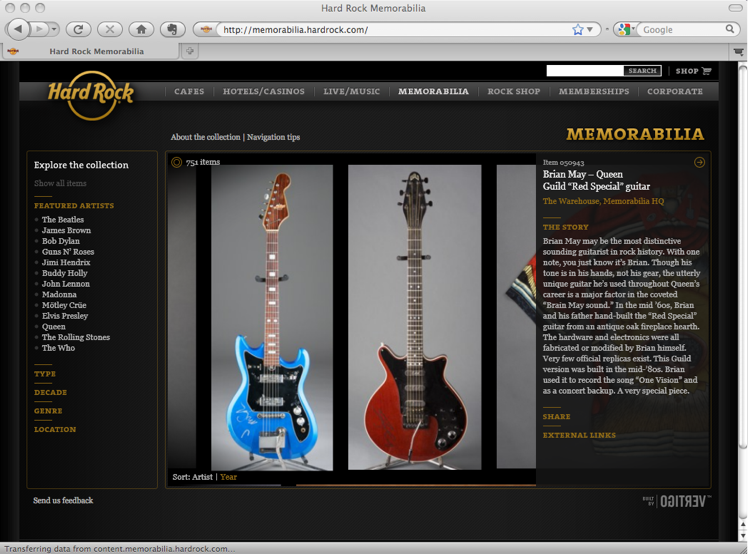
**Browsing the Hard Rock Memorabilia Collection** -- ArtScope finds a
  kindred spirit in the Hard Rock Cafe's Memorabilia site, which has a
  similar visual interface, and, in some ways, a better one for
  browsing through the company's collection of popular music
  artifacts. The controls and navigation are more along the lines of
  what I'd like to see brought to ArtScope. The Hard Rock Memorabilia
  tool has grab-and-drag navigation like SFMOMA's, but with an
  Apple-like design touch. The drag has a little inertia to it, which
  gives the navigation a natural and physical feel. That sense of
  inertia also carries over to the zoom, which supports trackpad and
  scroll wheel zooming - a much faster and more efficient way to zoom
  in and out. Zooming in ArtScope magnifies the circumscribed area of
  the lens, but also magnifies the background to a slightly lesser
  degree. Visually it's a bit cluttered, and upon using the
  unified-page-zoom on the Hard Rock site, the lens feels unnecessary.

<http://memorabilia.hardrock.com/>
<http://www.tidbits.com/resources/2009-04/HardRock.png>

  However, ArtScope is resizable and can take advantage of larger
  screens, while the Hard Rock Memorabilia tool maintains a fixed
  window size on all monitors. This becomes an issue with the latter's
  information pane, which, while slick in how it pops up at a certain
  degree of magnification, takes up prime real estate in the limited
  window area, occasionally blocking the object you're trying to view.
  Another strike against Hard Rock's more attractive information pane
  is that there are instances when you'd want to be able to view the
  item's information while zoomed out, as you can with ArtScope. Yet
  the largest problem with the Hard Rock Memorabilia tool is its slow
  load times. Zooming in almost always results in a blurry pixelated
  image that takes far too long to resolve into crisp detail. While
  you can zoom in quite close, the delay ensures you won't bother. In
  comparison, ArtScope zooms crisply and quickly.

  Lastly, unlike ArtScope, the Hard Rock Memorabilia tool lacks any
  search tool and instead provides categories for breaking the
  collection into chunks. ArtScope's approach here is far more
  effective and engaging, since it eliminates the traditional top-down
  establishment of categories, instead enabling users to create their
  own collections via the search tool.


**Rethinking the Online Museum** -- Despite my gripes about ArtScope's
  zooming, I still think it's a brilliant step toward answering the
  question of how museums can offer an online experience that goes
  beyond what's possible in the physical world. Nothing can replace
  the experience of seeing art in person, but since many people will
  never have the opportunity to stand face to face with even the most
  significant works of art, it's essential that we explore different
  ways of viewing these things on a computer screen. ArtScope
  encourages wandering, free associations, odd connections, and a
  playful engagement with a group of objects often perceived to be
  weighty and untouchable. The virtual Prado Museum in Google Earth
  offers another approach, though one that lends itself more to deep
  exploration of a very few works rather than any sort of synthesis of
  an entire museum's collection (see "Google Earth's Virtual Prado
  Museum," 2009-01-28).

<http://db.tidbits.com/article/10038>

  In sum, ArtScope produces an experience you simply cannot achieve in
  a physical setting, and proposes a new model for looking at art. It
  seizes upon the scalability of digital reproduction to enable new
  juxtapositions - a large sarcophagus and a tiny drawing can be
  viewed as identically sized images side by side, and we can sift
  through a collection almost as though we're thumbing through a deck
  of cards. I applaud the SFMOMA for approaching their Web site with a
  sense of inventiveness, and hope to see more museums consider their
  relationship to the Internet with an appreciation for what the
  digital dimension can offer, and for what possibilities remain
  unexplored.


TidBITS Watchlist: Notable Software Updates for 11-May-09
---------------------------------------------------------
  by Doug McLean <[email protected]>
  article link: <http://db.tidbits.com/article/10265>

  Fireworks CS4 10.0.3 Updater from Adobe is a maintenance update to
  the powerful vector and bitmap graphics editor. Changes include
  improved general stability under both Mac and Windows, a fix for a
  bug that caused text to shift, and a handful of bug fixes addressing
  issues related to pasting text from Microsoft Office into Fireworks.
  The update is available for download via the Adobe Update Manager
  and from Adobe's Web site. Also available for download from Adobe's
  Web site is a PDF version of the update's full release notes. ($299
  new, free update, 46.6 MB)

<http://www.adobe.com/products/fireworks/>
<http://www.adobe.com/support/fireworks/downloads_updaters.html>
<http://www.adobe.com/support/documentation/en/fireworks/cs4/Fireworks_CS4_Updater_10_0_3_ReleaseNotes.pdf>

  Xserve LOM Firmware Update 1.2 from Apple updates the Lights-Out
  Management environment for the Xserve (Early 2008). The update
  addresses "issues that cause frequent power supply and fan
  notifications to be sent." More information regarding the update,
  including installation steps, is available via Apple's Web site. The
  update is available via Software Update and can also be downloaded
  from Apple's Support Downloads page. (Free update, 719 KB)

<http://support.apple.com/downloads/Xserve_LOM_Firmware_Update_1_2>
<http://support.apple.com/kb/HT3539>

  BBEdit 9.2 from Bare Bones Software is the latest version of the
  powerful text editor. New features include a Sleep command that
  helps restore the application's current state at its next launch,
  full support for the LassoScript language, and Growl support for
  select functions. Other features receiving enhancements include
  BBEdit's expert preferences interface, FTP and SFTP clients,
  integration with Terminal, and command line tools. Full release
  notes are available via Bare Bones's Web site. ($125 new, free
  update, 15.4 MB).

<http://www.barebones.com/products/bbedit/>
<http://www.barebones.com/support/bbedit/arch_bbedit92.html>

  OmniFocus 1.6.1 from The Omni Group is a minor maintenance update to
  the task-management utility. Changes include enhanced compatibility
  with Mac OS X 10.4, improved syncing performance, and updated
  localizations. Two attachment-related bugs have also been fixed. A
  full list of changes is available on The Omni Group Web site.
  ($79.95 new, free update, 17.2 MB)

<http://www.omnigroup.com/applications/omnifocus/>
<http://www.omnigroup.com/applications/omnifocus/releasenotes/>

  SousChef 1.2 from Acacia Tree Software is significant update to the
  cooking and recipe management software. Changes include support for
  the metric system, the capability to import large MacGourmet
  databases, paginated search results, an enhanced grocery list
  feature, and more accurate ingredient parsing. A handful of bugs
  related to slow quit times, crashing, and dialog cancellations have
  also been fixed. ($30 new, free update, 8.7 MB)

<http://acaciatreesoftware.com/>

  iMac EFI Firmware Update 1.4 from Apple fixes "intermittent system
  freeze issues for iMac computers with ATI Radeon HD 4850 graphics
  and fixes wake-from-sleep issues in Boot Camp." Installation steps
  are available, and the update can be downloaded from Apple's Support
  Downloads page. (Free update, 1.7 MB)

<http://support.apple.com/downloads/iMac_EFI_Firmware_Update_1_4>
<http://support.apple.com/kb/HT3561>

  Tweetie 1.1 from Atebits is a quick update to the recently released
  Mac Twitter client. Changes include per-account notification
  settings, support for Growl, the capability to save searches, a new
  Mark All As Read command, and auto-updates for Trends. Also, error
  handling has been improved, the tweet display has been tweaked, the
  direct message display interface has been enhanced, and users can
  now opt to disable menu items. ($19.95 registered/free with ads,
  free update, 1.7 MB)

<http://www.atebits.com/tweetie-mac/>


ExtraBITS for 11-May-09
-----------------------
  by TidBITS Staff <[email protected]>
  article link: <http://db.tidbits.com/article/10272>

**Bluetooth Default Setting Poses Risk to MacBooks** -- Wired.com's
  Brian X. Chen reports on a potentially dangerous default Bluetooth
  setting found on Apple notebooks. The setting enables a Bluetooth
  device to wake a machine even if its lid is closed. For a user
  packing a MacBook and Bluetooth mouse into the same satchel, this
  default could result in an overheated disaster. (Posted 2009-05-08)

<http://www.wired.com/gadgetlab/2009/05/macbook-users-turn-off-this-bluetooth-default-setting-now/>


**Apple Announces Apps Must Work with iPhone 3.0** -- In not
  altogether surprising news, Apple has announced that all newly
  developed iPhone apps must be compatible with the beta version of
  the iPhone OS 3.0. In an email to developers, Apple stated that new
  apps would be tested on the iPhone OS 3.0, and that current apps
  must be updated to be compatible or will be removed from the App
  Store after the release of iPhone OS 3.0. (Posted 2009-05-08)

<http://www.macworld.com/article/140490/2009/05/iphone30_apps.html>


**MiFi Offers Portable Wi-Fi Connectivity** -- Sick of hunting for
  Wi-Fi whenever you're out and need to get online? New York Times
  columnist David Pogue has the skinny on the Novatel MiFi 2200, a
  portable Wi-Fi hotspot that gets its Internet connectivity via
  Verizon's 3G cellular data network. It could be a great tool for
  frequent travelers, but beware the bandwidth charges if you need to
  transfer a lot of data. (Posted 2009-05-08)

<http://www.nytimes.com/2009/05/07/technology/personaltech/07pogue.html>


**Adam Discusses the Kindle DX on the Tech Night Owl Live** -- Is the
  Kindle DX a ho-hum revision to Amazon's ebook reading device, or
  does its larger screen size and support for PDF make it more
  compelling than the previous models? Adam comes down on the side of
  "more compelling," although he also thinks that a color screen would
  be a boon for magazines and textbooks. (Posted 2009-05-08)

<http://www.techbroadcasting.com/podcast/now-playing-may-7-2009-david-biedny-adam-engst-and-steve-mr-gadget-kruschen/>


**MacBook Pros Edit Video on Mount Everest at 21,000 Feet** -- The
  video production guys filming this ascent of Mount Everest are
  extremely happy with the MacBook Pros they're using for Final Cut
  Pro editing. Be sure to note the high-bandwidth SherpaNet they use
  to send video to the base camp at 17,500 feet. (Posted 2009-05-07)

<http://www.youtube.com/watch?v=01g4ugvMCIY>


**Myst Comes to the iPhone** -- Originally released for the Mac in
  1993, the classic puzzle-adventure game Myst is now available for
  the iPhone and iPod touch for $5.99. The original game, which
  spawned multiple sequels, is currently unavailable for Mac OS X,
  making its portable arrival all the more appreciated. However,
  according to CNET's review, revisiting this gem comes at a price:
  over 700 MB of precious space. (Posted 2009-05-07)

<http://reviews.cnet.com/8301-19512_7-10232932-233.html>


**VMware Fusion Makes Friends with Windows 7 Release Candidate** --
  Microsoft recently made a release candidate of Windows 7 available
  to the public, and according to this post on VMware's Team Fusion
  blog, it works well in the current version of Fusion - but users
  should make a few tweaks for best results. (Posted 2009-05-06)

<http://blogs.vmware.com/teamfusion/2009/05/windows-7-on-mac-with-vmware-fusion-a-practical-guide-revisited.html>


**Text Message Limits Devised by Clever Committee Head** -- A German
  at a typewriter in 1985 figured out the 160-character limit of SMS
  for GSM networks with no market research. He looked at telexes and
  postcards, too. (Posted 2009-05-04)

<http://latimesblogs.latimes.com/technology/2009/05/invented-text-messaging.html>


Hot Topics in TidBITS Talk for 11-May-09
----------------------------------------
  by Jeff Carlson <[email protected]>
  article link: <http://db.tidbits.com/article/10274>

**Achieving Email Bliss with IMAP, Gmail, and Apple Mail** -- Joe
  Kissell's popular article brings up more discussion since last week,
  including the use of smart mailboxes in Mail to work around some
  Gmail limitations. (52 messages)

<http://emperor.tidbits.com/TidBITS/Talk/2639>


**How to Share Full-Quality Photos via iPhoto** -- It turns out that
  iPhoto compresses photos uploaded to Flickr, even at the Actual Size
  export setting. (8 messages)

<http://emperor.tidbits.com/TidBITS/Talk/2643>


**Ludditism** -- Readers debate the wisdom of relying on a GPS to
  provide directions, especially since those directions can often be
  wrong. Are gadgets wiping away essential skills like being able to
  read a map? (47 messages)

<http://emperor.tidbits.com/TidBITS/Talk/2645>


**Cleaning a dirty burner?** What's the best way to clean a DVD drive
  to prevent burn errors? (2 messages)

<http://emperor.tidbits.com/TidBITS/Talk/2647>


$$

This is TidBITS, a free weekly technology newsletter providing timely
news, insightful analysis, and in-depth reviews to the Macintosh and
Internet communities. Feel free to forward to friends; better still,
please ask them to subscribe!

Non-profit, non-commercial publications and Web sites may reprint or
link to articles if full credit is given. Others please contact us. We
do not guarantee accuracy of articles. Caveat lector. Publication,
product, and company names may be registered trademarks of their
companies. TidBITS ISSN 1090-7017.

Copyright 2009 TidBITS: Reuse governed by Creative Commons license.

Contact us at:    <[email protected]>
TidBITS Web site: <http://www.tidbits.com/>
License terms:    <http://www.tidbits.com/terms/>
Full text search: <http://www.tidbits.com/search/>
Subscriptions:    <http://www.tidbits.com/about/list.html>
Account help:     <http://www.tidbits.com/about/account-help.html>


--
If you want to unsubscribe or change your address, use this link
http://emperor.tidbits.com/webx?unsub@@.3c557dc4!u=306a67f9