@Mat

   - Thank you! I looked up "editmode preview tiddlywiki" and can't find
   anything. Is that a setting somewhere I can toggle? Also FYI this
   <https://clb.sh/b1c866> is how your SideEditor looks for me.
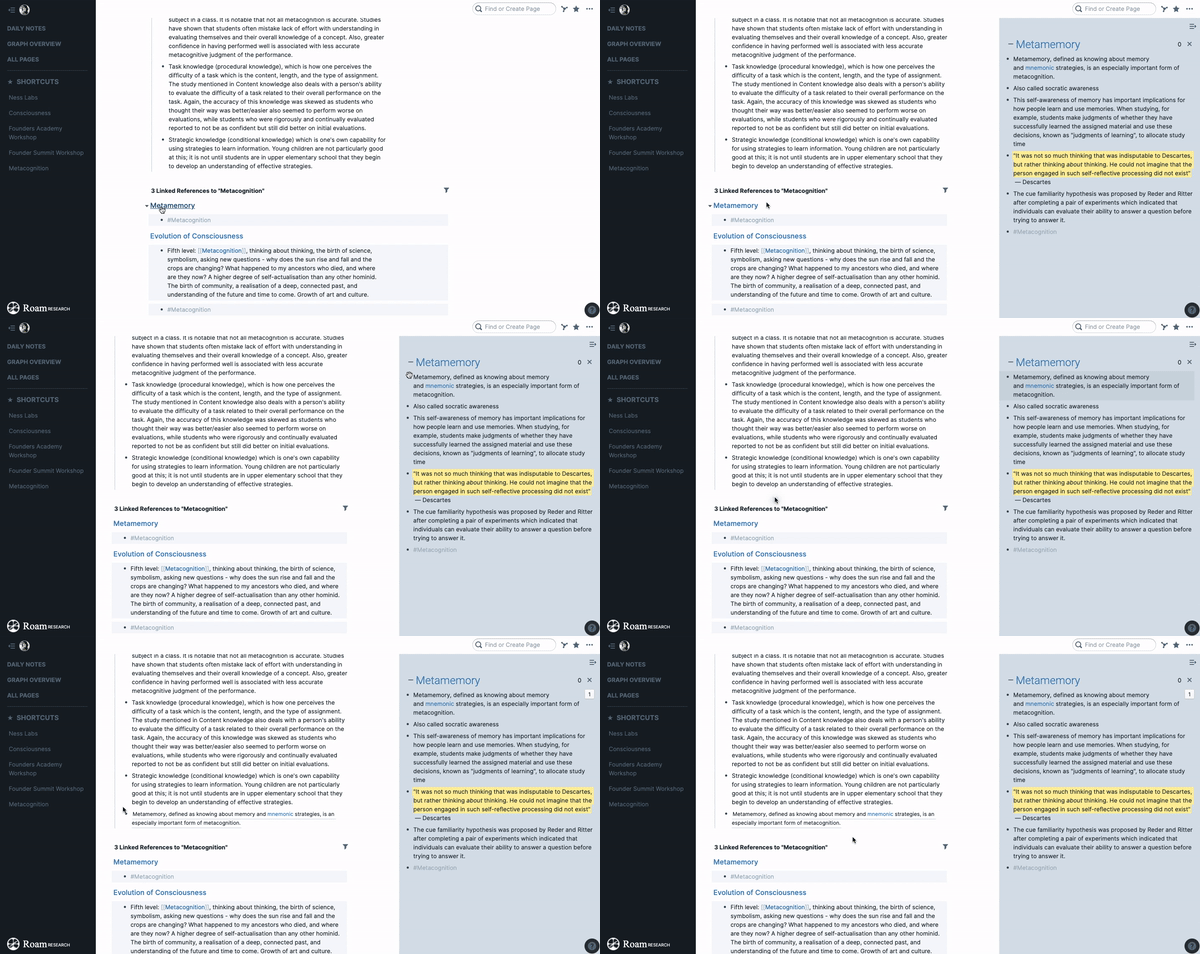
   - Sorry I'm tired, MAJ is french for "majuscule" (uppercase) which means
   the shift key :) So shift + click in Roam opens any link in the right-hand
   side panel. And then you can drag content between notes. Here
   <https://nesslabs.com/wp-content/uploads/2020/03/drag-block-side-panel.gif>
is
   a gif I made so you can see what it looks like.
   - Your Cherry Picker experiment is really cool. In Roam they append a
   unique ID to each block/bullet point. To me this is one of the most
   powerful features it has, it makes it very modular.
   - That Tiddler Philosophy link is the best thing I've read today when it
   comes to TW! It finally clicked. I totally respect that approach even
   though that's not how I naturally take notes myself. Having to proactively
   create a new tiddler for each "atomic idea" feels like more work than just
   letting my thoughts flow / taking notes on a page during a lecture or while
   watching a video, and having each bullet point automatically become its own
   "atomic idea" which I can remix/transcluse etc.
   - Will have a play with the excise editor tool
   <https://tiddlywiki.com/static/Using%2520Excise.html>!
@Mark

Yes, that's exactly what I'm talking about :) Having parallel search + open
links in parallel panel with shift-click would be awesome.

@David

Yes - edit more in the parallel tab would make TW much more powerful.

On Monday, April 13, 2020 at 8:15:30 PM UTC+1, Mark S. wrote:
>
>
>    - Having to search or paste the name of a page to open it in the right
>    side panel - in Roam MAJ + click on any link opens it in the right side
> and
>    it's also fully editable straight away so you can work on two note
>    (tiddlers) or even more in parallel (the side panel can hold many notes
> and
>    you can collapse them)
>
> Hm, maybe "MAJ" is an acronym for magic of some kind but how would you
>> click on any link unless all links were displayed all the time. Surely you
>> must search first? Are you saying you click and the 'page' opens in edit
>> mode? (I'm not familiar with Roam - maybe it only has one wysiwyg mode for
>> direct edit?)
>>
>>
>>
> I think Anne is referring to the "parallel" tab in tiddly blink. It needs
> a bit of work -- you have to type the *entire* tiddler address into the
> box, and then you only get a preview, not an editable version.
>
> For my own version, I have forward/back buttons on each tiddler. Then I
> can use the standard search box to find the tiddler I want, and then
> immediately navigate back. But I suppose the long-term solution would be to
> upgrade the parallel search so that it doesn't demand you remember the
> precise title.
>
>
On Monday, April 13, 2020 at 8:49:20 PM UTC+1, David Gifford wrote:
>
> The other main drawback to the parallel tab is that it is in view mode,
> not in edit mode.
>
> I would welcome code so that
>
> a) the search box in the parallel tab is auto-complete, and
> b) the text field is editable
>
> This would almost replicate what is available in Roam.
>
>
>
>
> On Mon, Apr 13, 2020 at 2:15 PM 'Mark S.' via TiddlyWiki <
> [email protected] <javascript:>> wrote:
>
>>
>>    - Having to search or paste the name of a page to open it in the
>>    right side panel - in Roam MAJ + click on any link opens it in the right
>>    side and it's also fully editable straight away so you can work on two
>> note
>>    (tiddlers) or even more in parallel (the side panel can hold many notes
>> and
>>    you can collapse them)
>>
>> Hm, maybe "MAJ" is an acronym for magic of some kind but how would you
>>> click on any link unless all links were displayed all the time. Surely you
>>> must search first? Are you saying you click and the 'page' opens in edit
>>> mode? (I'm not familiar with Roam - maybe it only has one wysiwyg mode for
>>> direct edit?)
>>>
>>>
>>>
>> I think Anne is referring to the "parallel" tab in tiddly blink. It needs
>> a bit of work -- you have to type the *entire* tiddler address into the
>> box, and then you only get a preview, not an editable version.
>>
>> For my own version, I have forward/back buttons on each tiddler. Then I
>> can use the standard search box to find the tiddler I want, and then
>> immediately navigate back. But I suppose the long-term solution would be to
>> upgrade the parallel search so that it doesn't demand you remember the
>> precise title.
>>
>> --
>> You received this message because you are subscribed to a topic in the
>> Google Groups "TiddlyWiki" group.
>> To unsubscribe from this topic, visit
>> https://groups.google.com/d/topic/tiddlywiki/gzHT17BBhmk/unsubscribe.
>> To unsubscribe from this group and all its topics, send an email to
>> [email protected] <javascript:>.
>> To view this discussion on the web visit
>> https://groups.google.com/d/msgid/tiddlywiki/36c974df-850e-4b10-8b83-0daa8028e62b%40googlegroups.com
>>
>> <https://groups.google.com/d/msgid/tiddlywiki/36c974df-850e-4b10-8b83-0daa8028e62b%40googlegroups.com?utm_medium=email&utm_source=footer>
>> .
>>
>

--
You received this message because you are subscribed to the Google Groups
"TiddlyWiki" group.
To unsubscribe from this group and stop receiving emails from it, send an email
to [email protected].
To view this discussion on the web visit
https://groups.google.com/d/msgid/tiddlywiki/d11388ac-034e-4270-bbe8-f554b48dac3e%40googlegroups.com.