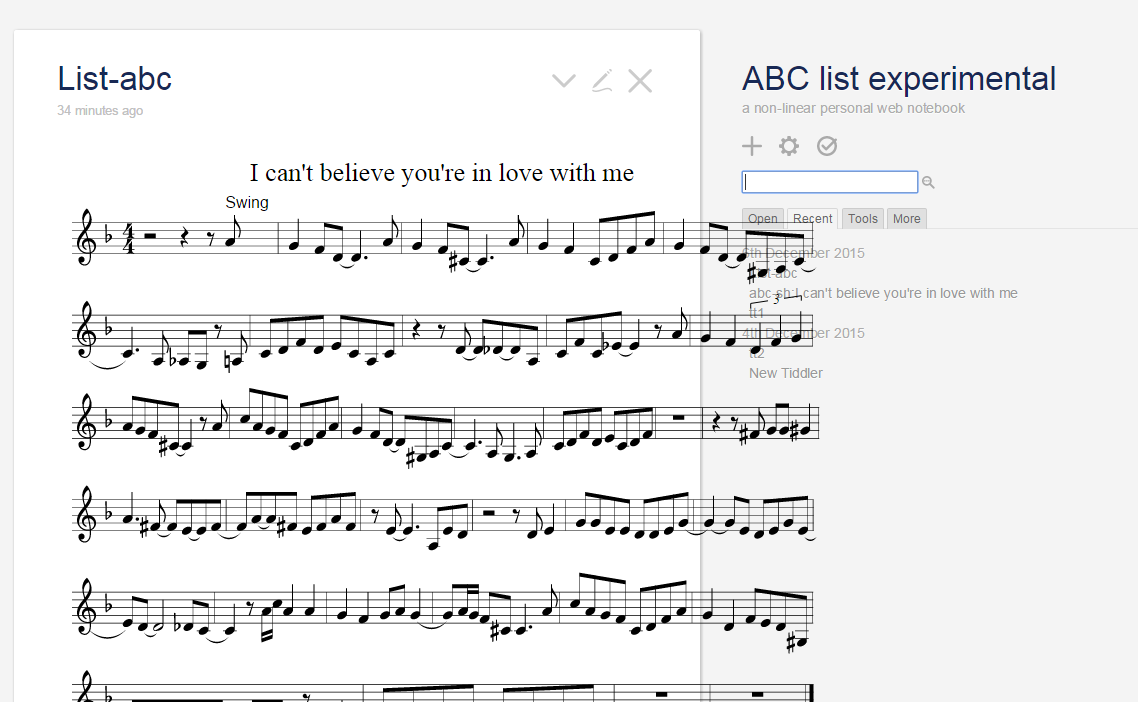
Hi,.

Thanks very much
I've updated the javascript.
No need to say that I'm blocking on the addEventListener

Here is the code I've updated which generates an internal error when I open
the tiddly

Here is what I did

   - Created 2 variables (widgetParent, widgetNextSib) to save the
   parameters passed to the render fct
   - Created a myScript fct which does what you have coded in the render
   but using the (widgetParent, widgetNextSib) variables
   - Added the listener and invoking the MyScript

No need to say that I'm a dummy tiddly développer ...

Thanks for your help
Vpl


\*/

(function(){


/*jslint node: true, browser: true */

/*global $tw: false */

"use strict";


var Widget = require("$:/core/modules/widgets/widget.js").widget;


var ABCWidget = function(parseTreeNode,options) {

this.initialise(parseTreeNode,options);

};


// vpl variables

var widgetParent;

var widgetNextSib;


/*

Inherit from the base widget class

*/

ABCWidget.prototype = new Widget();


/*

Render this widget into the DOM

*/

ABCWidget.prototype.render = function(parent,nextSibling) {

       // vpl

       widgetParent = parent;

       widgetNextSib = nextSibling;


this.parentDomNode = parent;

        var width = parent.clientWidth*2/3;

this.computeAttributes();

this.execute();

this.pNode = this.document.createElement("div");

parent.insertBefore(this.pNode,nextSibling);

if (this.source) {

this.tid  = $tw.wiki.getTiddlerText(this.source)

ABCJS.renderAbc(this.pNode, "%%staffwidth "+width+"\n"+this.tid);

}

this.domNodes.push(this.pNode);

};


/*

Compute the internal state of the widget

*/

ABCWidget.prototype.execute = function() {

this.source = this.getAttribute("source");

};


/*

Refresh the widget by ensuring our attributes are up to date

*/

ABCWidget.prototype.refresh = function(changedTiddlers) {

var changedAttributes = this.computeAttributes();

if(changedAttributes["source"]||changedTiddlers[this.source]) {

this.refreshSelf();

return true;

}

return false;

};


exports["abc"] = ABCWidget;


var myScript = function() {

this.parentDomNode = widgetParent;

        var width = parent.clientWidth*2/3;

this.computeAttributes();

this.execute();

this.pNode = this.document.createElement("div");

parent.insertBefore(this.pNode,widgetNextSib);

if (this.source) {

this.tid  = $tw.wiki.getTiddlerText(this.source)

ABCJS.renderAbc(this.pNode, this.tid);

}

this.domNodes.push(this.pNode);


};


ABCWidget.prototype.addEventListener("resize", myScript);


})();


Le lundi 7 décembre 2015 03:28:21 UTC-6, BJ a écrit :
>
> you could use this as a starting point:
>
>       this.parentDomNode = parent;
> var width = parent.clientWidth*2/3;
>       this.computeAttributes();
>       this.execute();
>       this.pNode = this.document.createElement("div");
>       parent.insertBefore(this.pNode,nextSibling);
>       if (this.source) {
>               this.tid  = $tw.wiki.getTiddlerText(this.source)
>               ABCJS.renderAbc(this.pNode, "%%staffwidth
> "+width+"\n"+this.tid);
>
>
> to make it reactive to the resize there's this event:
>
> *object*.addEventListener("resize", *myScript*);
>
>
>
> On Monday, December 7, 2015 at 12:03:57 AM UTC, vpl wrote:
>>
>> I've found in the documentation that a default width of the music is set
>> to 740 pixels.
>> Here is the link:
>> https://code.google.com/p/abcjs/wiki/InstallationDocumentation
>> Search for Basic abcjs
>> I've found in your widget how you invoke the renderAbc
>>
>> ABCJS.renderAbc(this.pNode, this.tid);
>>
>> Is there a way to retrieve the current tiddler size from the widget code
>> such as I could pass it to the rederAbc ?
>>
>> But will it solve the issue as I guess that tiddly will not invoke the
>> widget each time the tiddler size is changed, won't it ?
>>
>> Vpl
>>
>>
>> Le dimanche 6 décembre 2015 12:47:49 UTC+1, BJ a écrit :
>>>
>>> The music is an svg image with a fixed width determined by  %%staffwidth
>>> (if used) within the abc notation, If the staffwidth is set greater than
>>> the width of the tiddler then it will overflow the tiddler. (actually
>>> overflow the containing html element)
>>>
>>> I have no idea how it chooses a default width, maybe it is in the abc
>>> documentation?
>>>
>>> You could also have on the github of abc - do a search of the issues...
>>> ,maybe there is some css that can be set?
>>>
>>> On Sunday, December 6, 2015 at 10:12:46 AM UTC, vpl wrote:
>>>>
>>>> Hi,
>>>>
>>>>
>>>> Look at the below example.
>>>>
>>>> The music sheet size is exeeding the tiddler normal frame
>>>>
>>>>
>>>> VIncent
>>>>
>>>>
>>>>
>>>>
>>>> <https://lh3.googleusercontent.com/-HuYv901pYlM/VmQJ7ofDqHI/AAAAAAAAAD0/JDqmDh83JC8/s1600/ex-abc-pb.PNG>
>>>>
>>>>
>>>>
>>>> Le dimanche 6 décembre 2015 10:17:19 UTC+1, BJ a écrit :
>>>>>
>>>>> I am not sure what you are referring to, if its the width of the music
>>>>> image then this is controlled by (eg)
>>>>>
>>>>>
>>>>> %%staffwidth 500
>>>>>
>>>>>
>>>>>
>>>>> On Sunday, December 6, 2015 at 8:29:33 AM UTC, vpl wrote:
>>>>>>
>>>>>> Hi BJ,
>>>>>>
>>>>>> I was able to make it running based on your contribution. THanks a
>>>>>> lot !
>>>>>> The issue I see here is that the rendering size is not reduced
>>>>>> according to the window size (when I reduce the tiddly size).
>>>>>> FOr example
>>>>>> When we display the tt1 of your example and reduce the browser
>>>>>> windows, below a certain size the music sheet is not reduced correctly.
>>>>>> Where does it come from ?
>>>>>>
>>>>>> Regards
>>>>>>
>>>>>>
>>>>>> Le dimanche 6 décembre 2015 06:16:08 UTC+1, vpl a écrit :
>>>>>>>
>>>>>>> Hi BJ,
>>>>>>>
>>>>>>> This is exactly what I was looking for.
>>>>>>> How did you do that ?
>>>>>>> On my side I was blocked at the following stage
>>>>>>> I'm not a plugin expert and much more confortable at the moment with
>>>>>>> the macro option (at least I can make running a small one..)
>>>>>>> It seems that you developed a plugin to solve that ?
>>>>>>> Will appreciate any description as I need to use this capabilities
>>>>>>> now and would like to understand how it is integrated with tiddlyWiki
>>>>>>>
>>>>>>> Regards
>>>>>>>
>>>>>>>
>>>>>>>
>>>>>>> --------------------------------------------------------------------------------------------
>>>>>>> What I've done
>>>>>>> - copy the abcjs_basic_latest-min.js file in the same directory as
>>>>>>> my tiddlywiki
>>>>>>> - created a "abcjs_basic_latest-min.js" tiddler, tagged with
>>>>>>> $:/tags/RawMarkup and containing
>>>>>>> <script src="abcjs_basic_latest-min.js"
>>>>>>> type="text/javascript"></script>
>>>>>>> - created a tiddly called "$:/inmysocks/macros/render-abc.js"
>>>>>>>    - of type application/javascript
>>>>>>>    - with an attribute module-type called macro
>>>>>>>    - containing
>>>>>>> /*
>>>>>>> Run the macro
>>>>>>> */
>>>>>>> exports.run = function(music) {
>>>>>>> //Make each date object.
>>>>>>> var result;
>>>>>>> result = ABCJS.renderAbc('notation', music);
>>>>>>>
>>>>>>> //result = 'ABC';
>>>>>>> return result;
>>>>>>>
>>>>>>> - created a test-abc tiddler containing
>>>>>>> <<render-abc "%%staffwidth 500\nX: 1\nT: Chorus\nV: T1 clef=treble
>>>>>>> name="Soprano"\nV: T2 clef=treble name="Alto"\nV: B1 clef=bass
>>>>>>> name="Tenor"\nV: B2 clef=bass name="Bass"\nL:1/8\nK:G\nP:First
>>>>>>> Part\n[V:
>>>>>>> T1]"C"ed"Am"ed "F"cd"G7"gf |\n[V: T2]GGAA- A2BB |\n[V: B1]C3D- DF,3
>>>>>>> |\n[V:
>>>>>>> B2]C,2A,,2 F,,2G,,2 |">>
>>>>>>>
>>>>>>> - the macro is running in the sense that when I comment the result =
>>>>>>> ABCJS.renderAbc ... and uncomment the result = 'ABC' I get the ABC
>>>>>>> display
>>>>>>> - But when I do the reverse I don't have anything displayed.
>>>>>>>
>>>>>>> The Dev tools does nott give me any error ...
>>>>>>>
>>>>>>> I've also tried to copy paste the full content of
>>>>>>> abcjs_basic_latest-min.js file into bcjs_basic_latest-min.js tiddler.
>>>>>>>   In this case, when I close and re-open tiddlyWiki I get the
>>>>>>> content of the .js displayed just below the getting-start tiddler ...
>>>>>>>
>>>>>>> -----------------------------------------------
>>>>>>>
>>>>>>>
>>>>>>> Le vendredi 4 décembre 2015 19:29:57 UTC+1, BJ a écrit :
>>>>>>>>
>>>>>>>> Hi vpl,
>>>>>>>> I have put a widget together that could be used as a starting point:
>>>>>>>>
>>>>>>>> http://abcmusic.tiddlyspot.com/
>>>>>>>>
>>>>>>>> view it in ff (chrome won't load the lib from github)
>>>>>>>>
>>>>>>>> Feel free to use this if you want to develop abc as a plugin, if
>>>>>>>> you don't then maybe I will push it forward a bit more.
>>>>>>>>
>>>>>>>> cheers
>>>>>>>> BJ
>>>>>>>>
>>>>>>>> On Friday, December 4, 2015 at 9:10:11 AM UTC, vpl wrote:
>>>>>>>>>
>>>>>>>>> Hi,
>>>>>>>>>
>>>>>>>>> I'm trying to render abcjs music notation in tiddlywiki
>>>>>>>>> Bopland.org is closed now and Vexflow licensing model is not
>>>>>>>>> adapted.
>>>>>>>>> abcjs (http://abcjs.net/) looks very interesting and maintained.
>>>>>>>>>
>>>>>>>>> Looking at other thread I understand that
>>>>>>>>>  - I have to create a tiddler containing the
>>>>>>>>> abcjs_basic_latest-min.js content (available here
>>>>>>>>> https://raw.githubusercontent.com/paulrosen/abcjs/master/bin/abcjs_basic_2.2-min.js
>>>>>>>>> )
>>>>>>>>>  - tag it with systemConfig
>>>>>>>>>
>>>>>>>>> Then I block as I don't understand how to render the music content
>>>>>>>>> using abcjs
>>>>>>>>>
>>>>>>>>> I've tested on a html page the following code and it works
>>>>>>>>>
>>>>>>>>> <html>
>>>>>>>>> <head>
>>>>>>>>> <meta http-equiv="content-type" content="text/html; charset=UTF-8"
>>>>>>>>> />
>>>>>>>>> <meta name="viewport" content="width=device-width,
>>>>>>>>> initial-scale=1.0">
>>>>>>>>> <title>abcjs basic demo</title>
>>>>>>>>> <script src="abcjs_basic_latest-min.js"
>>>>>>>>> type="text/javascript"></script>
>>>>>>>>> </head>
>>>>>>>>> <body>
>>>>>>>>> <h1>abcjs basic demo page</h1>
>>>>>>>>> <div id="notation"></div>
>>>>>>>>>
>>>>>>>>> <script type="text/javascript">
>>>>>>>>> var chorus = '%%staffwidth 500\nX: 1\nT: Chorus\nV: T1 clef=treble
>>>>>>>>> name="Soprano"\nV: T2 clef=treble name="Alto"\nV: B1 clef=bass
>>>>>>>>> name="Tenor"\nV: B2 clef=bass name="Bass"\nL:1/8\nK:G\nP:First
>>>>>>>>> Part\n[V:
>>>>>>>>> T1]"C"ed"Am"ed "F"cd"G7"gf |\n[V: T2]GGAA- A2BB |\n[V: B1]C3D- DF,3
>>>>>>>>> |\n[V:
>>>>>>>>> B2]C,2A,,2 F,,2G,,2 |';
>>>>>>>>> </script>
>>>>>>>>>
>>>>>>>>> <div>
>>>>>>>>> <script type="text/javascript">
>>>>>>>>> ABCJS.renderAbc('notation', chorus);
>>>>>>>>> </script>
>>>>>>>>> </div>
>>>>>>>>>
>>>>>>>>> </body>
>>>>>>>>> </html>
>>>>>>>>>
>>>>>>>>>
>>>>>>>>> As you see, abcjs renders the content using ABCJS.renderAbc().
>>>>>>>>> But we have to pass to this method a string content (in our case a
>>>>>>>>> javascript variable) representing the music I want to render.
>>>>>>>>>
>>>>>>>>>
>>>>>>>>> Could somebody help me here,
>>>>>>>>> I'm block on tiddly and need an expert to unlock me ..
>>>>>>>>>
>>>>>>>>> With regards
>>>>>>>>>
>>>>>>>>> Vpl
>>>>>>>>>
>>>>>>>>

--
You received this message because you are subscribed to the Google Groups
"TiddlyWiki" group.
To unsubscribe from this group and stop receiving emails from it, send an email
to [email protected].
To post to this group, send email to [email protected].
Visit this group at http://groups.google.com/group/tiddlywiki.
To view this discussion on the web visit
https://groups.google.com/d/msgid/tiddlywiki/a8602c95-d8db-436f-acd5-ea90cb1ebfaa%40googlegroups.com.
For more options, visit https://groups.google.com/d/optout.