> Setup Instruction 3) Set Front Panel switch to Int or Ext, but my clock
> has no front panel switch.
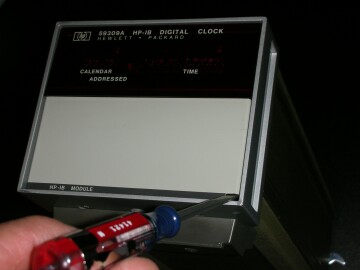
There are a whole set of cute switches behind the
bottom half of the front panel. Open the panel from
that tiny square cut-out on the lower left corner.

http://www.leapsecond.com/museum/hp59309a/open-front1.jpg
http://www.leapsecond.com/museum/hp59309a/open-front2.jpg

> Operating Instruction E) Send Start code from table 2 to synchronize
> clock with Reference Clock.  What does that mean?

You stop the clock with the P command; then set the
date and time with repeated D, H, M, and S commands;
then start the clock with the T command.

> Also there are DIP switches inside whose function I sure would like to
know.

Let me dig out my manual...

/tvb


_______________________________________________
time-nuts mailing list
[email protected]
https://www.febo.com/cgi-bin/mailman/listinfo/time-nuts