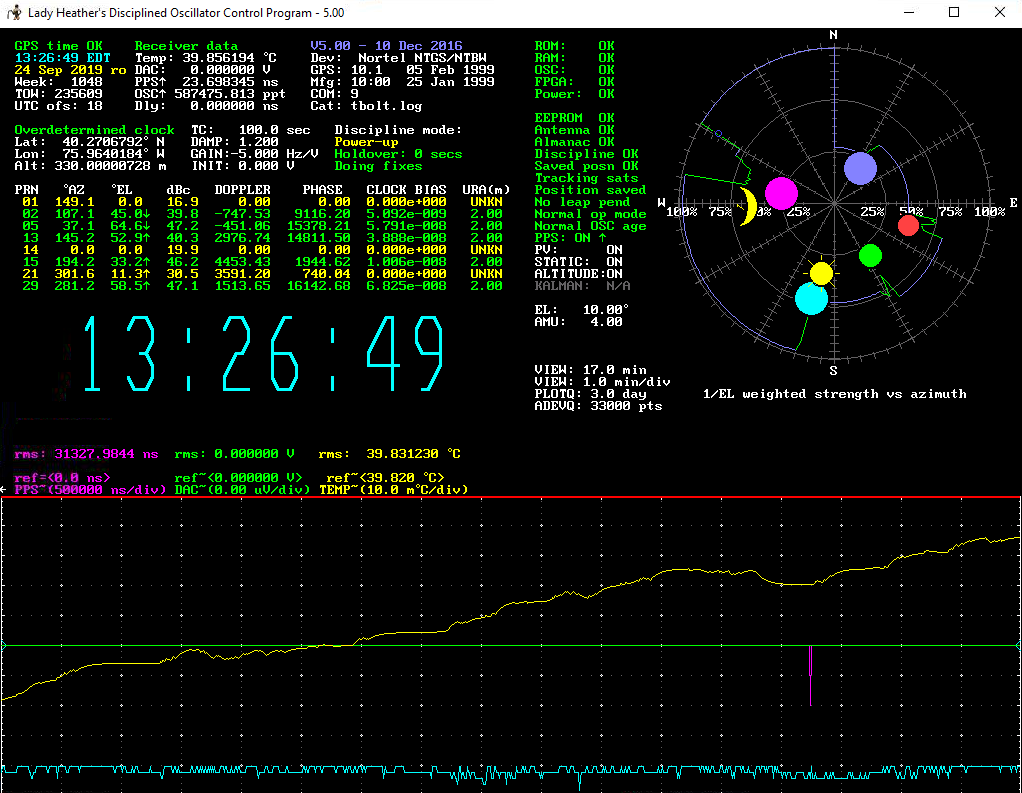
Something certainly seems a bit odd here.
The LH plot shows the device reporting itself as a Nortel NTGS/NTBW, even
though also indicating a Tbolt log file,  so if it really is a Thunderbolt are
you forcing it at start up to run as a Nortel unit?
It's also showing zero DAC voltage and that's not good either.
With something like the Thunderbolt you should be able to run LH with the
default config file, perhaps forcing a com port or designating a time zone so
there shouldn't really be much setting up required.
Perhaps worth running a fresh install of LH, and although perhaps not strictly
necessary you could update LH to version 6....
https://www.eevblog.com/forum/metrology/lady-heather-v6-beta-for-windows-exe/
Nigel GM8PZR

Date: Tue, 24 Sep 2019 13:32:18 -0400
From: Roger Rehr W3SZ <[email protected]>
To: [email protected]
Subject: [time-nuts] Am I doing something wrong?
Message-ID: <[email protected]>
Content-Type: text/plain; charset=utf-8; format=flowed

HI All,

I am wondering if I have set up my Trimble Thunderbolt wrong.

I have corrected for roll-over and everything looks good in Lady Heather
but the Thunderbolt stays in Power-up mode according to Lady Heather,
and is always "doing fixes" even though I have entered the lat and lon
for a fixed location.

According to Lady Heather Disciplining is OK, and of course the log
reflects this as well

#! new minor alarm state 0800:? Tracking sats?? Discipline OK?? : at tow
235167

You can see the situation from this screen grab of Lady Heather:
http://w3sz.com/TrimbleLadyHeather.PNG

Have I done something wrong in configuration, or is this consistent
Power-up mode and "doing fixes" notation the expected behavior?

I am using the Thunderbolt as at 10 MHz source for my microwave station.

Thanks in advance and 73,

Roger Rehr
W3SZ

_______________________________________________
time-nuts mailing list -- [email protected]
To unsubscribe, go to
http://lists.febo.com/mailman/listinfo/time-nuts_lists.febo.com
and follow the instructions there.