Another way to do it is to download the TinyOS plugin for Eclipse from here:
http://www.dcg.ethz.ch/~rschuler/
It draws component diagrams as well and allows you to break down the
components further to see how they are wired up internally.
Simon

Michael Schippling wrote:
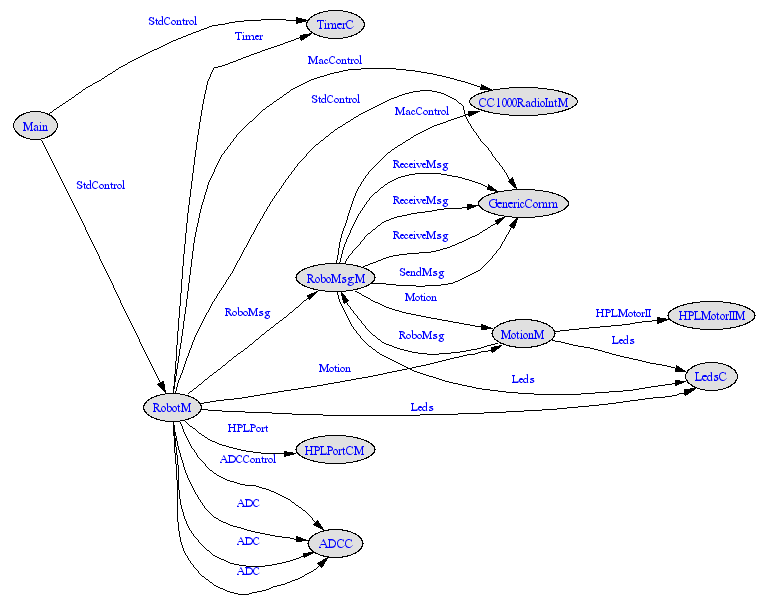
I don't know what that diagram looks like, but, assuming you have
GraphViz setup as it should be, you can do "make <platform> docs"
in any app directory and get a picture-to-puzzle-over like this:
http://www.etantdonnes.com/Motes/contrib.xbow.apps.Robot.Robot.nc.if.gif

In a fit of data hiding frenzy the output of the docs is put in:
    ../..doc/nesdoc/<platform>
MS

Bernd-Christian Renner wrote:
Hello list,
I would like to draw a Wiring/Configuration Diagram for a TinyOS
application
and would be glad if somebody could tell me how I could do that. What
I mean
is something like the graph in "The nesC Language: A holistic
approach to
networked embedded sytems", page 5, figure 6.


Thanks in advance
Christian
_______________________________________________
Tinyos-help mailing list
[email protected]
https://mail.millennium.berkeley.edu/cgi-bin/mailman/listinfo/tinyos-help
_______________________________________________
Tinyos-help mailing list
[email protected]
https://mail.millennium.berkeley.edu/cgi-bin/mailman/listinfo/tinyos-help
--
Simon Willis    BE(CompSys)(Hons)-BSc
PhD Candidate                           Tel: (07) 47814865
Electrical & Computer Engineering   Fax: (07) 47815177
James Cook University                   Mob: 0403653055
Townsville, QLD         4811            Email: [EMAIL PROTECTED]
                                        Web: http://eng.jcu.edu.au

_______________________________________________
Tinyos-help mailing list
[email protected]
https://mail.millennium.berkeley.edu/cgi-bin/mailman/listinfo/tinyos-help