On Sat, Feb 22, 2014 at 05:47:55PM +0000, Arlo Breault wrote:
>     It seems the right thing to do is mimic a browser, and I can think of at
>     least three ways to do that:
>      1. Try really hard, using NSS or some other library, to look like a
>         particular browser.
>      2. Run a second browser, apart from Tor Browser, that receives commands
>         from a client PT program and makes the HTTPS requests it is
>         commanded to.
>      3. Run a browser plugin *inside* Tor Browser, that makes HTTPS requests
>         *directly on the Internet, without going through Tor*. That is, the
>         plugin receives commands from the client PT program, and then
>         bypasses all of Tor Browser's proxy settings in order to send HTTPS
>         requests to the web site fronting the circumvention.
>
>     It's the third option I want to ask about. The first option puts us on
>     the parrot treadmill. The second has the usability and distribution
>     problems of running two browsers at once.
>
> Usability might not be such an issue if you're using a headless browser.
> Distribution still would be.
Thanks Arlo. I took this idea and some from IRC discussion and
summarized them here:

https://trac.torproject.org/projects/tor/wiki/doc/meek#HowtolooklikebrowserHTTPS

 1. Use your own HTTPS/TLS library, and take care to make sure your
    ciphersuites and extensions match those of a browser. There are
    [https://www.mozilla.org/projects/security/pki/python-nss/ Python bindings
for NSS]
    that might make it easier. Chromium is
    [https://code.google.com/p/chromium/issues/detail?id=62803 moving to
OpenSSL]
    in the future.
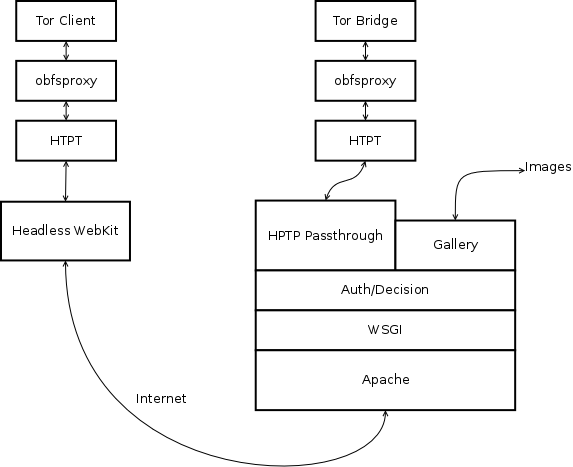
 2. Use a separate (headless) browser as an instrument for making HTTPS
    requests. This is what
    [https://raw.github.com/wiki/gsathya/htpt/Overall_architecture2.png htpt
plans to do].
    [http://phantomjs.org/ PhantomJS] is a headless WebKit that is
    scriptable with JavaScript. Its compressed size is 7–13 MB.
    [https://github.com/ariya/phantomjs/blob/master/examples/postserver.js This
postserver.js example]
    shows it running its own web server, which we could use as a means
    of communication:
      meek-client on localhost ←HTTP→ PhantomJS on localhost ←HTTPS→
www.google.com.
    Another option is to write an extension for some other browser and
    communicate with it using some custom IPC.
 3. Use an [https://developer.mozilla.org/en/Extensions extension] in
    Tor Browser itself. The plugin bypasses Tor Browser's normal proxy
    settings in order to issue HTTPS requests directly to the front
    domain.
     * [tor-dev] Feasibility of using a Tor Browser plugin as a PT component?
       https://lists.torproject.org/pipermail/tor-dev/2014-February/006266.html
    GeKo says that

[https://developer.mozilla.org/en-US/docs/XPCOM_Interface_Reference/nsISocketTransportService
 nsISocketTransportService]
    is what we want to look at.
     *
[https://stackoverflow.com/questions/10173811/how-to-connect-to-a-remote-server-using-nsisockettransportservice-in-a-firefox-e
 How to connect to a remote server using nsISocketTransportService in a firefox
extension?]
     *
[https://code.google.com/p/weaponry/source/browse/trunk/xulrunner/weaponry/distribution/bundles/[email protected]/components/WeaponryRawHttpRequest.js
 WeaponryRawHttpRequest.js]
       is doing what we want.
    [https://developer.mozilla.org/en-US/docs/Mozilla/XPCOM XPCOM] (a
    Firefox API) allows you to create
    [https://developer.mozilla.org/en-US/docs/WebAPI/TCP_Socket TCP sockets].

David Fifield
_______________________________________________
tor-dev mailing list
[email protected]
https://lists.torproject.org/cgi-bin/mailman/listinfo/tor-dev