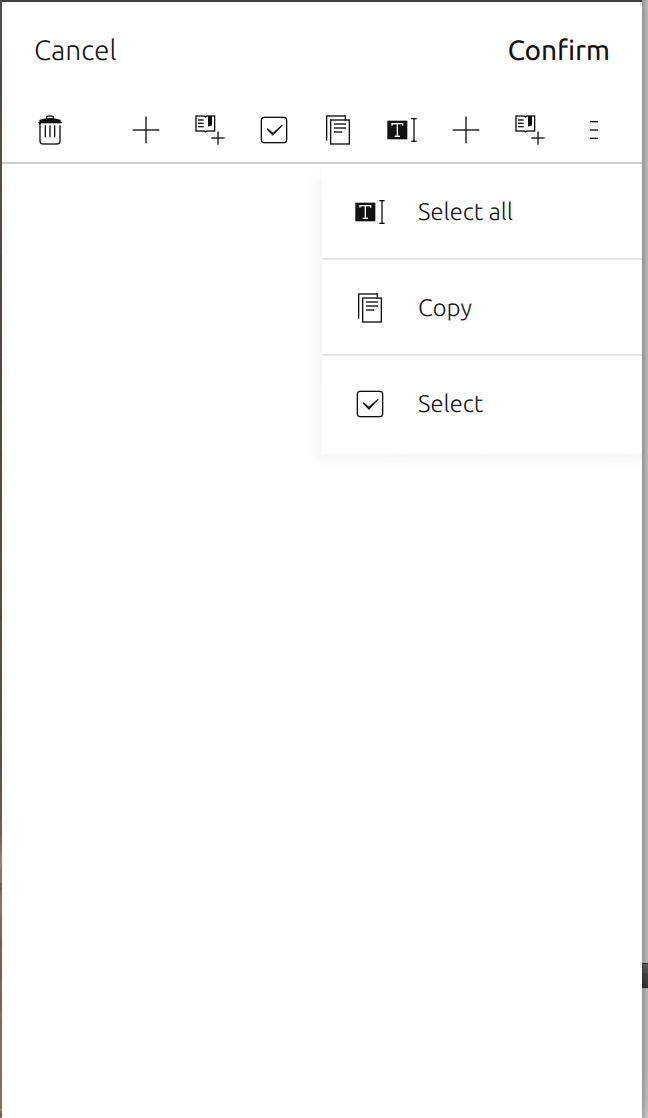
Attached is a screenshot of how the toolbar currently looks when there
are too many icons to fit. On the right-hand side it shows an overflow
button, and tapping that reveals the overflow panel with the remaining
actions.
** Attachment added: "toolbar-overflow.png"

https://bugs.launchpad.net/ubuntu/+source/ubuntu-ui-toolkit/+bug/1558018/+attachment/4602085/+files/toolbar-overflow.png

--
You received this bug notification because you are a member of Ubuntu
Touch seeded packages, which is subscribed to ubuntu-ui-toolkit in
Ubuntu.
https://bugs.launchpad.net/bugs/1558018

Title:
  Scrolling of icons in Toolbar

Status in Ubuntu UX:
  New
Status in ubuntu-ui-toolkit package in Ubuntu:
  Incomplete

Bug description:
  Currently, when the icons do not all fit in the toolbar, an overflow
  button is shown that shows an overflow popover/panel when clicked.
  This needs to be replaced by icon scrolling instead.

  See https://docs.google.com/document/d/1F-zD6CF8YFfA-
  nAtpdRniCqwUNJhSDJVFrRO76A1M-Q/edit

To manage notifications about this bug go to:
https://bugs.launchpad.net/ubuntu-ux/+bug/1558018/+subscriptions

--
Mailing list: https://launchpad.net/~touch-packages
Post to     : [email protected]
Unsubscribe : https://launchpad.net/~touch-packages
More help   : https://help.launchpad.net/ListHelp