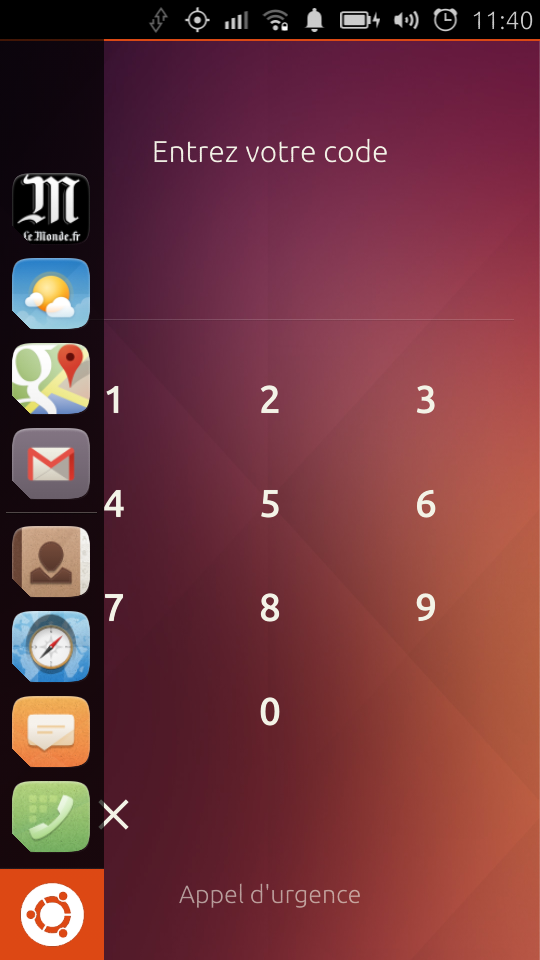
To start an app:

1) Swipe left to show launcher.
2) Keeping finger down in (1) long press an app icon in the launcher.
3) Remove both fingers from screen.
4) Swipe left to show launcher again.
5) Launcher should remain on screen allowing you to touch an app icon to launch
it. See attached.
** Attachment added: "launcher-shown-with-screen-locked.png"

https://bugs.launchpad.net/ubuntu/+source/unity8/+bug/1369457/+attachment/4204323/+files/launcher-shown-with-screen-locked.png

--
You received this bug notification because you are a member of Ubuntu
Touch seeded packages, which is subscribed to unity8 in Ubuntu.
https://bugs.launchpad.net/bugs/1369457

Title:
  able to left swipe and launch apps without unlocking phone

Status in “unity8” package in Ubuntu:
  New

Bug description:
  This is atleast a privacy issue but could also be a security depending
  on exactly what apps the user has pinned to their launcher.

To manage notifications about this bug go to:
https://bugs.launchpad.net/ubuntu/+source/unity8/+bug/1369457/+subscriptions

--
Mailing list: https://launchpad.net/~touch-packages
Post to     : [email protected]
Unsubscribe : https://launchpad.net/~touch-packages
More help   : https://help.launchpad.net/ListHelp