*** This bug is a duplicate of bug 1720651 ***
    https://bugs.launchpad.net/bugs/1720651
Same issue for me:
- Community Theme Snap,
- Wayland

---

Mutter version: 3.28.3-2~ubuntu18.04.1

Distributor ID: Ubuntu
Description:    Ubuntu 18.04.1 LTS
Release:        18.04
Codename:       bionic

GNOME Terminal 3.28.2 using VTE 0.52.2 +GNUTLS -PCRE2

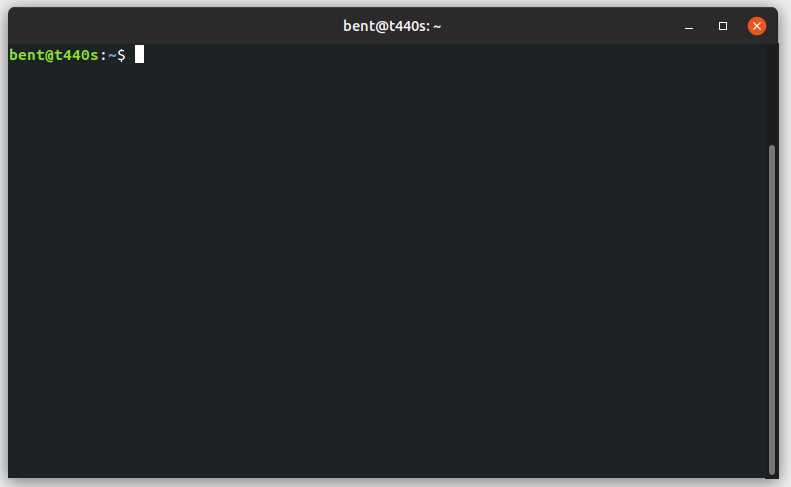
** Attachment added: "See right border of terminal Window scrollbar exceeds
window width)"

https://bugs.launchpad.net/ubuntu/+source/gnome-terminal/+bug/1750889/+attachment/5185932/+files/Screenshot%20from%202018-09-07%2009-01-54.png

--
You received this bug notification because you are a member of Ubuntu
Touch seeded packages, which is subscribed to gtk+3.0 in Ubuntu.
https://bugs.launchpad.net/bugs/1750889

Title:
  GNOME Terminal scrollbar looks weird on clean GNOME session under
  Wayland

Status in gnome-terminal package in Ubuntu:
  Confirmed
Status in gtk+3.0 package in Ubuntu:
  Confirmed

Bug description:
  When using a clean GNOME session (with Adwaita theme) in combination
  with Wayland, the scrollbar in GNOME Terminal looks weird (see
  screenshot 1). The window also looks like it does not have a focus,
  but it does. Clicking anywhere on the menu bar fixes the focus issue,
  but the scrollbar still looks weird (see screenshot 2).

To manage notifications about this bug go to:
https://bugs.launchpad.net/ubuntu/+source/gnome-terminal/+bug/1750889/+subscriptions

--
Mailing list: https://launchpad.net/~touch-packages
Post to     : [email protected]
Unsubscribe : https://launchpad.net/~touch-packages
More help   : https://help.launchpad.net/ListHelp