Hi Stefano
Thank you for the detailed explanation, I understand the issue now better.
Indeed, we do not have any pattern for this particular use case at the moment.
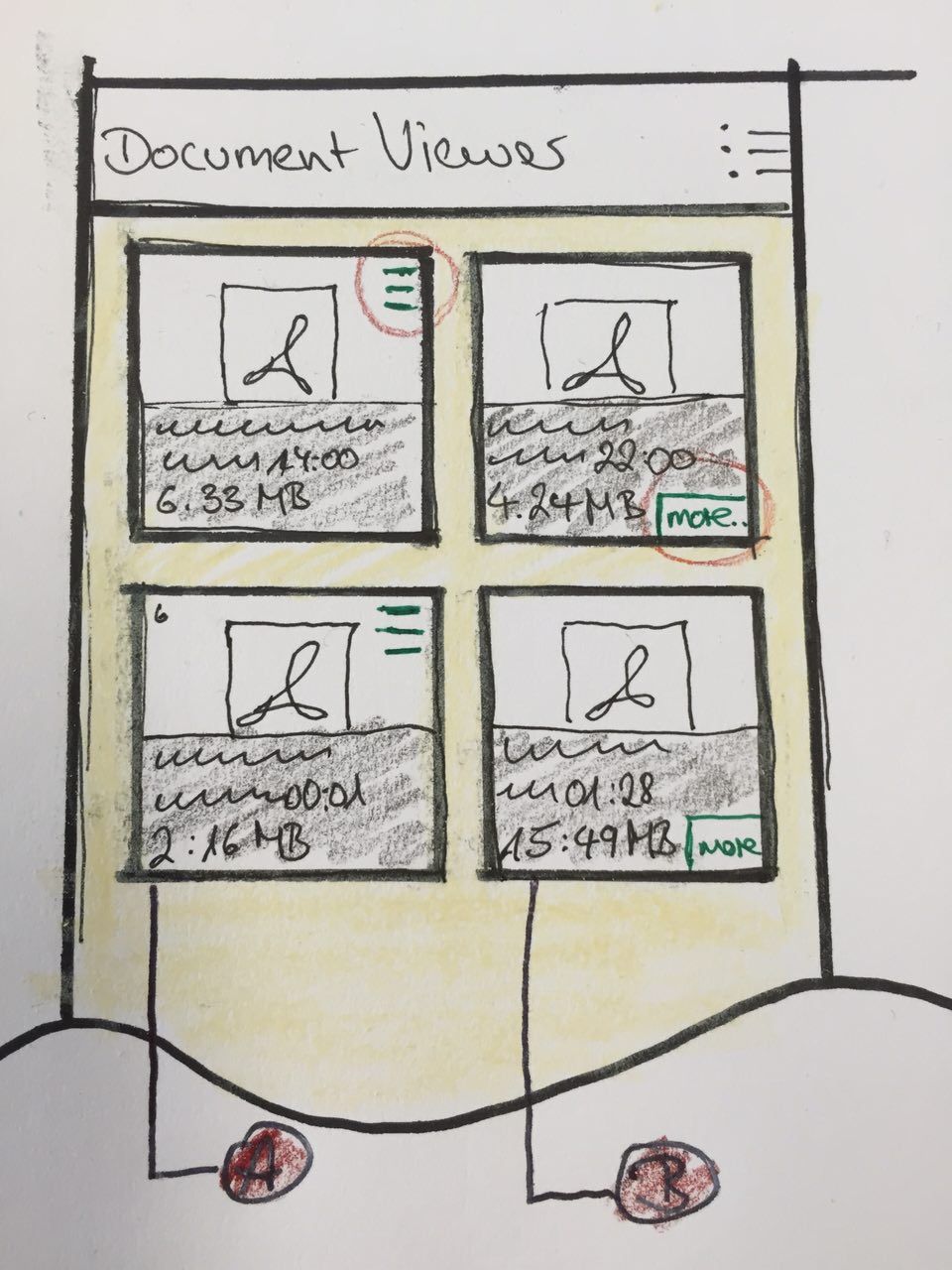
I would recommend you to do something similar as per your Android example:
- A: You include on the tile on the top right an overflow menu where you could
put any additional actions or
- B: you include a text link saying "more..." in the bottom right of the tile
which triggers a popover. The popover can be a list view with any additional
actions for that tile.
I included a sketched wireframe to illustrate what I mean. Hope it helps.
** Attachment added: "IMG_2015-06-12 15:05:17.jpg"

https://bugs.launchpad.net/ubuntu-docviewer-app/+bug/1447995/+attachment/4413942/+files/IMG_2015-06-12%2015%3A05%3A17.jpg

** Changed in: ubuntu-ux
       Status: Incomplete => Fix Committed

--
You received this bug notification because you are a member of Ubuntu
Touch seeded packages, which is subscribed to ubuntu-ui-toolkit in
Ubuntu.
https://bugs.launchpad.net/bugs/1447995

Title:
  [Document-Viewer] Re-enable swipe gestures of list items

Status in Document Viewer application for Ubuntu devices:
  New
Status in Ubuntu UX bugs:
  Fix Committed
Status in ubuntu-ui-toolkit package in Ubuntu:
  New

Bug description:
  STEP TO REPRODUCE THIS ISSUE:
  1. Open Document Viewer. The list of documents in $HOME/Documents will be
shown.
  2. Delete an entry in the list (N.B. not the grid), by swiping to right the
corrisponding list item.

  WHAT HAPPENS:
  The list item can not be swipped

  WHAT SHOULD HAPPENS:
  The list item can be swipped to right, and a red-coloured action is shown.
  Currently, to delete an item we need to switch to the multi-selection mode.

  BLOCKERS:
  We need to find an equivalent UI pattern for this user case, when the grid
view is used instead of the list view.

To manage notifications about this bug go to:
https://bugs.launchpad.net/ubuntu-docviewer-app/+bug/1447995/+subscriptions

--
Mailing list: https://launchpad.net/~touch-packages
Post to     : [email protected]
Unsubscribe : https://launchpad.net/~touch-packages
More help   : https://help.launchpad.net/ListHelp