What is Internet Explorer?  :)

Bootstrap is not IE friendly. Correction.. IE does not play well with
others, and the gracious nerds at Twitter that created bootstrap made the
choice that they would not be able to support IE 6/7/8. I beleive 9 and
above will play a bit better with B.S. since Microsoft finally started
going the route of excepting world standards. But the reason they made this
choice is because they are jumping on the HTML5 / CSS3 bandwagon and
rolling with it. Those old browsers can not handle those things. Rounded
corners are just square corners in the older IE's. And I am sure there are
many other problems with IE that I have not yet read about, but have surely
been discussed on here or stack overflow.
I just ran the site through the cross browser testing site to grab screen
shots to see what IE has in store for you:

http://crossbrowsertesting.com/users/28369/screenshots/z866957e433d08f7ee8c/public

It looks like the older IEs don't like the margins/padding you are using.
The corners are certainly square. And the transparent backgrounds within
the PNGs are not so see through.  The next step here was to run a real live
loaded test on that same site. I had them load IE8 on Windows7 and
confirmed a few things.

- I do not really see any extra margins. Can't help here.

- The corners not showing up are just the lack of that CSS property in
these older browsers.

- After clicking the green button, the 3 text fields look a little strange.
And when I click on any one of them, they shift and move around. Within
both situations, it looks like the margins and/or padding is not fitting
properly into your layout. And you focus on a field, those settings change
which makes the problem worse. Different browsers calculate the width /
height of an element differently when it comes to the padding / margins you
us. If those elements require a specific width and specific
padding/margins, you will need to find the best solution for IE.

Sorry I do not have a better answer for you. I do not run Windows and do
not have virtual box loaded to help. The cross browser site is what I use
to help narrow down issues like this. But your best bet would be to address
the issues with alternate IE only CSS declarations. Look into the specific
in font/input padding/margin/width issue, trying to find a smaller setting
for each in old IE. And the do the same for any other spacing issue places.

Have a great night!


- J e f f  C o n k l i n -
- http://www.getoutsidenj.com
- http://twitter.com/GetOutsideNJ
- http://www.carabs.com


On Wed, May 15, 2013 at 2:52 PM, Mattias Fjellvang <
[email protected]> wrote:

> Hey Bootstrappers!
>
> I have been working on getting my website for my start-up to work in
> Internet Explorer 7 and 8, but it just keeps messing up. It's really sad,
> because we're in a competition for our current start-up company and the
> judges are reviewing all projects (and we're gonna become the next one
> reviewed sooner or later)
>
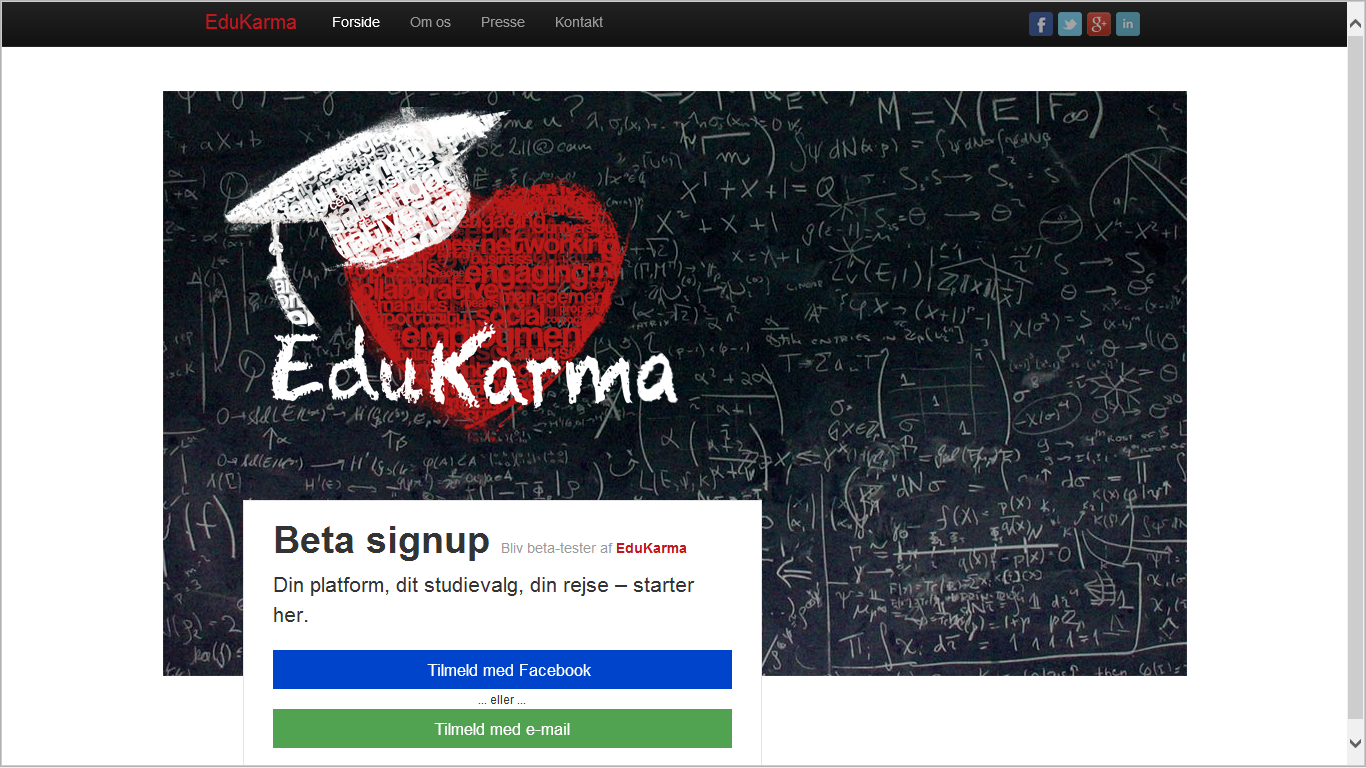
> Take a look at the website here: www.edukarma.com - check in Internet
> Explorer 7 and 8.
>
> In Internet Explorer 7 and 8:
>
>    - Huge some sort of "margin" in left and right side.
>    - Buttons are squared instead of rounded.
>    - When you click on "Tilmeld med e-mail"-button (the green one) the
>    three inputs are so messed up.
>
> Internet Explorer 7:
>
>    - The logo is on top of the "beta signup" box. Like the window is
>    smaller than it actually is.
>
> Screenshot in *Internet Explorer 7*:
>
>
> <https://lh4.googleusercontent.com/-XGLoyQ2N9xw/UZPXwVGbdnI/AAAAAAAAAHc/w3_4MZtFNEE/s1600/internet+explorer+7.png>
>
> Screenshot Internet Explorer 8:
>
>
> <https://lh4.googleusercontent.com/-kCMSVxI53LM/UZPYmBPQb3I/AAAAAAAAAHo/jwpnsnGP0oQ/s1600/internet+explorer+8.png>
>
>
>
> If anybody could help, just with ONE of the problems, it would really help
> me (and the team) out. I'm desperate!
>
> Thanks in advance!!
>
> --
> You received this message because you are subscribed to the Google Groups
> "twitter-bootstrap" group.
> To unsubscribe from this group and stop receiving emails from it, send an
> email to [email protected].
> For more options, visit https://groups.google.com/groups/opt_out.
>
>
>

--
You received this message because you are subscribed to the Google Groups
"twitter-bootstrap" group.
To unsubscribe from this group and stop receiving emails from it, send an email
to [email protected].
For more options, visit https://groups.google.com/groups/opt_out.