<https://lh4.googleusercontent.com/-L4PNtKEeoLY/Uc75oe3EEZI/AAAAAAAAAA4/iAHkv7gdbCI/s1440/problem.png>
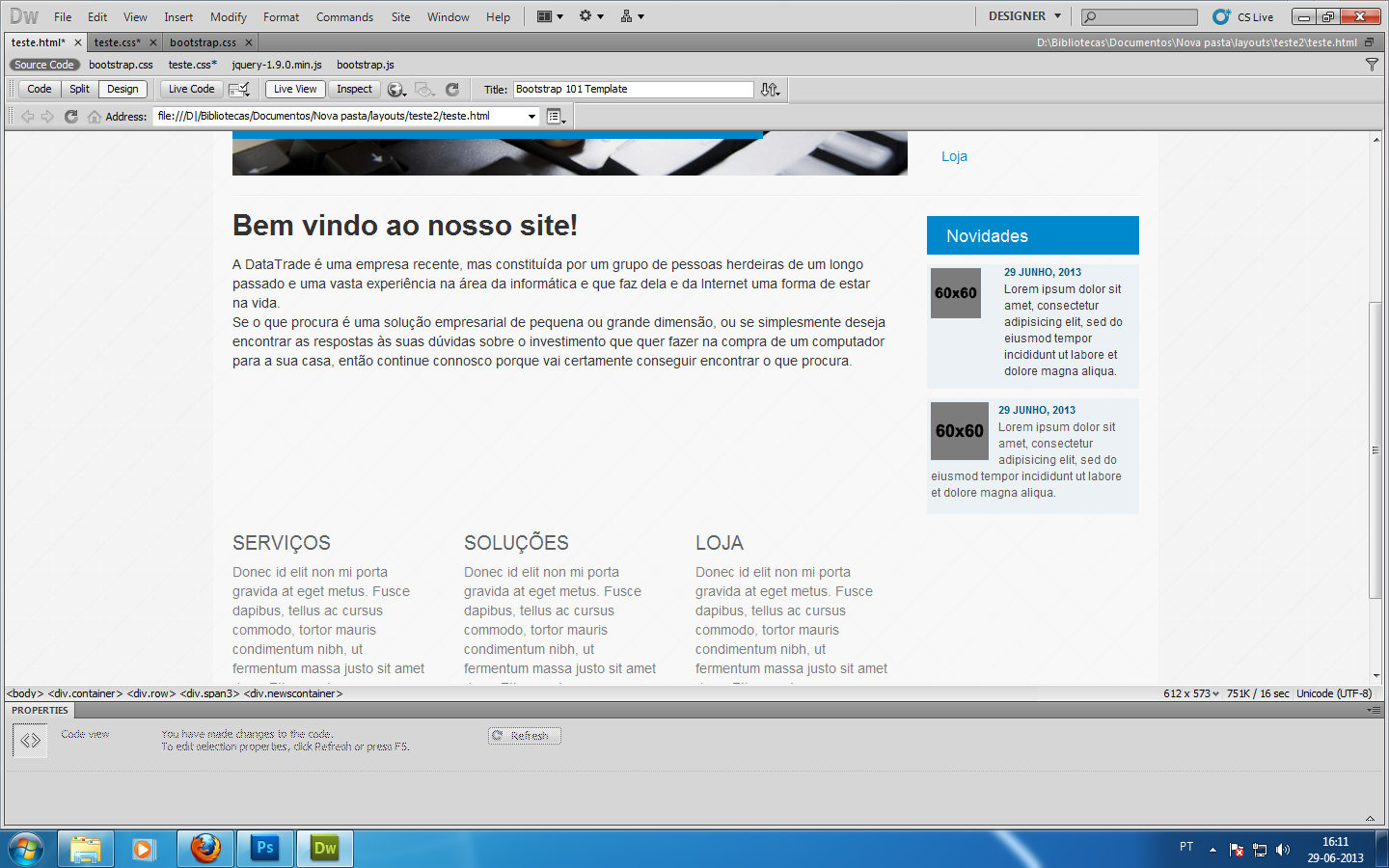
Ok guys I think I'm having a mental block or something. On the print screen
I took, look at that box at the right side, I want the design from the box
above but I want the text to flow like the upper box! I just can't get
there dunno why x)
Here is the code:

<div class="newscontent">
>           <div class="row">
>             <div class="span1">
>               <div class="thumbnail" style="border:0px"> <img
> src="imagens\60x60.jpg" alt="ALT NAME" class="pull-left"
> style='margin-right:10px'> </div>
>               </div>
>               <div class="span2">
>                 <h1 class="news">29 JUNHO, 2013</h1>
>                 <p class="news">Lorem ipsum dolor sit amet, consectetur
> adipisicing elit, sed do eiusmod tempor incididunt ut labore et dolore
> magna aliqua.</p>
>               </div>
>             </div>
>           </div>
>         <div class="newscontent">
>           <div class="thumbnail" style="border:0px"> <img
> src="imagens\60x60.jpg" alt="ALT NAME" class="pull-left"
> style='margin-right:10px'>
>             <div class="caption">
>               <h1 class="news">29 JUNHO, 2013</h1>
>               <p class="news">Lorem ipsum dolor sit amet, consectetur
> adipisicing elit, sed do eiusmod tempor incididunt ut labore et dolore
> magna aliqua.</p>
>             </div>
>           </div>
>         </div>
>

--
You received this message because you are subscribed to the Google Groups
"twitter-bootstrap" group.
To unsubscribe from this group and stop receiving emails from it, send an email
to [email protected].
For more options, visit https://groups.google.com/groups/opt_out.