hi,

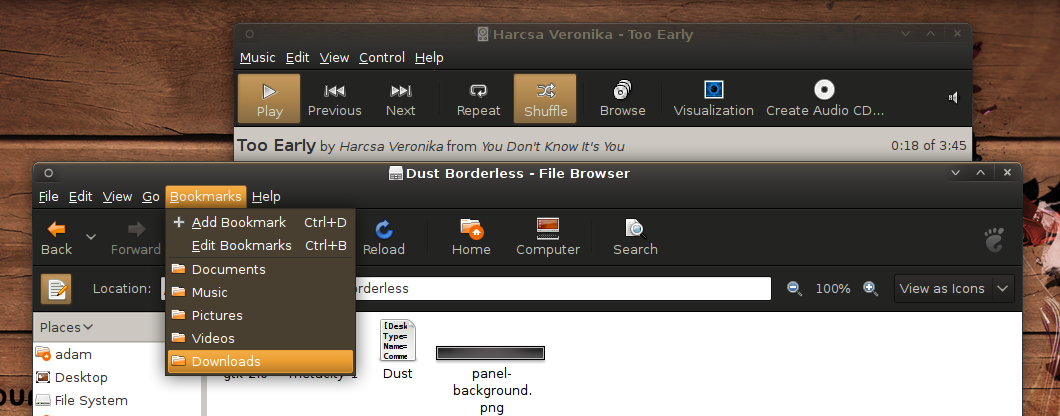
i checked out the latest release. i saw the toolbars have the gradients
again. Do you insist to them? IMO the flat bars definitly look better
and more professional.
and talking about the colors i changed the selected bg color to #FFBD61
and the bg_color to #CCC8C1, maybe you would like to consider them.
the selected color makes it more ubuntuish i think, and the background
color is darker, better for the eyes, and doesnt make a big contrast
with the toolbars wich makes it easier for the eyes. Please consider
them!

http://m.blog.hu/os/osline/image/dustcolors.png

Keep in mind if you change the selected color to mine, than you will get
big highlights on the metacity headers since it is a much lighter color.

On the picture I also changed the padding (2-2) and the roundness (2) of
the selected menu items.

Adam


On Tue, 2008-09-16 at 19:32 -0700, Rico Sta. Cruz wrote:
> Hi guys. First of all, I apologize for asking these here but I'm new to the
> community and I'm not sure on what the venue is for these sort of questions.
>
> I'm getting an error I can't explain:
> /home/rsc/.themes/Dust/gtk-2.0/gtkrc:43: Invalid symbolic color 'fg_color'
> /home/rsc/.themes/Dust/gtk-2.0/gtkrc:43: error: invalid identifier
> `fg_color', expected valid identifier
>
> They show up when my colors in the appearance dialog are set to default.
> However, when I change one a bit (say from #FFFFFF to #FFFFFE) just so it's
> not default, everything works fine. This is running Murrine, and the theme
> in question is in http://dump.ambiescent.com/i/Dust-20080917.tar.gz if
> anyone wishes to debug.
> --
> View this message in context:
> http://www.nabble.com/GTK-theme-help-tp19524364p19524364.html
> Sent from the ubuntu-art mailing list archive at Nabble.com.
>
>


--
ubuntu-art mailing list
[email protected]
https://lists.ubuntu.com/mailman/listinfo/ubuntu-art