Hi Adnane! I can reproduce something like you've described above, but
not the exact details.
I'm running lucid. If I:

 1. Open software-center, browse to "For Purchase"->Brukkon, and click Buy...
 2. Log in
 3. Click Cancel on the payment screen as in your screenshot (although my
payment screen is in a separate window - I'm guessing you're testing SCA on
natty?)

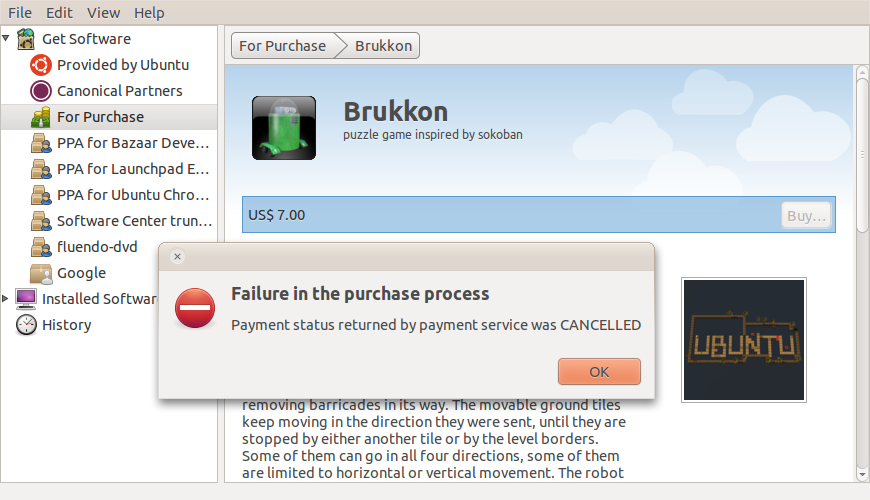
I don't see any looping - Isee very briefly the 'Processing payment'
screen (which is required, as the SC-server side doesn't even know the
payment is canceled until we request the payment status from payments*),
and then a dialog saying 'Failure in the purchase process' (attaching
screenshot).

@mvo: do you know what might have caused this change in behaviour?
AFAICS, we've not sent any user_canceled property in the title for
canceled purchases previously (I can see it was added to the login
cancel, but that's it). If that's the best solution I can add it in here
too.

** Attachment added: "696861-payment-canceled.png"

https://bugs.launchpad.net/ubuntu/+source/software-center/+bug/696861/+attachment/1796801/+files/696861-payment-canceled.png

--
You received this bug notification because you are a member of Ubuntu
Bugs, which is subscribed to Ubuntu.
https://bugs.launchpad.net/bugs/696861

Title:
  Looping messagebox if you cancel a purchase

--
ubuntu-bugs mailing list
[email protected]
https://lists.ubuntu.com/mailman/listinfo/ubuntu-bugs