*** This bug is a duplicate of bug 487695 ***
    https://bugs.launchpad.net/bugs/487695
I forgot to say I have an OfficeJet Pro 8500A.

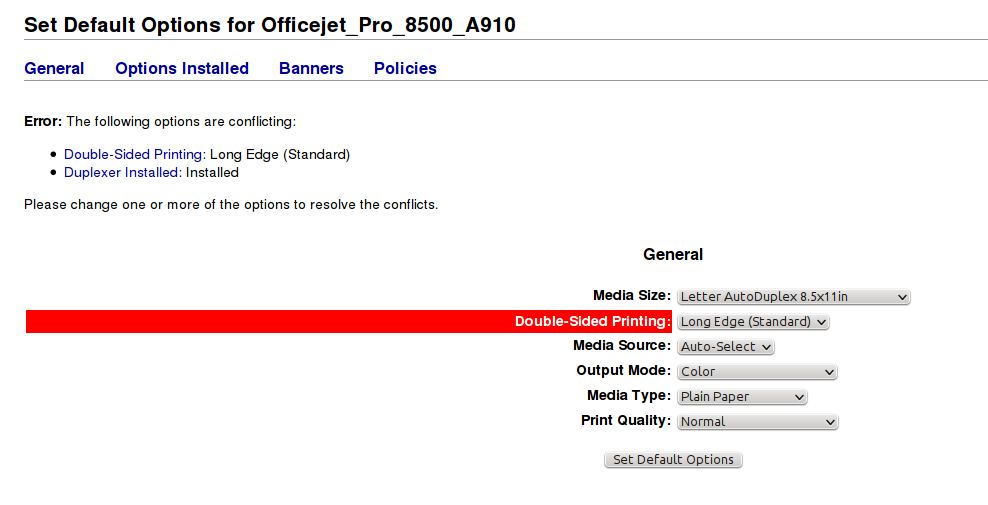
I just tried to set the CUPS Printer Default Options to "Long Edge" (my idea
was to 'force' even gnome/non-KDE apps to use duplex), and got this "fun"
result (see attached screenshot):
--- snip ---
Error: The following options are conflicting:

    Double-Sided Printing: Long Edge (Standard)
    Duplexer Installed: Installed

Please change one or more of the options to resolve the conflicts.
--- snap ---

Aha, so if I have a duplexer I cannot print duplex. Great. Of course
changing the "Duplexer Installed:" to "Not Installed" does not allow me
to set the "Double-Sided Printing:" option to "Long Edge (Standard)"
either.

** Attachment added: "screenshot"

https://bugs.launchpad.net/ubuntu/+source/hplip/+bug/428588/+attachment/2579813/+files/hp-cups-duplex-fun.png

--
You received this bug notification because you are a member of Ubuntu
Bugs, which is subscribed to Ubuntu.
https://bugs.launchpad.net/bugs/428588

Title:
  Problems with hpcups driver: Setting duplex too complicated,
  miscellaneous regressions

To manage notifications about this bug go to:
https://bugs.launchpad.net/evince/+bug/428588/+subscriptions

--
ubuntu-bugs mailing list
[email protected]
https://lists.ubuntu.com/mailman/listinfo/ubuntu-bugs