Public bug reported:

On a PC that I use (but has no keyboard), I have (currently)
$ cat /etc/issue
Ubuntu 10.04.4 LTS \n \l

Because it has no keyboard - I use "onboard" on it, and heavily rely on
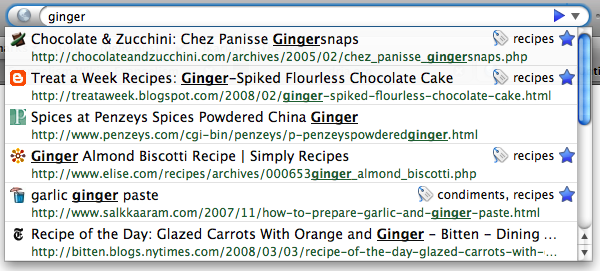
the URL/"Location"/"Awesome"/Address bar autocomplete; which is why I
noticed the problem immediately. Just to make sure - here is the drop
down window I'm talking about (even if the picture is from Firefox 3):

http://blog.mozilla.org/files/2008/04/2421200414_77674b14a4_o1.png
http://blog.mozilla.org/blog/2008/04/21/a-little-something-awesome-about-firefox-3/


I first updated the 'standalone' version of Firefox that I use (download from
Mozilla) to 13.0.1. Upon first start, autocomplete did work; soon after that
though, if you type say "y" in the bar, you would get no dropdown window with
results (even if I know, that for that letter, at least 'youtube.com' should
show) - and indeed, no dropdown for whatever you type.


At this point, I had an older version of Firefox 12 installed by Ubuntu
(hereafter `ubufox`) - so I could compare:  ubufox Firefox 12 had no problem
with dropdowns.

Then I did sudo apt-get update && sudo apt-get upgrade; this updated the
ubufox to Firefox 13 (and possibly bumped Ubuntu version to 10.04.4,
cannot recall). Then I tried ubufox 13 - same behavior with missing
autocomplete dropdown window when you start typing. Now the ubufox
version on the Lucid machine is (just brief, 'cause I'm retyping):

$  apt-cache policy firefox
firefox:
  Installed: 13.0.1+build1-0ubuntu0.10.04.1

As an experiment, I tried changing "browser.urlbar.autoFill" in
about:config from its default false to 'true' - the result of this is
now that there is still no dropdown - but autocomplete will react on
typing; except it will fill the address bar with the first URL it finds
(that is, as there is no dropdown, it will not show alternative matches)
.. However this feature is not really useful for me - I'd rather keep it
on false, and have the dropdown instead.

Another thing I tried is System/Preferences/Appearance/Visual Effects in
Lucid, and change from "Normal" (my default settings) to "None". I'm
guessing, this goes down to metacity as window manager - and in this
case, when you start typing in address bar, you can see that a box
starts being rendered right below the address/url bar  - and then
immediately disappears! If you then go back to Normal, the dropdown box
again is back to not being rendered at all.

I managed temporarily to get the dropdown back on the Mozilla version,
when I also updated all addons and restarted - but that lasted for only
a couple of tries; and then a few new tabs opened, it was back to not
rendering the autocomplete dropdown at all. I've also tried all kinds of
things like minimizing then restoring the firefox window; raising the
firefox About dialog window; doubleclicking on the firefox window topbar
so the whole window "compacts" and "uncompacts" - none of this seems to
have any effect on the appearance of the dropdown.


My guess is firefox doesn't talk to Gnome (window manager?) right, but there's
no way for me to confirm that, as I cannot tell where are actual firefox logs -
**not** firefox extensions logs - saved; I simply cannot find any webpages that
mention Firefox logs but this:

Location of Firefox log files • mozillaZine Forums -
http://forums.mozillazine.org/viewtopic.php?p=2773483

... and that one is not helpful, as most posters there don't see a
difference between an application log and extensions loading logfile;
and the '-console' switch mentioned there doesn't exist on Firefox 13
for linux.

** Affects: firefox (Ubuntu)
     Importance: Undecided
         Status: New


** Tags: firefox lucid

--
You received this bug notification because you are a member of Ubuntu
Bugs, which is subscribed to Ubuntu.
https://bugs.launchpad.net/bugs/1017885

Title:
  Firefox 13.0.1 in Lucid - problem with "Awesome bar"/"URL
  bar"/"Location bar" autocomplete/autofill: dropdown window not
  rendered/dissapears

To manage notifications about this bug go to:
https://bugs.launchpad.net/ubuntu/+source/firefox/+bug/1017885/+subscriptions

--
ubuntu-bugs mailing list
[email protected]
https://lists.ubuntu.com/mailman/listinfo/ubuntu-bugs