UPDATE 27 th DEC
**************************
Re: Raring environment test.

steps that I have done:
1- load image to usb stick and boot.

2- when prompted click try ubuntu

3- click suspend when desktop loads up.

Should have suspended normally ( i.e. when using 3.5.7.2).  Exact same
problem. It suspends, light is flashing, telling me that it suspended.
Pressing a key wakes up the machine, but it does not resume as expected
(straight to login screen) but POST's , displays vaio logo etc. After a
few seconds boot manager is displayed( since this test was with live usb
only).

I have tried the live environment to confirm whether it is  a possible conflict
when ubuntu is not the only OS that is installed.
( see below for more info.)

*****************************
Installing 13.04


Have installed 13.04 raring onto a 10gb partition on my hdd.

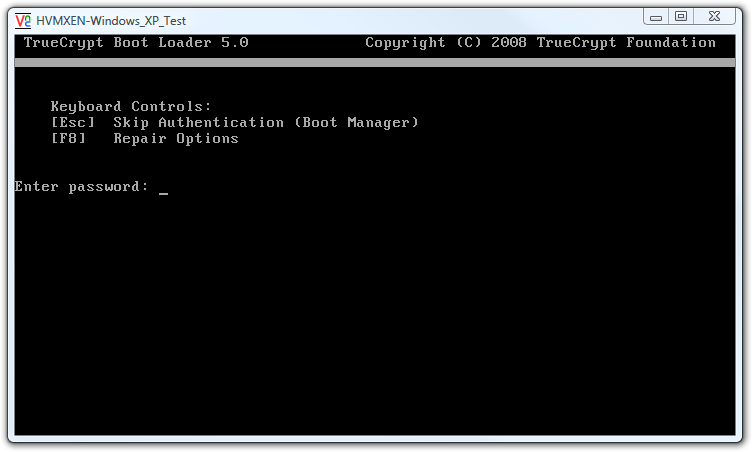
1-for completeness my boot manager is set up as follows. If the computer
is booted from cold, it displays the truecrypt boot manager ( along the
lines of  http://www.dsl.sk/images/articles/2008-02-07-truecrypt-8.png
).

2-  press esc and boot linux. Testing the live cd confirmed that  this
suspend problem is probably not due to a dual boot configuration.

Once 13.04 is installed, (and updated) the problem persists ONLY if the
proprietary flgrx drivers are installed. Leaving the system with open source
radeon drivers does not trigger the problem.     However this does not explain
why the live usb option fails to work, as no flgrx drivers are loaded as far as
i am aware.
 ********************

Based on my findings It has become apparent that i should retest the
kernel-bisect  kernels, with both flgrx and open source.

Have retested the kernels (the originals that were installed and not
deleted for the initial kernel-bisect ) first with radeon open source
driver and afterwards proprietary driver.

Here are the conclusions

v3.4-rc7-precise  Using radeon or proprietary --- problem still there

v3.5.6-quantal/ --> same as above, however if using radeon driver the
problem is extremely rare ( less than 1 in 100 cases, resumes normally).
This was tested in a variety of configurations, programs open or not,
video running (i.e. radeon driver used heavily), different devices
connected to usb, hdmi, vga etc.

v3.5.7.2-quantal/ --> problem fixed. However installing flgrx driver
reintroduces the problem. using the radeon open source driver and
repeating for multiple configurations does not reintroduce the
problem(have tried for about 30 min of suspend resume cycle, has not
failed once).

********************
Raring test 27 Dec 2012
Conclusion

In Raring environment the problem is fixed, however it appears that
between 3.2.xx (12.04 current kernel ) and 3.5.6 there was also a kernel
problem that caused this to happen. In 13.04 daily (i.e. 3.7.0.7
-generic at the time of writing )  the  problem is fixed. However the
issue remains with the flgrx driver, even on 3.7.0.7.


** Description changed:

  Suspend does not work.

  1- I click suspend, it attempts to suspend and shuts off with the power
  button blinking-as it does normally when it suspended in windows.

  2-however when it comes out of suspend it simply reboots- as in displays
  the vaio logo then goes to bootloader and then boots from HDD activity
  light on for 10-15 seconds and it eventually boots to login screen.
+
+
+ ****************RARING UPDATE******************
+
+ Raring test 27 Dec 2012
+
+
+ In Raring environment the problem is fixed, however it appears that between
3.2.xx (12.04 current kernel ) and 3.5.6 there was also a kernel problem that
caused this to happen. In 13.04 daily (i.e. 3.7.0.7 -generic at the time of
writing )  the  problem is fixed. However the issue remains with the flgrx
driver, even on 3.7.0.7.
+
+ *************RARING- UPDATE- ENDS*****************************

  Reverse mainline kernel version bisect revealed:
  v3.5.6-quantal --> doesn't work
  v3.5.7 & v3.5.7.1 experienced stability issues hence could not test them.
  v3.5.7.2-quantal --> suspend works in this one.

  ProblemType: Bug
  DistroRelease: Ubuntu 12.04
  Package: linux-image-3.2.0-24-generic-pae 3.2.0-24.37
  ProcVersionSignature: Ubuntu 3.2.0-24.37-generic-pae 3.2.14
  Uname: Linux 3.2.0-24-generic-pae i686
  NonfreeKernelModules: fglrx
  AlsaVersion: Advanced Linux Sound Architecture Driver Version 1.0.24.
  ApportVersion: 2.0.1-0ubuntu7
  Architecture: i386
  ArecordDevices:
   **** List of CAPTURE Hardware Devices ****
   card 0: Intel [HDA Intel], device 0: ALC262 Analog [ALC262 Analog]
     Subdevices: 1/1
     Subdevice #0: subdevice #0
  AudioDevicesInUse:
   USER        PID ACCESS COMMAND
   /dev/snd/controlC1:  anton      1769 F.... pulseaudio
   /dev/snd/controlC0:  anton      1769 F.... pulseaudio
  Card0.Amixer.info:
   Card hw:0 'Intel'/'HDA Intel at 0xd4a00000 irq 46'
     Mixer name : 'Realtek ALC262'
     Components : 'HDA:10ec0262,104d3a00,00100302
HDA:14f12c06,104d1700,00100000'
     Controls      : 17
     Simple ctrls  : 9
  Card1.Amixer.info:
   Card hw:1 'HDMI'/'HDA ATI HDMI at 0xd0030000 irq 48'
     Mixer name : 'ATI R6xx HDMI'
     Components : 'HDA:1002aa01,104d3a00,00100100'
     Controls      : 6
     Simple ctrls  : 1
  Card1.Amixer.values:
   Simple mixer control 'IEC958',0
     Capabilities: pswitch pswitch-joined penum
     Playback channels: Mono
     Mono: Playback [on]
  Date: Sat May  5 13:03:39 2012
  HibernationDevice: RESUME=UUID=84d193ac-adde-4162-a2ad-7513f1ff7004
  InstallationMedia: Ubuntu 12.04 LTS "Precise Pangolin" - Release i386
(20120423)
  MachineType: Sony Corporation VGN-NW11S_T
  ProcEnviron:
   LANGUAGE=en_GB:en
   TERM=xterm
   PATH=(custom, no user)
   LANG=en_GB.UTF-8
   SHELL=/bin/bash
  ProcFB: 0 VESA VGA
  ProcKernelCmdLine: BOOT_IMAGE=/boot/vmlinuz-3.2.0-24-generic-pae
root=UUID=f752714f-ab5b-4157-9a45-ca36a063d9ea ro quiet splash vt.handoff=7
  RelatedPackageVersions:
   linux-restricted-modules-3.2.0-24-generic-pae N/A
   linux-backports-modules-3.2.0-24-generic-pae  N/A
   linux-firmware                                1.79
  SourcePackage: linux
  UpgradeStatus: No upgrade log present (probably fresh install)
  dmi.bios.date: 08/27/2009
  dmi.bios.vendor: American Megatrends Inc.
  dmi.bios.version: R0180Y4
  dmi.board.asset.tag: N/A
  dmi.board.name: VAIO
  dmi.board.vendor: Sony Corporation
  dmi.board.version: N/A
  dmi.chassis.asset.tag: N/A
  dmi.chassis.type: 10
  dmi.chassis.vendor: Sony Corporation
  dmi.chassis.version: N/A
  dmi.modalias:
dmi:bvnAmericanMegatrendsInc.:bvrR0180Y4:bd08/27/2009:svnSonyCorporation:pnVGN-NW11S_T:pvrC601PLF4:rvnSonyCorporation:rnVAIO:rvrN/A:cvnSonyCorporation:ct10:cvrN/A:
  dmi.product.name: VGN-NW11S_T
  dmi.product.version: C601PLF4
  dmi.sys.vendor: Sony Corporation

--
You received this bug notification because you are a member of Ubuntu
Bugs, which is subscribed to Ubuntu.
https://bugs.launchpad.net/bugs/995052

Title:
  Suspend does not work Sony Corporation VGN-NW11S_T/VAIO

To manage notifications about this bug go to:
https://bugs.launchpad.net/linux/+bug/995052/+subscriptions

--
ubuntu-bugs mailing list
[email protected]
https://lists.ubuntu.com/mailman/listinfo/ubuntu-bugs