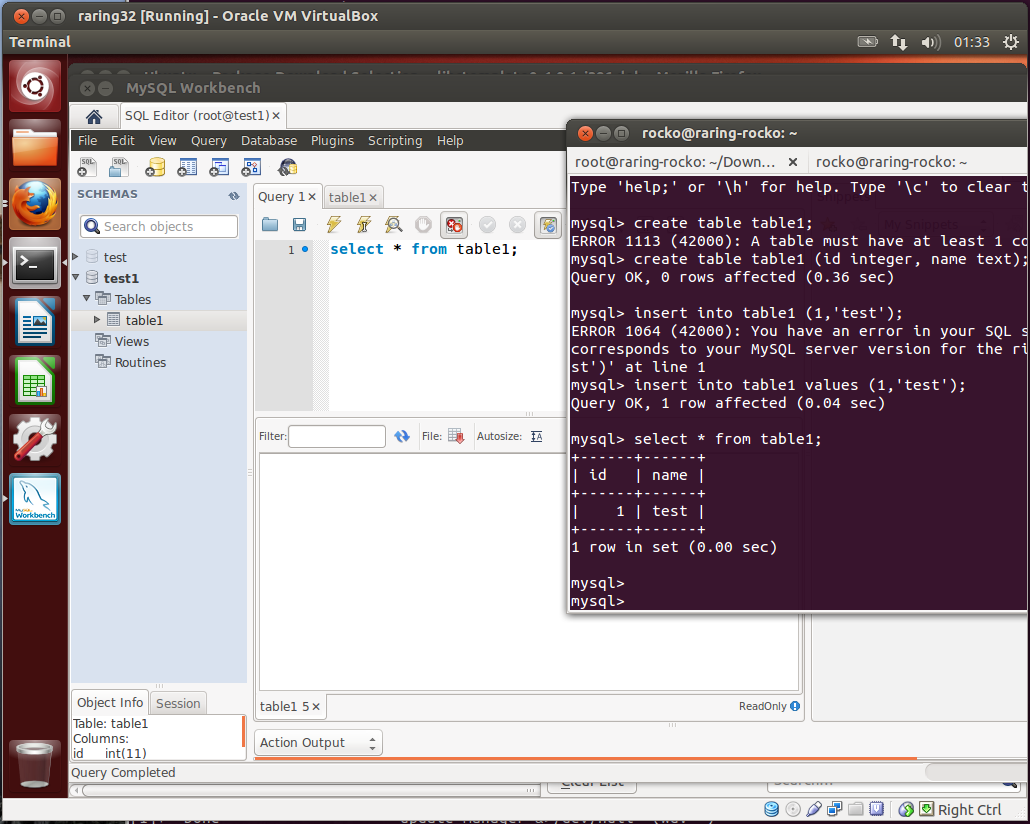
Here's a screenshot of the issue, and yes, it's different from this bug
(I could file another bug, but I wanted to confirm others get the
problem as well). You can see from the terminal window that there is a
record in table1, but the 'select * from table1;' command in mysql-
workbench shows no records, and the action output window doesn't show
anything either.
It's easy to recreate. I reproduced it using a 32-bit version of Raring
running in VirtualBox.

1. Install mysql-server. I set no password for the root user.

2. Run "mysql -uroot" to get into mysql, and create a schema and with a
table with a record in it:

create schema test1;
use test1;
create table1 (id integer, name text);
insert into table1 values (1, 'test');

3. Download the libctemplate0 deb file via the link at
http://packages.ubuntu.com/precise/libs/libctemplate0 and install with
'sudo dpkg -i', then download mysql-workbench.deb file and install it.

4. Open mysql-workbench and create a new connection with default schema
test1 for localhost.

5. Open the connection and create the query "select * from table1;" and
execute it. The action window and results window appear but both are
empty.

** Attachment added: "mysql-screenshot"

https://bugs.launchpad.net/ubuntu/+source/mysql-workbench/+bug/1108630/+attachment/3520087/+files/mysql-workbench-no-tables.png

--
You received this bug notification because you are a member of Ubuntu
Bugs, which is subscribed to Ubuntu.
https://bugs.launchpad.net/bugs/1108630

Title:
  mysql-workbench SQL Editor does not show any schemas

To manage notifications about this bug go to:
https://bugs.launchpad.net/ubuntu/+source/mysql-workbench/+bug/1108630/+subscriptions

--
ubuntu-bugs mailing list
[email protected]
https://lists.ubuntu.com/mailman/listinfo/ubuntu-bugs