Public bug reported:

When pluggin in an external projector the external resolution doesn't
get discovered reliable. This mostly happens in hotels or meeting
facilities where AV equipment has long calbles, low quality cables or
all sorts of switches between PC and projector. This renders the Ubuntu
Laptop useless as presentation machine. To adjust setting for a
previously unknown projector you typically have 30-90 sec, so fiddling
with X11 config files is out of the question.
Suggestion to fix:
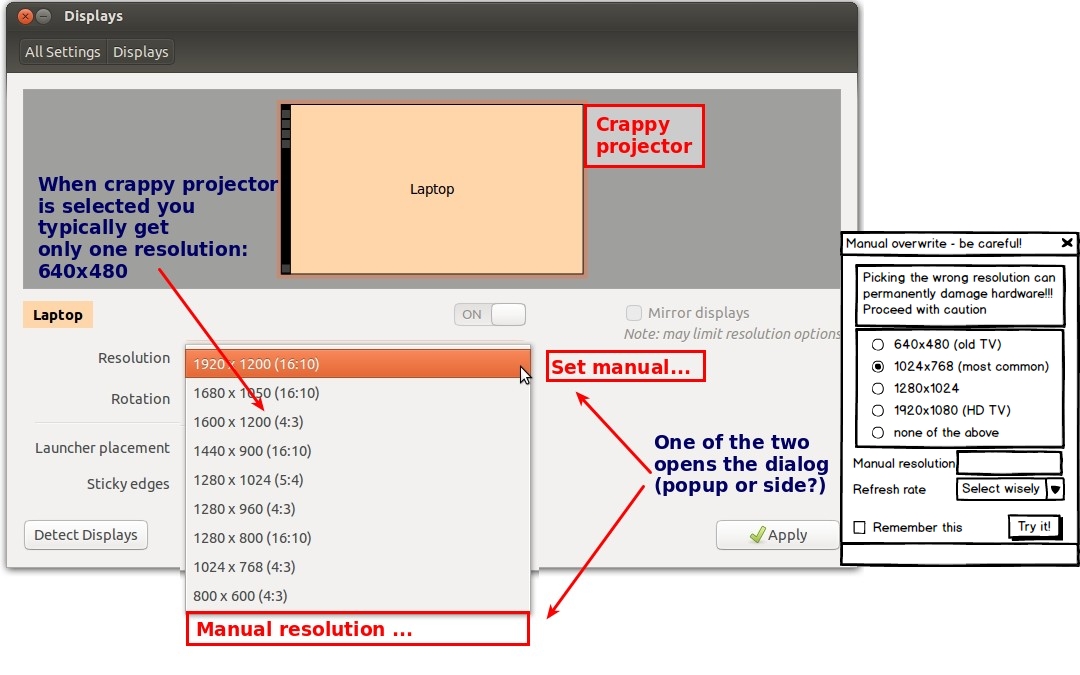
In the Gnome control center, Display settings screen (where you discover
displays and set resolutions) add the ability to manually specify display
properties. Before doing that manual, display a big fat warning.

There are 2 UI concepts I could imagine:

a) Extend the dropdown list to have the last option "Manual overwrite ..."
b) Have a button next to the resolution "Manual overwrite ..."

both would then show a dialog with the most common configurations (the
most probable use case is "projector at meeting facitily", so there are
not that many) and the option to memorize that for this user.

Problem occured since I use Ubuntu from 10.04 to 13.10.

** Affects: gnome-control-center-unity
     Importance: Undecided
         Status: New


** Tags: projector public resolutions

** Attachment added: "Layout idea"

https://bugs.launchpad.net/bugs/1286955/+attachment/4004565/+files/ScreenResolution.jpg

--
You received this bug notification because you are a member of Ubuntu
Bugs, which is subscribed to Ubuntu.
https://bugs.launchpad.net/bugs/1286955

Title:
  Resolution detection for external projectors lacks manual overwrite

To manage notifications about this bug go to:
https://bugs.launchpad.net/gnome-control-center-unity/+bug/1286955/+subscriptions

--
ubuntu-bugs mailing list
[email protected]
https://lists.ubuntu.com/mailman/listinfo/ubuntu-bugs