Public bug reported:

1) Open a new presentation document
2) Add a Smiley face from the Symbol Shape set
3) Select the Smiley face and click on the Animation icon on the side pane
4) Click on the + on the Animation tab to add an animation
5) Select the Circle animation on the tab
6) Clik OK
7) Click on the Options [...] button
8) Choose the sound you like
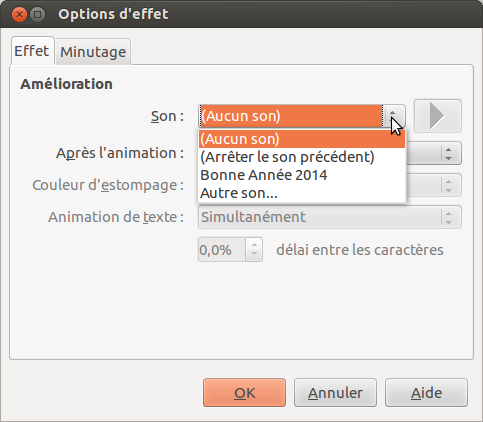
Result no sound are found (see attachment)

Expected:  Have the list of sound (see second attachment)

The same problem affect sound selection in animation or in transition

ProblemType: Bug
DistroRelease: Ubuntu 14.04
Package: libreoffice (not installed)
ProcVersionSignature: Ubuntu 3.13.0-19.40-generic 3.13.6
Uname: Linux 3.13.0-19-generic x86_64
ApportVersion: 2.13.3-0ubuntu1
Architecture: amd64
CurrentDesktop: Unity
Date: Fri Mar 28 14:37:58 2014
EcryptfsInUse: Yes
InstallationDate: Installed on 2014-02-09 (46 days ago)
InstallationMedia: Ubuntu 14.04 LTS "Trusty Tahr" - Alpha amd64 (20140203)
SourcePackage: libreoffice
UpgradeStatus: No upgrade log present (probably fresh install)

** Affects: df-libreoffice
     Importance: Unknown
         Status: Unknown

** Affects: libreoffice (Ubuntu)
     Importance: Undecided
         Status: New


** Tags: amd64 apport-bug trusty

** Attachment added: "No sound listed"

https://bugs.launchpad.net/bugs/1298995/+attachment/4048584/+files/Capture%20du%202014-02-01%2012%3A22%3A45.png

--
You received this bug notification because you are a member of Ubuntu
Bugs, which is subscribed to Ubuntu.
https://bugs.launchpad.net/bugs/1298995

Title:
  Impress: no sound listed in gallery for animation or transition

To manage notifications about this bug go to:
https://bugs.launchpad.net/df-libreoffice/+bug/1298995/+subscriptions

--
ubuntu-bugs mailing list
[email protected]
https://lists.ubuntu.com/mailman/listinfo/ubuntu-bugs