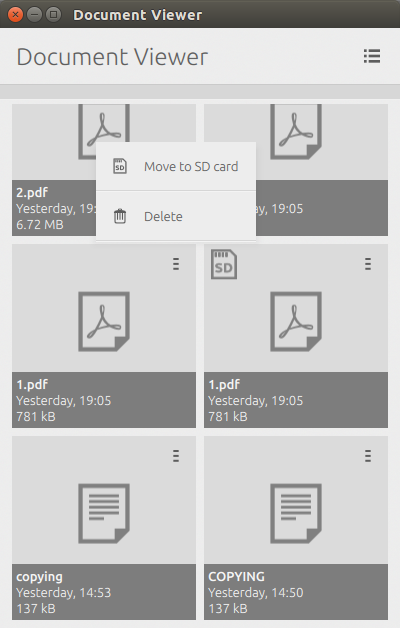
I'm working on the overflow menu as per specifications.

I'm currently using the standard APIs provided by the
Ubuntu.Components.Popups QML module, and I feel that the position of the
menu is confusing (see attachment - the menu actions are related to the
"1.pdf" document, stored in the internal storage).
Would it be better to switch to an ActionSelectionPopover or add a arrow
pointing to the hamburger icon?

** Attachment added: "Screenshot from 2015-06-23 23:46:22.png"

https://bugs.launchpad.net/ubuntu-docviewer-app/+bug/1447995/+attachment/4419672/+files/Screenshot%20from%202015-06-23%2023%3A46%3A22.png

** Changed in: ubuntu-docviewer-app
       Status: New => In Progress

** Changed in: ubuntu-docviewer-app
   Importance: Undecided => Medium

** Changed in: ubuntu-docviewer-app
     Assignee: (unassigned) => Stefano Verzegnassi (verzegnassi-stefano)

** Description changed:

  STEP TO REPRODUCE THIS ISSUE:
  1. Open Document Viewer. The list of documents in $HOME/Documents will be
shown.
  2. Delete an entry in the list (N.B. not the grid), by swiping to right the
corrisponding list item.

  WHAT HAPPENS:
  The list item can not be swipped

  WHAT SHOULD HAPPENS:
  The list item can be swipped to right, and a red-coloured action is shown.
  Currently, to delete an item we need to switch to the multi-selection mode.

- BLOCKERS:
- We need to find an equivalent UI pattern for this user case, when the grid
view is used instead of the list view.
+ DESIRED SOLUTION:
+ See "Option A" in the comment #4.

--
You received this bug notification because you are a member of Ubuntu
Bugs, which is subscribed to Ubuntu.
https://bugs.launchpad.net/bugs/1447995

Title:
  [Document-Viewer] Re-enable swipe gestures of list items

To manage notifications about this bug go to:
https://bugs.launchpad.net/ubuntu-docviewer-app/+bug/1447995/+subscriptions

--
ubuntu-bugs mailing list
[email protected]
https://lists.ubuntu.com/mailman/listinfo/ubuntu-bugs