Public bug reported:

This is on a Ubuntu 16.04 LTS 64-bit live session.
In the Network Connections dialog, Add/Edit a connection.  In the IPv4
Settings (or IPv6 Settings) tabs, set the method to Manual, and Add a
new address.

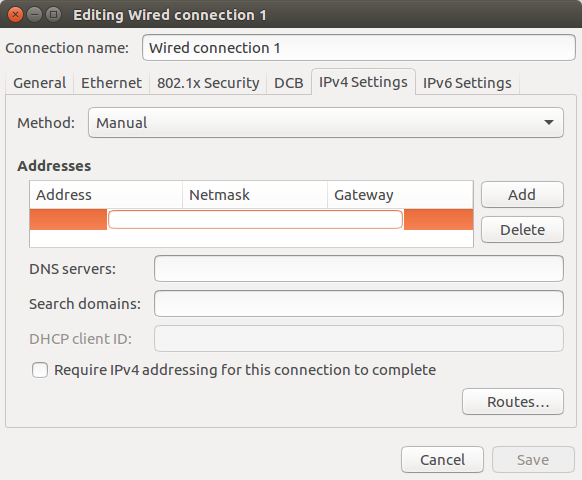
A text box for Address comes up, approximately spanning the first two
columns (Address and Netmask).

Pressing Tab (with or without a valid address) brings up a text box
starting in the middle of the Address column and ending in the middle of
the Gateway column.

Pressing Tab again brings up a text box in spanning the final two
columns (Netmask and Gateway).

(When a field is no longer edited, it appears in the right place.)

Strangely, once a complete, valid entry is made (e.g. 192.168.0.1 / 24 /
192.168.0.254), the next Gateway text box seems to subsequently be put
in the right place (spanning only the Gateway column).

In each case I would expect the text box to exactly fill the specific
column it is for.

** Affects: network-manager-applet (Ubuntu)
     Importance: Undecided
         Status: New

** Attachment added: "An example of the Netmask text field in a strange
position"

https://bugs.launchpad.net/bugs/1584053/+attachment/4666901/+files/Netmask%20text%20field.png

--
You received this bug notification because you are a member of Ubuntu
Bugs, which is subscribed to Ubuntu.
https://bugs.launchpad.net/bugs/1584053

Title:
  Editing manual IP fields brings up textboxes with the wrong
  size/position

To manage notifications about this bug go to:
https://bugs.launchpad.net/ubuntu/+source/network-manager-applet/+bug/1584053/+subscriptions

--
ubuntu-bugs mailing list
[email protected]
https://lists.ubuntu.com/mailman/listinfo/ubuntu-bugs