Update: I thought it might be a permission problem, so I tried
configuring my monitors manually using "sudo xrandr...". Same result -
error dialog and fallback to mirroring.
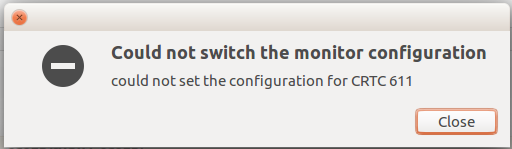
I attach a more accurate photo of the error dialog that pops up at every
failure - sometimes for more than one monitor, with different
identifiers of "CRTCXXX".


** Attachment added: "Selection_011.png"

https://bugs.launchpad.net/ubuntu/+source/nvidia-graphics-drivers-361/+bug/1615734/+attachment/4726257/+files/Selection_011.png

--
You received this bug notification because you are a member of Ubuntu
Bugs, which is subscribed to Ubuntu.
https://bugs.launchpad.net/bugs/1615734

Title:
  Multiple monitors broken

To manage notifications about this bug go to:
https://bugs.launchpad.net/ubuntu/+source/nvidia-graphics-drivers-361/+bug/1615734/+subscriptions

--
ubuntu-bugs mailing list
[email protected]
https://lists.ubuntu.com/mailman/listinfo/ubuntu-bugs