Public bug reported:

Ubuntu 18.04.1, gnome/X11 session.
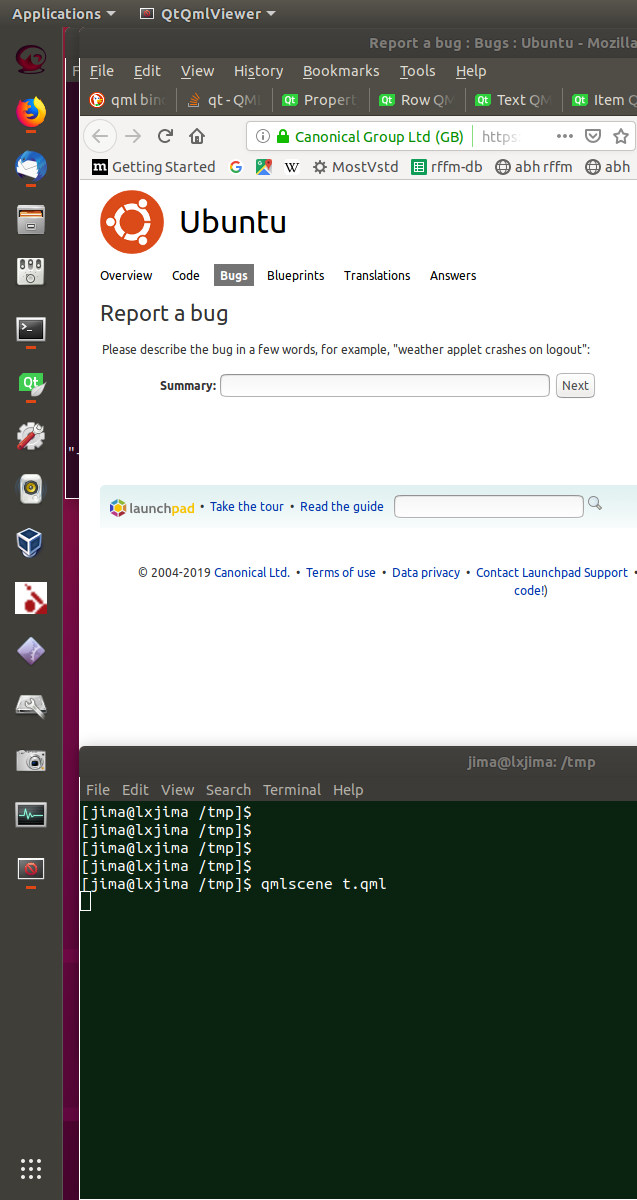
All the icons in the activities panel (the left side-bar) are shrunk if
an app is run which does not specify an icon. Perhaps the default icon
is too large, or otherwise lacking in a way which causes the entire
side-bar to be re-scaled, shrinking the existing icons.

The example below usses qmlscene (a tool to run Qt-based apps), but I've
seen this with other apps which don't have a proper icon, such as the
citrix receiver.

Please see attached screenshots (before and after running a qmlscene
program)

STEPS TO REPRODUCE:

1. # Install Qt with qmlscene.
   # I think this is enough:
sudo apt-get install qmlchooser qmlscene
   # But if not, then:
sudo apt-get install qtcreator qtbase5-dev

2. # create a trivial qml program
echo 'import QtQuick 2.9' >t.qml
echo 'import QtQuick.Controls 2.2' >>t.qml
echo 'ApplicationWindow { id: top; visible:true }' >>t.qml

3. qmlscene t.qml

RESULTS: The icons in the left sidebar contract to about half their
previous size.

** Affects: gnome-panel (Ubuntu)
     Importance: Undecided
         Status: Invalid

** Attachment added: "after.png (showing shrunken icons in task bar)"
   https://bugs.launchpad.net/bugs/1816255/+attachment/5239165/+files/after.png

--
You received this bug notification because you are a member of Ubuntu
Bugs, which is subscribed to Ubuntu.
https://bugs.launchpad.net/bugs/1816255

Title:
  Default sidebar icon screws up size of all icons

To manage notifications about this bug go to:
https://bugs.launchpad.net/ubuntu/+source/gnome-panel/+bug/1816255/+subscriptions

--
ubuntu-bugs mailing list
[email protected]
https://lists.ubuntu.com/mailman/listinfo/ubuntu-bugs