Public bug reported:

Steps to reproduce:
1. Install Ubuntu 19.04
2. Install `libreoffice-texmaths` package
3. Launch LibreOffice Writer
4. Click on Pi button
Expected results:
* the opened window have quick access buttons panel as shown on project
web-site ( http://roland65.free.fr/texmaths/images/texmaths-screenshot.png )

Actual results:
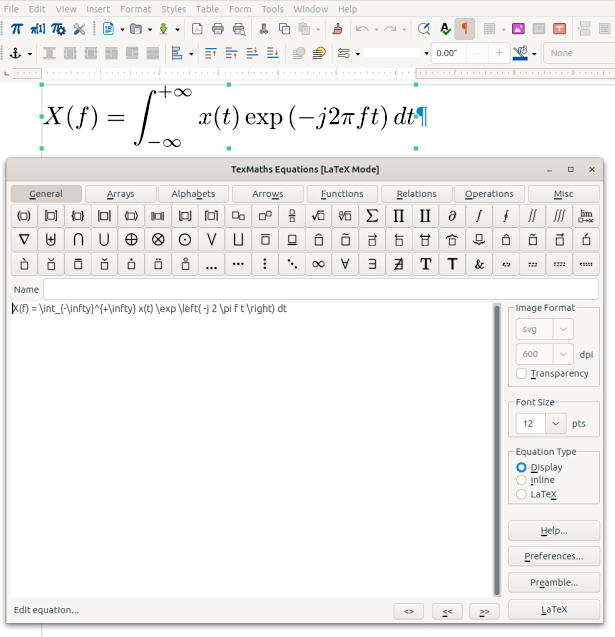
* the opened window do not have quick access buttons panel (see screenshot)

Notes:
1. first seen on AskUbuntu ( https://askubuntu.com/q/1141686/66509 )
2. the solution is not install oxt from project web-site.
3. all Ubuntu versions are affected.

ProblemType: Bug
DistroRelease: Ubuntu 19.04
Package: libreoffice-texmaths 0.43-2
ProcVersionSignature: Ubuntu 5.0.0-13.14-generic 5.0.6
Uname: Linux 5.0.0-13-generic x86_64
ApportVersion: 2.20.10-0ubuntu27
Architecture: amd64
CurrentDesktop: MATE
Date: Thu May  9 18:06:24 2019
InstallationDate: Installed on 2019-04-18 (20 days ago)
InstallationMedia: Ubuntu-MATE 19.04 "Disco Dingo" - Release amd64 (20190416)
PackageArchitecture: all
SourcePackage: libreoffice-texmaths
UpgradeStatus: No upgrade log present (probably fresh install)

** Affects: libreoffice-texmaths (Ubuntu)
     Importance: Undecided
         Status: New


** Tags: apport-bug bionic cosmic disco eoan xenial

** Attachment added: "TexMaths equations window do not have buttons"

https://bugs.launchpad.net/bugs/1828433/+attachment/5262693/+files/texmaths-no-buttons.png

--
You received this bug notification because you are a member of Ubuntu
Bugs, which is subscribed to Ubuntu.
https://bugs.launchpad.net/bugs/1828433

Title:
  Quick access buttons panel is not shown in TexMaths Equations window

To manage notifications about this bug go to:
https://bugs.launchpad.net/ubuntu/+source/libreoffice-texmaths/+bug/1828433/+subscriptions

--
ubuntu-bugs mailing list
[email protected]
https://lists.ubuntu.com/mailman/listinfo/ubuntu-bugs