Public bug reported:

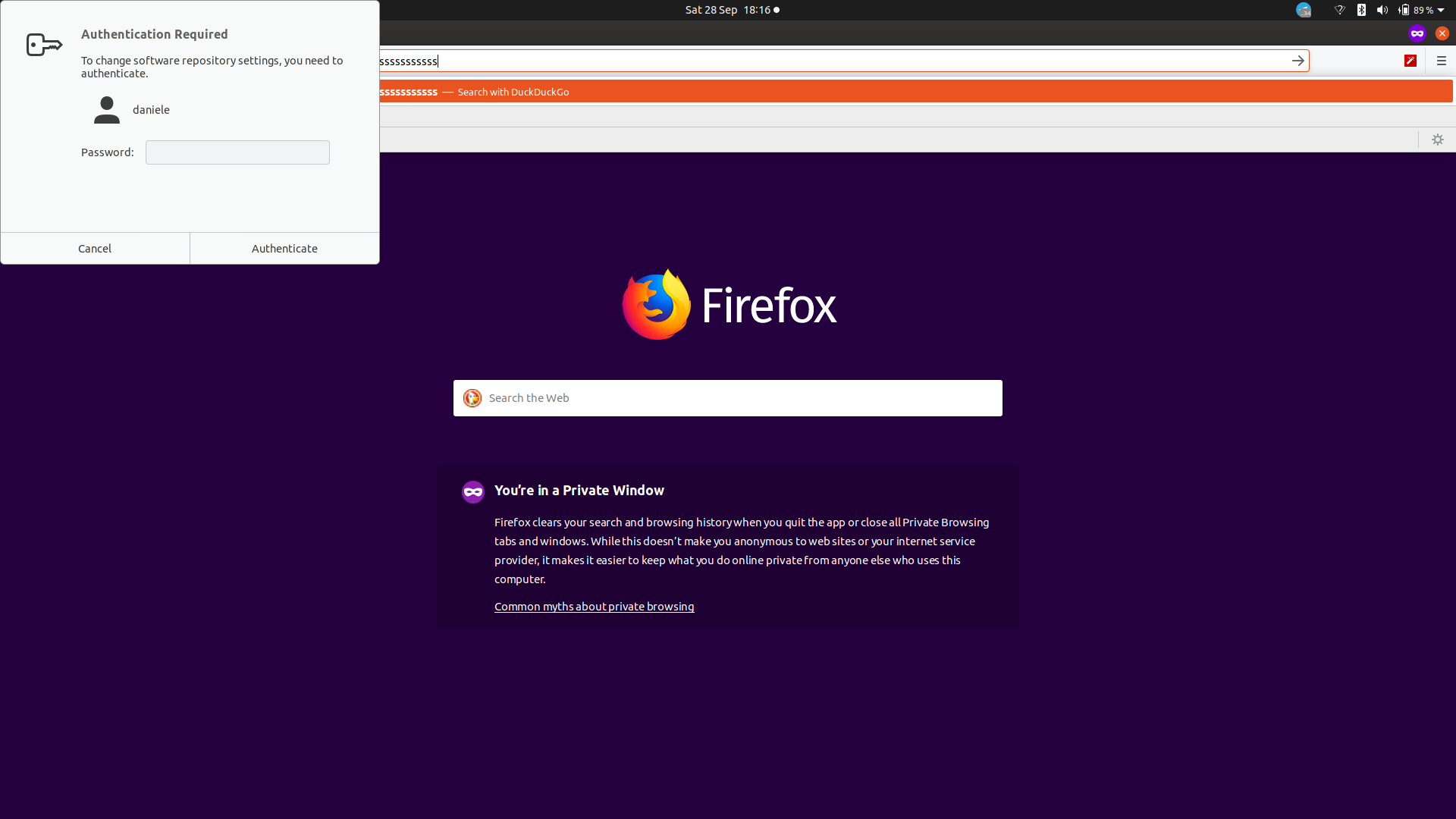
The "Authentication required" screen appeared while I was changing
software repository settings, but it is stuck there:
1. I can click "cancel" but there is no effect
2. The window is now always on top of any other window, despite the original
Software Repository Settings windows has been closed (actually, terminated
manually)

As you can see in the screenshot, The Firefox windows has focus now as I
am typing in the address bar, but still the "dead" authentication window
is on top.

Using Ubuntu 19.10 on a Yoga Lenovo S940, upgraded from 19.04

** Affects: ubuntu
     Importance: Undecided
         Status: New

** Attachment added: "Screenshot from 2019-09-28 18-16-35.png"

https://bugs.launchpad.net/bugs/1845795/+attachment/5292289/+files/Screenshot%20from%202019-09-28%2018-16-35.png

** Description changed:

  The "Authentication required" screen appeared while I was changing
  software repository settings, but it is stuck there:

  1. I can click "cancel" but there is no effect
  2. The window is now always on top of any other window, despite the original
Software Repository Settings windows has been closed (actually, terminated
manually)

  As you can see in the screenshot, The Firefox windows has focus now as I
  am typing in the address bar, but still the "dead" authentication window
  is on top.
+
+ Using Ubuntu 19.10 on a Yoga Lenovo S940, upgraded from 19.04

** Package changed: pulseaudio (Ubuntu) => ubuntu

--
You received this bug notification because you are a member of Ubuntu
Bugs, which is subscribed to Ubuntu.
https://bugs.launchpad.net/bugs/1845795

Title:
  authentication window got stuck over other windows

To manage notifications about this bug go to:
https://bugs.launchpad.net/ubuntu/+bug/1845795/+subscriptions

--
ubuntu-bugs mailing list
[email protected]
https://lists.ubuntu.com/mailman/listinfo/ubuntu-bugs