I am able to reproduce on noble as well, with the small caveat that
volume must be on. The patch referenced in #10 looks reasonable to SRU
in my opinion.
** Description changed:

  Problem: visual bell during screensaver turns terminal very dark with no
  remedy.

  Reproducing:

  - Settings -> Accessibility -> Hearing -> Visual Alerts -> On
-   (Flash the entire Window)
+   (Flash the entire Window)

  - Open a gnome-terminal
+
+ - Ensure volume is not muted

  - type: xdg-screensaver activate; printf '\a'

  - Wake up the screensaver, and notice that the window in which there was
  a bell, is darker.

  Tested and reproduced on:

  - Jammy (2024-06-15)
  - Noble (2024-07-04)

  ---------------------
  Original ticket below
  vvvvvvvvvvvvvvvvvvvvv

  ========
  Symptoms
  ========

  Sometimes, when coming back to my laptop, and unlocking an existing
  GNOME session, I find that my gnome-terminal has turned very dark. I
  have found no triggers (other than session unlock) and no fixes to undo
  the darkness.

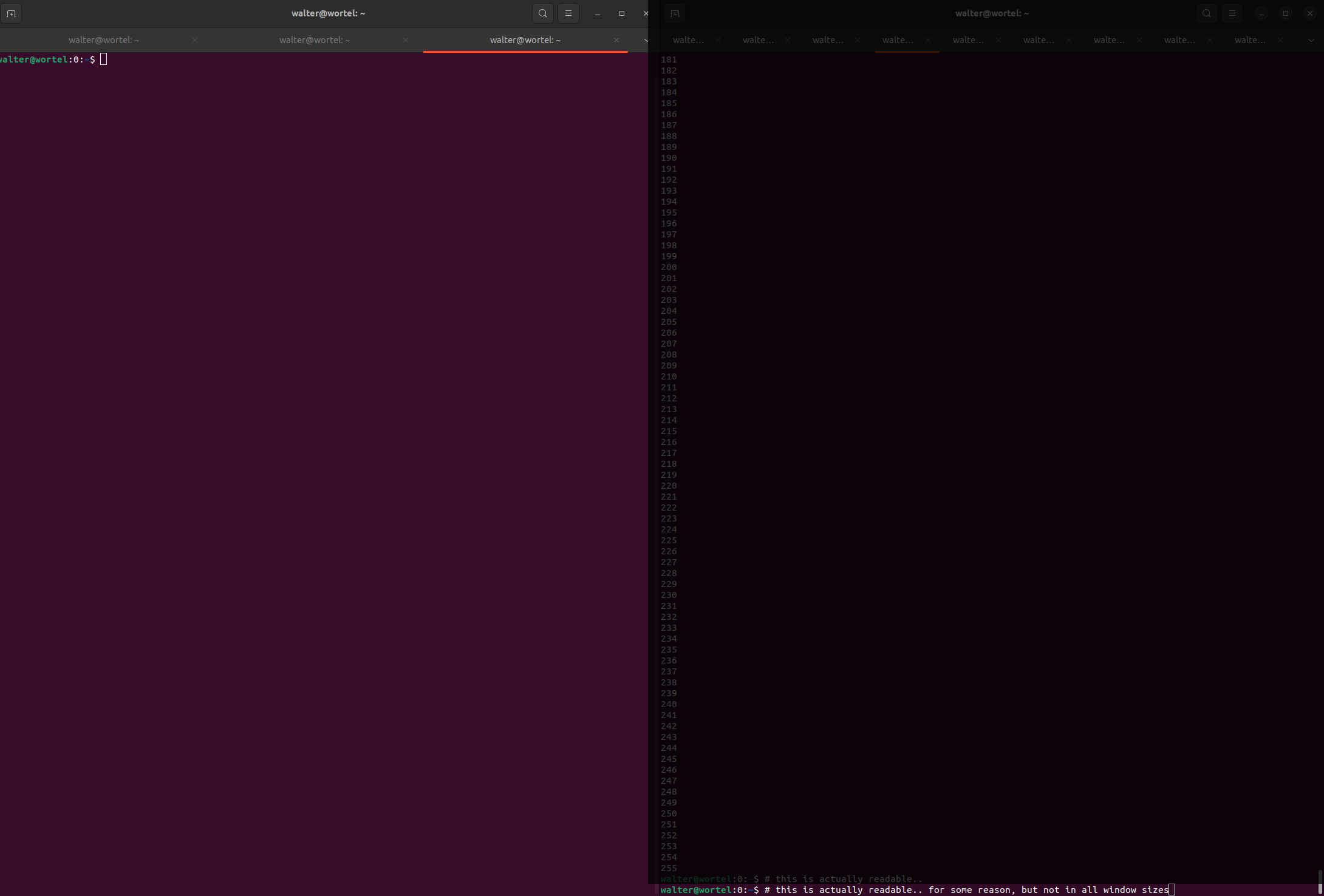
  It looks like this:


https://junk.devs.nu/2024/lp2064716-gnome-terminal-turned-dark/gnome-terminal-very-dark-on-the-right.png
  (
https://bugs.launchpad.net/ubuntu/+source/gnome-terminal/+bug/2064716/+attachment/5774287/+files/gnome-terminal-very-dark-on-the-right.png
 )

  The window on the right is the one I found after unlocking my GNOME
  session. The window on the left was a second terminal I started, which
  has the normal brightness.

  Using some color picking, I can say that the brightness has been reduced
  by 70%-85%.

  Here's an animation of the window:


https://junk.devs.nu/2024/lp2064716-gnome-terminal-turned-dark/gnome-terminal-turned-very-dark.webm
  (
https://bugs.launchpad.net/ubuntu/+source/gnome-terminal/+bug/2064716/+attachment/5774288/+files/gnome-terminal-turned-very-dark.webm
 )

  The video shows:
  - The dark window in a smaller state;
  - settings are opened, and switched to bright colors;
  - both the good and the bad terminals get lighter, but the bad terminal is
still way too dark;
  - moving the window to the right shows a glitch in the glitch where the
bottom-most row has normal colors.

  ========
  Versions
  ========

  - Ubuntu Jammy 22.04 (many versions)
  - gnome-terminal 3.44.0-1ubuntu1
  - libmutter 42.9-0ubuntu7

  I thought it might be a Wayland thing, but I switched back to Xorg
  recently and the problem wasn't gone. I've not seen this bug with Focal.
  And my colleagues haven't seen the bug either.

  ========
  Followup
  ========

  I have no idea where to look further. I did some probing with xprop on
  the window, that gave me no useful info, and may likely not be relevant
  as Wayland is also affected.

  Any suggestions to get to the bottom of this is appreciated.

  Unfortunately, I don't know how to trigger the bug. I always have
  terminals open, and only 1% of the time (ball park) when unlocking does
  this occur.

  Let me know. Cheers!
  Walter Doekes

** Also affects: gnome-terminal (Ubuntu Plucky)
   Importance: Undecided
       Status: New

** Also affects: gnome-terminal (Ubuntu Questing)
   Importance: Undecided
       Status: New

** Also affects: gnome-terminal (Ubuntu Noble)
   Importance: Undecided
       Status: New

** Changed in: gnome-terminal (Ubuntu)
       Status: Confirmed => Fix Released

** Changed in: gnome-terminal (Ubuntu Plucky)
       Status: New => Fix Released

** Changed in: gnome-terminal (Ubuntu Questing)
       Status: New => Fix Released

** Changed in: gnome-terminal (Ubuntu Noble)
       Status: New => Triaged

** Changed in: gnome-terminal (Ubuntu Noble)
   Importance: Undecided => Medium

** Tags added: dcr-incoming

--
You received this bug notification because you are a member of Ubuntu
Bugs, which is subscribed to Ubuntu.
https://bugs.launchpad.net/bugs/2064716

Title:
  gnome-terminal darkened by visual bell during screensaver

To manage notifications about this bug go to:
https://bugs.launchpad.net/gnome-terminal/+bug/2064716/+subscriptions


--
ubuntu-bugs mailing list
[email protected]
https://lists.ubuntu.com/mailman/listinfo/ubuntu-bugs