No, there is no difference. It is just about how you hold your tablet
(one hand, both hands...)
Am 30.01.2012 16:27, schrieb [email protected]:
> Can it understand the difference between a thumb and a regular finger?
> Else it's just a one finger swipe (which makes sense as well. Drag
> down for notifications, drag right for launcher).
>
> On Mon, Jan 30, 2012 at 8:06 PM, Ian Santopietro <[email protected]
> <mailto:[email protected]>> wrote:
>
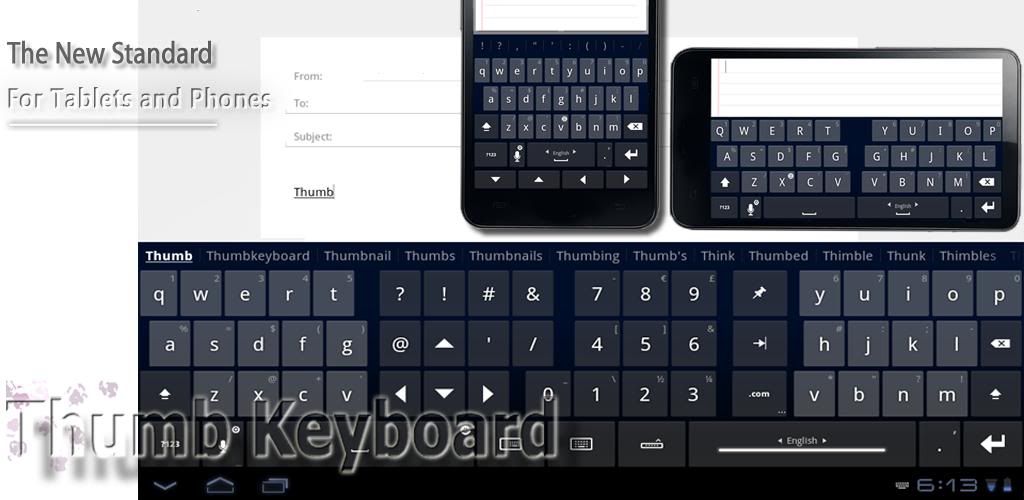
>     A quick note on the thumb keyboard. It's an awesome idea, but on a
>     widescreen (16:9/16:10) tablet, the keyboard is workable in
>     portrait orientation. The thumb keyboard is much more useful on
>     the iPad, which uses a 4:3 screen ratio, and has a much wider
>     portrait keyboard.
>
>     On Jan 30, 2012 3:03 AM, "Markus Burrer" <[email protected]
>     <mailto:[email protected]>> wrote:
>
>         I think, it's more "natural" to swipe with the thumb because
>         normally you hold the tablet with both hands, thumbs on top.
>         You just need to move your thumb to launch or switch apps.
>         Thats what I don't like at Android. You need a lot of actions
>         to switch between apps.
>
>         With the  four finger tap you need to let loose the tablet
>         with one hand to make the gesture or the tap. With the "left
>         thumb swipe" you don't. I'm holding my tablet right now and
>         try the four finger gesture and it feels uncomfortable. Or is
>         there a "swipe with the thumb patent" somewhere so you can't
>         use it?
>
>         Also the screen keyboard should have a "thumb mode" like the
>         MultiLing Keyboard from Android because even on a 7 inch
>         Tablet with big hands like mine it is uncomfortable to type
>         with the standard Android keyboard.
>
>
> http://macoymejia.files.wordpress.com/2011/07/wpid-cap201107121734.jpg?w=549
>
> http://i874.photobucket.com/albums/ab307/mobilesat/android/ThumbKeyboard.jpg
>
>         With the "left thumb reveal" and a thumb keyboard you can
>         launch applications from the launcher or switch between them
>         without the need to let loose the tablet. You also can open
>         the Dash and type to search with both hands on the device.
>         Especially with bigger and heavier devices (10 inch Atom
>         Tablets) this would be an important convenience
>
>         Hope you understand what I mean, my english is worst
>
>         Markus
>
>
>         Am 30.01.2012 09:51, schrieb Mitchell Reese:
>>         A lot of this is already implemented in the multi-touch
>>         gesture stack built on top of Ubuntu. I.e., a four finger tap
>>         opens the dash, while a four finger swipe unhides the
>>         launcher (or dock, depending on what you call it), etc. From
>>         what I've read, it shouldn't be too hard to remap these if
>>         your preferences are different. The main thing we need is a
>>         multitouch device we can actually /install/ Ubuntu on
>>         natively that supports multitouch at this level.
>>
>>         Plasma Active looks really interesting, as does the Mali
>>         graphics core. I'm interested to see where it goes. For
>>         myself, I love the 7 inch tablet form factor.
>>
>>         On 30/01/12 19:19, Markus Burrer wrote:
>>>         I think, the easiest way to reveal the launcher on a tablet would
>>> be a
>>>         gesture like at the dolphin browser for Android to open the
>>> bookmarks.
>>>
>>>         Just wipe right from the left border. The launcher should stay open.
>>>         Wipe left to hide. Wipe up and down to scroll and tap to open the
>>> Dash
>>>         or run an application.
>>>
>>>         Markus
>>>
>>
>>
>
>
>         --
>         Mailing list: https://launchpad.net/~ubuntu-tablet
>         <https://launchpad.net/%7Eubuntu-tablet>
>         Post to     : [email protected]
>         <mailto:[email protected]>
>         Unsubscribe : https://launchpad.net/~ubuntu-tablet
>         <https://launchpad.net/%7Eubuntu-tablet>
>         More help   : https://help.launchpad.net/ListHelp
>
>
>     --
>     Mailing list: https://launchpad.net/~ubuntu-tablet
>     <https://launchpad.net/%7Eubuntu-tablet>
>     Post to     : [email protected]
>     <mailto:[email protected]>
>     Unsubscribe : https://launchpad.net/~ubuntu-tablet
>     <https://launchpad.net/%7Eubuntu-tablet>
>     More help   : https://help.launchpad.net/ListHelp
>
>
--
Mailing list: https://launchpad.net/~ubuntu-tablet
Post to     : [email protected]
Unsubscribe : https://launchpad.net/~ubuntu-tablet
More help   : https://help.launchpad.net/ListHelp