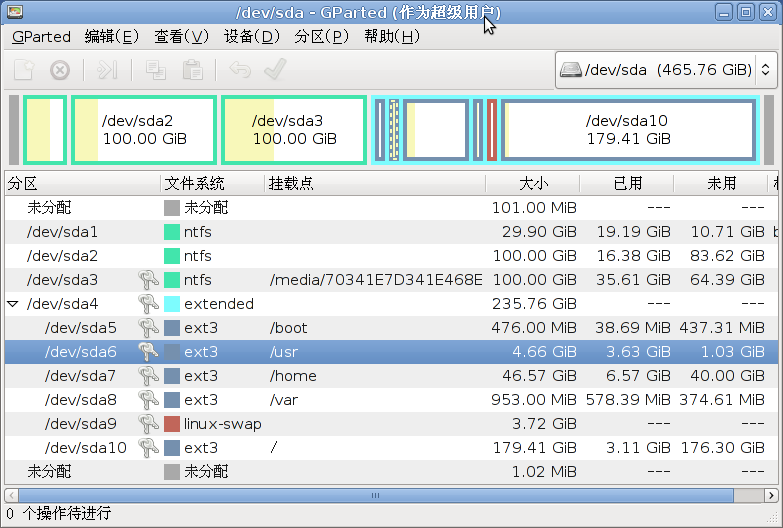
可以试试 修改/dev/sda10的大小, 然后新建个 /dev/sda11

> mount /dev/sda11 /mnt
> rsync -avHW /usr/* /mnt/
完了以后,/dev/sda11里面应该有一份/usr的数据,

* 修改 /etc/fstab (小心,建议读一下相关文档,这个文件是机器启动过程
中,mount各个设备的规则)

/dev/sda6 /usr ext3 defaults 0 2
## 上面这行换成
/dev/sda6 /oracle ext3 defaults 0 2

然后加一行
/dev/sda11 /usr ext3 defaults 0 2


On 28/03/11 11:52, mjxian wrote:
> umount /usr 合并到 /home,
>
这步应该做不了,很多进程在访问/usr
> mkdir /home/oracle
> ln -s /home/oracle /oracle
>
>
> 在 2011年3月23日 上午9:40,段会强 <[email protected]> 写道:
>
>> 使用过gparted的朋友:
>>
>> 我安装系统时分区规划没做好,具体分区见下图:
>>
>> 现在我想把从/下分100G给/usr,把现在/usr的5G分给/oracle.
>> 但是由于/和/usr两个逻辑分区没有相连,move无法进行。并且/无法卸载,也就无
>> 法分出100G来。
>> 请问,各位有什么建议?
>>
>> 段会强
>>
>>
>> -------------- 下一部分 --------------
>> 一个HTML附件被移除...
>> URL:
>> <https://lists.ubuntu.com/archives/ubuntu-zh/attachments/20110323/4659bb8c/attachment.html>
>> -------------- 下一部分 --------------
>> A non-text attachment was scrubbed...
>> Name: Screenshot--dev-sda - GParted.png
>> Type: image/png
>> Size: 72008 bytes
>> Desc: 不可用
>> URL:
>> <https://lists.ubuntu.com/archives/ubuntu-zh/attachments/20110323/4659bb8c/attachment.png>
>> --
>> ubuntu-zh mailing list
>> [email protected]
>> https://lists.ubuntu.com/mailman/listinfo/ubuntu-zh
>>
>>


--
ubuntu-zh mailing list
[email protected]
https://lists.ubuntu.com/mailman/listinfo/ubuntu-zh