Hi Scott

Padding is a non-standard property of UITextField. RunRev could use a category
to give us padding if they wanted. See
http://stackoverflow.com/questions/3727068/set-padding-for-uitextfield-with-uitextborderstylenone
I don't know of its possible for me to add a category to a class the engine
uses and it work. It's worth an attempt but I think unless the external is
linked in a certain way it would fail. It would be nice to be able to add a
global UITextField padding command ;-)

Cheers

--
M E R Goulding
Software development services

mergExt - There's an external for that!

On 04/08/2012, at 8:17 AM, Scott Rossi <[email protected]> wrote:

> Thanks for the suggestion Terry (and everyone else).
>
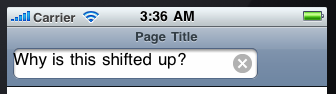
> I've since learned that the field portion of the input control always stays
> aligned to the top of its region, regardless of the control's height, while
> the clearbutton stays aligned to the vertical center of its height.  I think
> this means the input control needs to be carefully sized to position its
> text and icon/s correctly (I assumed the text and icon would always appear
> vertically centered, but obviously this is isn't the case).
>
> Regards,
>
> Scott Rossi
> Creative Director
> Tactile Media, UX Design
>
>
>
> Recently, Terry Judd wrote:
>
>>
>> On 03/08/2012, at 08:41 PM, Scott Rossi wrote:
>>
>>> Anyone know why the text of a UITextField (input) appears shifted up?  Is
>>> there any way to shift it down?
>>>
>>> There's very little on the card -- just a group and a graphic to define the
>>> region in which to display the text.
>>>
>>> http://www.tactilemedia.com/download/uitextfield.png
>>>
>>> The clearbutton for the control is displayed, and this appears in the proper
>>> position, but for some reason the text is appearing shifted upward about 4
>>> pixels.  It appears the same in both the simulator and on a device.
>>>
>>> Any suggestions for a fix?
>>
>> Hi Scott - I seem to recall struggling with this some time ago when I had to
>> implement user and password fields using the native controls. What I seem to
>> have done is create an appropriately sized background to sit behind the
>> control and then used a LC field to position/align the entry text correctly -
>> with the textHeight of the LC field set to the same value as the fontSize. I
>> then create the native control and set its rect to the rect of the LC field
>> and its fontSize to the LC field's fontSize. This seems to work for me.
>>
>> Terry...
>>
>>>
>>> Thanks & Regards,
>>>
>>> Scott Rossi
>>> Creative Director
>>> Tactile Media, UX Design
>>>
>>>
>>>
>>> _______________________________________________
>>> use-livecode mailing list
>>> [email protected]
>>> Please visit this url to subscribe, unsubscribe and manage your subscription
>>> preferences:
>>> http://lists.runrev.com/mailman/listinfo/use-livecode
>>>
>>
>> Dr Terry Judd
>> Senior Lecturer in Medical Education
>> Medical Eduction Unit
>> Faculty of Medicine, Dentistry & Health Sciences
>> The University of Melbourne
>>
>>
>>
>>
>>
>> _______________________________________________
>> use-livecode mailing list
>> [email protected]
>> Please visit this url to subscribe, unsubscribe and manage your subscription
>> preferences:
>> http://lists.runrev.com/mailman/listinfo/use-livecode
>>
>
>
>
>
>
> _______________________________________________
> use-livecode mailing list
> [email protected]
> Please visit this url to subscribe, unsubscribe and manage your subscription
> preferences:
> http://lists.runrev.com/mailman/listinfo/use-livecode

_______________________________________________
use-livecode mailing list
[email protected]
Please visit this url to subscribe, unsubscribe and manage your subscription
preferences:
http://lists.runrev.com/mailman/listinfo/use-livecode