Hi Richard.
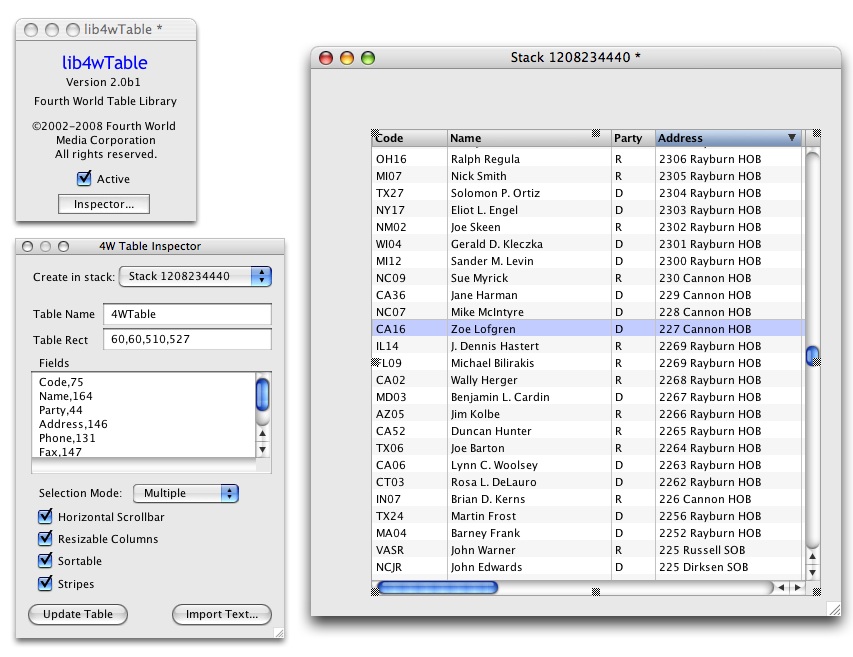
This looks like a very usable table object in it's own right. While I
would like editing in cells at some point, my specific needs would be
to present the user with a list of records, from which they could
double click one so I could present them with a detail record to work
with. The nice thing about your table object is it LOOKS like a table.
I would pay good money for such a tool, for personal use or otherwise.

Bob "SlimPikn" Sneidar
Hog Pilot Extraordinaire

On Apr 18, 2008, at 8:49 AM, Richard Gaskin wrote:
viktoras wrote:
> I think given enough motivation (stress, fun, money ;-) ) someone
> should be able to create such a perfect "generic" standard reusable
> table object using combination of existing text fields and other
> objects in rev. And I know a few examples that can be reused.
> Nevertheless, for most tasks gridded text field with a few
> scripts is more than sufficient (displaying database contents,
> calculations, etc...)...
The difficulty in creating a one-size-fits-all table is that there
are at least three different types:
- grid editor:  the type seen in spreadsheets; allows in-cell
 editing, has row and column selection controls on left and
 top respectively, allows single cells to be selected, and
 allows regions of cells, even discontiguous ones, to be
 selected.

- list selector:  most commonly seen in databases; selects
 whole lines (records) rather than single cells, may or may
 not allow in-cell editing.

- html table: for displaying text; allows multiple lines per
 cell, can display any control in a cell; provides selection
 of text rather than cells or rows.
It may be possible to create a single table object in the engine
which adopts these different behaviors based on a style property,
but if building one based on the current objects available it may be
best to build them separately, since each would be constructed using
very different means.
There are a number of requests for various enhancements related to
grids, worth voting for if you haven't already:
add html table functionality to fields
<http://quality.runrev.com/qacenter/show_bug.cgi?id=1447>

More complete tables (actual grid control)
<http://quality.runrev.com/qacenter/show_bug.cgi?id=670>

Addition of "column" and "row" as chunk types
<http://quality.runrev.com/qacenter/show_bug.cgi?id=4623>

Zero-width columns
<http://quality.runrev.com/qacenter/show_bug.cgi?id=5947>

Add tabAlign property for fields
<http://quality.runrev.com/qacenter/show_bug.cgi?id=2282>


> However, a few default features that would be nice to have in those
> text fields would be possibility to resize the cells by dragging
> vertical gridlines with mouse. This is based on feedback from my
> own clients - they usually ask why in my apps they can not contract
> or expand table collumns by dragging column borders with mouse, or
> make cell resize to match its contents on left-doubleclick...
I've been working off-and-on for quite some time on a database
selector type of table object - here's a snapshot of the latest
version in action:
<http://www.fourthworldlabs.com/table.jpg>
It's columns are resizable as you describe, except for the double-
click to resize to match the formattedwidth of the column. That's a
good feature I can add soon.
It doesn't currently provide in-cell editing, since the project I'm
using it in right now is essentially a database and only needs a
selector. I may have another project coming up in which in-cell
editing may be useful, and if so I may add that.
My original goal was to release it as a product for a modest
licensing fee as Malte has done with his wonderful animation
library, but the table needs of other developers here vary so
broadly that I haven't yet decided if it's worth the effort to
document it and clean up the API to make it suitable as a product.
Like Steven McConnell says, "With a tool it need only be possible to
use it correctly, but with a product it should be impossible to use
it incorrectly." :) The difference between the two is about an
order of magnitude more work, and the nice thing about it not being
a product is that I can manage expectations easily without pressure,
since I'm the only customer.
That said, it would be nice to know if this gadget would be useful
to others, with a licensing fee of something like $50 for commercial
use and free for use in non-commercial projects. I could even price
it higher if people insist. :)
If so, please drop me a note offline and let me know, and that'll
help me gauge what level of effort I should put into this.
> I know this is possible to script, however, somehow did not try yet
> to create such a useful script myself :-).
Can't say I blame you. Getting column resizing to work as well as
iTunes is a lot of mind-bending work, especially if the table allows
horizontal scrolling as iTunes does. Mine's not yet quite perfect,
but getting it even close was a lot of work across more than a dozen
revisions. So many ways to skin cats.....
> Also cell addressing with commands like "answer the cell A3 of
> fld myTable" or "get the cells A1:B10 of fld myTable"  or "put
> the cells A1:Z1 of field myTable into fld myHeader" would be
> very useful for any text field, not just tables... Any recipes?..

You could write a function for that, something like:

-- GridContents
-- Returns the contents of the field specified by a long ID
-- in pTableObjectILongID, according to the specification in
-- pCellSpecifier.
--
-- pCellSpecifier uses spreadsheet conventions, where a selection
-- is either a single cell with row specified by a letter and
-- column specified by as number (e.g., "A10"), or a pair of
-- such specifiers denoting a range, separated by a colon
-- (e.g., "A1:B16").
--
function  GridContents pTableObjectILongID, pCellSpecifier
The hard part is parsing the alphabetic portion of pCellSpecifier;
not impossible, but tedious to script. And unless one had
spreadsheet-like row and column header controls denoting the cell
locations on screen, the usefulness of such a function would be very
limited.
Using numbers rather than letters would reduce the tedium in writing
the script, allowing specifiers like "1,1:2,10" for what would in
spreadsheet-talk be "A1:B10". If numeric row specifiers were
acceptable it would be fairly simple to script, a la:
on mouseUp
 put GridContents(the long id of fld "fwTableField", "1,2:2,8")
end mouseUp


function  GridContents pTableObjectILongID, pCellSpecifier
 put the text of pTableObjectILongID into tData
 -- Parse the specifier:
 set the linedel to ":"
 put item 1 of line 1 of pCellSpecifier into tStartRow
 put item 2 of line 1 of pCellSpecifier into tStartCol
 put item 1 of line 2 of pCellSpecifier into tEndRow
 put item 2 of line 2 of pCellSpecifier into tEndCol
 --
 set the linedel to cr
 set the itemdel to tab
 if tEndRow is empty then
   -- Single cell in specifier:
   return item tStartCol of line tStartRow of tData
   --
 else
   -- Range in specifier:
   --
   -- Get only the rows of interest:
   put line tStartRow to tEndRow of tData into tData
   -- Step through them to extract the columns:
   put empty into tNuData
   repeat for each line tLine in tData
     put item tStartCol to tEndCol of tLine &cr after tNuData
   end repeat
   delete last char of tNuData -- trailing cr
   --
   return tNuData
 end if
end GridContents


--
Richard Gaskin
Managing Editor, revJournal
_______________________________________________________
Rev tips, tutorials and more: http://www.revJournal.com
_______________________________________________
use-revolution mailing list
[email protected]
Please visit this url to subscribe, unsubscribe and manage your
subscription preferences:
http://lists.runrev.com/mailman/listinfo/use-revolution
_______________________________________________
use-revolution mailing list
[email protected]
Please visit this url to subscribe, unsubscribe and manage your subscription
preferences:
http://lists.runrev.com/mailman/listinfo/use-revolution