On 15/02/2017 13:56, Tech wrote:
Hello,

actually that field at that stage was not flagged.

Checking them it's now working, but was generated confusion is that without
checking them, the other information as FirstName, LastName etc are propagated.

Is there a way to keep as default the check [v] active?


No, but that panel will disappear once 2.0.3 will be out (see [1]), and the
default behaviour will be as if every check was active.

Regards.

[1] https://issues.apache.org/jira/browse/SYNCOPE-991


BQ_BEGIN

On 15/02/2017 12:07, Andrea Patricelli wrote:

BQ_BEGIN


Good morning,

we made a double check and password propagation on Active Directory was
successful.

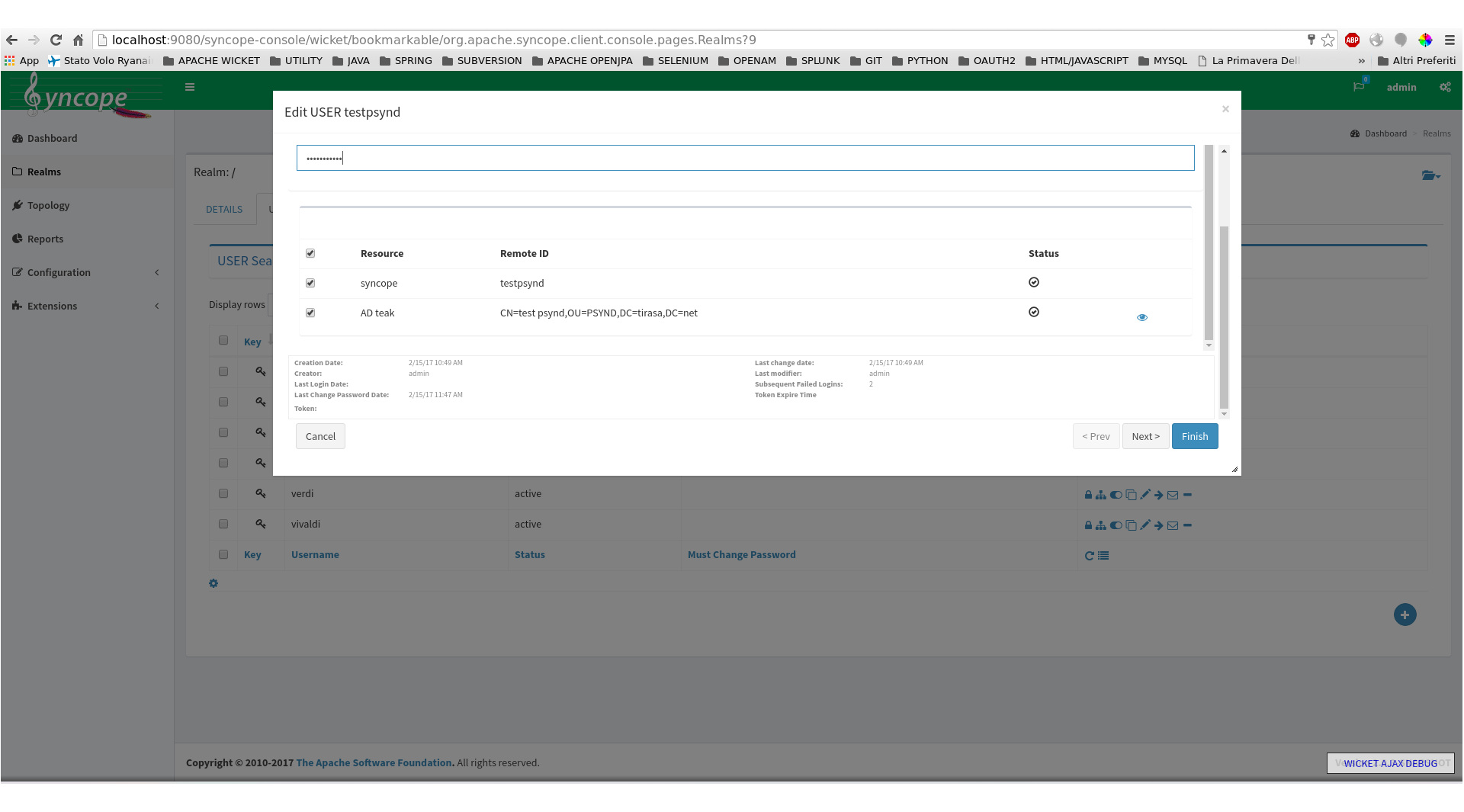
In the user edit form (first tab of the wizard), beneath password and confirm
password text areas, there are two (or more) checkboxes (depends on the number
of resources associated to the user), have you flagged the AD checkbox?
Please see image at [1].

HTH,
Andrea
[1] https://ibin.co/3CTCYNjuyWT7.png

Il 13/02/2017 14:52, Tech ha scritto:

BQ_BEGIN

Dear experts,

We guess that there is a bug in the AD connector.


    1. We are able to set in SSL the connection
    2. we can create a user with a chosen password
    3. we login with success to the system using the chosen password
    4. we try to change any value from the user interface and these changes are
immediately reflected to the AD
    5. we change the password, but it is not propagated
    6. we change the first name and it's correctly propagated, but the password
is not
    7. we try to manually run the PushTask, and only in this case the password
is correctly propagated


We are able to automatically propagate all fields except the password (that
requires a manual propagation), could you please double check?
Thanks


On 30/01/2017 16:02, Tech wrote:

BQ_BEGIN

The value in 'password.cipher.algorithm' was SHA1.

We updated to AES, we changed again the password for the user and we tried to
login again to the enduser portal.

It's working, we tried to connect to AD but without success.

We realized after that the password, with a difference with the other fields,
is not immediately propagate when changed, but it's only propagated by the
scheduler.

Can this be changed?

Thanks for your support


On 30/01/2017 15:24, Francesco Chicchiriccò wrote:

BQ_BEGIN

On 30/01/2017 15:18, Tech wrote:

BQ_BEGIN

Yes, I can confirm, right in this moment we are only performing manual
provisioning.

This is of course not the goal, but before moving to an automatic provision of
accounts we want the manual one working

BQ_END

What is your value for the 'password.cipher.algorithm' general configuration
parameter? If not 'AES', pushing password values (as any other encrypted value)
will not work anyway.

The point is that Active Directory requires cleartext password values
(encrypted via ConnId's GuardedString), which are normally available only
during user update, not later. This unless AES (e.g. reversible encryption) is
set for internal password values.
Provisioning - via resource assignment - is part of user update, push occurs
after user update.

Regards.


BQ_BEGIN

On 30/01/2017 15:14, Francesco Chicchiriccò wrote:

BQ_BEGIN

On 30/01/2017 15:11, Tech wrote:

BQ_BEGIN

We are associating using a manual provisioning

BQ_END

Do you mean that you are only relying on a push task for provisioning to AD?

Could you confirm that you are *not* assigning the AD resource directly to the
users, neither via group membership or template?


BQ_BEGIN

Here the main information:


Connector version 1.3.2

-SSL enabled
-Retrieve deleted users enabled
-Retrieve deleted groups enabled
-Trust all certs enabled

Entry object classes:
-Top
-person
-organizationalPerson
-inetOrgPerson
-user

Custom user search filter
cn=*

Rootsuffixes + base contexts + defaul people container:
ou=myad,dc=test,dc=local

uidAttribute
- cn

Object clases to synchronize
- user


Resource:

username -> cn (remote key)
password -> __PASSWORD__ (Password)
email -> mail
fn -> givenName
ln -> sn
username -> sAMAccountName

Object link
'CN='+username+',OU=myad,dc=test,dc=local'


Push tasks:

Active
Matching rule : Update
Unmatching rule: provision
Allow Create, update, delete, sync status


On 30/01/2017 15:01, Francesco Chicchiriccò wrote:

BQ_BEGIN

On 30/01/2017 14:53, Tech wrote:

BQ_BEGIN

This is what happen when I open the Password Manager, while when I update the
password no log is generated.

BQ_END

This is what I suspected: you could definitely find a confirmation if you are
able to verify that the user on Active Directory has still the password set
during create (while on Syncope the password value was changed).

How are you associating the users to the AD resource? Directly or via group?
Could you please enlist your full connector configuration (with *all* options)
and resource mapping? Screenshots will also work via http://pasteboard.co/ ,
for example.

Regards.


BQ_BEGIN

13:43:57.477 DEBUG Enter: getObject(ObjectClass: __ACCOUNT__, Attribute:
{Name=__UID__, Value=[user07]}, OperationOptions:
{ATTRS_TO_GET:[__PASSWORD__,mail,sAMAccountName,givenName,__NAME__,cn,sn,__UID__,__ENABLE__]})
 Method: getObject
13:43:57.477 DEBUG Enter: executeQuery(ObjectClass: __ACCOUNT__,
LdapFilter[nativeFilter: (cn=user07); entryDN: null],
org.identityconnectors.framework.impl.api.local.operations.SearchImpl$1@3c72ca1f,
 OperationOptions:
{ATTRS_TO_GET:[__PASSWORD__,mail,sAMAccountName,givenName,__NAME__,cn,sn,__UID__,__ENABLE__]})
 Method: executeQuery
13:43:57.478 WARN Reading passwords not supported Method: getAttributesToGet
13:43:57.478 WARN Attribute __ENABLE__ of object class __ACCOUNT__ is not
mapped to an LDAP attribute Method: getLdapAttribute
13:43:57.478 DEBUG Options filter: {0} null Method: getInternalSearch
13:43:57.478 DEBUG Search filter: {0} cn=* Method: getInternalSearch
13:43:57.478 DEBUG Native filter: {0} (cn=user07) Method: getInternalSearch
13:43:57.478 DEBUG Membership filter: {0} Method: getInternalSearch
13:43:57.478 DEBUG Searching in [OU=myad,DC=test,DC=local] with filter
(&(&(objectClass=top)(objectClass=person)(objectClass=organizationalPerson)(objectClass=user))(cn=user07)(cn=*))
 and SearchControls: {returningAttributes=[cn, entryDN, givenName, mail,
sAMAccountName, sn, unicodePwd, userAccountControl], scope=SUBTREE} Method:
doSearch
13:43:57.479 DEBUG User Account Control: 512 Method: createConnectorObject
13:43:57.479 DEBUG Enter: {Uid=Attribute: {Name=__UID__, Value=[user07]},
ObjectClass=ObjectClass: __ACCOUNT__, Attributes=[Attribute:
{Name=__PASSWORD__,
Value=[org.identityconnectors.common.security.GuardedString@204e249b]},
Attribute: {Name=userAccountControl, Value=[512]}, Attribute:
{Name=sAMAccountName, Value=[user07]}, Attribute: {Name=mail, Value=[
[email protected] ]}, Attribute: {Name=__NAME__,
Value=[CN=user07,OU=myad,DC=test,DC=local]}, Attribute: {Name=cn,
Value=[user07]}, Attribute: {Name=sn, Value=[oln07updated]}, Attribute:
{Name=__UID__, Value=[user07]}, Attribute: {Name=__ENABLE__, Value=[true]},
Attribute: {Name=givenName, Value=[ofn07updated]}], Name=Attribute:
{Name=__NAME__, Value=[CN=user07,OU=myad,DC=test,DC=local]}} Method: handle
13:43:57.479 DEBUG Return: false Method: handle
13:43:57.479 DEBUG Return Method: executeQuery
13:43:57.480 DEBUG Return: {Uid=Attribute: {Name=__UID__, Value=[user07]},
ObjectClass=ObjectClass: __ACCOUNT__, Attributes=[Attribute:
{Name=__PASSWORD__,
Value=[org.identityconnectors.common.security.GuardedString@204e249b]},
Attribute: {Name=sAMAccountName, Value=[user07]}, Attribute: {Name=mail,
Value=[ [email protected] ]}, Attribute: {Name=__NAME__,
Value=[CN=user07,OU=myad,DC=test,DC=local]}, Attribute: {Name=cn,
Value=[user07]}, Attribute: {Name=sn, Value=[oln07updated]}, Attribute:
{Name=__UID__, Value=[user07]}, Attribute: {Name=__ENABLE__, Value=[true]},
Attribute: {Name=givenName, Value=[ofn07updated]}], Name=Attribute:
{Name=__NAME__, Value=[CN=user07,OU=myad,DC=test,DC=local]}} Method: getObject

On 30/01/2017 14:36, Francesco Chicchiriccò wrote:

BQ_BEGIN

On 30/01/2017 12:34, Tech wrote:

BQ_BEGIN

When we create the user we are able to initialize the correct password,
connecting to the target system we can verify that Syncope did its job.

If the Admin tries to reset the password from the console, or if the user tries
to change is password from the enduser interface, the password is still
correctly updated into Syncope, but it's not propagated to AD, therefore the
user will be able to login only using the old password.

BQ_END

Hi,
I am not completely familiar with AD password management internals, but I would
examine what Syncope is actually sending to AD by watching the core-connid.log
file both when creating new user and updating existing user, to determine if
Syncope is effectively sending the updated password to AD during the latter
phase.

Regards.


BQ_BEGIN

On 30/01/2017 12:28, Tech wrote:

BQ_BEGIN

I'm not sure about this step.

As mentioned we can already propagate changes as "email, "first name" and "last
name".

The AD user that we are using is able to change the passwords of other AD
users, create, update and delete other users.

I think that there is an additional step that was not performed in Syncope.

On 27/01/2017 16:32, Fabio Martelli wrote:

BQ_BEGIN

Il 27/01/2017 15:53, Tech ha scritto:

BQ_BEGIN

Yes, we are connecting via SSL.

We know that the connection is working because we are still able to propagate
the user modification like firstname and lastname.

We can change the password and internally is working, but it's not propagated
to AD.

BQ_END
When you performed the change password by using the administration console, did
you select AD resource in the list provided after password fields?
Are you sure that the user principal configured to perform updates into AD owns
all the needed entitlements?

BQ_BEGIN


the On 27/01/2017 15:42, Fabio Martelli wrote:

BQ_BEGIN

Hi, find my comment in-line.
Regards,
F.

Il 27/01/2017 12:12, Tech ha scritto:

BQ_BEGIN


Hello,

we are working on the password propagation using the AD connector.

We are able to check the connectivity both using plain and SSL, we are able to
create new users and to update information like email, first name and last
name.

We edit the connector:

    * We check SSL
    * we change the Server port to 636
    * We enable Trust all certs


We run again some modification and the first name and last name are still
updated.

We try now to change the password, both from user and admin interface.

The user can correctly access to Syncope using the new credentials, while we
detect that the password is not correctly propagated to the target system.
BQ_END

Do you mean that you can still access with the previous one?
Please note that you can change password by working in SSL only [1].

Regards,
F.

[1]
https://connid.atlassian.net/wiki/pages/viewpage.action?pageId=360482#ActiveDirectory(JNDI)-Configuration


BQ_END

BQ_END

BQ_END

BQ_END

BQ_END

BQ_END

BQ_END

BQ_END

BQ_END

BQ_END

BQ_END

BQ_END

BQ_END

BQ_END

BQ_END

BQ_END


--
Francesco Chicchiriccò

Tirasa - Open Source Excellence http://www.tirasa.net/ Member at The Apache
Software Foundation
Syncope, Cocoon, Olingo, CXF, OpenJPA, PonyMail
http://home.apache.org/~ilgrosso/