-----BEGIN PGP SIGNED MESSAGE-----
Hash: SHA256

Hello Conrad,
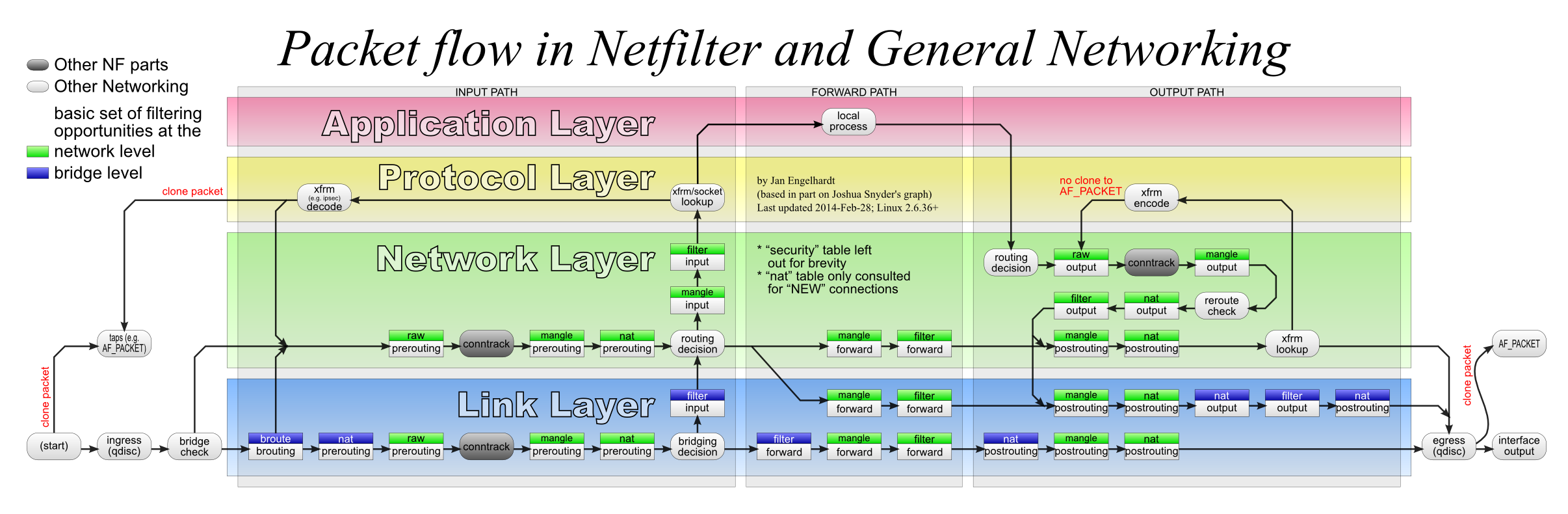
Use stateful firewalling. See [1] for a good template to start out with.
Forwarded traffic passes through the filter table in the FORWARD chain.
Only traffic destined for the host itself goes through the filter table
in the INPUT chain.
See this[2] diagram for details.
Some more information about firewalling on linux can be reached
over the other links[3][4][5][6].

[1] https://github.com/QueuingKoala/netfilter-samples
[2] http://inai.de/images/nf-packet-flow.png
[3] http://sfvlug.editthis.info/wiki/Things_You_Should_Know_About_Netfilter
[4] https://www.frozentux.net/iptables-tutorial/chunkyhtml/x4033.html
[5] https://www.frozentux.net/documents/iptables-tutorial/
[6] http://inai.de/documents/Perfect_Ruleset.pdf


Mit freundlichen Grüßen/Kind Regards,
Noel Kuntze

GPG Key ID: 0x63EC6658
Fingerprint: 23CA BB60 2146 05E7 7278 6592 3839 298F 63EC 6658

Am 08.06.2015 um 00:30 schrieb Conrad Kostecki:
> Hello Noel,
>
>> Your certificate lacks a SAN field for your IP, so strongSwan defaults
>> back to the DN of the certificate. Generate a new certificate for the
>> server, which has that SAN field
>> set. It is also advisable to set a SAN field for the DNS name.
>>
>>> Sun, 2015-06-07 % 05[CFG]   id '5.9.63.241' not confirmed by certificate,
>>> defaulting to 'C=DE, ST=Niedersachsen, L=Hannover, O=Privat, OU=StrongSwan,
>>> CN=vpn.bl4ckb0x.de, [email protected]'
>
> Okay. I've fixed it. SAN fields with my IP are now in the certificate. But it
> didn't change anything.
>
>> Furthermore, your "esp" and "ike" settings are wrong. Please set
>> them correctly. Refer to the man page for details.
>
> I've set this now to:
> esp=aes256-sha1!
> ike=aes256-sha1-modp1024!
>
> That should be for start okay.
>
>> Also set fragmentation=yes, because you use certificates
>> and try setting the IKE proposal to secure values.
>
> fragmentation=yes is already set.
>
>> I googled error 809 for WIndows 8.1 and it means, that the remote
>> server didn't respond.
>> Check intermediate and local firewalls to check if they allow outbound
>> IPsec traffic.
>
> Well. How can I debug this specific? My linux router has set with iptables:
>
> $IPTABLES --append INPUT --protocol 50 --jump ACCEPT
> $IPTABLES --append INPUT --protocol 51 --jump ACCEPT
> $IPTABLES --append INPUT --protocol udp --destination-port 500 --jump ACCEPT
> $IPTABLES --append INPUT --protocol udp --destination-port 4500 --jump ACCEPT
>
> Do I have to forward it explicit to the windows client behind the router?
>
> Conrad

-----BEGIN PGP SIGNATURE-----
Version: GnuPG v2

iQIcBAEBCAAGBQJVdMfrAAoJEDg5KY9j7GZYtvoP/Ap1upEbeVzlUap8UU55qOct
Z5vtkmhrg/ckph/pktfDvpoLk/uj6/1hMBDRfHqOY8szDnrOX1QBAt4nVp4yhVkP
J+//6rhX91yRGnghMJEHL5yBKgBwn2Q6qOo3kwk9SSFVBSdCd5mYM7aDSLrVOjEK
OEh5yWGUPe0Sp8X2y/9jcrVPMPu3RQ03sfYqPIzN+/FCJKnSTJsBqWyKYNFdDaLo
FKk6Hg1JyOLr1wiYAr4hK0UbUjQiIv3ZYk2EqD4ti1jkWbDvwSZccbxe5iDfHsCn
AeiR5V9vxY17wUhcSW2xMBZd7bJvezdLmlSfiPvldHLbeCiu29OzOaGLFazSsFut
Y8M0KyWZhbDy+aMPSVBbeWdyiE3nzYZhcQKK9DhRgFfdWnN2DasbAIGkBZBgIsPu
j+e8ZEwY6oFoM2X/wx7vvA7x4XKwC03Yl5X6pwXkorzxaR830pJ6NVaAnolNHzKk
patI1cCBz2v/I4biZkuuWifHKE3Aj2KpAE19X/zgwHdQl6+S0jOg8ptGnwkF0ryH
1nwsbi9CPUvy/+45UJzHJpu0RaprMfd4r3UWeiKDqdGUQoQ/e7RdX64ATDkRmJAd
PgWyzFIiUznRzsonXlhXT6ggHkKSFQiKhTqQV6GfogUdnrM+JHngNfdEjYYwYxSI
Xx/8jBZoTHezDjrC39pi
=Msni
-----END PGP SIGNATURE-----

_______________________________________________
Users mailing list
[email protected]
https://lists.strongswan.org/mailman/listinfo/users